https://github.com/maxwroc/battery-state-card
Battery state card for Home Assistant
https://github.com/maxwroc/battery-state-card
battery hassio home-assistant lovelace-custom-card sensor
Last synced: 4 months ago
JSON representation
Battery state card for Home Assistant
- Host: GitHub
- URL: https://github.com/maxwroc/battery-state-card
- Owner: maxwroc
- License: mit
- Created: 2020-04-16T18:07:43.000Z (over 6 years ago)
- Default Branch: master
- Last Pushed: 2024-04-16T15:53:24.000Z (over 2 years ago)
- Last Synced: 2025-04-09T07:02:52.456Z (over 1 year ago)
- Topics: battery, hassio, home-assistant, lovelace-custom-card, sensor
- Language: TypeScript
- Homepage:
- Size: 1.35 MB
- Stars: 980
- Watchers: 12
- Forks: 41
- Open Issues: 57
-
Metadata Files:
- Readme: README.md
- License: LICENSE
Awesome Lists containing this project
- awesome-home-assistant - Battery State Card - List devices with their battery levels in a tidy card, sorted and color-coded (1,236★). (Dashboard Cards / 📋 Status & info rows)
README
# Battery State Card
[![GitHub Release][releases-shield]][releases]
[![GitHub All Releases][downloads-total-shield]][releases]
[![hacs_badge][hacs-shield]][hacs]
[](https://coveralls.io/github/maxwroc/battery-state-card?branch=master)
[![Community Forum][forum-shield]][forum]
[![Buy me a coffee][coffee-shield]][coffee-link]
Battery state card for [Home Assistant](https://github.com/home-assistant/home-assistant). It shows battery levels from connected devices (entities).
## Overview
This card was inspired by [another great card](https://github.com/cbulock/lovelace-battery-entity) showing the battery states. I have decided to implement my own as there was no response for pull requests from author and I wanted to fix few things and also add couple new features.

## Breaking changes
Update to v4.X.X
* The `display` entity data field has been renamed to `entity`. If you use `display.` prefix in filters (e.g. `name: "display.platform"`), update them to use `entity.` (e.g. `name: "entity.platform"`). The same applies to KString references like `{display.name}` — use `{entity.name}` instead.
* The KString `between` function now uses an **inclusive** range. Previously `between(2,6,30)` would match values strictly between 2 and 6 (exclusive); now it matches values from 2 to 6 inclusive. If you relied on the exclusive behavior, adjust your thresholds accordingly.
* The `{charging}` entity data field is now an object with `text` (string) and `is_active` (boolean) properties. If you use `{charging}` in `secondary_info` or other KStrings, update it to `{charging.text}`. You can also use `{charging.is_active}` to access the boolean charging state.
* Default configuration is now shallow-merged with your custom config. Previously, specifying any custom config would discard all defaults. Now, default values (e.g. `sort`, `filter`, `collapse`, `bulk_rename`, `colors`, `secondary_info`) are applied for any properties you don't explicitly set. If you relied on the old behavior where defaults were fully replaced, you may need to explicitly override specific properties (e.g. `filter: {}` to disable the default filter).
Update to v3.X.X
* Secondary info last_updated / last_changed values. Now these values has to be put in quotes and curly braces e.g. `secondary_info: "{last_updated}"`
* Secondary info charging indication. Now the value has to be in curly braces e.g. `secondary_info: "{charging}"`
* Sorting setting has changed. Now it is called `sort` (previously "sort_by_level") and it can define multiple levels of sorting.
* Color settings are now in a single config entry `colors` ("color_thresholds" and "color_gradient" settings are not working any more)
Update to v2.X.X
* When you want to use it as entity (e.g. in `entities` card) you need to use different type: `custom:battery-state-entity` instead of `custom:battery-state-card`.
* Custom styles are not supported any more
## Config
### Default card config
The card comes with built-in defaults shown below. These defaults are shallow-merged with your custom config — any property you don't explicitly set will use its default value. To disable a default, override it explicitly (e.g. `filter: {}` to remove the default filter).
```yaml
type: "custom:battery-state-card"
secondary_info: "{last_changed}"
filter:
include:
- name: "attributes.device_class"
value: "battery"
exclude:
- name: "entity_id"
value: "binary_sensor.*"
sort:
by: "state"
collapse: 8
bulk_rename:
- from: " Battery"
- from: " level"
colors:
steps:
- '#ff0000'
- '#ffff00'
- '#00ff00'
gradient: true
```
The following config resets all the above defaults, you can use it as a base config if you want to fully configure the card on your own
```yaml
type: "custom:battery-state-card"
secondary_info: null
filter: {}
sort: {}
collapse: 0
bulk_rename: []
colors: {}
```
### Card config
| Name | Type | Default | Since | Description |
|:-----|:-----|:-----|:-----|:-----|
| type | string | **(required)** | v0.9.0 | Must be `custom:battery-state-entity` |
| entities | list([Entity](#entity-object) \| string) | | v0.9.0 | List of entities. It can be collection of entity/group IDs (strings) instead of Entity objects.
| title | string | | v0.9.0 | Card title
| sort | list([Sort](#sort-object) \| string) | | v3.0.0 | Sets the sorting options
| group | number \| list([Group](#group-object)) | | v1.0.0 | Number of entities to show. Rest will be available in expandable section ([example](#sorted-list-and-collapsed-view)). Or list of entity/battery groups ([example](#battery-groups))
| filter | [Filters](#filters) | | v1.3.0 | Filter groups to automatically include or exclude entities ([example](#entity-filtering-and-bulk-renaming))
| bulk_rename | list([Convert](#convert)) \| [BulkRename](#bulk-rename) | | v1.3.0 | Rename rules applied for all entities ([example](#entity-filtering-and-bulk-renaming))
| theme | string | | v3.3.0 | Name of the theme to apply (must be installed in Home Assistant). ([example](#using-themes))
| default_config_base | boolean | `true` | v4.1.0 | Whether to use default config values (sort, collapse, colors, etc.) as a base for the card configuration. When set to `false` only user-specified settings are used. Useful when entities are managed externally (e.g. via auto-entities card).
+[common options](#common-options) (if specified they will be applied to all entities)
### Entity object
| Name | Type | Default | Since | Description |
|:-----|:-----|:-----|:-----|:-----|
| type | string | | v0.9.0 | Must be `custom:battery-state-entity` if used as entity row e.g. in entity-list card |
| entity | string | **(required)** | v0.9.0 | Entity ID
| name | string | | v0.9.0 | Entity name override
| icon | string \| null | | v1.6.0 | Icon override. Set to a custom icon (e.g. `mdi:battery`), use entity attribute (e.g. `attributes.battery_icon`), or set to `null` to use the entity's default icon
| attribute | string | | v0.9.0 | Name of attribute (override) to extract the value from. By default we look for values in the following attributes: `battery_level`, `battery`. If they are not present we take entity state.
| multiplier | number | `1` | v0.9.0 | If the value is not in 0-100 range we can adjust it by specifying multiplier. E.g. if the values are in 0-10 range you can make them working by putting `10` as multiplier.
+[common options](#common-options) (if specified they will override the card-level ones)
### Common options
These options can be specified both per-entity and at the top level (affecting all entities).
| Name | Type | Default | Since | Description |
|:-----|:-----|:-----|:-----|:-----|
| colors | [ColorSettings](#color-settings) | (see [below](#default-colors)) | v3.0.0 | Color settings
| tap_action | [TapAction](#tap-action) | more-info | v1.1.0 | Action that will be performed when this entity is tapped.
| state_map | list([Convert](#convert))| | v1.1.0 | Collection of value mappings. It is useful if your sensor doesn't produce numeric values. ([example](#non-numeric-state-values))
| charging_state | [ChargingState](#charging-state-object) | | v1.1.0 | Configuration for charging indication. ([example](#charging-state-indicators))
| secondary_info | [KString](#keyword-string-kstring) | | v3.0.0 | Secondary info text. It can be a custom text with keywords (dynamic values) ([example](#secondary-info))
| round | number | | v2.1.0 | Rounds the value to number of fractional digits
| unit | string | `"%"` | v2.1.0 | Override for unit displayed next to the state/level value ([example](#other-use-cases))
| value_override | [KString](#keyword-string-kstring) | | v3.0.0 | Allows to override the battery level value. Note: when used the `multiplier`, `round`, `state_map` setting is ignored
| non_battery_entity | boolean | `false` | v3.0.0 | Disables default battery state sources e.g. "battery_level" attribute
| default_state_formatting | boolean | `true` | v3.1.0 | Can be used to disable default state formatting e.g. entity display precision setting
| debug | boolean \| string | `false` | v3.2.0 | Whether to show debug output (all available entity data). You can use entity_id if you want to debug specific one.
| respect_visibility_setting | boolean | `true` | v3.3.0 | Whether to hide entities which are marked in the UI as hidden on dashboards.
| unpack | boolean | `false` | v4.0.0 | Whether to unpack entities that have an `entity_id` array attribute (e.g. sensor groups) into separate batteries. ([example](#unpacking-grouped-entities))
| style | string | | v4.0.0 | Custom CSS rules injected into the element's shadow DOM. Allows targeting inner elements (e.g. `.name`, `.state`, `.icon`). Can be used together with card-level `theme`. ([example](#custom-styles))
### Keyword string (KString)
This is a string value containing dynamic values. Data for dynamic values can be taken from entity properties, its attributes, other entity state/attributes, etc.
| Type | Example | Description |
|:-----|:-----|:-----|
| Charging state | `"{charging.text}"` | Shows text specified in [ChargingState](#charging-state-object)
| Entity property | `"{last_updated}"` | Current entity property. To ensure relative time, use the reltime() function via "\|" (see below). E.g.: `"Changed: {last_updated\|reltime()}"`
| Entity attributes | `"Remaining time: {attributes.remaining_time}"` | Current entity attribute value.
| Other entity data | `"Since last charge: {sensor.tesla.attributes.distance}"` | You can use full "path" to the other entity data
Keywords support simple functions to convert the values
| Func | Example | Description |
|:-----|:-----|:-----|
| round(\[number\]) | `"{state\|round(2)}"` | Rounds the value to number of fractional digits. E.g. if state is 20.617 the output will be 20.62.
| replace(\[old_string\],\[new_string\]) | `"{attributes.friendly_name\|replace(Battery level,)}"` | Simple replace. E.g. if name contains "Battery level" string then it will be removed
| multiply(\[number\]) | `"{state\|multiply(10)}"` | Multiplies the value by given number
| greaterthan(\[threshold_number\],\[result_value\]) | `"{state\|greaterthan(10,100)}"` | Changes the value to a given one when the threshold is met. In the given example the value will be replaced to 100 when the current value is greater than 10
| lessthan(\[threshold_number\],\[result_value\]) | `"{state\|lessthan(10,0)}"` | Changes the value to a given one when the threshold is met. In the given example the value will be replaced to 0 when the current value is less than 10
| between(\[lower_threshold_number\],[upper_threshold_number\],\[result_value\]) | `"{state\|between(2,6,30)}"` | Changes the value to a given one when the value is between two given numbers (inclusive). In the given example the value will be replaced to 30 when the current value is between 2 and 6 (including 2 and 6)
| thresholds(\[number1\],\[number2\],...) | `"{state\|thresholds(22,89,200,450)}"` | Converts the value to percentage based on given thresholds. In the given example values will be converted in the following way 20=>0, 30=>25, 99=>50, 250=>75, 555=>100
| abs() | `"{state\|abs()}"` | Produces the absolute value
| equals(\[value\],\[result_value\]) | `"{state\|equals(on,1)}"` | Changes the value conditionally - whenever the initial value is equal the given one
| reltime() | `"Changed: {last_changed\|reltime()}"` | Converts date to relative time e.g. "1 minute ago"
You can execute functions one after another. For example if you have the value "Battery level: 26.543234%" and you want to extract and round the number then you can do the following: `"{attribute.battery_level|replace(Battery level:,)|replace(%,)|round()} %"` and the end result will be "27"
### Sort object
| Name | Type | Default | Since | Description |
|:-----|:-----|:-----|:-----|:-----|
| by | string | **(required)** | v3.0.0 | Field of the entity used to sort (`"state"` or `"name"`)
| desc | boolean | `false` | v3.0.0 | Whether to sort in descending order
Note: you can simplify this setting and use just use strings if you want to keep ascending order e.g.:
```yaml
sort:
- "name"
- "state"
```
Note: the state and name values used for sorting are the ones you see rendered on the card (e.g. after state_map transformations). You can use raw entity values to sort by prefixing their names with `entity.`. E.g. `entity.last_changed` or `entity.attributes.battery_level` or `entity.state`
### Color settings
| Name | Type | Default | Since | Description |
|:-----|:-----|:-----|:-----|:-----|
| steps | list([ColorStep](#color-step) \| string) | **(required)** | v3.0.0 | List of colors or color steps
| gradient | boolean | `false` | v3.0.0 | Whether to enable smooth color transition between steps
Note: enabling `gradient` requires at least two colors/steps and all provided colors need to be in hex HTML format e.g. `#ff00bb`.
#### Color step
| Name | Type | Default | Since | Description |
|:-----|:-----|:-----|:-----|:-----|
| value | number | **(required)** | v0.9.0 | Threshold value
| color | string | `inherit` | v0.9.0 | CSS color which will be used for levels below or equal the value field. If not specified the default one is used (default icon/text color for current HA theme)
#### Default colors
| Value | Color | Description |
|:------|:------|:------|
| 20 | `var(--label-badge-red)` | If value is less or equal `20` the color will be red
| 55 | `var(--label-badge-yellow)` | If value is less or equal `55` the color will be yellow
| 100 | `var(--label-badge-green)` | If value is less or equal `100` the color will be green
Note: the exact color is taken from CSS variable and it depends on your current template.
### Filters
| Name | Type | Default | Description |
|:-----|:-----|:-----|:-----|
| include | list([Filter](#filter-object)) | | Filters for auto adding entities
| exclude | list([Filter](#filter-object)) | | Filters to remove entities dynamically
Note: The action (include/exclude) is performed when at least one of the filters is matching (OR). Since v3.3.0 you can use [composite filters](#composite-filters) (`and`, `or`, `not`) to combine multiple conditions.
Note: Include filters should rely on static entity properties. E.g. you should not add include filter which checks the `state` property. Include filters are processed only once - when page is loaded (to minimize perf impact).
### Filter object
| Name | Type | Default | Description |
|:-----|:-----|:-----|:-----|
| name | string | **(required)** | Name of the property/attribute. E.g. `state`, `computed.state`, `attribute.device_class`
| operator | string | | Operator for value comparison (see [filter operators](#filter-operators))
| value | any | | Value to compare the property/attribute to
**Note:** In v4.1.0 the `state` value is the original entity state (something what you may find in the HA developer tools). If you use `state_map`, any other state transformation or if you want to filter based on the final state shown in the card please use `computed.state` instead.
### Composite filters
Since v3.3.0, you can create complex filter conditions using logical operators:
| Name | Type | Since | Description |
|:-----|:-----|:-----|:-----|
| `and` | list([Filter](#filter-object)) | v3.3.0 | Matches when **all** filters in the list match
| `or` | list([Filter](#filter-object)) | v3.3.0 | Matches when **any** filter in the list matches
| `not` | list[Filter](#filter-object) | v3.3.0 | Inverts the result of the filter (matches when the filter doesn't match)
Composite filters can be nested to create complex conditions.
**Example: Using AND to match entities with both conditions**
```yaml
filter:
include:
- and:
- name: entity_id
value: "*_battery*"
- name: state
operator: "<"
value: 50
```
**Example: Using OR for multiple patterns**
```yaml
filter:
include:
- or:
- name: entity_id
value: "*_battery"
- name: entity_id
value: "*_power"
```
**Example: Using NOT to exclude specific entities**
```yaml
filter:
include:
- name: "attributes.device_class"
value: battery
exclude:
- not:
name: state
operator: "<"
value: 20
```
**Example: Complex nested conditions**
```yaml
filter:
include:
- and:
- or:
- name: entity_id
value: "sensor.*_battery"
- name: "attributes.device_class"
value: battery
- not:
name: entity_id
value: "*_exclude_*"
```
### Filter operators
Operator is an optional property. If operator is not specified it depends on `value` config property:
* if `value` is not specified the default operator is `exists`
* if `value` starts and ends with slash "`/`" or if it contains wildcard "`*`" the operator is `matches`
* if `value` property is set but above conditions are not met the operator is "`=`"
| Name | Since | Type |
|:-----|:-----|:-----|
| `"exists"` | v1.3.0 | It checks if field is present (e.g. to match entities having particular attribute regardless of the attribute value). It doesn't require `value` to be specified.
| `"not_exists"` | v3.1.0 | It checks if field is not present (e.g. to match entities without particular attribute). It doesn't require `value` to be specified.
| `"="` | v1.3.0 | If value equals the one specified in `value` property.
| `">"` | v1.3.0 | If value is greater than one specified in `value` property. Possible variant: `">="`. Value must be numeric or datetime type.
| `"<"` | v1.3.0 | If value is lower than one specified in `value` property. Possible variant: `"<="`. Value must be numeric or datetime type.
| `"contains"` | v1.3.0 | If value contains the one specified in `value` property. **Since v4.0.0**: Also supports arrays - checks if any array element contains the search string.
| `"matches"` | v1.3.0 | If value matches the one specified in `value` property. You can use wildcards (e.g. `"*_battery_level"`) or regular expression (must be prefixed and followed by slash e.g. `"/[a-z_]+_battery_level/"`)
**Example: Include entities with specific device label**
```yaml
filter:
include:
- name: "device.labels"
operator: contains
value: "office_stuff"
```
**Example: Include only entities WITHOUT a specific label**
```yaml
filter:
include:
- not:
name: "device.labels"
operator: contains
value: "ignore_battery"
```
**Example: Exclude entities not updated within the last 24 hours (show only stale devices)**
```yaml
filter:
include:
- name: attributes.device_class
value: battery
exclude:
- name: last_updated
operator: ">"
value: "24h"
```
### Tap-Action
The definition is similar to the default [tap-action](https://www.home-assistant.io/lovelace/actions/#tap-action) in HomeAssistant.
| Name | Type | Default | Description |
|:-----|:-----|:-----|:-----|
| action | string | `more-info` | Action type, one of the following: `more-info`, `call-service`, `navigate`, `url`, `none`
| service | [KString](#keyword-string-kstring) \| string | | Service to call when `action` defined as `call-service`. Eg. `"notify.pushover"`. Supports KString for dynamic values.
| service_data | any | | Service data to include when `action` defined as `call-service`. Supports KString in nested string values.
| data | any | | Additional data for the action. Supports KString in nested string values.
| target | any | | Target for the service call. Supports KString in nested string values.
| navigation_path | [KString](#keyword-string-kstring) \| string | | Path to navigate to when `action` defined as `navigate`. Eg. `"/lovelace/0"`. Supports KString for dynamic values.
| url_path | [KString](#keyword-string-kstring) \| string | | Url to navigate to when `action` defined as `url`. Eg. `"https://www.home-assistant.io"`. Supports KString for dynamic values.
Note: From version 3.3.0 card supports all native Home Assistant actions and related functionalities: [Actions - Home Assistant](https://www.home-assistant.io/dashboards/actions/#tap-action)
**KString support in actions:** Since v3.3.0, tap actions support [KString](#keyword-string-kstring) for dynamic values. This allows you to use entity data (state, attributes, etc.) in action parameters. KString processing happens just before the action is executed, ensuring up-to-date values.
**Examples:**
```yaml
# Navigate to device page using device_id from entity attributes
tap_action:
action: navigate
navigation_path: "/config/devices/device/{attributes.device_id}"
# Open URL with dynamic content
tap_action:
action: url
url_path: "https://example.com/battery-report?level={state}&device={attributes.device_name}"
# Call service with dynamic data
tap_action:
action: call-service
service: "notify.mobile_app"
service_data:
message: "Low battery alert: {state}%"
title: "Warning for {attributes.friendly_name}"
data:
entity_id: "{entity_id}"
battery_level: "{state}"
# Use KString functions in actions
tap_action:
action: call-service
service: "script.battery_notification"
data:
rounded_level: "{state|round(0)}"
doubled_value: "{state|multiply(2)|round(1)}"
```
### Convert
| Name | Type | Default | Since | Description |
|:-----|:-----|:-----|:-----|:-----|
| from | any | **(required)** | v1.1.0 | Value to convert. Note it is type sensitive (eg. `false` != `"false"`)
| to | any | **(required)** | v1.1.0 | Target value
| display | string | | v3.0.0 | Override for displayed entity state (when the current entity state matches the `from` value)
### Bulk rename
| Name | Type | Default | Since | Description |
|:-----|:-----|:-----|:-----|:-----|
| rules | list([Convert](#convert)) | | v3.1.0 | Rename rules applied for all entities
| capitalize_first | bool | `true` | v3.1.0 | Whether to capitalize first letter ([example](#entity-filtering-and-bulk-renaming))
### Charging-state object
Note: All of these values are optional but at least `entity_id` or `state` or `attribute` is required.
| Name | Type | Default | Since | Description |
|:-----|:-----|:-----|:-----|:-----|
| entity_id | string | | v1.1.0 | Other entity id where charging state can be found
| attribute | list([Attribute](#attribute-object)) | | v1.2.0 | List of attribute name-values indicating charging in progress
| state | list(any) | | v1.1.0 | List of values indicating charging in progress
| icon | string | | v1.1.0 | Icon to show when charging is in progress
| secondary_info_text | [KString](#keyword-string-kstring) | | v1.1.0 | Text to be shown when battery is charging. Supports dynamic values (e.g., `{state}`, `{attributes.x}`). To show it you need to have `secondary_info: "{charging.text}"` property set on entity. ([example](#secondary-info))
### Attribute object
| Name | Type | Default | Description |
|:-----|:-----|:-----|:-----|
| name | string | **(required)** | Name of the attribute. If the charging info is in an object use the path e.g. "charger.is_charging"
| value | string | | Value of the attribute
### Group object
| Name | Type | Default | Since | Description |
|:-----|:-----|:-----|:-----|:-----|
| name | string | | v1.4.0 | Name of the group. Keywords available: `{min}`, `{max}`, `{count}`, `{range}`
| secondary_info | string | | v1.4.0 | Secondary info text, shown in the second line. Same keywords available as in `name`
| icon | string | | v1.4.0 | Group icon. It can be a static icon available in HA or dynamic one taken from one of the group items (`first`, `last`)
| icon_color | string | | v2.0.0 | Group icon color. It can be a static HTML (e.g. `#ff0000`) or dynamic (`first` or `last`) color value based on the battery colors in the group.
| min | number | | v1.4.0 | Minimal battery level. Batteries below that level won't be assigned to this group.
| max | number | | v1.4.0 | Maximal battery level. Batteries above that level won't be assigned to this group.
| filter | list([Filter](#filter-object)) | | v4.0.0 | Advanced filters for assigning batteries to the group (same filter syntax as card-level [filters](#filters)). When specified `min`/`max` are ignored. Supports [composite filters](#composite-filters).
| by | string | | v4.0.0 | Property path to automatically create sub-groups by (e.g. `"area.name"`). Each unique value becomes a separate group. Entities with missing values stay ungrouped. Can be combined with `filter`. ([example](#dynamic-grouping-with-by))
| entities | list(string) | | v1.4.0 | List of entity ids
## Examples
You can use this component as a card or as an entity (e.g. in `entities card`);
### Card view
Card view is useful when you want to have cleaner config (you don't need to duplicate settings in every entity entry) and when you want to apply same settings (e.g. colors) for all the battery entities.

```yaml
type: "custom:battery-state-card"
title: "Battery levels"
entities:
- sensor.bathroom_motion_battery_level
- sensor.bedroom_balcony_battery_level
- entity: "sensor.bedroom_motion_battery_level"
name: "Bedroom motion sensor"
```
### Entity view
Entity view is useful when you want to add battery status next to other sensors (in the same card).

Note: there is a different `type` used.
```yaml
type: entities
title: Other
show_header_toggle: false
entities:
- sensor.energy_rpi_monthly
- sensor.home_assistant_v2_db
- sensor.hassio_online
- sensor.last_boot
- type: "custom:battery-state-entity"
entity: "sensor.temp_outside_battery_numeric"
```
### Custom colors
#### Custom threshold colors

```yaml
type: "custom:battery-state-card"
title: "Custom color thresholds"
colors:
steps:
- value: 35 # applied to all values below/equal
color: "#8fffe1"
- value: 45 # applied to all values below/equal
color: "#8fbbff"
- value: 60 # applied to all values below/equal
color: "#978fff"
- value: 100 # applied to all values below/equal
color: "#fe8fff"
entities:
- entity: "sensor.bathroom_motion_battery_level"
name: "Bathroom motion sensor"
- entity: "sensor.bedroom_balcony_battery_level"
name: "Bedroom balcony door sensor"
- entity: "sensor.bedroom_motion_battery_level"
name: "Bedroom motion sensor"
- entity: "sensor.bedroom_switch_battery_level"
name: "Bedroom Aqara switch"
- entity: "sensor.bedroomtemp_battery_level"
name: "Bedroom temp. sensor"
```
#### Gradient colors

```yaml
type: "custom:battery-state-card"
title: "Color gradient"
colors:
steps:
- "#ff0000" # red
- "#ffff00" # yellow
- "#00ff00" # green
gradient: true
entities:
- entity: "sensor.bathroom_motion_battery_level"
name: "Bathroom motion sensor"
- entity: "sensor.bedroom_balcony_battery_level"
name: "Bedroom balcony door sensor"
- entity: "sensor.bedroom_motion_battery_level"
name: "Bedroom motion sensor"
- entity: "sensor.bedroom_switch_battery_level"
name: "Bedroom Aqara switch"
- entity: "sensor.bedroomtemp_battery_level"
name: "Bedroom temp. sensor"
```
#### Disabling colors
When you put empty array in `steps` property you can disable colors.

```yaml
type: "custom:battery-state-card"
title: "No color"
colors:
steps: []
entities:
- sensor.bedroom_motion_battery_level
- sensor.bathroom_motion_battery_level
- sensor.bedroomtemp_battery_level
- sensor.bedroom_balcony_battery_level
- sensor.bedroom_switch_battery_level
```
You can setup as well colors only for lower battery levels and leave the default one for the rest.

```yaml
type: "custom:battery-state-card"
title: "No color - selective"
colors:
steps:
- value: 20
color: "red"
- value: 60
color: "yellow"
entities:
- sensor.bedroom_motion_battery_level
- sensor.bathroom_motion_battery_level
- sensor.bedroomtemp_battery_level
- sensor.bedroom_balcony_battery_level
- sensor.bedroom_switch_battery_level
```
### Sorted list and collapsed view

```yaml
type: "custom:battery-state-card"
title: "Sorted list and collapsed view"
sort: "state"
collapse: 4
entities:
- sensor.bedroom_motion_battery_level
- sensor.bathroom_motion_battery_level
- sensor.bedroomtemp_battery_level
- sensor.bedroom_balcony_battery_level
- sensor.bedroom_switch_battery_level
```
### Battery groups
Battery groups allow you to group together set of batteries/entities based on couple conditions. You can use HA group entities to tell which entities should go to the group, or you can set min/max battery levels, or specify explicit list of entities which should be assigned to particular group. You can also use advanced filters (same syntax as the card-level [filters](#filters)) for more flexible group assignment.
Note: If you have battery groups defined in Home Assistant you can use their IDs instead of single entity ID (in `entities` collection).

```yaml
type: 'custom:battery-state-card'
title: Battery state card
sort: "state"
collapse:
- name: 'Door sensors (min: {min}%, count: {count})' # special keywords in group name
secondary_info: 'Battery levels {range}%' # special keywords in group secondary info
icon: 'mdi:door'
entities: # explicit list of entities
- sensor.bedroom_balcony_battery_level
- sensor.main_door_battery_level
- sensor.living_room_balcony_battery_level
- group_id: "group.motion_sensors_batteries" # using HA group
secondary_info: No icon # Secondary info text
icon: null # removing default icon for this group (from HA group definition)
- group_id: "group.temp_sensors_batteries"
min: 99 # all entities below that level should show up as ungrouped
icon: 'mdi:thermometer' # override for HA group icon
entities:
# if you need to specify some properties for any entity in the group
- entity: "sensor.bedroom_balcony_battery_level"
name: "Bedroom balcony door"
multiplier: 10
# entities from below HA group won't be grouped as there is no corresponding collapsed group
- group.switches_batteries
```
**Using filters in groups**
You can use advanced filters instead of `min`/`max` for more flexible group assignment. The filters use the same syntax as the card-level [filters](#filters), including support for [composite filters](#composite-filters) (`and`, `or`, `not`). All filters must match for a battery to be assigned to the group.
Note: The order of groups matters. Each battery is assigned to the first group whose filters match. If a battery meets the conditions of multiple groups it will only appear in the earliest matching one.
```yaml
type: 'custom:battery-state-card'
title: Battery groups with filters
sort: "state"
filter:
include:
- name: "attributes.device_class"
value: battery
collapse:
- name: "Office critical ({count})"
icon: 'mdi:battery-alert'
filter:
- name: state
operator: "<"
value: 20
- name: "area.name"
value: Office
- name: "Low ({count})"
icon: 'mdi:battery-low'
filter:
- name: state
operator: "<"
value: 20
- name: "OK ({count})"
icon: 'mdi:battery'
filter:
- not:
name: state
operator: "<"
value: 20
```
### Dynamic grouping with `by`
Instead of defining groups manually, you can use the `by` property to automatically create groups based on an entity data property. Each unique value of the property becomes a separate group. Entities where the value is missing, null, or empty stay ungrouped.
> **Note:** When using dot-notation paths (e.g. `attributes.battery_type` or `area.name`), always wrap the value in quotes in YAML to prevent it from being interpreted as a nested key.
**Group by area:**
```yaml
type: "custom:battery-state-card"
filter:
include:
- name: "attributes.device_class"
value: battery
group:
- by: "area.name"
```
**Group by battery type (Battery Notes):**
```yaml
type: "custom:battery-state-card"
secondary_info: "{attributes.battery_type}"
filter:
include:
- name: "attributes.device_class"
value: battery
collapse:
- by: "attributes.battery_type"
icon: "mdi:battery-alert"
icon_color: red
filter:
- name: state
operator: "<"
value: 50
- by: "area.name"
```
**Group by area, excluding charging batteries:**
```yaml
type: "custom:battery-state-card"
filter:
include:
- name: "attributes.device_class"
value: battery
group:
- by: "area.name"
secondary_info: "Devices: {count}, {min}-{max}%"
filter:
- name: "charging.is_active"
value: false
```
### Non-numeric state values
If your sensor doesn't produce numeric values you can use `state_map` property and provide mappings from one value to the other.
```yaml
type: "custom:battery-state-card"
title: "String values - state map"
entities:
- entity: "binary_sensor.battery_state"
name: "Binary sensor state"
state_map:
- from: "on"
to: 100
- from: "off"
to: 25
- entity: "sensor.bedroom_motion"
name: "Sensor string attribute"
attribute: "replace_battery"
state_map:
- from: false
to: 100
- from: true
to: 25
```
### Charging state indicators
If your device provides charging state you can configure it in the following way:

```yaml
type: "custom:battery-state-card"
title: "Charging indicators"
entities:
- entity: "sensor.device_battery_numeric"
charging_state: # uses other entity state value
entity_id: "binary_sensor.device_charging"
state: "on"
- entity: "sensor.mi_roborock"
charging_state: # uses sensor.mi_roborock state value
state: "charging"
icon: "mdi:flash"
color: "yellow"
- entity: "sensor.samsung"
charging_state: # uses is_charging attribute on sensor.samsung entity
attribute:
name: "is_charging"
value: "yes"
```
Card-level charging state configuration
```yaml
type: "custom:battery-state-card"
title: "Charging indicators"
charging_state:
attribute: # whenever one of below attributes is matching
- name: "Battery State"
value: "Charging"
- name: "is_charging"
value: true
state: # or if entity state matches one of the following
- "charging"
- "Charging"
entities:
- sensor.device_battery_numeric
- sensor.mi_roborock
- sensor.samsung
```
### Entity filtering and bulk renaming
If you want to add battery entities automatically or if you want to see them only in specific conditions you can use filters.
If you add entities automatically you cannot specify properties for individual entities. It is possible though to specify card-level properties which will be applied to all entities (see [common options](#common-options)). For example if you wanted to set custom names (e.g. if your sensors are suffixed with some common string) you can use `bulk_rename` property to define renaming rules.

```yaml
type: 'custom:battery-state-card'
title: Filters
sort: "state"
bulk_rename:
- from: "Battery Level" # simple string replace (note: "to" is not required if you want to remove string)
to: "sensor"
- from: "/\\s(temperature|temp)\\s/" # regular expression
to: " temp. "
entities:
# entities requiring additional properties can be added explicitly
- entity: "sensor.temp_outside_battery_numeric"
multiplier: 10
name: "Outside temp. sensor"
filter:
include: # filters for auto-adding
- name: entity_id # entities which id ends with "_battery_level"
value: "*_battery_level"
- name: "attributes.device_class" # and entities which device_class attribute equals "battery"
value: battery
exclude: # filters for removing
- name: state # exclude entities above 99% of battery level
value: 99
operator: ">"
```
Bulk rename using BulkRename object to disable capitalizing the first letter of entity name (enabled by default)
```yaml
type: 'custom:battery-state-card'
title: Filters
sort: "state"
bulk_rename:
rules:
- from: "Battery Level" # simple string replace (note: "to" is not required if you want to remove string)
to: "sensor"
- from: "/\\s(temperature|temp)\\s/" # regular expression
to: " temp. "
capitalize_first: false
filter:
include: # filters for auto-adding
- name: entity_id # entities which id ends with "_battery_level"
value: "*_battery_level"
- name: "attributes.device_class" # and entities which device_class attribute equals "battery"
value: battery
```
### Secondary info

```yaml
type: "custom:battery-state-card"
name: Secondary info
secondary_info: "{last_updated}" # applied to all entities which don't have the override
entities:
- entity: "sensor.bedroom_motion_battery_level"
name: "Bedroom motion sensor"
- entity: "sensor.mi_roborock"
secondary_info: "{charging.text}" # only appears when charging is detected
charging_state:
attribute:
name: "is_charging"
value: true
secondary_info_text: "Charging at {state}%" # supports KString - shows current battery level
- entity: "sensor.jacks_motorola"
name: "Jack's phone"
secondary_info: "Motorola" # Static text
```
### Tap actions

```yaml
type: 'custom:battery-state-card'name: Click
colors:
steps:
- '#ff0000'
- '#0000ff'
- '#00ff00'
gradient: true
entities:
- entity: "sensor.bedroom_motion_battery_level"
name: More info
tap_action: more-info
value_override: 100
- entity: "sensor.bathroom_motion_battery_level"
name: Navigation path
tap_action:
action: navigate
navigation_path: /lovelace/1
value_override: 0
- entity: "sensor.bedroomtemp_battery_level"
name: Call service - Pushover
tap_action:
action: call-service
service: "notify.pushover"
service_data:
message: Call service works
title: Some title
value_override: 60
- entity: "sensor.bedroom_balcony_battery_level"
name: Url
tap_action:
action: url
url_path: 'http://reddit.com'
value_override: 20
- entity: "sensor.bedroom_switch_battery_level"
name: No action
value_override: 80
```
### Using Themes
You can apply any Home Assistant theme to the card using the `theme` property. The card will apply the theme's CSS variables to match your Home Assistant theme.
```yaml
type: "custom:battery-state-card"
theme: slate # Apply the "slate" theme
entities:
- sensor.bedroom_motion_battery_level
- sensor.bathroom_motion_battery_level
```
**Light/Dark Mode Support**: The card automatically detects if your theme has separate light and dark modes and applies the appropriate mode based on Home Assistant's dark mode setting.
### Custom styles
You can use the `style` property to inject custom CSS rules into the component's shadow DOM. This allows you to target inner HTML elements like `.name`, `.state`, `.icon`, `ha-card`, etc.
#### Card-level custom styles
```yaml
type: "custom:battery-state-card"
style: |
ha-card {
background: #1E1E1E;
}
.name {
font-weight: bold;
}
entities:
- sensor.bedroom_motion_battery_level
- sensor.bathroom_motion_battery_level
```
You can also use CSS variables to customize the look:
```yaml
type: "custom:battery-state-card"
style: ":host { --ha-card-background: #1E1E1E; --primary-text-color: #E0E0E0; }"
entities:
- sensor.bedroom_motion_battery_level
```
#### Per-entity custom styles
Since `style` is a [common option](#common-options), it can be set per-entity to style individual battery elements:
```yaml
type: "custom:battery-state-card"
title: "Custom styled entities"
entities:
- entity: "sensor.bedroom_battery"
style: ".name { color: red; }"
- sensor.bathroom_battery # no custom style
```
#### Combining with themes
You can combine `style` with `theme`. Theme CSS variables are applied as inline styles on the host element, while custom `style` rules are injected into the shadow DOM — so both work independently:
```yaml
type: "custom:battery-state-card"
theme: slate
style: |
:host { --primary-color: #ff5722; }
.name { font-style: italic; }
entities:
- sensor.bedroom_motion_battery_level
```
### Unpacking grouped entities
Some entities (e.g. sensor groups or template sensors) contain an `entity_id` attribute with a list of other entity IDs. You can unpack these into separate battery entries.
Entities in the `group` domain are always unpacked automatically. For entities in other domains (e.g. `sensor`) you can enable unpacking either per-entity or at the card level.
#### Per-entity unpack
Use `unpack: true` on a specific entity to unpack only that one:
```yaml
type: "custom:battery-state-card"
title: "Sensor group batteries"
entities:
- entity: "sensor.battery_group"
unpack: true
- sensor.some_other_battery # this one is shown as-is
```
#### Card-level unpack
Use `unpack: true` at the card level to automatically unpack all entities that have an `entity_id` array attribute:
```yaml
type: "custom:battery-state-card"
title: "Auto-unpack all groups"
unpack: true
filter:
include:
- name: "attributes.device_class"
value: battery
```
Note: When card-level `unpack` is enabled, any entity (regardless of domain) whose `entity_id` attribute is an array will be replaced by its child entities. Entities without an `entity_id` array attribute are unaffected.
### Other use cases
#### Signal strength

```yaml
type: "custom:battery-state-card"
secondary_info: "{last_changed}"
icon: >-
mdi:signal-cellular-{state|abs()|greaterthan(80,outline)|greaterthan(75,1)|greaterthan(60,2)|greaterthan(2,3)}
filter:
include:
- name: "attributes.device_class"
value: signal_strength
collapse: 7
sort: state
bulk_rename:
- from: " Signal"
- from: " signal"
- from: " Strength"
- from: " strength"
- from: " RSSI"
- from: " numeric"
colors:
steps:
- color: "#ff0000"
value: -90
- color: "#ffff00"
value: -80
- color: "#00ff00"
value: -50
gradient: true
```
#### HDD temperatures

```yaml
type: "custom:battery-state-card"
title: HDD temperatures
icon: "mdi:harddisk"
colors:
steps:
- value: 26
color: blue
- value: 36
color: green
- value: 45
color: yellow
- value: 60
color: red
tap_action:
action: more-info
collapse: 3
sort:
by: state
desc: true
unit: °C
round: 0
filter:
include:
- name: entity_id
value: "sensor.nasos_sd*"
- name: entity_id
value: "sensor.omv2_sd*"
- name: entity_id
value: "sensor.exnas_st12*temper*"
- name: entity_id
value: "sensor.*_disk_*_temperature"
entities:
- entity: "sensor.vidik_temperature"
- entity: "sensor.exnas_d1_temperatures_temperature"
```
#### Motion sensors (sorted by state and last changed property)
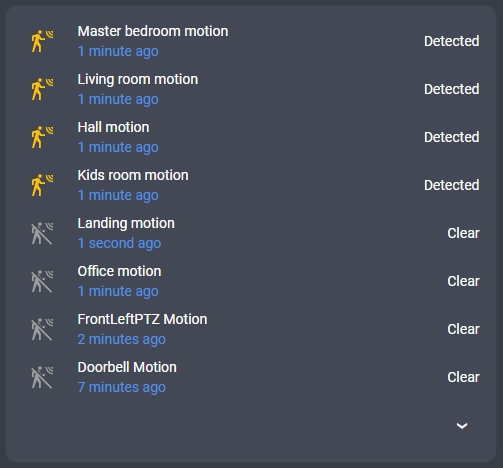
```yaml
type: "custom:battery-state-card"
secondary_info: '{last_changed}'
icon: '{state|equals(off,mdi:motion-sensor-off)|equals(on,mdi:motion-sensor)}'
filter:
include:
- name: "attributes.device_class"
value: motion
sort:
- by: state
desc: true
- by: "entity.last_changed"
desc: true
colors:
steps:
- value: 0
color: inherit
- value: 1
color: var(--state-active-color)
unit: null
state_map:
- from: 'off'
to: 0
display: Clear
- from: 'on'
to: 1
display: Detected
collapse: 8
```
#### Using default entity icons
If your entities already have appropriate icons defined and you want to keep them instead of using battery icons, set `icon` to `null`:
```yaml
type: "custom:battery-state-card"
title: "Devices with original icons"
entities:
- entity: "sensor.phone_battery"
icon: null
- entity: "sensor.tablet_battery"
icon: null
- entity: "sensor.watch_battery"
icon: null
```
You can also apply it to all entities using [common options](#common-options):
```yaml
type: "custom:battery-state-card"
title: "Devices with original icons"
icon: null # Apply to all entities
filter:
include:
- name: entity_id
value: "*_battery"
```
#### Default configuration to work with the "Battery Notes" integration
The "HA-Battery_Notes HACS integration automatically adds additional information about all battery devices within your HA implementation, such as battery types, etc. The Configuration below automatically creates a table for all Battery Plus devices and shows the required type and number of devices.
[HA-Battery-notes]: https://github.com/andrew-codechimp/HA-Battery-Notes
```yaml
type: "custom:battery-state-card"
secondary_info: "{attributes.battery_type_and_quantity}"
filter:
include:
- name: entity_id
value: "*battery_plus"
exclude:
- name: entity_id
value: "binary_sensor.*"
sort:
by: state
desc: true
bulk_rename:
- from: " Battery"
- from: " level"
colors:
steps:
- "#ff0000"
- "#ffff00"
- "#00ff00"
gradient: true
```
## Battery Notes
This card has built-in support for the [Battery Notes](https://github.com/andrew-codechimp/HA-Battery-Notes) integration. Battery Notes is a popular HACS integration that adds additional information about battery devices, such as battery type and quantity.
When Battery Notes is installed it creates additional entities for each device (on the `battery_notes` platform). The card automatically **deduplicates** these entities: when both the original battery entity and the Battery Notes "battery plus" entity (with `state_class: measurement`) are present, the card keeps only the battery plus entity, which has the most up-to-date state and extra attributes like `battery_type`.
This deduplication is **enabled by default**. If you want to keep all entities (including duplicates), disable it:
```yaml
type: "custom:battery-state-card"
battery_notes_dedup: false
```
With deduplication active, Battery Notes attributes are available directly on the entity. You can reference them in `secondary_info`:
```yaml
type: "custom:battery-state-card"
secondary_info: "{attributes.battery_type}"
filter:
include:
- name: "attributes.device_class"
value: battery
```
You can also group batteries by battery type using the `by` property in [group config](#group-object):
```yaml
type: "custom:battery-state-card"
secondary_info: "{attributes.battery_type}"
filter:
include:
- name: "attributes.device_class"
value: battery
sort:
by: state
collapse:
- by: "attributes.battery_type"
```
## Installation
Once added to [HACS](https://community.home-assistant.io/t/custom-component-hacs/121727) add the following resource to your **lovelace** configuration (if you have yaml mode active)
```yaml
lovelace:
mode: yaml
resources:
- url: "/hacsfiles/battery-state-card/battery-state-card.js"
type: module
```
If you don't have HACS you can download js file from [latest release](https://github.com/maxwroc/battery-state-card/releases/latest). Drop it then in `www` folder in your `config` directory. Next add the following entry in lovelace configuration
```yaml
resources:
- url: "/local/battery-state-card.js"
type: module
```
## Troubleshooting
You can turn on the debug output via `debug` setting. It can be turned on for all of the entities:
```yaml
debug: true
```
Or single entity by specifying entity_id:
```yaml
debug: "sensor.owl_energy_signal_strength"
```
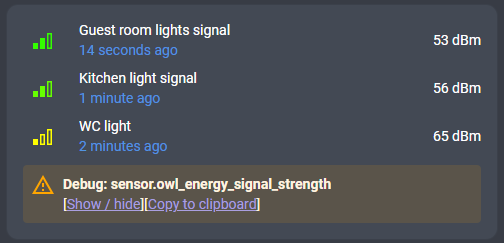
Note: "Copy to clipboard" is available only if you access your HA via https.
After clicking on show/hide you will see the entity data which is available for the card to process.
Click to see example output
```json
{
"entity_id": "sensor.owl_energy_signal_strength",
"state": "-72",
"attributes": {
"state_class": "measurement",
"event": "115a011a32e20100000172000031bbc85d69",
"unit_of_measurement": "dBm",
"assumed_state": true,
"device_class": "signal_strength",
"friendly_name": "Owl energy Signal strength"
},
"context": {
"id": "01HPC8X76DDZ4D3XK5BMH8KKFW",
"parent_id": null,
"user_id": null
},
"last_changed": "2024-02-11T14:24:59.597Z",
"last_updated": "2024-02-11T14:24:59.597Z",
"entity": {
"entity_id": "sensor.owl_energy_signal_strength",
"device_id": "91b4ffe9a73db4d1ee9482d0e7d94a84",
"platform": "rfxtrx",
"entity_category": "diagnostic",
"name": "Signal strength"
},
"device": {
"area_id": "outside",
"configuration_url": null,
"config_entries": [
"2c67d4fe27613df1b3de59a1f042dc5c"
],
"connections": [],
"disabled_by": null,
"entry_type": null,
"hw_version": null,
"id": "91b4ffe9a73db4d1ee9482d0e7d94a84",
"identifiers": [
[
"rfxtrx",
"5a",
"1",
"32:e2"
]
],
"manufacturer": null,
"model": "ELEC2, CM119/160",
"name_by_user": "Owl energy",
"name": "ELEC2, CM119/160 32:e2",
"serial_number": null,
"sw_version": null,
"via_device_id": null
},
"area": {
"aliases": [],
"area_id": "outside",
"name": "Outside",
"picture": null
}
}
```
When you look at the entity data you can for example figure out what you can display using KString e.g. `Area: {area.name}, Device: {device.name_by_user}`
## Development
Click to expand
```shell
npm install
npm run build
```
Bundled transpiled code will appear in `dist` directory.
For automatic compilation on detected changes use:
```
npm run watch
```
The `watch` script starts web server exposing dist dir so you can reference the local file in your HA via the following:
```yaml
lovelace:
resources:
- url: "http://127.0.0.1:5501/dist/battery-state-card.js"
type: module
```
Note: there is "undocumented" `value_override` property on the [entity object](#entity-object) which you can use for testing.
### Testing
```shell
npm run test
```
Or (to see tests coverage report)
```shell
npm run test+coverage
```
Tests in `card` and `entity` directory are e2e tests which run in Electron (headless) browser. All the other tests run in node env (hence they are much faster).
## Do you like the card?
If you do like the card please star it on [GitHub](https://github.com/maxwroc/battery-state-card)!
If you want to show your support please
[![Buy me a coffee][coffee-image]][coffee-link]
Thanks!
If you think that I deserve
## License
This project is under the [MIT license](https://github.com/maxwroc/battery-state-card/blob/master/LICENSE).
## Automatic notifications about low battery levels
It is not possible to do such a thing from the card level. If you want to get automatic notifications/alerts you can use the blueprint shared by sbyx:
https://my.home-assistant.io/create-link/?redirect=blueprint_import&blueprint_url=https%3A%2F%2Fgist.github.com%2Fsbyx%2F1f6f434f0903b872b84c4302637d0890
Click on "copy url" button and paste it in your browser. If you have configured my.home-assistant.io already you should be redirected to the page in your HA where you can review the blueprint code and add it. Once you add it you can create automation based on it.
## My other HA related repos
[github-flexi-card](https://github.com/maxwroc/github-flexi-card) | [homeassistant-config](https://github.com/maxwroc/homeassistant) | [lovelace-card-boilerplate](https://github.com/maxwroc/lovelace-card-boilerplate)
[releases]: https://github.com/maxwroc/battery-state-card/releases
[releases-shield]: https://img.shields.io/github/release/maxwroc/battery-state-card.svg?style=popout
[downloads-total-shield]: https://img.shields.io/github/downloads/maxwroc/battery-state-card/total
[forum]: https://community.home-assistant.io/t/lovelace-battery-state-card/191535
[forum-shield]: https://img.shields.io/badge/community-forum-brightgreen.svg?style=popout
[hacs-shield]: https://img.shields.io/badge/HACS-Default-orange.svg
[hacs]: https://hacs.xyz/docs/default_repositories
[coffee-shield]: https://img.shields.io/badge/Buy_me_a-coffee-yellow?logo=buymeacoffee&logoColor=ffffff
[coffee-link]: https://buymeacoffee.com/maxwroc
[coffee-image]: https://www.buymeacoffee.com/assets/img/custom_images/yellow_img.png