https://github.com/maz01001/satisfactoryflowchart
Simple flowchart for Satisfactory (1.0)
https://github.com/maz01001/satisfactoryflowchart
graph json-converter nodejs satisfactory
Last synced: 3 months ago
JSON representation
Simple flowchart for Satisfactory (1.0)
- Host: GitHub
- URL: https://github.com/maz01001/satisfactoryflowchart
- Owner: MAZ01001
- License: mit
- Created: 2024-09-11T00:34:59.000Z (almost 2 years ago)
- Default Branch: main
- Last Pushed: 2025-01-16T17:56:06.000Z (over 1 year ago)
- Last Synced: 2025-06-02T08:47:14.049Z (about 1 year ago)
- Topics: graph, json-converter, nodejs, satisfactory
- Language: JavaScript
- Homepage: https://maz01001.github.io/SatisfactoryFlowchart/
- Size: 1.37 MB
- Stars: 1
- Watchers: 1
- Forks: 0
- Open Issues: 0
-
Metadata Files:
- Readme: README.md
- License: LICENSE
Awesome Lists containing this project
README
# Satisfactory flowchart
Simple flowchart for [Satisfactory](https://www.satisfactorygame.com/ "Open official Satisfactory website"), a game developed & published by _Coffe Stain Studios_ ([game Steam page](https://store.steampowered.com/app/526870/Satisfactory/ "Open Satisfactory Steam page")).
> [!NOTE]
> TODO
>
> - build interactive graph/flowchart
>
- [`data.json`](#datajson)
- [`data.txt`](#datatxt)
- [`data.dot`](#datadot)
- [`gephi.svg`](#gephisvg)
- [`convert_json.js`](#convert_jsonjs)
- [Extract images](#extract-images)
- [Parsing JSON data (notes)](#parsing-json-data-notes)
- [Legacy U3 flowchart](#legacy-u3-flowchart)
---
## [`data.json`](https://github.com/MAZ01001/SatisfactoryFlowchart/blob/main/data.json "Click to view file in GitHub")
`UTF-8` JSON file with the following structure/formatting
```typescript
declare type DATA_JSON = {
descriptions: {
products: [string, number, string, string, string][]; // [ display name, sink value, element type (Solid|Liquid|Gas), IMG path, description ]
manufacturers: [string, string, string][]; // [ display name, IMG path, description ]
};
recipes: {
name: string; // recipe display name
input: [string, number][]; // [ product display name, amount per cycle (items or m³) ]
output: [string, number][]; // [ product display name, amount per cycle (items or m³) ]
machine: [string, ...string[]]; // manufacturer display names
duration: number; // time in seconds for one production cycle (items/min = amount * 60 / duration)
}[];
};
```
click to show/hide example JSON data in en-US language
```JSON
{
"descriptions": {
"products": [
["Heavy Modular Frame", 10800,"S","./FactoryGame/Content/FactoryGame/Resource/Parts/ModularFrameHeavy/UI/IconDesc_ModularFrameHeavy_256.png", "A more robust multipurpose frame."],
["Nitrogen Gas", 10,"G","./FactoryGame/Content/FactoryGame/Resource/Parts/PackagedNitrogen/UI/IconDesc_NitrogenGas_256.png", "Has a variety of uses, including metallurgy, cooling, and Nitric Acid production. On MASSAGE-2 (AB)b, it can be extracted from underground gas wells."],
["Water", 5,"L","./FactoryGame/Content/FactoryGame/Resource/RawResources/Water/UI/LiquidWater_Pipe_256.png", "It's water."],
// ...
],
"manufacturers": [
["Constructor", "./FactoryGame/Content/FactoryGame/Buildable/Factory/ConstructorMk1/UI/IconDesc_ConstructorMk1_256.png","Crafts 1 part into another part.\n\nCan be automated by feeding component parts in via a Conveyor Belt connected to the input port. The resulting parts can be automatically extracted by connecting a Conveyor Belt to the output port."],
["Crafting Bench", "./FactoryGame/Content/FactoryGame/Buildable/Factory/WorkBench/UI/Workbench_256.png", "Allows you to manually craft a wide range of different parts. \nThese parts can then be used to construct various factory buildings, vehicles, and equipment."],
["Smelter", "./FactoryGame/Content/FactoryGame/Buildable/Factory/SmelterMk1/UI/IconDesc_SmelterMk1_256.png", "Smelts ore into ingots.\n\nCan be automated by feeding ore in via a Conveyor Belt connected to the input port. The resulting ingots can be automatically extracted by connecting a Conveyor Belt to the output port."]
// ...
]
},
"recipes": [
{
"name": "Excited Photonic Matter",
"input": [],
"output": [["Excited Photonic Matter",10]],
"machine": ["Converter"],
"duration": 3
},
{
"name": "Heavy Modular Frame",
"input": [["Screw",120],["Modular Frame",5],["Steel Pipe",20],["Encased Industrial Beam",5]],
"output": [["Heavy Modular Frame",1]],
"machine": ["Manufacturer","Crafting Bench"],
"duration": 30
},
{
"name": "Ionized Fuel",
"input": [["Power Shard",1],["Rocket Fuel",16]],
"output": [["Compacted Coal",2],["Ionized Fuel",16]],
"machine": ["Refinery"],
"duration": 24
},
// ...
]
}
```
it uses one tab indentation and except top-levels everything is sorted alphabetically by _name_ with respect to language of _DOCS.json_ file, so binary search is possible (for names)
some additional spaces have been added to make it more human readable
_there are narrow-non-break-spaces (U+202F) in descriptions between value and unit pairs ie `1000-2000\u202FMW`_
_liquid/gas volume is already converted to m³ (from dm³)_
Scroll [UP](#datajson "Scroll to start of section: data.json")
| [TOP](#satisfactory-flowchart "Scroll to top of document: Satisfactory flowchart")
## [`data.txt`](https://github.com/MAZ01001/SatisfactoryFlowchart/blob/main/data.txt "Click to view file in GitHub")
list of all AWESOME Sink values (coupon cost) in ascending order
Does not include `FICSIT Coupon` (gives `1` each) and lists non-sinkable items like artifacts or waste, with ones that yield DNA points under `0`
Scroll [UP](#datatxt "Scroll to start of section: data.txt")
| [TOP](#satisfactory-flowchart "Scroll to top of document: Satisfactory flowchart")
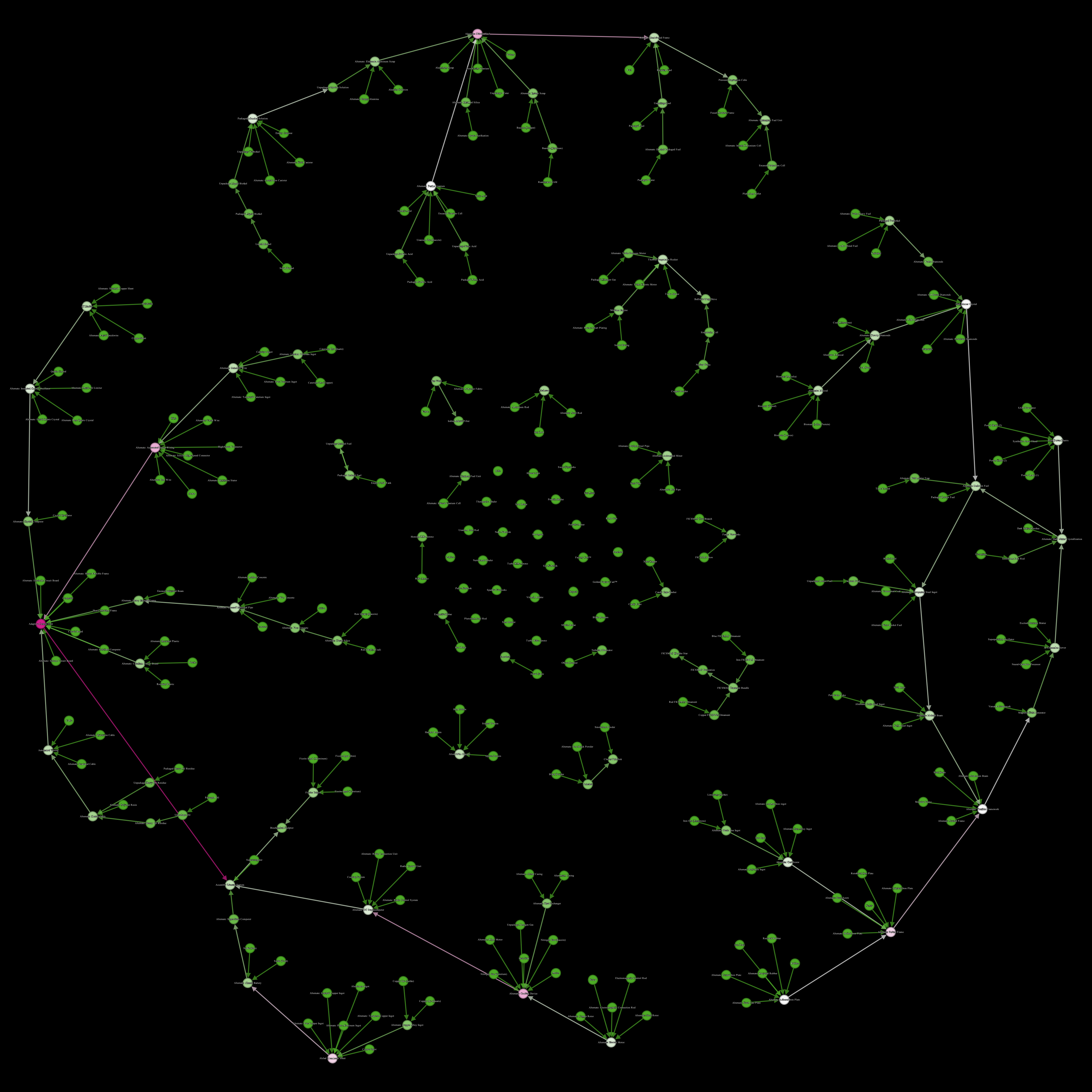
## [`data.dot`](https://github.com/MAZ01001/SatisfactoryFlowchart/blob/main/data.dot "Click to view file in GitHub")
directed graph of recipe order
> for all recipes `A` and `B`: when `A.outputs` matches at least one product in `B.inputs`: connect `A -> B`
all recipes are connected via index (same index as `data.json`) and labeled with their name (same language as `data.json`)
first all recipes (with label) then all connections for each recipe (all outgoing connections inline)
Scroll [UP](#datadot "Scroll to start of section: data.dot")
| [TOP](#satisfactory-flowchart "Scroll to top of document: Satisfactory flowchart")
## [`gephi.svg`](https://github.com/MAZ01001/SatisfactoryFlowchart/blob/main/gephi.svg "Click to view file in GitHub")
a (static) graph view of `data.dot` via (outdated)

> SVG with selectable text here:
Scroll [UP](#datadot "Scroll to start of section: data.dot")
| [TOP](#satisfactory-flowchart "Scroll to top of document: Satisfactory flowchart")
## [`convert_json.js`](https://github.com/MAZ01001/SatisfactoryFlowchart/blob/main/convert_json.js "Click to view file in GitHub")
- get `node.js`: (easier to install `Visual Studio (Community)` and add `node.js` as dev-environment)
```shell
# generate data.json with en-US language in current directory (overrides data.json)
node convert_json.js /Satisfactory/CommunityResources/Docs/en-US.json data.json
# optionally also generate data.txt to see sink values (overrides data.json and data.txt)
node convert_json.js /Satisfactory/CommunityResources/Docs/en-US.json data.json data.txt
# optionally also generate data.dot for graphing (overrides data.json and data.txt and data.dot)
node convert_json.js /Satisfactory/CommunityResources/Docs/en-US.json data.json data.txt data.dot
```
the script works with any of the languages in the `/Satisfactory/CommunityResources/Docs/` folder; string-sorting is also language dependent
_does not calculate graph connections when `data.dot` CLI-parameter is not supplied_
Scroll [UP](#convert_jsonjs "Scroll to start of section: convert_json.js")
| [TOP](#satisfactory-flowchart "Scroll to top of document: Satisfactory flowchart")
## Extract images
run script ([`convert_json.js`](#convert_jsonjs)) and copy regexp "FModel IMG path regexp" logged to console (yellow on black, near the end)
- get `7Zip`:
- get `FModel`:
1. open `/Satisfactory/FactoryGameSteam.exe` via 7zip, go to folder `.rsrc` and open `version.txt` and see `PRODUCTVERSION` for Unreal-Engine version ~ `5,3,2,0` = `5.3`
2. open FModel and follow the steps at \[[archive](https://github.com/satisfactorymodding/Documentation/blob/13a335186fb21965055007ecc9738ee8fa392708/modules/ROOT/pages/Development/ExtractGameFiles.adoc#fmodel "(GitHub) plain text permalink of website")\] (only `FModel` section) but with the Unreal-Engine version from previous step instead
3. then in `Archives` tab (Loading Mode: Multiple) select `FactoryGame-Windows.pak` and `FactoryGame-Windows.utoc` and click on Load, it should switch to the `Folders` tab
4. then click in the folder view and hit Ctrl+Shift+F and paste in the "FModel IMG path regexp" from before (make sure to check the `.*` to the right of the search bar) and press Enter
- current FModel IMG path regexp (might be outdated): `FactoryGame/Content/FactoryGame/(Resource/|Buildable/Factory/(WorkBench|Workshop|QuantumEncoder|Converter|HadronCollider|OilRefinery|FoundryMk1|Packager|ManufacturerMk1|AssemblerMk1|Blender|SmelterMk1|ConstructorMk1)/).*_256`
5. select all listed files (Ctrl+A) and right-click and `safe texture (.png)`
after all have finished extracting there should be a folder `FactoryGame` inside `/FModel/Output/Exports` with all the icons;
this is the root folder with the folder structure that the `data.json` expects,
so you can copy paste that to the same directory where you have the `data.json` stored (so the relative-paths in `data.json` work)
Scroll [UP](#extract-images "Scroll to start of section: Extract images")
| [TOP](#satisfactory-flowchart "Scroll to top of document: Satisfactory flowchart")
## Parsing JSON data (notes)
the JSON file _Coffe Stain Studios_ provides is in `UTF-16 LE + BOM`
JavaScript (node.js) as most languages use UTF-16 natively so that is not a problem but the BOM (0xFEFF) at start of file needs to be ignored so JSON can be parsed → skip first (utf-16) character (2 bytes) when loading file
(relevant) `NativeClass` names (via regexp `\.(\w+)'$`) ! not ordered in JSON file
- product-recipes:
- `FGRecipe`
- _under `Classes` each as `{mDisplayName, mIngredients, mProduct, mProducedIn}`_
- __ignore all that have empty `mProducedIn`__
- __ignore all that have `BP_BuildGun_C` or `FGBuildGun` in `mProducedIn`__
- `mProducedIn` ~> regexp match all `"[^".]*\.(\w+)"` for manufacturer-class-name
- __replace `BP_WorkBenchComponent_C`, `FGBuildableAutomatedWorkBench`, and `Build_AutomatedWorkBench_C` with (just one) `Build_WorkBench_C`__
- __replace `BP_WorkshopComponent_C` with `Build_Workshop_C`__
- `mIngredients` and `mProduct` ~> skip first and last 2 chars; split at each `),(` then regexp match `ItemClass="[^']+'[^.]+\.(\w+)'"` (product-class-name) and `Amount=([0-9]+)` (convert to number) on each entry
- `mManufactoringDuration` is stored as string so parse to float
- product descriptions & img path:
- `FGAmmoTypeInstantHit`
- `FGAmmoTypeProjectile`
- `FGAmmoTypeSpreadshot`
- `FGConsumableDescriptor`
- `FGEquipmentDescriptor`
- `FGResourceDescriptor`
- `FGPowerShardDescriptor`
- `FGItemDescriptor`
- `FGItemDescriptorBiomass`
- `FGItemDescriptorNuclearFuel`
- `FGItemDescriptorPowerBoosterFuel`
- _under `Classes` each as `{ClassName, mDisplayName, mDescription, mForm, mSmallIcon, mResourceSinkPoints}`_
- use `ClassName` for resolving class names in recipes later
- replace all `\r\n` in `mDescription` with `\n`
- `mForm` can be `RF_SOLID`, `RF_LIQUID`, `RF_GAS`, or `RF_INVALID` (string) use first letter and note what is liquid/gas for unit conversion in recipes later
- `mSmallIcon` for img paths later during resolving class names in recipes
- `mResourceSinkPoints` for AWESOME Sink points (DNA points are not given and others at 0 will clog the sink)
- manufacturer descriptions:
- `FGBuildableManufacturer`
- `FGBuildableManufacturerVariablePower`
- __and from `FGBuildable` only `Build_WorkBench_C` and `Build_Workshop_C`__
- _under `Classes` each as `{ClassName, mDisplayName, mDescription}`_
- manufacturer img path:
- `FGBuildingDescriptor`
- __includes more than those found under "manufacturer descriptions"__
- _under `Classes` each as `{ClassName, mDisplayName, mSmallIcon}`_
- ignore all where `ClassName` matches regexp `Beam|Blue|[Ww]alk|Conveyor|Foundation|Generator|Jump|Miner|Pi(?:llar|pe)|Power|Roof|Sign|Storage|Train|Wall|Set_|_8x` (for most but not all redundant images)
after parsing, when resolving class names in recipes, for every `mSmallIcon` replace `_512` with `_256` then match with regexp `Texture2D /Game/([^.]*)\.` and replace entire string with `"/FactoryGame/Content/$1.png"` (where `$1` is from the regexp match) to match [extracted images](#extract-images) paths/folder structure
also check if any name in recipes in-/output is a liquid/gas and convert amount accordingly (divide by 1000 when liquid/gas otherwise do nothing)
Scroll [UP](#parsing-json-data-notes "Scroll to start of section: Parsing JSON data (notes)")
| [TOP](#satisfactory-flowchart "Scroll to top of document: Satisfactory flowchart")
## Legacy U3 flowchart
if you want to see the old flowchart I made for the U3 (0.3) version of Satisfactory, you can find the code in the legacy branch in this repo
and a wayback-machine snapshot of the website here:
it might still be available at its original location
and the source code at [MAZ01001/MAZ01001.github.io/site/satisfactory_u3_flowchart.html](https://github.com/MAZ01001/MAZ01001.github.io/blob/master/site/satisfactory_u3_flowchart.html "open file in GitHub repository")
Scroll [UP](#legacy-u3-flowchart "Scroll to start of section: Legacy U3 flowchart")
| [TOP](#satisfactory-flowchart "Scroll to top of document: Satisfactory flowchart")