https://github.com/mblumtritt/natty-ui
This is the beautiful, nice, nifty, fancy, neat, pretty, cool, lovely, natty user interface you like to have for your CLI.
https://github.com/mblumtritt/natty-ui
ansi cli gem ruby ruby-gem ui
Last synced: over 1 year ago
JSON representation
This is the beautiful, nice, nifty, fancy, neat, pretty, cool, lovely, natty user interface you like to have for your CLI.
- Host: GitHub
- URL: https://github.com/mblumtritt/natty-ui
- Owner: mblumtritt
- License: bsd-3-clause
- Created: 2023-10-30T21:41:28.000Z (over 2 years ago)
- Default Branch: main
- Last Pushed: 2024-03-09T15:40:13.000Z (over 2 years ago)
- Last Synced: 2024-03-15T09:33:51.141Z (over 2 years ago)
- Topics: ansi, cli, gem, ruby, ruby-gem, ui
- Language: Ruby
- Homepage:
- Size: 253 KB
- Stars: 1
- Watchers: 1
- Forks: 0
- Open Issues: 1
-
Metadata Files:
- Readme: README.md
- License: LICENSE
Awesome Lists containing this project
README
# NattyUI 
This is the beautiful, nice, nifty, fancy, neat, pretty, cool, rich, lovely, natty user interface you like to have for your command line applications. It contains elegant, simple and beautiful tools that enhance your command line interfaces functionally and aesthetically.
- Gem: [rubygems.org](https://rubygems.org/gems/natty-ui)
- Source: [github.com](https://github.com/mblumtritt/natty-ui)
- Help: [rubydoc.info](https://rubydoc.info/gems/natty-ui/NattyUI)
## Description
Here you find elegant, simple and beautiful tools that enhance your command line application functionally and look.
You can style your text using a [BBCode](https://en.wikipedia.org/wiki/BBCode)-like syntax
```ruby
ui.puts '[b]Hello World![/b]' # bold
ui.puts '[i]Hello World![/i]' # italic
ui.puts '[u]Hello World![/u]' # underline
ui.puts '[yellow on_blue]Hello World![/]'
```
which supports all ANSI attributes, colors in 3/4-bit, 8-bit and Truecolor. There are headers, rulers, diverse message types, framed blocks and tables to layout your text. You can organize the output of tasks, use progress bars and request and handle user input. And there are text animations for fame and fun!
🚀 Have a look at the [features](https://rubydoc.info/gems/natty-ui/NattyUI/Features) or check the code [examples](./examples/)!
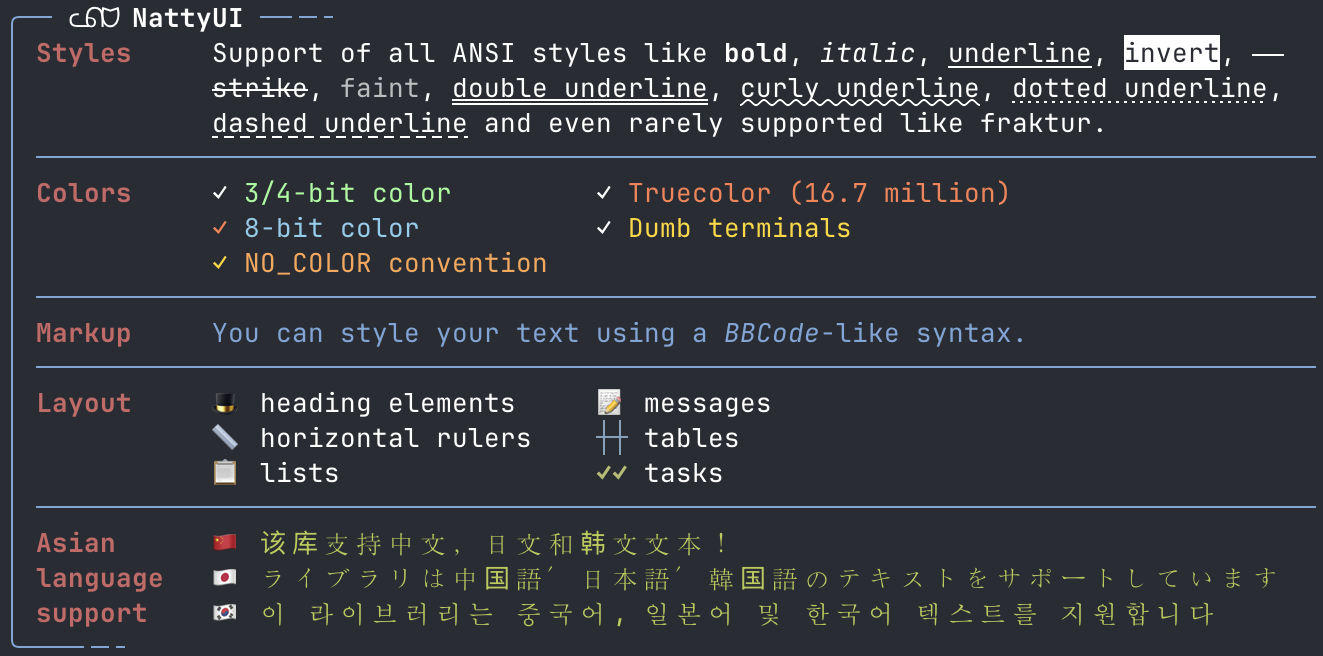
## NO_COLOR Convention
NattyUI follows the [NO_COLOR convention](https://no-color.org).
## Help
📕 See the [online help](https://rubydoc.info/gems/natty-ui/NattyUI) and have a look at the [examples](./examples/) directory to learn from code.
### Run Examples
You can execute the examples by
```sh
ruby ./examples/demo.rb
```
or see the non-ANSI version
```sh
NO_COLOR=1 ruby ./examples/demo.rb
```
## Installation
You can install the gem in your system with
```shell
gem install natty-ui
```
or you can use [Bundler](http://gembundler.com/) to add NattyUI to your own project:
```shell
bundle add natty-ui
```
After that you only need one line of code to have everything together
```ruby
require 'natty-ui'
```