https://github.com/mcgillij/py3status-github-notifications
py3status module to display your github notifications
https://github.com/mcgillij/py3status-github-notifications
github notifications py3status python
Last synced: over 1 year ago
JSON representation
py3status module to display your github notifications
- Host: GitHub
- URL: https://github.com/mcgillij/py3status-github-notifications
- Owner: mcgillij
- License: mit
- Created: 2021-03-10T03:43:02.000Z (over 5 years ago)
- Default Branch: main
- Last Pushed: 2024-12-23T04:42:28.000Z (over 1 year ago)
- Last Synced: 2025-04-11T09:58:26.430Z (over 1 year ago)
- Topics: github, notifications, py3status, python
- Language: Python
- Homepage:
- Size: 355 KB
- Stars: 6
- Watchers: 1
- Forks: 1
- Open Issues: 0
-
Metadata Files:
- Readme: README.md
- License: LICENSE
Awesome Lists containing this project
README
# py3status-github-notifications
py3status module for showing your Github notifications in i3
[](https://pepy.tech/project/py3status-github-notifications)
## Screenshot


## Prerequisites
* [i3wm](https://i3wm.org/)
* [py3status](https://github.com/ultrabug/py3status)
* [pygithub](https://github.com/PyGithub/PyGithub)
* Notification API token from Github
* [Awesome Terminal Fonts](https://github.com/gabrielelana/awesome-terminal-fonts)
## Getting your Notification API Token
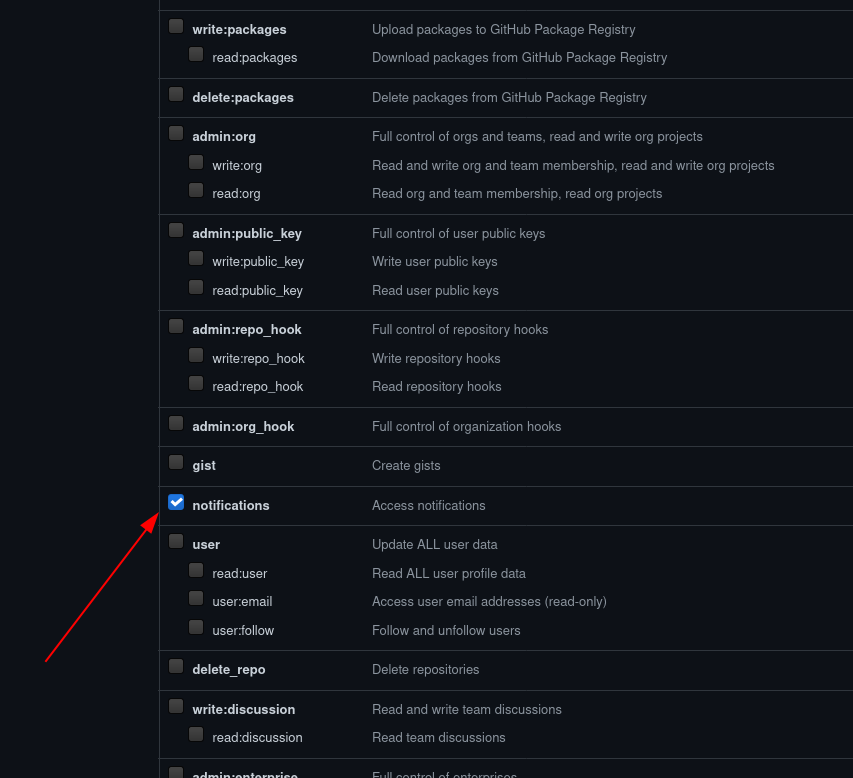
You can get this directly on Github, by going to your own *Account settings*, *Developer Settings* and finally **Personal access tokens**.
Make sure to limit the access to **ONLY** notifications.
## Installation
There are several methods to install py3status-github-notifications.
Directly from Github using git, pip / pipenv or poetry, the AUR (Arch package).
### Direct From Github
Installing directly from Github with git, means you will need to make sure you have the dependencies already installed.
``` bash
git clone git@github.com:mcgillij/py3status-github-notifications.git
mkdir -p ~/.i3/py3status/ && cd ~/i3/py3status/
ln -s ../../py3status-github-notifications/src/py3status_github_notifications/github_notifications.py ./
```
And down to the configuration section.
### Installing with Pip, Pipenv or Poetry
You will need to install the fonts separately to get the :octocat: emoji.
``` bash
pip install py3status-github-notifications
pipenv install py3status-github-notifications
poetry add py3status-github-notifications
```
### With `yay`
``` bash
yay -S py3status-github-notifications
```
## Configuration
Once you have the module installed using whichever method you chose above, edit your py3status configuration and add the following options.
**~/.config/i3/i3status.conf**
``` bash
...
order += "github_notifications"
github_notifications {
gh_token = "PASTE YOUR NOTIFICATIONS ONLY TOKEN HERE"
on_click 1 = "exec xdg-open https://github.com/notifications"$
}
...
```
And restart **i3** and your should be good to go.
## Configuration Options
You can pass in the following configuration options:
* cache_timeout # default 300