https://github.com/mdbootstrap/bootstrap-modal-methods
Methods for responsive Popup with Bootstrap 5. Show, hide / close or toggle a modal with JavaScript or via data attributes.
https://github.com/mdbootstrap/bootstrap-modal-methods
bootstrap bootstrap5 methods modal modal-dialog modals
Last synced: about 2 months ago
JSON representation
Methods for responsive Popup with Bootstrap 5. Show, hide / close or toggle a modal with JavaScript or via data attributes.
- Host: GitHub
- URL: https://github.com/mdbootstrap/bootstrap-modal-methods
- Owner: mdbootstrap
- License: mit
- Created: 2022-06-13T13:43:38.000Z (about 4 years ago)
- Default Branch: main
- Last Pushed: 2022-06-15T10:03:47.000Z (about 4 years ago)
- Last Synced: 2025-08-16T12:45:04.563Z (12 months ago)
- Topics: bootstrap, bootstrap5, methods, modal, modal-dialog, modals
- Language: SCSS
- Homepage: https://mdbootstrap.com/docs/standard/extended/modal-methods/
- Size: 936 KB
- Stars: 1
- Watchers: 4
- Forks: 1
- Open Issues: 0
-
Metadata Files:
- Readme: README.md
- License: LICENSE
Awesome Lists containing this project
README
Methods for responsive Popup with Bootstrap 5. Show, hide / close or toggle a modal with JavaScript or via data attributes.
The modal plugin toggles your hidden content on demand, via JavaScript or data attributes
In order to fully use the methods described below, please make sure to read the API tab in our main Modals documentation. This helper page will simply provide you with some examples of most common JavaScript methods for Bootstrap modals.
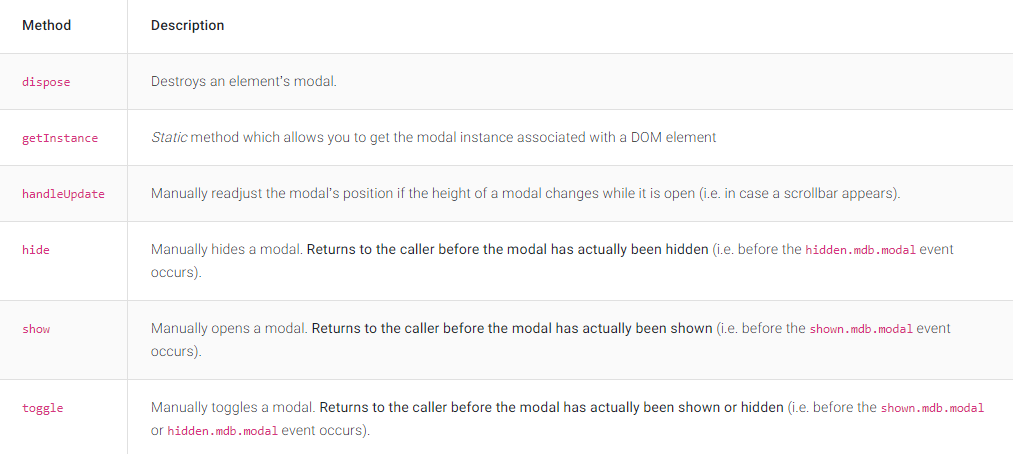
Check out [Bootstrap Modal Methods Documentation](https://mdbootstrap.com/docs/standard/extended/modal-methods/) for detailed instructions & even more examples.
## Modal Show
```javascript
const myModalEl = document.getElementById('myModal')
const modal = new mdb.Modal(myModalEl)
modal.show()
```
## Modal Close / Hide
```javascript
const myModalEl = document.getElementById('myModal')
const modal = new mdb.Modal(myModalEl)
modal.hide()
```
## Modal Toggle
```javascript
const myModalEl = document.getElementById('myModal')
const modal = new mdb.Modal(myModalEl)
modal.toggle()
```
## How to use?
1. Download MDB 5 - free UI KIT
2. Choose your favourite customized component and click on the image
3. Copy & paste the code into your MDB project
[:arrow_forward: Subscribe to YouTube channel for web development tutorials & resources](https://www.youtube.com/MDBootstrap?sub_confirmation=1)
___
## More extended Bootstrap documentation
- Bootstrap Address Form
- Bootstrap Avatar
- Bootstrap Back To Top Button
- Bootstrap Carousel Slider with Thumbnails
- Bootstrap Chat
- Bootstrap Code Blocks
- Bootstrap Comments
- Bootstrap Comparison Table
- Bootstrap Credit Card Form
- Bootstrap Drawer
- Bootstrap Nested Dropdown
- Bootstrap FAQ component / section
- Bootstrap Gallery
- Bootstrap Hamburger Menu
- Bootstrap Invoice
- Bootstrap Jumbotron
- Bootstrap Login Form
- Bootstrap Maps
- Bootstrap Media Object
- Bootstrap Mega Menu
- Bootstrap Multiselect
- Bootstrap News Feed
- Bootstrap Offcanvas
- Bootstrap Order Details
- Bootstrap Page Transitions
- Bootstrap Payment Forms
- Bootstrap Product Cards
- Bootstrap Profiles
- Bootstrap Quotes
- Bootstrap Registration Form
- Bootstrap Expanding Search Bar
- Bootstrap Shopping Carts
- Bootstrap Side Navbar
- Bootstrap Sidebar
- Bootstrap Social Media Icons & Buttons
- Bootstrap Square Buttons
- Bootstrap Survey Form
- Bootstrap Testimonial Slider
- Bootstrap Testimonials
- Bootstrap Textarea
- Bootstrap Timeline
- Bootstrap To Do List
- Bootstrap Video Carousel / Gallery
- Bootstrap Weather
- Bootstrap Dark Mode
- Bootstrap Padding
- Bootstrap Modal Size
- Bootstrap Modal Backdrop
- Bootstrap Card Deck
- Bootstrap Table Filter
- Bootstrap Slider
- Bootstrap Logo
- Bootstrap Popup
- Bootstrap Max Width
- Bootstrap Hero
- Bootstrap Select Dropdown
- Bootstrap Labels
- Bootstrap Dialog
- Bootstrap Screen Sizes
- Bootstrap Dropdown Button
- Bootstrap Widgets