https://github.com/mdbootstrap/react-sidebar
Sidebar is an additional navigation component that provides extensive support and a clear way for navigating through complex websites with hundreds of links and subpages.
https://github.com/mdbootstrap/react-sidebar
bootstrap bootstrap-navbar bootstrap-react bootstrap-sidebar bootstrap-sidenav bootstrap-template bootstrap-theme bootstrap5 jsx react sidebar
Last synced: 4 months ago
JSON representation
Sidebar is an additional navigation component that provides extensive support and a clear way for navigating through complex websites with hundreds of links and subpages.
- Host: GitHub
- URL: https://github.com/mdbootstrap/react-sidebar
- Owner: mdbootstrap
- License: other
- Created: 2022-07-28T08:37:12.000Z (about 4 years ago)
- Default Branch: main
- Last Pushed: 2022-08-01T11:49:19.000Z (about 4 years ago)
- Last Synced: 2025-08-23T00:41:01.032Z (12 months ago)
- Topics: bootstrap, bootstrap-navbar, bootstrap-react, bootstrap-sidebar, bootstrap-sidenav, bootstrap-template, bootstrap-theme, bootstrap5, jsx, react, sidebar
- Language: JavaScript
- Homepage: https://mdbootstrap.com/docs/react/extended/sidebar/
- Size: 533 KB
- Stars: 1
- Watchers: 4
- Forks: 1
- Open Issues: 0
-
Metadata Files:
- Readme: README.md
- License: License.pdf
Awesome Lists containing this project
README
Sidebar is an additional navigation component that provides extensive support and a clear way for navigating through complex websites with hundreds of links and subpages.
Check out [React Sidebar Documentation](https://mdbootstrap.com/docs/react/extended/sidebar/) for detailed instructions & even more examples.
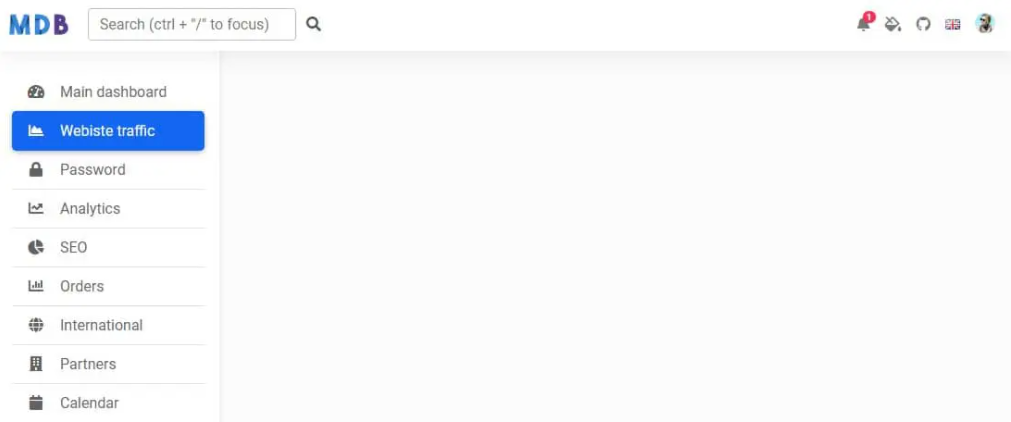
## Basic example
```js
import React, { useState } from 'react';
import {
MDBContainer,
MDBNavbar,
MDBNavbarBrand,
MDBNavbarToggler,
MDBIcon,
MDBNavbarNav,
MDBNavbarItem,
MDBNavbarLink,
MDBDropdown,
MDBDropdownToggle,
MDBDropdownMenu,
MDBDropdownItem,
MDBDropdownLink,
MDBCollapse,
MDBRipple,
MDBBadge,
MDBInput,
MDBListGroup,
MDBListGroupItem
} from 'mdb-react-ui-kit';
export default function Basic() {
const [showShow, setShowShow] = useState(false);
const toggleShow = () => setShowShow(!showShow);
return (
<>
Main Dashboard
Website traffic
Password
Analitics
SEO
Orders
International
Partners
Calendar
User
Sales

1
Some news
Another news
Something else here
.jpg)
My profile
Settings
Logout
>
);
}
```
```css
body {
background-color: #fbfbfb;
}
@media (min-width: 992px) {
.sidebar {
height: unset!important;
}
}
/* Sidebar */
.sidebar {
position: fixed;
top: 0;
bottom: 0;
left: 0;
padding: 58px 0 0;
/* Height of navbar */
box-shadow: 0 2px 5px 0 rgb(0 0 0 / 5%), 0 2px 10px 0 rgb(0 0 0 / 5%);
width: 240px;
/* z-index: 600; */
}
.sidebar.show {
height: 100vh;
}
@media (max-width: 992px) {
.sidebar {
width: 100%;
}
}
.sidebar .active {
border-radius: 5px;
box-shadow: 0 2px 5px 0 rgb(0 0 0 / 16%), 0 2px 10px 0 rgb(0 0 0 / 12%);
}
.sidebar-sticky {
position: relative;
top: 0;
height: calc(100vh - 48px);
padding-top: 0.5rem;
overflow-x: hidden;
overflow-y: auto;
/* Scrollable contents if viewport is shorter than content. */
}
```
## How to use?
1. Download MDB React - free UI KIT
2. Choose your favourite customized component and click on the image
3. Copy & paste the code into your MDB project
[▶️ Subscribe to YouTube channel for web development tutorials & resources](https://www.youtube.com/MDBootstrap?sub_confirmation=1)
## More examples
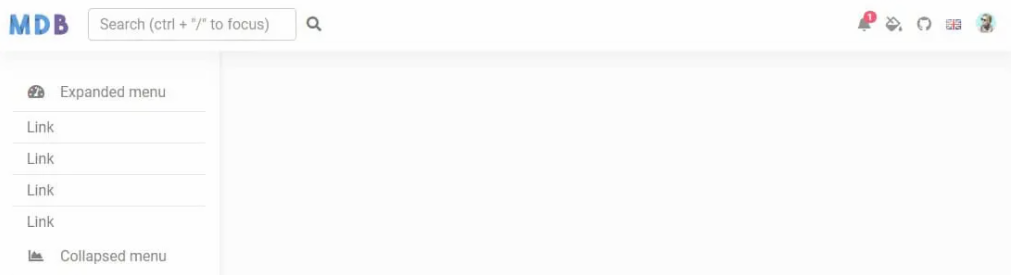
[React Sidebar Collapse:
](https://mdbootstrap.com/docs/react/extended/sidebar/#section-collapse)