https://github.com/mdocui/mdocui
Generative UI for LLMs using Markdoc {% %} tag syntax
https://github.com/mdocui/mdocui
ai generative-ui llm markdoc react streaming ui-components
Last synced: 3 months ago
JSON representation
Generative UI for LLMs using Markdoc {% %} tag syntax
- Host: GitHub
- URL: https://github.com/mdocui/mdocui
- Owner: mdocui
- License: mit
- Created: 2026-03-27T10:53:14.000Z (3 months ago)
- Default Branch: main
- Last Pushed: 2026-04-01T13:31:03.000Z (3 months ago)
- Last Synced: 2026-04-03T04:04:30.591Z (3 months ago)
- Topics: ai, generative-ui, llm, markdoc, react, streaming, ui-components
- Language: TypeScript
- Homepage: https://mdocui.github.io
- Size: 249 KB
- Stars: 3
- Watchers: 0
- Forks: 0
- Open Issues: 0
-
Metadata Files:
- Readme: README.md
- License: LICENSE
Awesome Lists containing this project
README



Documentation · Live Demo · npm
> **Alpha** -- mdocUI is under active development. The API may change between minor versions. We follow [semver](https://semver.org/) and will reach 1.0 once the API stabilizes.
Generative UI library for LLMs using Markdoc `{% %}` tag syntax inline with markdown prose.
LLMs write natural markdown **and** drop interactive UI components in the same stream — charts, buttons, forms, tables, cards, and more. No custom DSL to learn, no JSON blocks, no JSX confusion.
**Key features:** built-in prose rendering, component merging, CLI scaffolder, error boundaries, streaming animations, shimmer placeholders, prop validation, context data passthrough, and configurable prompt verbosity.
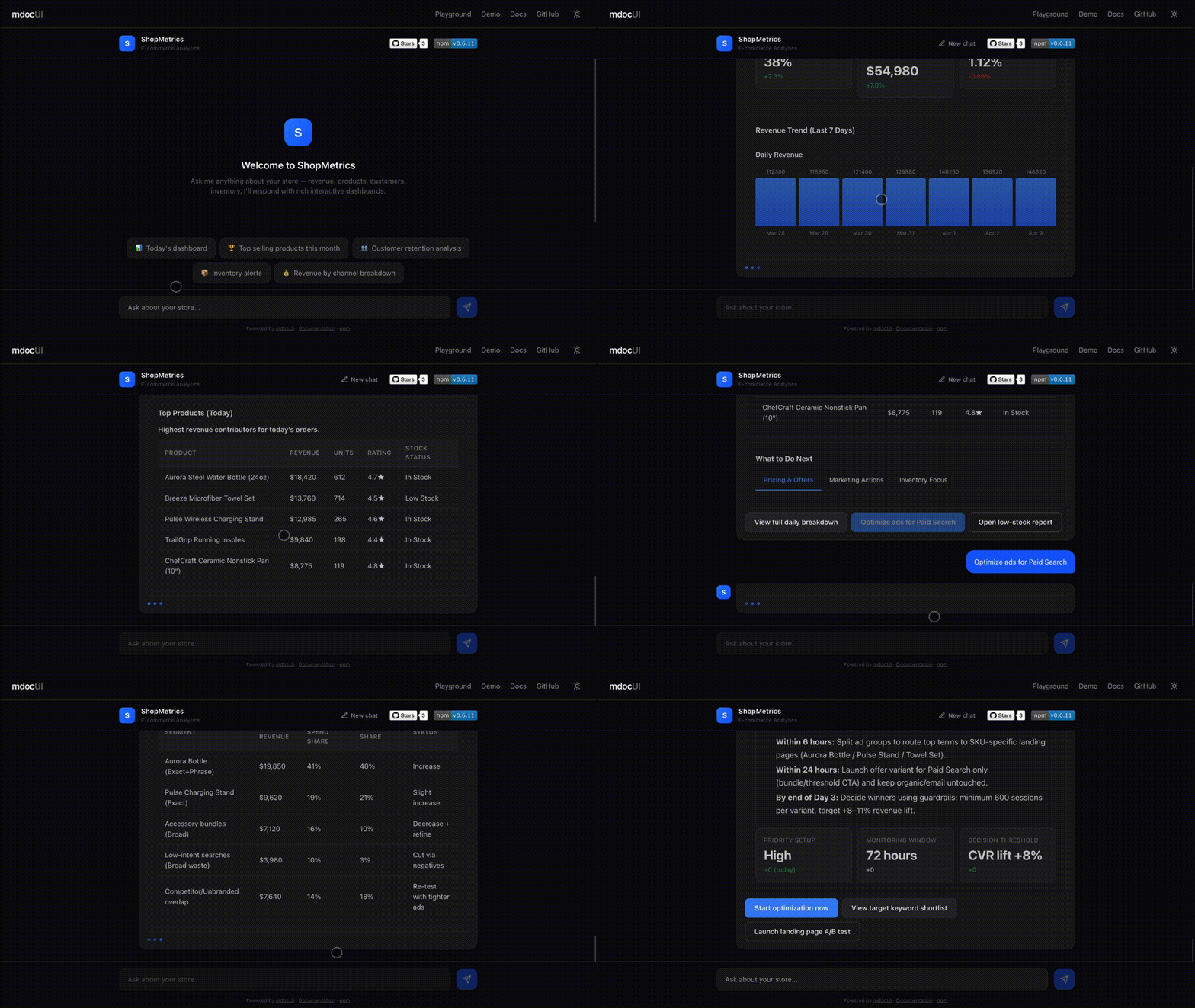
```
The Q4 results show strong growth across all segments.
{% chart type="bar" labels=["Jan","Feb","Mar"] values=[120,150,180] /%}
Revenue grew **12%** quarter-over-quarter.
{% callout type="info" title="Action Required" %}
Review the pipeline before end of quarter.
{% /callout %}
{% button action="continue" label="Show by region" /%}
{% button action="continue" label="Export as PDF" /%}
```
## Syntax: Markdown + Markdoc Tags
mdocUI combines two syntaxes in a single stream:
- **[Markdown](https://commonmark.org/)** -- the universal prose format created by John Gruber (2004), standardized by [CommonMark](https://github.com/commonmark/commonmark-spec). Handles headings, bold, italic, lists, links, code blocks -- everything an LLM already knows how to write.
- **[Markdoc](https://github.com/markdoc/markdoc) `{% %}` tags** -- the tag syntax from Stripe's Markdoc framework (2022, MIT). Markdoc extends Markdown with `{% %}` custom tags for structured content.
mdocUI borrows **only the `{% %}` tag syntax** from Markdoc. We do not use Markdoc's parser, runtime, compiler, schema system, or config layer. We built our own streaming parser from scratch, purpose-built for token-by-token LLM output.
### Tag forms
Self-closing (no body):
```
{% tagname attr="value" /%}
```
With body content:
```
{% tagname attr="value" %}
Body content here -- can include markdown or nested tags.
{% /tagname %}
```
### Why `{% %}` works for streaming
The character sequence `{%` never appears in normal prose, standard markdown, or fenced code blocks. This makes it a reliable delimiter that a character-by-character streaming parser can detect without ambiguity -- no lookahead, no backtracking, no fragile heuristics.
The LLM writes both markdown **and** component tags in the same response. The parser separates them into prose nodes and component nodes as tokens arrive.
## Why mdocUI?
| Approach | Prose? | Components? | Streaming? | Token efficient? |
|----------|--------|-------------|------------|------------------|
| Plain markdown | Yes | No | Yes | Yes |
| OpenUI Lang | No | Yes | Yes | Yes |
| JSON blocks in markdown | Yes | Yes | Fragile | No |
| JSX in markdown | Yes | Yes | Fragile | No |
| **mdocUI** | **Yes** | **Yes** | **Yes** | **Yes** |
Markdoc's `{% %}` delimiters are unambiguous — they never appear in normal prose or code, making streaming parsing reliable.
## Packages
| Package | Description | Status |
|---------|-------------|--------|
| [`@mdocui/core`](packages/core) | Streaming parser, tokenizer, component registry, prompt generator | Alpha |
| [`@mdocui/react`](packages/react) | React renderer, 24 default components, `useRenderer` hook | Alpha |
| [`@mdocui/cli`](packages/cli) | Scaffold, generate system prompts, preview | Alpha |
## Quick Start
```bash
pnpm add @mdocui/core @mdocui/react
```
### 1. Generate a system prompt
`generatePrompt()` merges two layers into one prompt: the **library layer** (tag syntax, component signatures, composition rules — auto-generated from the registry) and your **app layer** (preamble, domain rules, examples). You never write syntax docs manually.
```typescript
import { generatePrompt } from '@mdocui/core'
import { createDefaultRegistry, defaultGroups } from '@mdocui/react'
const registry = createDefaultRegistry()
const systemPrompt = generatePrompt(registry, {
preamble: 'You are a helpful assistant.',
groups: defaultGroups,
})
// Pass systemPrompt to your LLM
```
### 2. Render streamed output
```tsx
import { useRenderer } from '@mdocui/react'
import { Renderer, defaultComponents, createDefaultRegistry } from '@mdocui/react'
const registry = createDefaultRegistry()
function Chat() {
const { nodes, isStreaming, push, done } = useRenderer({ registry })
// Call push(chunk) as tokens arrive from LLM
// Call done() when stream ends
// useRenderer batches renders to at most one per frame (~60fps) automatically
return (
{
if (event.action === 'continue') {
sendMessage(event.label)
}
}}
onError={(event) => {
console.error(`Component ${event.componentName} failed:`, event.error)
}}
/>
)
}
```
### 3. Handle actions and errors
Every interactive component fires through a single `onAction` callback:
```typescript
onAction={(event) => {
switch (event.action) {
case 'continue':
// Send event.label as a new user message
break
case 'submit:formName':
// event.formState has all field values
break
case 'open_url':
// event.params.url has the URL
break
}
}}
```
Catch component rendering errors with `onError`:
```typescript
onError={(event) => {
console.error(`${event.componentName} failed to render:`, event.error)
// event.props contains the props that caused the error
}}
```
## Custom Components
Every component receives `ComponentProps` and can be swapped:
```typescript
interface ComponentProps {
name: string
props: Record
children?: React.ReactNode
className?: string
onAction: ActionHandler
isStreaming: boolean
}
```
### Override specific components
```tsx
import { defaultComponents, Renderer } from '@mdocui/react'
const myComponents = {
...defaultComponents,
button: MyButton, // swap just the button
card: MyShadcnCard, // use your shadcn card
}
```
### Tailwind / className support
Pass per-component classes via `classNames`:
```tsx
```
### Bring your own components entirely
```tsx
const shadcnComponents = {
button: ({ props, onAction }) => (
onAction({ type: 'button_click', action: props.action, label: props.label, tagName: 'button' })}>
{props.label}
),
card: ({ props, children }) => (
{props.title}{children}
),
}
```
## Architecture
| Layer | Role |
|-------|------|
| **Tokenizer** | Character-by-character lexer, tracks `IN_PROSE` / `IN_TAG` / `IN_STRING` states |
| **StreamingParser** | Buffers incomplete tags, merges prose, emits `ASTNode[]` |
| **ComponentRegistry** | Validates tag names and props via Zod schemas |
| **Renderer** | Maps AST nodes to React components with error boundaries and animations |
The core is framework-agnostic. `@mdocui/react` is one adapter — Vue, Svelte, and Angular adapters can follow the same pattern.
## Available Components
### Layout
`stack` `grid` `card` `divider` `accordion` `tabs` `tab`
### Interactive
`button` `button-group` `input` `textarea` `select` `checkbox` `toggle` `form`
### Data
`chart` `table` `stat` `progress`
### Content
`callout` `badge` `image` `code-block` `link`
All components render theme-neutral semantic HTML with `data-mdocui-*` attributes. They use `currentColor` and `inherit` — no hardcoded colors. They adapt to any light or dark theme automatically. Style them with CSS, Tailwind `classNames`, or swap in your own components entirely.
## Development
```bash
# Install
pnpm install
# Build all packages
pnpm build
# Run tests
pnpm test
# Lint
pnpm lint
# Run playground
pnpm playground
```
## Contributing
Contributions are welcome! See [CONTRIBUTING.md](CONTRIBUTING.md) for the full guide.
1. Fork the repo
2. Create a feature branch (`git checkout -b feature/my-change`)
3. Make your changes with tests
4. Run `pnpm test && pnpm lint`
5. Open a pull request
## For AI Agents
- [SKILL.md](SKILL.md) — implementation guide for AI coding agents
- [llms.txt](https://mdocui.github.io/llms.txt) — machine-readable project summary for LLM crawlers
**Install as a Claude Code skill:**
Project-level (current project only):
```bash
mkdir -p .claude/skills/mdocui
curl -o .claude/skills/mdocui/SKILL.md https://raw.githubusercontent.com/mdocui/mdocui/main/SKILL.md
```
Personal (available in all your projects):
```bash
mkdir -p ~/.claude/skills/mdocui
curl -o ~/.claude/skills/mdocui/SKILL.md https://raw.githubusercontent.com/mdocui/mdocui/main/SKILL.md
```
Then invoke with `/mdocui` in Claude Code.
## Roadmap
**Renderers**
- `@mdocui/vue` — Vue 3 renderer
- `@mdocui/svelte` — Svelte 5 renderer
- `@mdocui/solid` — SolidJS renderer
**Integrations**
- `@mdocui/nextjs` — App Router helpers, RSC-safe imports, route handler template
- `@mdocui/vercel-ai` — Vercel AI SDK `useChat` to `useRenderer` bridge
**Developer tools**
- `@mdocui/devtools` — browser panel for AST inspection, parse meta, streaming state
- VS Code extension — syntax highlighting and autocomplete for `{% %}` tags
**Milestone**
- v1.0.0 — stable API, frozen component props, CHANGELOG
Have an idea? [Open a suggestion issue](https://github.com/mdocui/mdocui/issues/new?labels=enhancement&title=Suggestion:+).
## License
[MIT](LICENSE)