https://github.com/me-majidi/ng2-loading-spinner
:hourglass_flowing_sand: Angular Loading Spinner
https://github.com/me-majidi/ng2-loading-spinner
angular angular2 loading loading-spinner
Last synced: 4 months ago
JSON representation
:hourglass_flowing_sand: Angular Loading Spinner
- Host: GitHub
- URL: https://github.com/me-majidi/ng2-loading-spinner
- Owner: me-majidi
- Created: 2018-08-01T18:47:28.000Z (almost 8 years ago)
- Default Branch: master
- Last Pushed: 2020-10-11T23:08:14.000Z (over 5 years ago)
- Last Synced: 2025-09-01T13:56:49.817Z (10 months ago)
- Topics: angular, angular2, loading, loading-spinner
- Language: TypeScript
- Homepage: https://me-majidi.github.io/ng2-loading-spinner/
- Size: 766 KB
- Stars: 4
- Watchers: 0
- Forks: 2
- Open Issues: 1
-
Metadata Files:
- Readme: README.md
Awesome Lists containing this project
README

Ng2-loading-spinner
Customisable loading spinner for angular applications
[](https://www.npmjs.com/package/ng2-loading-spinner)
[](https://me-majidi.github.io/ng2-loading-spinner)
[](https://travis-ci.com/me-majidi/ng2-loading-spinner)
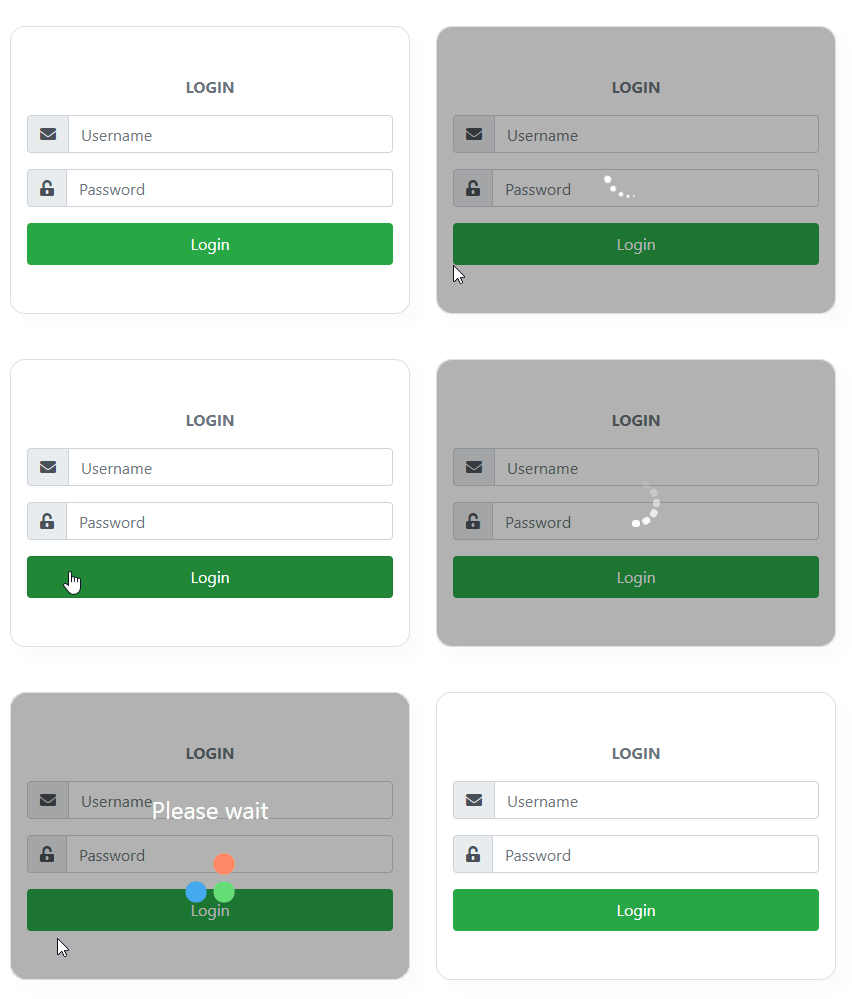
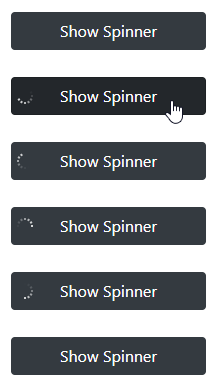
## Table of contents
- [Online Demo](https://me-majidi.github.io/ng2-loading-spinner/)
- [Installation](https://www.npmjs.com/package/ng2-loading-spinner#installation)
- [Usage](https://www.npmjs.com/package/ng2-loading-spinner#usage)
- [API](https://www.npmjs.com/package/ng2-loading-spinner#api)
- [Examples](https://www.npmjs.com/package/ng2-loading-spinner#examples)
## Installation
```shell
npm install --save ng2-loading-spinner
```
## Usage
Import `Ng2LoadingSpinnerModule` in your module
```typescript
import { NgModule } from '@angular/core';
import { Ng2LoadingSpinnerModule } from 'ng2-loading-spinner'
@NgModule({
imports: [ Ng2LoadingSpinnerModule.forRoot({}) ]
})
export class TestModule { }
```
then, use the `ng2-loading` directive on the element you want to have a spinner on:
```html
...
```
the directive expects a boolean for showing and removing Loading spinner:
``` typescript
@Component({
selector : 'app.component',
templateUrl: './app.component.html',
styleUrls : [ './app.component.css' ]
})
export class AppComponent {
showSpinner: boolean = true;
constructor() {
setTimeout(() => {
this.showSpinner = false;
}, 1500);
}
}
```
## API
#### Input parameters
Input | Type | Required | Description |
------ | ----- | ----- | ----- |
ng2-loading | boolean | Required | A boolean, which will determine when spinner is added to the DOM |
config | INg2LoadingSpinnerConfig | Optional | Configuartion object for spinner. If no config options are set, the default config options will be used. |
template | TemplateRef | Optional | If provided, the custom template will be shown in place of the default spinner animations. You can use this for rendering custom spinners instead of default spinner animations |
#### Configurable options
Config options can be set globally using the forRoot module import statement as well as being passed into each loader instance.Options passed to the instance of loader will override each global options.
Option | Required | type | Default value | Description | Examples |
--- | --- | --- | --- | --- | ---- |
animationType | Optional | string | ANIMATION_TYPES.fadingCircle | The spinner animation to be used. import ANIMATION_TYPES constant to select valid options. | ANIMATION_TYPES.chasingDots |
backdropColor | Optional | string | rgba(0, 0, 0, 0.3) | Background color of backdrop element | 'red', 'rgb(120, 0, 171)', '#434343' |
backdropBorderRadius | Optional | string | 0 | The border-radius property to be aplied to the spinner | '10px', '1rem', '50%' |
spinnerColor | Optional | string | white | Color of spinner | 'red', 'rgb(120, 0, 171)', '#434343' |
spinnerPosition | Optional | string | 'center' | Position the spinner into the host view | 'top', 'right', 'bottom', 'left', 'top-right', 'bottom-left' |
spinnerSize | Optional | string | 'md' | Option that indicates size of spinner | 'sm', 'md', 'lg' |
spinnerFontSize | Optional | string | | Option for controlling size of spinner.If provided `spinnerSize` option will be ignored | '10px', '1rem' |
#### Available spinner positions:
Position |
------ |
center |
top |
right |
bottom |
left |
top-right |
left-right |
top-left |
bottom-left |
#### Available spinner sizes:
Size |
------ |
xs |
sm |
md |
lg |
xl |
## Examples
#### Example 1 - with custom configuration options
```typescript
import { NgModule } from '@angular/core';
import { Ng2LoadingSpinnerModule } from 'ng2-loading-spinner'
@NgModule({
imports: [ Ng2LoadingSpinnerModule.forRoot({
backdropColor : 'rgba(0, 0, 0, 0.3)',
spinnerColor : '#fff',
}) ]
})
export class TestModule { }
```
``` typescript
import { Component } from '@angular/core';
import { ANIMATION_TYPES } from 'ng2-loading-spinner';
import { INg2LoadingSpinnerConfig } from 'ng2-loading-spinner';
@Component({
selector : 'app-example1',
templateUrl: './example1.component.html',
styleUrls : [ './example1.component.css' ]
})
export class Example1Component {
show = false;
loadingConfig: INg2LoadingSpinnerConfig = {
animationType : ANIMATION_TYPES.dualCircle,
spinnerPosition: 'left',
backdropBorderRadius: '15px',
spinnerSize: 'md',
spinnerFontSize: '2rem'
};
constructor () {
}
showLoading() {
this.show = true;
setTimeout(() => {
this.show = false;
}, 1500);
}
}
```
```html
Show Spinner
```
#### Example2 - using custom template
``` typescript
import { Component } from '@angular/core';
import { ANIMATION_TYPES } from 'ng2-loading-spinner';
import { INg2LoadingSpinnerConfig } from 'ng2-loading-spinner';
import { AuthService } from '../auth.service'
@Component({
selector : 'app-example2',
templateUrl: './example2.component.html',
styleUrls : [ './example2.component.css' ]
})
export class Example2Component {
show = false;
loadingConfig: INg2LoadingSpinnerConfig = {
animationType : ANIMATION_TYPES.dualCircle,
backdropColor : 'rgba(0, 0, 0, 0.3)',
spinnerColor : '#fff',
spinnerPosition: 'center',
backdropBorderRadius: '15px',
spinnerSize: 'md',
spinnerFontSize: '2rem'
};
constructor (private authService: AuthService) {
}
onLogin() {
this.show = true;
this.authService.login()
.subscribe((res) => {
this.show = false;
})
}
}
```
``` html
Login
Please wait
```
and style this custom loader in example2.component.css:
``` css
.custom-loader {
....
}
```