https://github.com/medflyt/eslint-plugin-graphql-type-checker
An ESLint plugin that generates & validates TypeScript type annotations for GraphQL queries.
https://github.com/medflyt/eslint-plugin-graphql-type-checker
eslint generated gql graphql literal plugin template types typescript typings validation
Last synced: 5 months ago
JSON representation
An ESLint plugin that generates & validates TypeScript type annotations for GraphQL queries.
- Host: GitHub
- URL: https://github.com/medflyt/eslint-plugin-graphql-type-checker
- Owner: MedFlyt
- Created: 2021-08-10T10:16:20.000Z (almost 5 years ago)
- Default Branch: master
- Last Pushed: 2024-06-06T14:00:22.000Z (about 2 years ago)
- Last Synced: 2025-04-03T01:17:45.439Z (over 1 year ago)
- Topics: eslint, generated, gql, graphql, literal, plugin, template, types, typescript, typings, validation
- Language: TypeScript
- Homepage:
- Size: 1.62 MB
- Stars: 0
- Watchers: 7
- Forks: 1
- Open Issues: 0
-
Metadata Files:
- Readme: README.md
Awesome Lists containing this project
README
## eslint-plugin-graphql-type-checker [](https://www.npmjs.com/package/@medflyt/eslint-plugin-graphql-type-checker) [](https://github.com/MedFlyt/eslint-plugin-graphql-type-checker/actions/workflows/build-test.yml?query=branch%3Amaster)
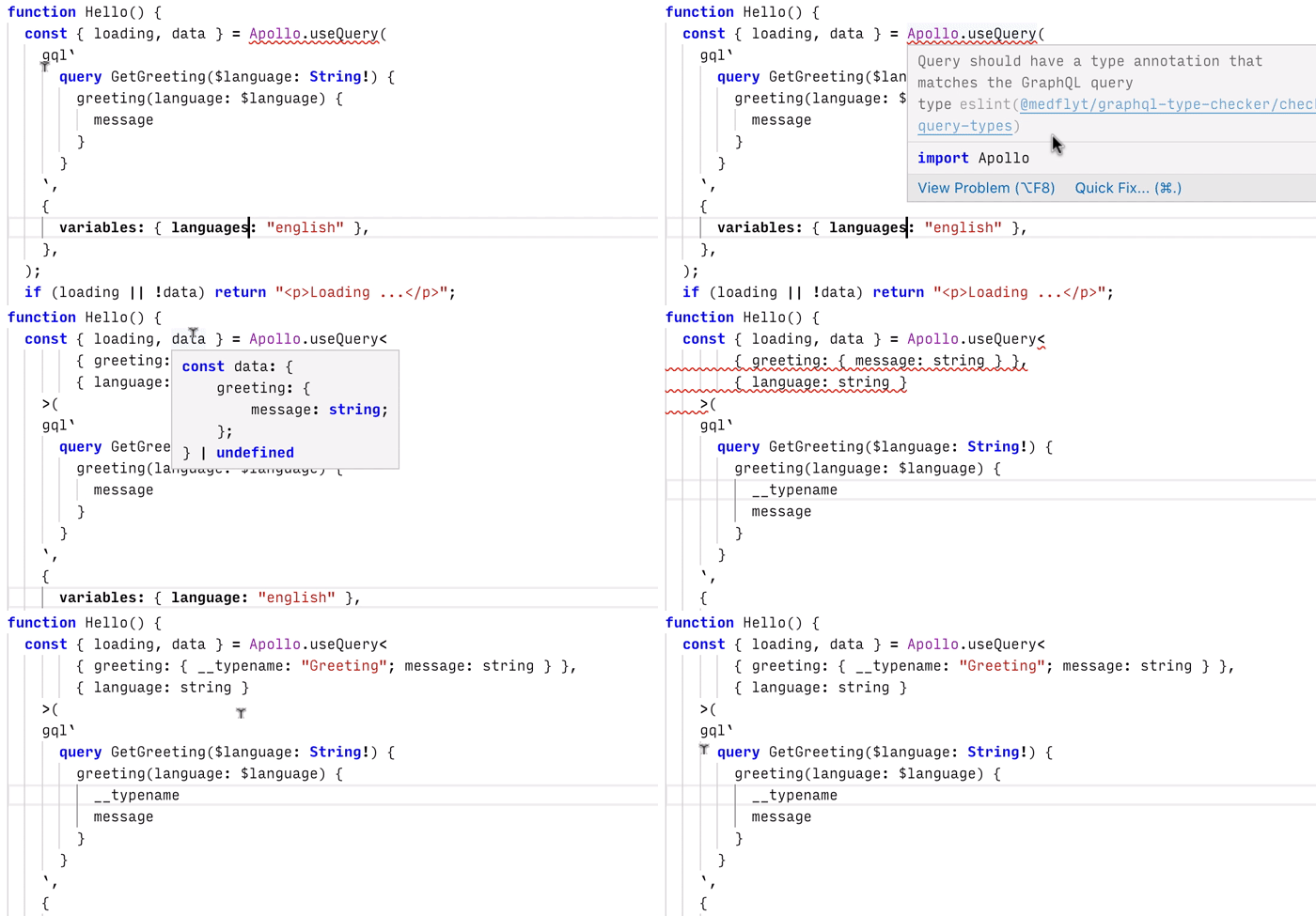
The [`eslint-plugin-graphql-type-checker`](https://www.npmjs.com/package/@medflyt/eslint-plugin-graphql-type-checker) package is an ESLint plugin that generates and validates TypeScript type annotations for GraphQL queries. It contains a single rule `@medflyt/graphql-type-checker/check-query-types`, which triggers on configured annotation targets (e.g. `useQuery`) and inspects queries passed as `gql` tagged templates (i.e. ``gql`query ..` ``). From the query and the schema associated with the anotation target, it infers an annotation for the result and argument types, which can be applied to the code as an ESLint fix.
**NOTE:** The plugin is still a work in progress, and currently only supports query operations, without fragments, union types or interfaces.
## Example
As an example, consider this basic schema:
```graphql
type Query {
greeting(language: String!): Greeting!
}
type Greeting {
greeting_id: ID!
message: String!
}
```
We can perform an untyped query with `useQuery` like this:
```ts
const { data } = useQuery(
gql`
query GetGreeting($language: String!) {
greeting(language: $language) {
__typename
message
}
}
`,
{
variables: { language: 'english' }, // Strongly-typed variables
},
)
```
If the plugin is configured for `useQuery` with the appropriate schema, the code above will trigger this lint error:
```text
Target should have a type annotation that matches the GraphQL query type
```
with a suggestion to fix the code to
```ts
const { data } = useQuery<{ greeting: { __typename: 'Greeting'; message: string } }, { language: string }>(
gql`
query GetGreeting($language: String!) {
greeting(language: $language) {
__typename
message
}
}
`,
{
variables: { language: 'english' },
},
)
```
Both `data` and `variables` are now strongly typed according to the query in the `gql` tagged template.
If the `useQuery` call already has a type annotation, the plugin will compare it to the inferred one (disregarding layout and redundant syntax, like extra parentheses), and propose a fix in case of a difference.
To minimize the need to reformat after applying a fix, the suggested code fixes are formatted with prettier, using the target project's prettier configuration, if it has one.
# Installation
Install the plugin with
```bash
npm install -D @medflyt/eslint-plugin-graphql-type-checker
```
# Configuration
The plugin only has a single rule `@medflyt/graphql-type-checker/check-query-types`, which has the following configuration (expressed as a TypeScript type):
```ts
export type RuleOptions = [
{
annotationTargets: Array<
(FunctionTarget | MethodTarget | TaggedTemplateTarget) & {
schemaFilePath: string
}
>
},
]
type FunctionTarget = { function: { name: string } }
type MethodTarget = { method: { objectName: string; methodName: string } }
type TaggedTemplateTarget = { taggedTemplate: { name: string } }
```
An annotation target can be either a function name, an object/method name pair, or a tagged-template tag name, together with a schema file path.
### Function target
A function target will the trigger the plugin everywhere that function gets called. For example, to have the plugin target the `useQuery` call, use a configuration like this:
```javascript
module.exports = {
parser: "@typescript-eslint/parser",
plugins: ["@typescript-eslint", "@medflyt/graphql-type-checker"],
extends: [],
rules: {
"@medflyt/graphql-type-checker/check-query-types": [
"error", {
annotationTargets: [
{
function: { name: 'useQuery' },
schemaFilePath: 'src/schemas/some-schema.graphql',
},
// ... other annotation targets
],
},
],
// ... other rules
},
};
```
This will provide a type annotation to every `useQuery` call with a `gql` tagged template argument (i.e. ``useQuery(gql`..`)``), for example:
```ts
const { data } = useQuery<{ greeting: { message: string } }, { language: string }>(
gql`
query GetGreeting($language: String!) {
greeting(language: $language) {
message
}
}
`,
{ variables: { language: 'english' } },
)
```
Both `data` and `variables` here are strongly typed. See [`src/demo/queries/apollo/useQueryExample.tsx`](https://github.com/MedFlyt/eslint-plugin-graphql-type-checker/blob/master/src/demo/queries/apollo/useQueryExample.tsx) for the full source of this example.
The configuration above only works for `useQuery` calls that have a direct `gql` tagged-template argument. If the query is large, inlining it in the call clutters the code, and it makes more sense to declare it in a separate constant. To type queries declared separately, we can write a helper function to be be targeted by the plugin:
```ts
const annotateQuery = (gql: Apollo.DocumentNode): Apollo.TypedDocumentNode => gql
```
If the plugin configuration specifies a function target for `annotateQuery`, the plugin will provide annotations for queries wrapped in it, like this:
```ts
const greetingQuery = annotateQuery<{ greeting: { message: string } }, { language: string }>(gql`
query GetGreeting($language: String!) {
greeting(language: $language) {
message
}
}
`)
```
The resulting `greetingQuery` will have type `Apollo.TypedDocumentNode<{ greeting: { message: string } }, { language: string }>` and can be used in a `useQuery` call to make it strongly typed:
```ts
const { data } = useQuery(greetingQuery, { variables: { language: 'english' } })
```
(Full source: [`src/demo/queries/apollo/annotateQueryExample.tsx`](https://github.com/MedFlyt/eslint-plugin-graphql-type-checker/blob/master/src/demo/queries/apollo/annotateQueryExample.tsx)).
### Object/method target
An object/method target only applies to direct method calls on objects (i.e. `OBJECT.METHOD`). This can be useful if a project has several schemas, since you can configure a separate object/method target for each schema:
```ts
annotationTargets: [
{
objectName: 'Schema1',
methodName: 'useQuery',
schemaFilePath: 'src/schemas/schema-1.graphql',
},
{
objectName: 'Schema2',
methodName: 'useQuery',
schemaFilePath: 'src/schemas/schema-2.graphql',
},
// ... other annotation targets
]
```
If you now use a named import `import * as Schema1 from '@apollo/client'`, all `Schema1.useQuery` calls in the module will trigger the plugin with the `src/schemas/schema-1.graphql` schema.
### Tagged-template target
It is also possible to directly target tagged templates such as `gql`:
```ts
annotationTargets: [
{
taggedTemplate: { name: 'gql' },
schemaFilePath: 'src/schemas/some-schema.graphql',
},
// ... other annotation targets
]
```
This will annotate the `gql` call, so we need a generic version of it:
```ts
const gql = function , TVariables = Record>(
literals: string | readonly string[],
...args: any[]
): Apollo.TypedDocumentNode {
return Apollo.gql(literals, ...args)
}
```
We can now use this generic `gql` to write queries, and the plugin will provide type annotations (project wide, so all `gql` tagged templates will need to be the generic one):
```ts
const greetingQuery = gql<{ greeting: { message: string } }, { language: string }>`#graphql
query GetGreeting($language: String!) {
greeting(language: $language) {
message
}
}
`
```
Note that the VSCode GraphQL plugin currently does not recognize generic `gql` tagged templates as GraphQL, so an extra `#graphql` comment is necessary to enable syntax coloring and other GraphQL functionality.
It is also possible to target tagged templates with different tag names, for example to support different schemas, or to be able to still use the non-generic `gql`. The example in [`src/demo/queries/apollo/tgqlTaggedTemplateExample.tsx`](https://github.com/MedFlyt/eslint-plugin-graphql-type-checker/blob/master/src/demo/queries/apollo/tgqlTaggedTemplateExample.tsx) uses `tgql` to avoid annotating every instance of `gql` in the project.
For more examples, see the [`src/demo/.eslintrc.js`](https://github.com/MedFlyt/eslint-plugin-graphql-type-checker/blob/master/src/demo/.eslintrc.js) configuration, and the query samples in [`src/demo/queries`](https://github.com/MedFlyt/eslint-plugin-graphql-type-checker/blob/master/src/demo/queries).
# Demo
To run the plugin directly from the sources, clone this repository, and run
```bash
npm install
npm run install-demo
```
followed by either `npm run build` or `npm run build-watch`.
The plugin can now be called from the command line on the examples in `src/demo/queries`, for example with:
```bash
npx eslint src/demo/queries/apollo/useQueryExample.tsx
```
(To see an error message, try changing `{ message: string }` to `{ message: number }` in the type annotation.)
If you have an ESLint editor extension, you can also open the samples in `src/demo/queries` in your editor and use the quick-fix suggestions to update the type annotations. Note that after changing the plugin sources and rebuilding, you will have to reload or restart the editor to see the effects.