https://github.com/meetpateltech/convelyze
Visualize your ChatGPT usage with interactive charts and insights.
https://github.com/meetpateltech/convelyze
ai chatgpt data-analysis openai
Last synced: over 1 year ago
JSON representation
Visualize your ChatGPT usage with interactive charts and insights.
- Host: GitHub
- URL: https://github.com/meetpateltech/convelyze
- Owner: meetpateltech
- Created: 2024-09-21T07:02:23.000Z (almost 2 years ago)
- Default Branch: main
- Last Pushed: 2025-02-01T10:30:01.000Z (over 1 year ago)
- Last Synced: 2025-02-01T11:25:54.322Z (over 1 year ago)
- Topics: ai, chatgpt, data-analysis, openai
- Language: TypeScript
- Homepage: https://convelyze.pages.dev
- Size: 5.53 MB
- Stars: 9
- Watchers: 1
- Forks: 2
- Open Issues: 2
-
Metadata Files:
- Readme: README.md
Awesome Lists containing this project
README
# Convelyze
Convelyze is a powerful web application that visualizes your ChatGPT usage, providing comprehensive analytics and insights into your conversations.
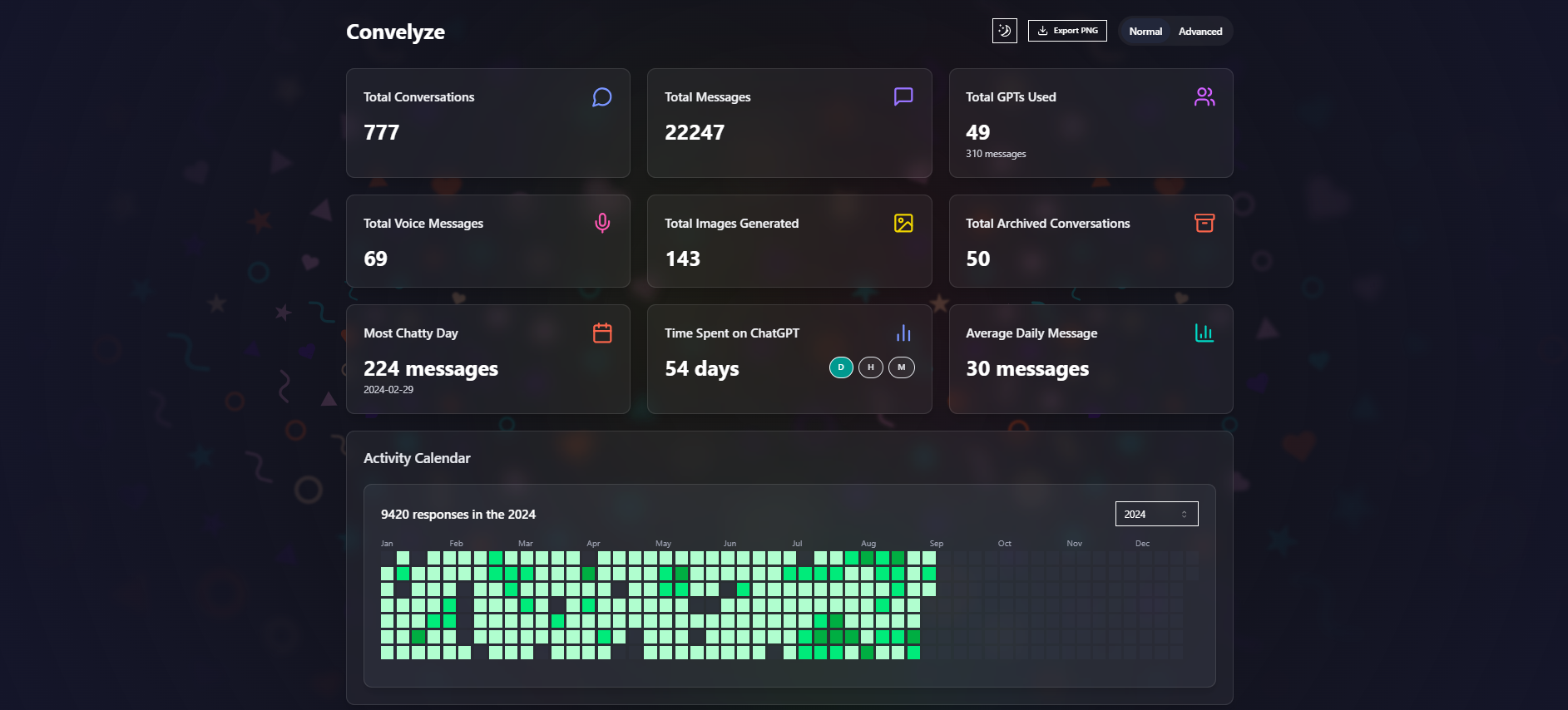
[](https://convelyze.pages.dev/demo)
## Key Features
- 📊 **Comprehensive Analytics**: Track conversations, messages, GPT usage, model usage, and more.
- 🧩 **Monthly Model Breakdowns & Cost Estimation**: View ChatGPT token usage with monthly model breakdowns, estimated costs, and compare API pricing.
- 🔒 **Privacy First**: All data is processed client-side for maximum security. Your conversations stay private.
- 🖥️ **Open Source**: The project is open source, allowing for community contributions and transparency.
- 🌓 **Light & Dark Mode**: Seamlessly switch between light and dark themes for comfortable viewing in any environment.
- 📈 **Interactive Visualizations**: Includes activity calendars, usage timelines, and various charts for in-depth analysis.
### Detailed Metrics
- 💬 Total Conversations and Messages
- 🤖 Total GPTs Used and GPT Messages
- 🗣️ Total Voice Messages
- 🖼️ Total Images Generated
- 🗄️ Total Archived Conversations
- 📅 Most Chatty Day
- ⏱️ Time Spent on ChatGPT
- 📊 Average Daily Message Count
- 📆 Activity Calendar
- 👥 Role-Based Message Count (Overall, GPTs, Voice)
- 🕰️ Shift-Wise Message Count
- 🧠 Model-Wise Message Count
- 📈 Usage Timeline
- 🔄 Default Model Slug Count
- ✅ AI Message Status
- 🔧 Model Adjustments Count
- 📎 User Attachment Mime Type Count
- 🛠️ Tool Usage Statistics:
- 💾 Memory Usage
- 🐍 Code Interpreter Usage
- 🌐 Browser Tool Usage
- 🌍 Network Location Data
- 🛑 Interrupted Response Count
- 📝 Canvas Stats:
- 📄 Text Doc Canvas Usage
- 💻 Code Canvas Usage
- > Generated Code Blocks Count
## How to Use
1. **Export Your ChatGPT Data**:
- Go to chatgpt.com
- Open Profile -> Settings -> Data controls
- Click on 'Export data'
2. **Receive Export Email**:
- Wait for an email from OpenAI with your data export
- This may arrive within minutes or take up to a few weeks
3. **Upload and Analyze**:
- Extract the zip file from the email
- Upload the `conversations.json` file to the Convelyze dashboard
- View your personalized ChatGPT usage analysis
## Tech Stack
- **Frontend**: React.js with Next.js framework
- **Styling**: Tailwind CSS for responsive design
- **Data Visualization**: Recharts library
- **File Handling**: react-dropzone for file uploads
- **UI Components**:
- Custom components (MetricCard, GlassCard, etc.)
- shadcn/ui library components
- **Icons**: Lucide React icons
- **Export Functionality**: html2canvas for exporting dashboard as an image
- **Animations**: react-confetti for celebratory effects
## How to Run Locally
To run Convelyze locally, follow these steps:
1. **Clone the Repository**:
```bash
git clone https://github.com/meetpateltech/convelyze.git
cd convelyze
```
2. **Install Dependencies**:
Convelyze uses [Bun](https://bun.sh) as the package manager. If you don't have Bun installed, you can [install it here](https://bun.sh/docs/installation).
```bash
bun install
```
3. **Run the Application**:
To start the local development server, run:
```bash
bun run dev
```
4. **Open the Application**:
Once the server is running, open your browser and go to `http://localhost:3000` to see the application.
## Contributing
Convelyze is open source, and contributions are welcome! If you would like to contribute, follow these steps:
1. **Fork the Repository**: Create a copy of the repository under your own GitHub account.
2. **Create a Branch**: Make a new branch for your feature or bug fix.
```bash
git checkout -b my-new-feature
```
3. **Commit Your Changes**: After making your changes, commit them with a descriptive message.
```bash
git commit -m "Add new feature"
```
4. **Push to Your Branch**: Push your branch to GitHub.
```bash
git push origin my-new-feature
```
5. **Submit a Pull Request**: Open a pull request and describe your changes.
6. **Code Review**: The maintainers will review your changes, provide feedback, and hopefully merge your changes into the main branch.
## Reporting Issues
If you encounter any problems while using Convelyze, feel free to:
1. **Create an Issue**: Open an issue on the GitHub repository.
2. **Describe the Problem**: Clearly explain the issue, including steps to reproduce if applicable.
3. **Submit the Issue**: The maintainers will review and address it as soon as possible.