https://github.com/megahertz/react-media-slider
React Slider for HTML5 audio and video
https://github.com/megahertz/react-media-slider
Last synced: 12 months ago
JSON representation
React Slider for HTML5 audio and video
- Host: GitHub
- URL: https://github.com/megahertz/react-media-slider
- Owner: megahertz
- Created: 2016-09-02T10:04:49.000Z (almost 10 years ago)
- Default Branch: master
- Last Pushed: 2016-09-19T14:50:15.000Z (almost 10 years ago)
- Last Synced: 2025-07-16T20:35:28.059Z (about 1 year ago)
- Language: JavaScript
- Homepage: https://megahertz.github.io/react-media-slider/
- Size: 4.71 MB
- Stars: 15
- Watchers: 2
- Forks: 7
- Open Issues: 0
-
Metadata Files:
- Readme: README.md
Awesome Lists containing this project
README
# react-media-slider
[](https://badge.fury.io/js/react-media-slider)
[Example](https://github.com/megahertz/react-media-slider/tree/master/example)
[Demo](https://megahertz.github.io/react-media-slider/)
## Description
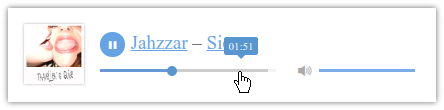
React Slider for HTML5 audio and video. This library contains two
components: ProgressSlider and VolumeSlider. To create your own player
you only need to include these two components and call `media.play()`
of HTMLAudioElement
## Installation
Install with [npm](https://npmjs.org/package/react-media-slider):
npm install react-media-slider
## Usage
```js
import { ProgressSlider, VolumeSlider } from 'react-media-slider';
…
render() {
// Get HTMLAudioElement
const { audio } = this.state;
return (
…
…
…
}
}
```
### Options
- media – HTMLAudioElement. Alternatively, you can
[set it after render](https://github.com/megahertz/react-media-slider/blob/master/example/player.jsx#L26)
- style – described below
- disableHint – disable time / volume hint above a slider
### Styling
You can override all attributes using "style" attribute. Here is a default value:
```json
{
"colors": {
"background": "rgba(0, 0, 0, .05)",
"progress": "rgba(0, 101, 225, .5)",
"controls": "#5796ce",
"buffered": "#ccc"
},
"container": {
"position": "relative",
"height": "10px",
"padding": "4px 0 10px",
"cursor": "pointer",
"WebkitTouchCallout": "none",
"WebkitUserSelect": "none",
"MozUserSelect": "none",
"MsUserSelect": "none",
"userSelect": "none",
"WebkitTapHighlightColor": "transparent"
},
"body": {
"height": "3px",
"position": "relative",
"background": "rgba(0, 0, 0, .05)"
},
"bufferedContainer": {
"position": "absolute",
"top": "0",
"left": "0",
"bottom": "0",
"right": "0"
},
"bufferedFragment": {
"display": "block",
"position": "absolute",
"height": "100%",
"background": "#ccc"
},
"progress": {
"position": "relative",
"height": "100%",
"background": "rgba(0, 101, 225, .5)"
},
"handle": {
"opacity": "0"
},
"handleHovered": {
"display": "block",
"float": "right",
"width": "10px",
"height": "10px",
"margin": "-3px -7px 0 0",
"borderRadius": "100%",
"opacity": "1",
"transition": "opacity .3s",
"background": "#5796ce"
},
"hint": {
"position": "absolute",
"opacity": "0",
"top": "-200px",
"display": "none"
},
"hintHovered": {
"position": "absolute",
"left": "0",
"top": "-28px",
"marginLeft": "2px",
"padding": ".2em .3em",
"transform": "translateX(-50%)",
"color": "#fff",
"borderRadius": "2px",
"fontSize": "80%",
"pointerEvents": "none",
"opacity": "1",
"transition": "opacity .3s",
"background": "#5796ce"
},
"hintArrow": {
"position": "absolute",
"left": "50%",
"bottom": "-11px",
"width": "0",
"height": "0",
"marginLeft": "-6px",
"border": "6px solid transparent",
"borderTopColor": "#5796ce"
}
}
```
## License
Licensed under MIT.