https://github.com/mehcode/atom-project-plus
Simply awesome project management in Atom.
https://github.com/mehcode/atom-project-plus
Last synced: over 1 year ago
JSON representation
Simply awesome project management in Atom.
- Host: GitHub
- URL: https://github.com/mehcode/atom-project-plus
- Owner: mehcode
- License: mit
- Created: 2016-02-23T06:10:34.000Z (over 10 years ago)
- Default Branch: master
- Last Pushed: 2017-05-26T18:33:57.000Z (about 9 years ago)
- Last Synced: 2025-02-27T17:17:08.765Z (over 1 year ago)
- Language: JavaScript
- Homepage: https://atom.io/packages/project-plus
- Size: 3.23 MB
- Stars: 99
- Watchers: 8
- Forks: 18
- Open Issues: 40
-
Metadata Files:
- Readme: README.md
- Changelog: CHANGELOG.md
- License: LICENSE.md
Awesome Lists containing this project
README
# Project Plus
[](https://travis-ci.org/mehcode/atom-project-plus)
[](https://atom.io/packages/project-plus)
[](https://atom.io/packages/project-plus)
Simply awesome project management in Atom.
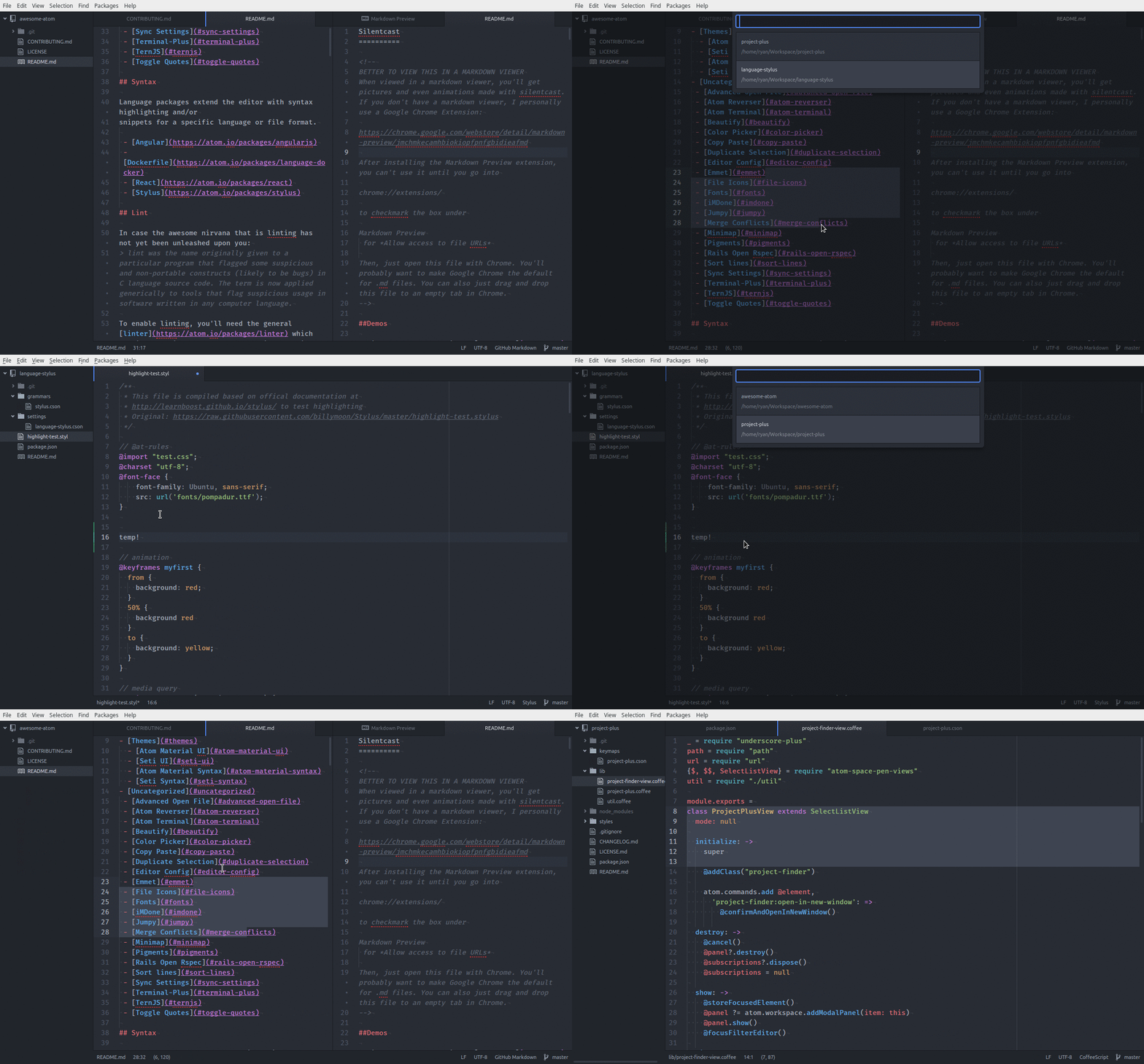
- **No configuration** — atom was already keeping track of your projects
- **No mess** (project files) — atom already knows about your projects and their needs (and is planning to know more)
- **No weirdness** — switching between projects (in the same window) is done correctly and does not corrupt state (unlike every existing project package I've seen)
- Fully supports projects with multiple paths
## Installation
```
apm install project-plus
```
## Usage
#### Project Finder
- `ctrl-alt-p` (linux/windows) or `ctrl-cmd-p` (mac) to open the project finder
- `enter` will open the project in the current window by default[*](#open-in-new-window)
- `shift-enter` will open the project in a new window by default[*](#open-in-new-window)
#### Project Tab
- `ctrl-cmd-tab` will switch to the next recently used project
- `ctrl-shift-cmd-tab` will switch to the previous recently used project
## Commands
#### Project Plus: Open
Switch to a project (in the current atom window by default[*](#open-in-new-window)) by selecting one or more
folders using an OS folder picker.
#### Project Plus: Close
Close the current project and revert to an empty atom window.
#### Project Plus: Save
Saves the current project and marks it to be shown in the project finder (
if not using auto-discover).
#### Project Plus: Remove
Remove a project from the session storage and from the `projects.cson`.
#### Project Plus: Edit Projects
Opens the `projects.cson` file. This file can be populated either manually or
via saving projects with `project-plus:save`.
## Configuration
#### Auto Discover
Disable to limit the project finder to explicitly saved projects (
managed through `projects.cson` in the Atom configuration directory).
#### Project Home
Specify a folder or glob pattern to limit projects that are discovered. This is
a case-sensitive field, make sure you've got the path name specified correctly.
Any saved projects that aren't in your project home will still be displayed.
#### Show Project Path
Disable to hide the project paths.
#### Open in New Window
Open projects in a new window by default. `shift-enter` will always do the inverse.
## Contributing
Always feel free to help out! Whether it's filing bugs and feature requests
or working on some of the open issues, Atom's [contributing guide](https://github.com/atom/atom/blob/master/CONTRIBUTING.md)
will help get you started while the [guide for contributing to packages](https://github.com/atom/atom/blob/master/docs/contributing-to-packages.md)
has some extra information.
## License
[MIT License](http://opensource.org/licenses/MIT) - see the [LICENSE](https://github.com/mehcode/atom-project-plus/blob/master/LICENSE.md) for more details.