https://github.com/mehrdadlinux/linux_righclick_menu_scripts
Gitclone & JupiterLab add to your context menu or right-click mouse operation
https://github.com/mehrdadlinux/linux_righclick_menu_scripts
Last synced: about 1 month ago
JSON representation
Gitclone & JupiterLab add to your context menu or right-click mouse operation
- Host: GitHub
- URL: https://github.com/mehrdadlinux/linux_righclick_menu_scripts
- Owner: MehrdadLinux
- License: mit
- Created: 2024-08-09T10:24:14.000Z (almost 2 years ago)
- Default Branch: main
- Last Pushed: 2025-05-17T10:56:40.000Z (about 1 year ago)
- Last Synced: 2025-05-17T11:34:46.249Z (about 1 year ago)
- Language: Shell
- Homepage:
- Size: 2.63 MB
- Stars: 4
- Watchers: 1
- Forks: 1
- Open Issues: 0
-
Metadata Files:
- Readme: README.md
- License: LICENSE
Awesome Lists containing this project
README
${\color{red}Linux}$ ${\color{green}Right click Menu }$ ${\color{red}Scripts}$
A collection of scripts for lazy people :D
Automating actions in Nautilus (GNOME's file manager) with scripts
# Requirements
- xclip
- exiftool
- git
- jupyter-lab
# Linux_Righclick_Menu_Scripts
A collection of scripts for lazy people :D
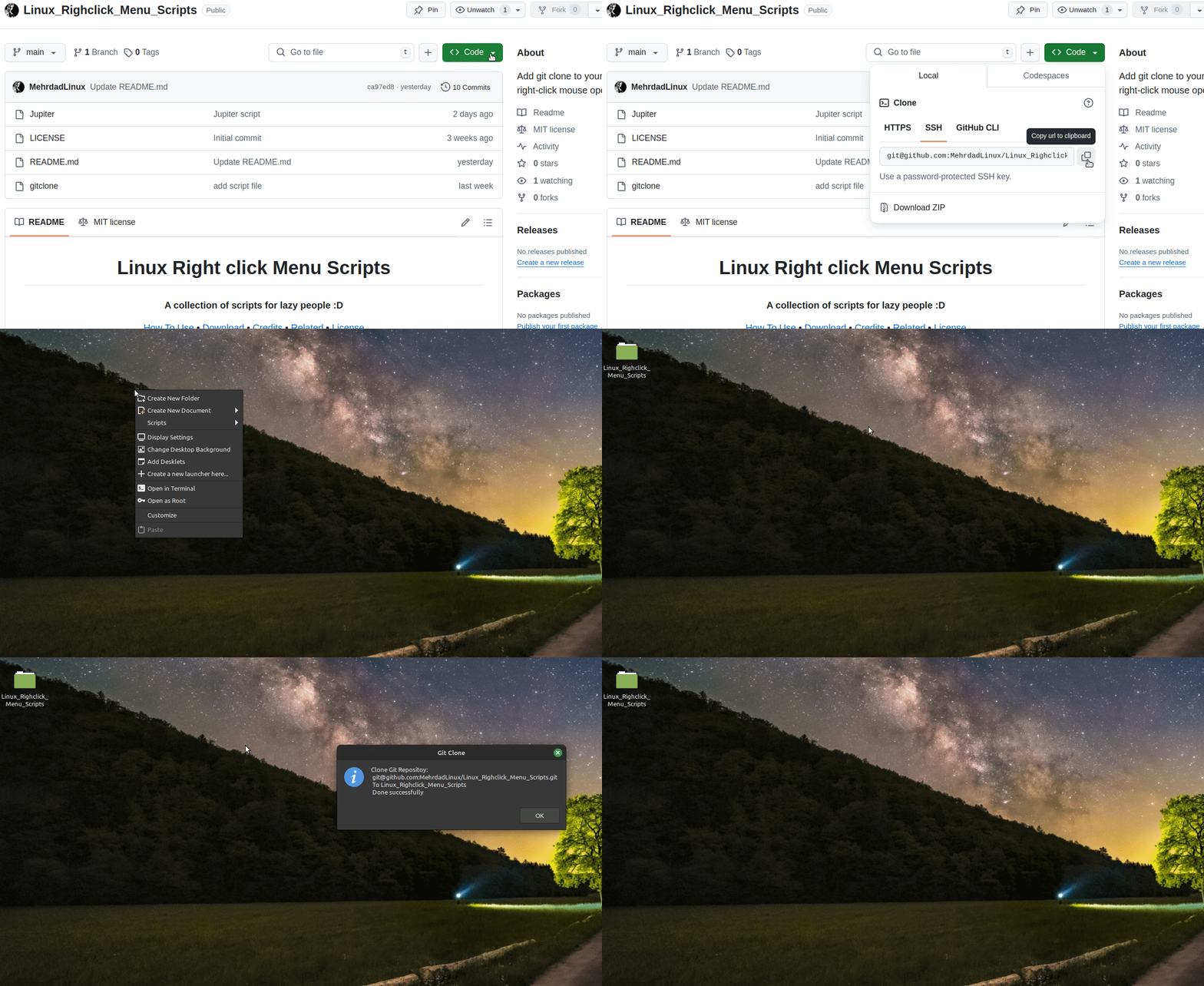
## gitclone : clone repo on your system
- 
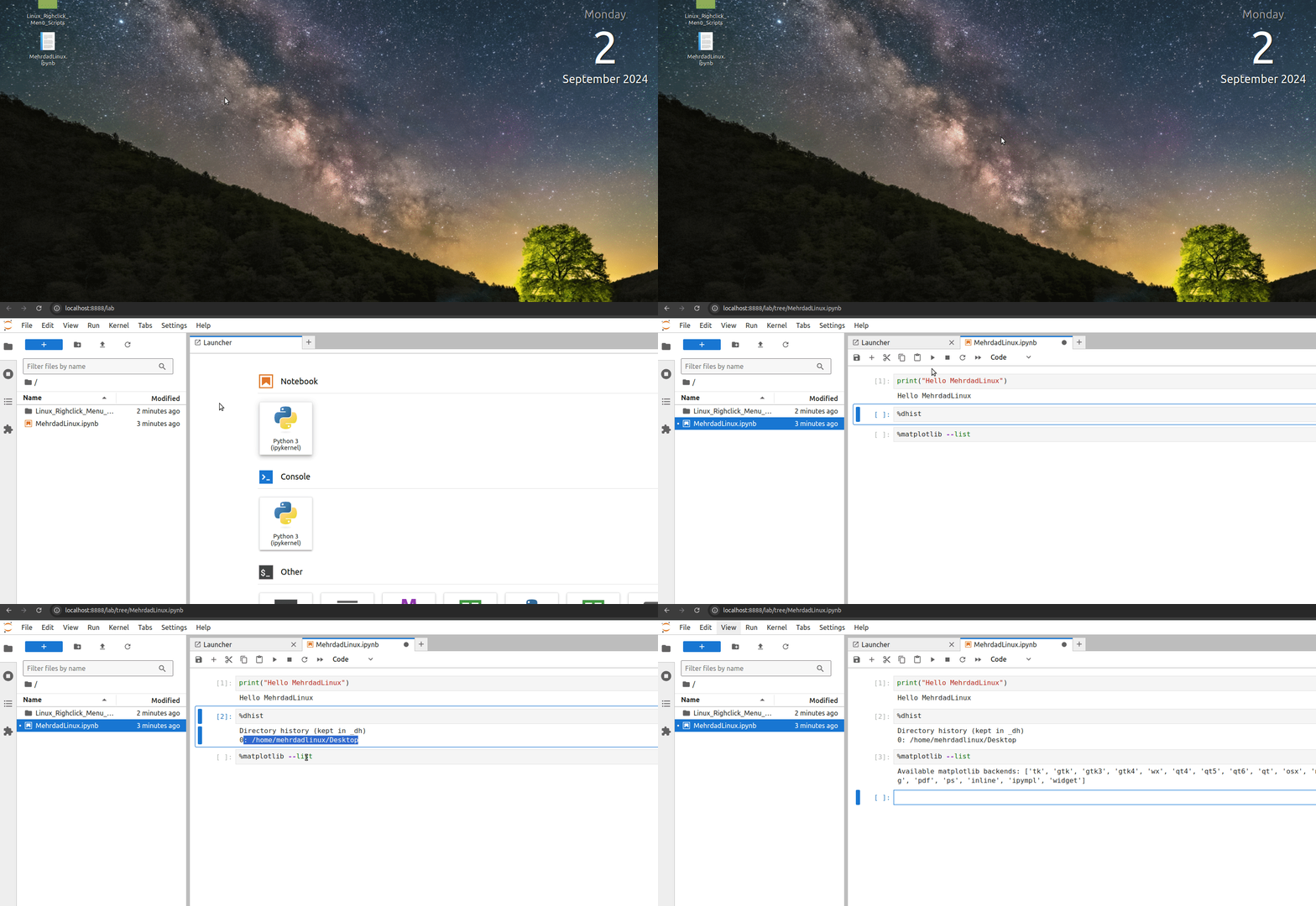
## Jupiter : open jupyterlab in your folder
- 
# How To Use
Add these scripts to desktop environment file manager scripts :
Show instructions
```
Nemo ==> ~/.local/share/nemo/scripts
Nautilus ==> ~/.local/share/nautilus/scripts/
```
# How it works?
Gnome scripts
GNOME Files, formerly and internally known as Nautilus, is the official file manager for the GNOME desktop Nautilus script is an executable shell script that is placed in a special scripts directory so that the Nautilus graphical shell can find it. This allows you to extend the functionality of the file browser to do just about anything.
Do you have a question?
> [!NOTE]
> if you have differnet file manager you have to find your script path
> [!TIP]
> Right click on any script and select an icon for it. The icons are available in the icon folder
> The scripts do not have .sh extension because when they are placed in the menu, the name becomes long. I removed it because it is not necessary. You can change the name.
> [!IMPORTANT]
> don't forget to chmod a+x [yourscript]
> [!WARNING]
>
> [!CAUTION]
> You can customize the scripts according to your needs
:+1: This change looks great - it's ready to use! :shipit:
# Resource
- [NautilusScriptsHowto](https://help.ubuntu.com/community/NautilusScriptsHowto)
- [Nautilus Scripts](https://www.gnome-look.org/browse?cat=126&ord=latest)
# License
[(Back to top)](#table-of-contents)
The MIT License (MIT) Please have a look at the [LICENSE.md](LICENSE) for more details.