https://github.com/memfault/memfault-ncs-quickstart-fw
https://github.com/memfault/memfault-ncs-quickstart-fw
Last synced: 7 months ago
JSON representation
- Host: GitHub
- URL: https://github.com/memfault/memfault-ncs-quickstart-fw
- Owner: memfault
- Created: 2025-10-28T19:08:09.000Z (9 months ago)
- Default Branch: main
- Last Pushed: 2025-11-06T16:01:02.000Z (9 months ago)
- Last Synced: 2025-11-06T18:06:41.784Z (9 months ago)
- Language: Dockerfile
- Size: 10.7 KB
- Stars: 0
- Watchers: 0
- Forks: 0
- Open Issues: 1
-
Metadata Files:
- Readme: README.md
Awesome Lists containing this project
README
# Memfault NCS Quickstart Firmware
This repository contains tooling for building sample firmware images for
nRF-Connect SDK quickstart. See more here:
https://docs.memfault.com/docs/category/quickstart
## Using the Payloads
Find the latest release
[here](https://github.com/memfault/memfault-ncs-quickstart-fw/releases/latest).
Download the ZIP file for your board and extract it. You should find two folders
inside, `0.0.1` and `0.0.2`, each containing assets for that firmware version.
1. Flash the `0.0.1` image to your board using `nrfutil` or the nRF Connect
Programmer app. Note: flashing the `nrf54h20dk` is different, you'll need to
flash the 4 hex files separately.
```bash
nrfutil device program --options chip_erase_mode=ERASE_ALL,reset=RESET_DEFAULT --firmware /0.0.1/merged.hex
```
2. Write the Memfault Project Key to the device: go to
https://app.memfault.com/organizations/-/projects/-/settings and copy the
project key. Then, use a serial terminal to connect to the board's virtual
COM port (baud rate 115200), and use this command to set the project key:
```bash
uart:~$ config set_project_key
Memfault project key saved to settings successfully
```
3. Create a `0.0.2` release in Memfault
[here](https://app.memfault.com/organizations/-/projects/-/releases?new), and
add the `0.0.2` payload:
- Name the release `0.0.2`
- When adding the payload ("Add OTA Payload to Release"):
- Hardware Version: this is the board name, eg `nrf54l15`. Use `mflt
get_device_info` in the serial terminal to confirm the value to use here:
```bash
uart:~$ mflt get_device_info
[00:44:37.079,012] mflt: S/N: 59699E41B038
[00:44:37.079,045] mflt: SW type: app
[00:44:37.079,068] mflt: SW version: 0.0.1
[00:44:37.079,103] mflt: HW version: nrf54l15dk
```
- Software Type: `app`
- The payload file to upload is `/0.0.2/dfu_application.zip`
4. Deploy the release to the `default` cohort
[here](https://app.memfault.com/organizations/-/projects/-/cohorts).
5. Install the nRF Connect Device Manager iOS or Android app:
- 🍎 [iOS - Apple App Store](https://apps.apple.com/no/app/nrf-connect-device-manager/id1519423539)
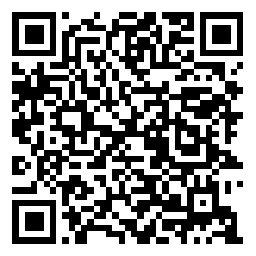
- 🤖 [Android - Google Play Store](https://play.google.com/store/apps/details?id=no.nordicsemi.android.nrfconnectdevicemanager)
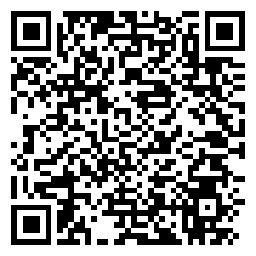
6. Use the nRF Connect Device Manager app to scan for and connect to your
device. Use the "Image" tab on the device page, select "Check for Update",
and "Download" to download the FOTA package.
7. Once the download is complete, select "Start", "Confirm only" to install the
update. The app will upload the new image to the device, and it will restart.
You can see the new image version printed in the serial console when the
device restarts:
```bash
I: Image version: v0.0.2
*** Booting My Application v0.0.2-fd967e4ec918 ***
```