https://github.com/meniny/oops
⚠️A SCLAlertView Like Dialog View for iOS in Swift
https://github.com/meniny/oops
Last synced: about 1 year ago
JSON representation
⚠️A SCLAlertView Like Dialog View for iOS in Swift
- Host: GitHub
- URL: https://github.com/meniny/oops
- Owner: Meniny
- License: mit
- Created: 2017-07-17T15:08:02.000Z (almost 9 years ago)
- Default Branch: master
- Last Pushed: 2017-08-06T10:41:08.000Z (almost 9 years ago)
- Last Synced: 2025-04-07T18:44:54.734Z (about 1 year ago)
- Language: Swift
- Homepage:
- Size: 1.3 MB
- Stars: 10
- Watchers: 2
- Forks: 1
- Open Issues: 0
-
Metadata Files:
- Readme: README.md
- License: LICENSE
Awesome Lists containing this project
README





## What's this?
`Oops` is a delightful [SCLAlertView](https://github.com/dogo/SCLAlertView) like dialog view for iOS written in Swift.
## Requirements
* iOS 8.0+
* Xcode 8 with Swift 3
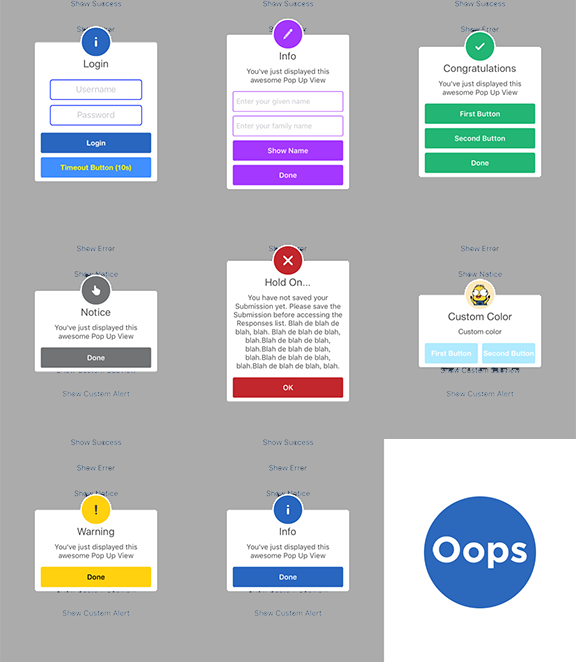
## Preview
## Installation
#### CocoaPods
```ruby
pod 'Oops'
```
## Contribution
You are welcome to fork and submit pull requests.
## License
`Oops` is open-sourced software, licensed under the `MIT` license.
## Minimum Usage
```swift
Oops.show(.info, title: kInfoTitle, detail: kSubtitle)
Oops().show(.error, title: kErrorTitle, detail: kSubtitle)
```
```swift
let configuration = Oops.Configuration(dynamicAnimatorActive: true)
configuration.shouldAutoDismiss = false
let alert = Oops(configuration: configuration)
alert.addTextField("Username")
alert.addTextField("Password")
alert.addButton("Login") {
print("Logged in")
alert.hideView()
}
alert.show(.notice, title: kNoticeTitle, detail: kSubtitle)
```
## Samples
```swift
import UIKit
import Oops
let kSuccessTitle = "Congratulations"
let kErrorTitle = "Connection error"
let kNoticeTitle = "Notice"
let kWarningTitle = "Warning"
let kInfoTitle = "Info"
let kSubtitle = "You've just displayed this awesome Pop Up View"
let kDefaultAnimationDuration = 2.0
class ViewController: UIViewController {
@IBAction func showSuccess(_ sender: AnyObject) {
let alert = Oops()
alert.addButton("First Button", target: self, selector: #selector(ViewController.firstButtonAction))
alert.addButton("Second Button") {
print("Second button tapped")
}
alert.show(.success, title: kSuccessTitle, detail: kSubtitle)
}
@IBAction func showError(_ sender: AnyObject) {
Oops().show(.error,
title: "Hold On...",
detail: "You have not saved your Submission yet. Please save the Submission before accessing the Responses list. Blah de blah de blah, blah. Blah de blah de blah, blah.Blah de blah de blah, blah.Blah de blah de blah, blah.Blah de blah de blah, blah.Blah de blah de blah, blah.",
completeText: "OK")
}
@IBAction func showNotice(_ sender: AnyObject) {
let configuration = Oops.Configuration(dynamicAnimatorActive: true)
Oops(configuration: configuration).show(.notice, title: kNoticeTitle, detail: kSubtitle)
}
@IBAction func showWarning(_ sender: AnyObject) {
Oops().show(.warning, title: kWarningTitle, detail: kSubtitle)
}
@IBAction func showInfo(_ sender: AnyObject) {
Oops().show(.info, title: kInfoTitle, detail: kSubtitle)
}
@IBAction func showEdit(_ sender: AnyObject) {
let configuration = Oops.Configuration(showCloseButton: false)
let alert = Oops(configuration: configuration)
let txt1 = alert.addTextField("Enter your given name", text: "Elias")
let txt2 = alert.addTextField("Enter your family name", text: "Abel")
alert.addTextField("Enter your password", text: "123456", secure: true)
// alert.addTextView()
// alert.addTextView()
alert.addButton("Go") {
Oops.show(.info, title: nil, detail: "\(txt1.text ?? "NA") \(txt2.text ?? "NA")")
}
alert.show(.editor, title: kInfoTitle, detail: kSubtitle)
}
@IBAction func showCustomSubview(_ sender: AnyObject) {
// Create custom configuration Configuration
let configuration = Oops.Configuration(
titleFont: UIFont(name: "HelveticaNeue", size: 20)!,
textFont: UIFont(name: "HelveticaNeue", size: 14)!,
buttonFont: UIFont(name: "HelveticaNeue-Bold", size: 14)!,
showCloseButton: false,
dynamicAnimatorActive: true
)
configuration.shouldAutoDismiss = false
// Initialize Oops using custom configuration
let alert = Oops(configuration: configuration)
// Creat the subview
let subview = UIView(frame: CGRect(x: 0, y: 0, width: 216, height: 100))
let x = (subview.frame.width - 180) / 2
// Add textfield 1
let textfield1 = UITextField(frame: CGRect(x: x,y: 10,width: 180,height: 40))
textfield1.layer.borderColor = UIColor.green.cgColor
textfield1.layer.borderWidth = 1.5
textfield1.layer.cornerRadius = 5
textfield1.placeholder = "Username"
textfield1.textAlignment = NSTextAlignment.center
subview.addSubview(textfield1)
// Add textfield 2
let textfield2 = UITextField(frame: CGRect(x: x, y: textfield1.frame.maxY + 10, width: 180, height: 40))
textfield2.isSecureTextEntry = true
textfield2.layer.borderColor = UIColor.blue.cgColor
textfield2.layer.borderWidth = 1.5
textfield2.layer.cornerRadius = 5
textfield1.layer.borderColor = UIColor.blue.cgColor
textfield2.placeholder = "Password"
textfield2.textAlignment = NSTextAlignment.center
subview.addSubview(textfield2)
// Add the subview to the alert's UI property
alert.customSubview = subview
alert.addButton("Login") {
print("Logged in")
alert.hideView()
}
// Add Button with visible timeout and custom Colors
let showTimeout = Oops.Button.ShowTimeoutConfiguration(prefix: "(", suffix: "s)")
alert.addButton("Timeout Button", backgroundColor: UIColor(red:0.26, green:0.56, blue:1.00, alpha:1.00), textColor: UIColor.yellow, showTimeout: showTimeout) {
print("Timeout Button tapped")
}
let timeoutValue: TimeInterval = 10.0
let timeoutAction: Oops.TimeoutConfiguration.ActionClosure = {
print("Timeout occurred")
}
alert.show(.success, title: "Login", detail: "", timeout: Oops.TimeoutConfiguration(timeoutValue: timeoutValue, timeoutAction: timeoutAction))
}
@IBAction func showCustomAlert(_ sender: AnyObject) {
let configuration = Oops.Configuration(
titleFont: UIFont(name: "HelveticaNeue", size: 20)!,
textFont: UIFont(name: "HelveticaNeue", size: 14)!,
buttonFont: UIFont(name: "HelveticaNeue-Bold", size: 14)!,
showCloseButton: false,
dynamicAnimatorActive: true,
buttonsLayout: .horizontal
)
configuration.circleIconHeight = configuration.circleHeight
// configuration.shouldAutoDismiss = false
let alert = Oops(configuration: configuration)
alert.addButton("First Button", target: self, selector: #selector(ViewController.firstButtonAction))
alert.addButton("Second Button") {
print("Second button tapped")
}
// alert.addButton("Third Button") {
// print("Third button tapped")
// }
let color = UIColor(red:0.87, green:0.29, blue:0.22, alpha:1.00)
alert.show(.notice, title: "Custom Color", detail: "Custom color", icon: #imageLiteral(resourceName: "avatar"), color: color)
}
func firstButtonAction() {
print("First button tapped")
}
}
```