https://github.com/meowrch/bluevein
Cross-platform tool to automatically synchronize Bluetooth pairing keys between Linux and Windows on dual-boot systems.
https://github.com/meowrch/bluevein
arch ble bluetooth bluetooth-keys bluetooth-le bluetooth-sync bt-dualboot dualboot key-sync linux windows
Last synced: 4 months ago
JSON representation
Cross-platform tool to automatically synchronize Bluetooth pairing keys between Linux and Windows on dual-boot systems.
- Host: GitHub
- URL: https://github.com/meowrch/bluevein
- Owner: meowrch
- License: gpl-3.0
- Created: 2025-12-05T19:00:07.000Z (7 months ago)
- Default Branch: main
- Last Pushed: 2026-01-21T12:41:39.000Z (5 months ago)
- Last Synced: 2026-01-22T00:18:00.422Z (5 months ago)
- Topics: arch, ble, bluetooth, bluetooth-keys, bluetooth-le, bluetooth-sync, bt-dualboot, dualboot, key-sync, linux, windows
- Language: Rust
- Homepage:
- Size: 1.58 MB
- Stars: 13
- Watchers: 0
- Forks: 2
- Open Issues: 0
-
Metadata Files:
- Readme: README.md
- License: LICENSE
Awesome Lists containing this project
README

# 🩸 BlueVein
### *Forget about re-pairing Bluetooth devices*
**Dual-boot without the headache**
[](https://github.com/meowrch/BlueVein/issues)
[](https://github.com/meowrch/BlueVein/stargazers)
[](./LICENSE)
[](./README.ru.md)
[](./README.md)
[🚀 Quick Start](#quick-start) - [⚡ How It Works](#how-it-works) - [🔬 Technical Details](#technical-details) - [💬 Support](#support)
***
## 🎯 The Problem We Solved
### **Sound familiar?**
🎧 **You're in Windows**
Connected Bluetooth headphones → Works perfectly!
🔄 **Reboot to Linux**
Headphones don't work → Need to **pair again**
🔁 **Back to Windows**
Headphones don't work again → **Pair again**
> [!CAUTION]
> **This hell repeats EVERY time** you switch between OSes. \
> With headphones. With mouse. With keyboard. With gamepad. With all devices.
> [!NOTE]
> Interesting fact. You typically spend 1 to 3 minutes reconfiguring bluetooth devices when switching between OSes. \
> **3 minutes × 3 switches per day × 250 working days = 37.5 hours per year.**
### **BlueVein is the solution:**
Pair your device **once** in any OS. \
Switch between Windows and Linux. \
**Everything works automatically**. Forever.
## 🌟 Why BlueVein?
| Feature | What it gives you |
|:---:|:---|
| 🔄 **Bidirectional sync** | Changes in any OS are instantly synchronized |
| 🚀 **Zero configuration** | Install → Run → Forget about the problem |
| 💾 **Direct EFI access** | No partition mounting via [fat32-raw](https://github.com/meowrch/fat32-raw) |
| 🛡️ **Security** | Works at system level with administrator privileges |
| 📡 **Real-time monitoring** | Tracks changes instantly |
| 🔍 **Periodic checking** | Checks for updates from the other OS every 30 seconds |
### Linux
#### Option 1: Arch Linux (AUR)
```bash
# Install via AUR
yay -S bluevein-bin
# Start the service
sudo systemctl enable --now bluevein
# Check status
sudo systemctl status bluevein
```
#### Option 2: Manual build (any distribution)
```bash
# 1. Clone and build
git clone https://github.com/meowrch/BlueVein.git
cd BlueVein
cargo build --release
# 2. Install
sudo cp target/release/bluevein /usr/bin/
sudo cp ./systemd/bluevein.service /etc/systemd/system/
# 3. Run
sudo systemctl daemon-reload
sudo systemctl enable --now bluevein
# 4. Verify
sudo systemctl status bluevein
```
### Windows
#### Option 1: Pre-built release
1. Go to [Releases](https://github.com/meowrch/BlueVein/releases)
2. Download `bluevein.exe` from the latest release
3. Open PowerShell as Administrator
4. Execute:
```bash
# Install and start
.\bluevein.exe install
.\bluevein.exe start
# Verify
Get-Service BlueVeinService
```
#### Option 2: Manual build
```bash
# 1. Build
cargo build --release
cd target\release
# 2. Open PowerShell as Administrator
# 3. Install and start
.\bluevein.exe install
.\bluevein.exe start
# 4. Verify
Get-Service BlueVeinService
```
## ⌨️ Service Management
### Linux
```bash
# Start/stop/restart
sudo systemctl start bluevein
sudo systemctl stop bluevein
sudo systemctl restart bluevein
# Status and logs
sudo systemctl status bluevein
sudo journalctl -u bluevein -f
# Autostart
sudo systemctl enable bluevein # enable
sudo systemctl disable bluevein # disable
```
### Windows
```powershell
# Service management
.\bluevein.exe start # Start
.\bluevein.exe stop # Stop
.\bluevein.exe install # Install
.\bluevein.exe uninstall # Uninstall
# Or via net
net start BlueVeinService
net stop BlueVeinService
# Check status
Get-Service BlueVeinService
```
### System Architecture
```mermaid
graph TB
subgraph Windows
WinBT[Registry Bluetooth]
WinMonitor[BlueVein Monitor]
end
subgraph Linux
LinuxBT[BlueZ Bluetooth]
LinuxMonitor[BlueVein Monitor]
end
subgraph EFI["EFI Partition"]
Config[bluevein.json]
end
WinBT <-->|Track changes| WinMonitor
LinuxBT <-->|Track changes| LinuxMonitor
WinMonitor <-->|Read/Write keys| Config
LinuxMonitor <-->|Read/Write keys| Config
style Config fill:#89b4fa,stroke:#313244,stroke-width:2px,color:#1e1e2e
style WinMonitor fill:#f38ba8,stroke:#313244,stroke-width:2px,color:#1e1e2e
style LinuxMonitor fill:#a6e3a1,stroke:#313244,stroke-width:2px,color:#1e1e2e
```
### Synchronization Algorithm
```mermaid
sequenceDiagram
participant OS as Operating System
participant Monitor as BlueVein Monitor
participant EFI as EFI/bluevein.json
Note over OS,EFI: 1️⃣ System boot
Monitor->>EFI: Reads keys from EFI
Monitor->>OS: Reads local devices
Monitor->>OS: Updates device keys from EFI if they differ
Monitor->>EFI: Adds new devices from OS to EFI
Note over OS,EFI: 2️⃣ New device pairing
OS->>Monitor: Event: new device
Monitor->>EFI: Reads current bluevein.json
Monitor->>EFI: Adds/updates device key
Note over OS,EFI: 3️⃣ Periodic check (every 30 sec)
Monitor->>EFI: Checks for changes from other OS
Monitor->>OS: Applies new keys to existing devices
```
### Key Operating Principles
- **On boot:** BlueVein checks keys in EFI and updates them for devices present in the system. New devices from the system are added to EFI
- **On new pairing:** The key is immediately saved to EFI and becomes available to the other OS
- **On removal:** The device remains in EFI (it may be active on the other OS)
- **Periodically:** Checks for changes every 30 seconds and applies key updates from EFI
### Bluetooth LE Support
BlueVein fully supports Bluetooth Low Energy devices with all key types:
| Key Type | Purpose | Support |
|----------|---------|-------|
| **LTK** | Long Term Key — main encryption key | ✅ Full |
| **Peripheral LTK** | LTK for device in peripheral role | ✅ Full |
| **IRK** | Identity Resolving Key — for privacy (random MAC) | ✅ Full |
| **CSRK** | Connection Signature Resolving Key — for data signing | ✅ Full |
| **AddressType** | Address type (public/random) | ✅ Full |
### Architecture Decisions
**Dual-mode devices:**
BlueVein automatically merges Classic and LE keys for devices supporting both modes (e.g., many Bluetooth headphones).
**CSRK SignCounter:**
- Windows doesn't persist SignCounter in registry — it's kept in driver memory only
- BlueVein stores Counter in `bluevein.json` and takes MAX value during sync
- This prevents counter rollback and protects against replay attacks
### Known Limitations
**CSRK SignCounter on Windows:**
Windows Bluetooth stack doesn't persist SignCounter in registry. BlueVein works around this by storing it in `bluevein.json`, but frequent OS switching may reduce accuracy.
**Impact:** Minimal. Modern LE devices (keyboards, mice, headphones, gamepads) use LTK for encrypted connections, not CSRK for data signing. Issue may only affect specific IoT devices using unencrypted connections with signing.
**Solution:** If device doesn't auto-connect after sync — re-pair once. Counter will reset and everything will work.
## 📚 FAQ
### Will this break my Bluetooth?
No. BlueVein only reads and writes pairing keys. It doesn't touch drivers or system files.
### What devices are supported?
**Any Bluetooth devices**: headphones (AirPods, Sony, Bose), mice (Logitech MX Master), keyboards, gamepads (Xbox, PS5).
**Tested on:**
- AirPods Pro 2
- Sony WH-1000XM5
- Logitech MX Master 3
- Xbox Series X Controller
### Is my data safe?
Yes. Pairing keys are stored in the EFI partition, which only root/admin can access. BlueVein runs with elevated privileges, but the [code is open](https://github.com/meowrch/BlueVein) — you can verify it yourself.
### What about BitLocker or LUKS encryption?
BlueVein works independently of disk encryption. The EFI partition is typically not encrypted and accessible before OS boot.
### Does it work with triple-boot?
Yes. BlueVein synchronizes keys between **all** OSes on one machine, regardless of how many there are.
### What if I already have `bt-dualboot` installed?
BlueVein is **fully automatic** and works in real-time as a background service.
`bt-dualboot`, besides requiring manual commands after each pairing, has several other drawbacks identified by the community:
- **Crashes on real devices.** Doesn't support LE keyboards. Crashes on some configurations.
- **Doesn't work with multiple Bluetooth adapters.** If you have built-in + external adapter — you'll get an error.
- **Requires** mounting the Windows partition.
- **Uses [hacky methods](https://www.kali.org/tools/chntpw/)** to modify Windows system registry
- **Abandoned since 2022** — issues remain unanswered
---
## ⚒️ Troubleshooting
| Problem | Solution |
|---------|----------|
| ❌ **Service won't start (Linux)** | Run `sudo systemctl status bluevein` and check logs: `sudo journalctl -u bluevein -n 50` |
| ❌ **Service won't start (Windows)** | Make sure PowerShell is running **as Administrator** |
| ❌ **Device still won't sync** | Check that EFI partition is mounted: `lsblk -f \| grep vfat` (Linux) or verify the service is running |
| ❌ **Permission denied** | BlueVein requires root/admin. On Linux use `sudo systemctl` or run the service as root |
> [!TIP]
> **Still not working?** \
> [Open an issue](https://github.com/meowrch/BlueVein/issues) with logs and OS information.
### 🐛 Found a bug?
1. Collect logs:
```bash
# Linux
sudo journalctl -u bluevein -n 100 > bluevein_logs.txt
# Windows
C:/ProgramData/BlueVein/bluevein.log
```
2. [Create an Issue](https://github.com/meowrch/BlueVein/issues) with detailed description and logs
### 💡 Have an idea?
Open a [Feature Request](https://github.com/meowrch/BlueVein/issues/new) — we always welcome improvements!
## 🤝 Contributing
Want to improve BlueVein? We'd love your contribution!
1. Fork the repository
2. Create a feature branch (`git checkout -b feature/AmazingFeature`)
3. Commit your changes (`git commit -m 'Add some AmazingFeature'`)
4. Push to the branch (`git push origin feature/AmazingFeature`)
5. Open a Pull Request
## ☕ Support the Project
**Like BlueVein?** Help the project grow! 🚀
| 💎 Cryptocurrency | 📬 Address |
|:---:|:---|
| **TON** | `UQB9qNTcAazAbFoeobeDPMML9MG73DUCAFTpVanQnLk3BHg3` |
| **Ethereum** | `0x56e8bf8Ec07b6F2d6aEdA7Bd8814DB5A72164b13` |
| **Bitcoin** | `bc1qt5urnw7esunf0v7e9az0jhatxrdd0smem98gdn` |
| **Tron** | `TBTZ5RRMfGQQ8Vpf8i5N8DZhNxSum2rzAs` |
*Every donation motivates us to continue developing the project! ❤️*
## 📊 Project Statistics
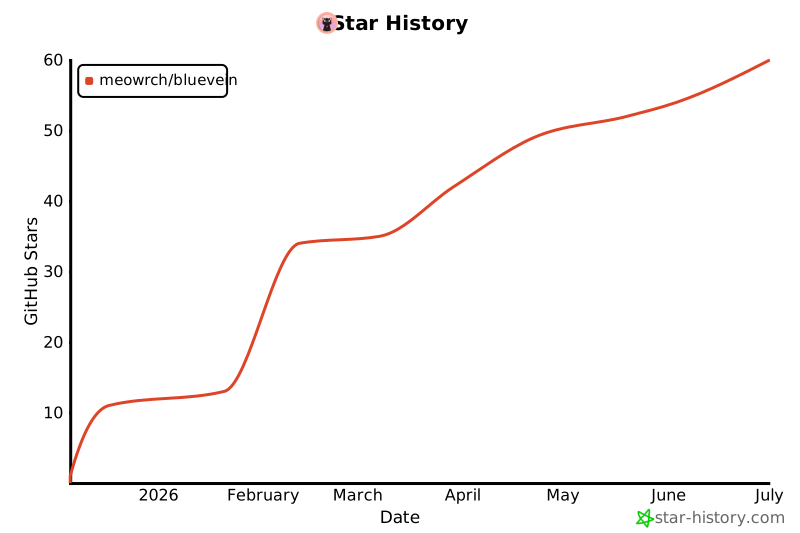
---
**Made with ❤️ for the Linux community**