https://github.com/meshtastic/rust
A Rust library for connecting to and configuring Meshtastic radios.
https://github.com/meshtastic/rust
library meshtastic rust-lang
Last synced: about 1 year ago
JSON representation
A Rust library for connecting to and configuring Meshtastic radios.
- Host: GitHub
- URL: https://github.com/meshtastic/rust
- Owner: meshtastic
- License: gpl-3.0
- Created: 2023-08-27T05:05:53.000Z (almost 3 years ago)
- Default Branch: main
- Last Pushed: 2025-02-04T11:37:30.000Z (over 1 year ago)
- Last Synced: 2025-03-29T14:07:24.311Z (over 1 year ago)
- Topics: library, meshtastic, rust-lang
- Language: Rust
- Homepage: https://meshtastic.org/
- Size: 154 KB
- Stars: 59
- Watchers: 7
- Forks: 24
- Open Issues: 8
-
Metadata Files:
- Readme: README.md
- Funding: .github/FUNDING.yml
- License: LICENSE
- Codeowners: .github/CODEOWNERS
Awesome Lists containing this project
README
# Meshtastic.rs
> [!IMPORTANT]
> **📢 Meshtastic Rust needs a new platform owner / maintainer 📢**
>
> More details are available in [Issue #25](https://github.com/meshtastic/rust/issues/25).
## Overview
Meshtastic.rs is a crate that allows you to interact with Meshtastic devices in Rust. This crate is designed
to be used on a desktop environment, and currently supports connecting to radios via USB serial and TCP.
This crate is designed to be used within the tokio asynchronous runtime.
[](https://crates.io/crates/meshtastic)
[](https://docs.rs/meshtastic)
[](https://github.com/meshtastic/rust/blob/main/LICENSE)
## Installation
You can add this crate to your project using the following command:
```shell
cargo add meshtastic
```
Alternatively, you can clone this repository to your own working directory:
```shell
git clone https://github.com/meshtastic/rust.git
```
Recursively clone our Git submodules by running:
```shell
git submodule update --init
```
## Usage
This crate provides basic TCP and serial connection examples within the `/examples` directory. You can run
these examples using the following commands:
```bash
cargo run --example basic_tcp
cargo run --example basic_serial
```
### TCP Example
This example requires a Meshtastic with an exposed IP port, or a simulated radio via the Meshtastic Docker instance ([see here](https://meshtastic.org/docs/software/linux-native#usage-with-docker)).
```rust
/// This example connects to a TCP port on the radio, and prints out all received packets.
/// This can be used with a simulated radio via the Meshtastic Docker firmware image.
/// https://meshtastic.org/docs/software/linux-native#usage-with-docker
use std::io::{self, BufRead};
use meshtastic::api::StreamApi;
use meshtastic::utils;
#[tokio::main]
async fn main() -> Result<(), Box> {
let stream_api = StreamApi::new();
println!("Enter the address of a TCP port to connect to, in the form \"IP:PORT\":");
let stdin = io::stdin();
let entered_address = stdin
.lock()
.lines()
.next()
.expect("Failed to find next line")
.expect("Could not read next line");
let tcp_stream = utils::stream::build_tcp_stream(entered_address).await?;
let (mut decoded_listener, stream_api) = stream_api.connect(tcp_stream).await;
let config_id = utils::generate_rand_id();
let stream_api = stream_api.configure(config_id).await?;
// This loop can be broken with ctrl+c, or by unpowering the radio.
while let Some(decoded) = decoded_listener.recv().await {
println!("Received: {:?}", decoded);
}
// Note that in this specific example, this will only be called when
// the radio is disconnected, as the above loop will never exit.
// Typically you would allow the user to manually kill the loop,
// for example with tokio::select!.
let _stream_api = stream_api.disconnect().await?;
Ok(())
}
```
### Serial Example
This example requires a powered and flashed Meshtastic radio connected to the host machine via a USB serial port.
```rust
/// This example connects to a radio via serial, and prints out all received packets.
/// This example requires a powered and flashed Meshtastic radio.
/// https://meshtastic.org/docs/supported-hardware
use std::io::{self, BufRead};
use meshtastic::api::StreamApi;
use meshtastic::utils;
#[tokio::main]
async fn main() -> Result<(), Box> {
let stream_api = StreamApi::new();
let available_ports = utils::stream::available_serial_ports()?;
println!("Available ports: {:?}", available_ports);
println!("Enter the name of a port to connect to:");
let stdin = io::stdin();
let entered_port = stdin
.lock()
.lines()
.next()
.expect("Failed to find next line")
.expect("Could not read next line");
let serial_stream = utils::stream::build_serial_stream(entered_port, None, None, None)?;
let (mut decoded_listener, stream_api) = stream_api.connect(serial_stream).await;
let config_id = utils::generate_rand_id();
let stream_api = stream_api.configure(config_id).await?;
// This loop can be broken with ctrl+c, or by disconnecting
// the attached serial port.
while let Some(decoded) = decoded_listener.recv().await {
println!("Received: {:?}", decoded);
}
// Note that in this specific example, this will only be called when
// the radio is disconnected, as the above loop will never exit.
// Typically you would allow the user to manually kill the loop,
// for example with tokio::select!.
let _stream_api = stream_api.disconnect().await?;
Ok(())
}
```
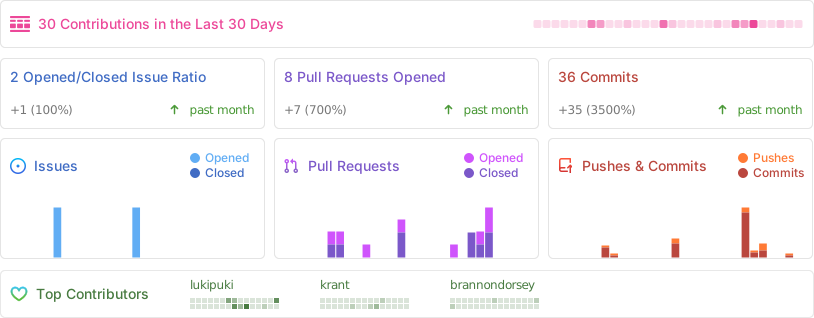
## Stats
## Contributing
Contributions are welcome! If you find a bug or want to propose a new feature, please open an issue or submit a pull request.
## License
This project is licensed under the GPL-3.0 License.