https://github.com/meta-magic/amexio-performance
amexio-performance
https://github.com/meta-magic/amexio-performance
Last synced: about 1 month ago
JSON representation
amexio-performance
- Host: GitHub
- URL: https://github.com/meta-magic/amexio-performance
- Owner: meta-magic
- License: apache-2.0
- Created: 2018-11-01T06:57:57.000Z (over 7 years ago)
- Default Branch: master
- Last Pushed: 2019-07-05T06:16:18.000Z (about 7 years ago)
- Last Synced: 2025-02-26T14:25:56.226Z (over 1 year ago)
- Language: TypeScript
- Size: 733 KB
- Stars: 0
- Watchers: 5
- Forks: 0
- Open Issues: 0
-
Metadata Files:
- Readme: README.md
- Changelog: CHANGELOG.md
- License: LICENSE
- Code of conduct: CODE_OF_CONDUCT.md
Awesome Lists containing this project
README

Amexio Angular EXtensions v5.3.1
Amexio (Angular MetaMagic EXtensions for Inputs and Outputs) is a rich set of 130+ Angular (4/5/6)
UI Components powered by HTML5 & CSS3 for Responsive Web Design & 50+ built-in Material Design Themes. Components includes Form components, charts, maps, dashboards, Tabs, Grids, Trees, Layouts etc. We added D3 Charts support with Amexio Drillable Charts option.

## Browsers support made by godban
| [ ](http://godban.github.io/browsers-support-badges/)IE / Edge | [
 ](http://godban.github.io/browsers-support-badges/)Firefox | [
 ](http://godban.github.io/browsers-support-badges/)Chrome | [
 ](http://godban.github.io/browsers-support-badges/)Safari | [
 ](http://godban.github.io/browsers-support-badges/)Opera | [
 ](http://godban.github.io/browsers-support-badges/)iOS Safari | [
 ](http://godban.github.io/browsers-support-badges/)Chrome for Android |
| --------- | --------- | --------- | --------- | --------- | --------- | --------- |
| IE 11, Edge last 5 versions| last 5 versions| last 5 versions| last 3 versions| last 4 versions| last 3 versions| last 3 versions
## Table of Content
- [Features](#features)
- [Overview](#overview)
- [Getting Started](#getting-started)
- [Installation](#amexio-angular-extension---installation)
- [Amexio Modules](#amexio-modules)
- [Amexio Themes](#amexio-themes-material--bootstrap)
- [License](#license)
## Features
- __Pure TypeScript:__ Amexio is a pure Typescript library with 0 Dependencies & Angular 5 Support.
- __Server Rending Support:__ Components support & optimized for server side rendering.
- __Highly Customizable Styling:__ Lot of customization can be done easily using the Amexio SCSS files.
- __100+ High Grade Components:__ We make sure you're nothing short of while building your app
- __Modular Support:__ Load Only what you want, amexio is Modular.
## Angular CLI - Installation
### Overview
The Angular CLI is a tool to initialize, develop, scaffold and maintain Angular applications
### Getting Started
To install the Angular CLI:
```bash
npm install -g @angular/cli
```
Generating and serving an Angular project via a development server Create and run a new project:
```bash
ng new my-project
cd my-project
ng serve
```
Navigate to http://localhost:4200/. The app will automatically reload if you change any of the source files.
For More on Angular CLI [commands](https://github.com/angular/angular-cli/wiki) click on the link.
## Amexio D3 Charts - Installation
To install this library, follow the steps given below:
```bash
$ cd your-angular-project
```
```bash
$ npm install amexio-chart-d3 --save
```
and then from your Angular `AppModule`:
```typescript
import { BrowserModule } from '@angular/platform-browser';
import { NgModule } from '@angular/core';
import {FormsModule} from "@angular/forms";
import { AppComponent } from './app.component';
// To import D3-Chart :-
import { AmexioChartD3Module } from 'amexio-chart-d3';
@NgModule({
declarations: [
AppComponent
],
imports: [
BrowserModule,
FormsModule,
AmexioChartD3Module,
],
providers: [],
bootstrap: [AppComponent]
})
export class AppModule { }
```
## Amexio Angular Extension - Installation
To install this library, follow the steps given below:
```bash
$ cd your-angular-project
```
```bash
$ npm install amexio-ng-extensions@latest --save
```
and then from your Angular `AppModule`:
```typescript
import { BrowserModule } from '@angular/platform-browser';
import { NgModule } from '@angular/core';
import {FormsModule} from "@angular/forms";
import { AppComponent } from './app.component';
// Import your library
import { AmexioWidgetModule,CommonDataService } from 'amexio-ng-extensions';
// To import Charts
import { AmexioChartsModule } from 'amexio-ng-extensions';
//To import Maps
import { AmexioMapsModule } from 'amexio-ng-extensions';
// To import Dashboard
import { AmexioDashboardModule } from 'amexio-ng-extensions';
// To import Enterprise
import { AmexioEnterpriseModule } from 'amexio-ng-extensions';
@NgModule({
declarations: [
AppComponent
],
imports: [
BrowserModule,
FormsModule,
AmexioWidgetModule,
AmexioChartsModule,
AmexioMapsModule,
AmexioDashboardModule,
AmexioEnterpriseModule
],
providers: [CommonDataService],
bootstrap: [AppComponent]
})
export class AppModule { }
```
# Amexio Modules
Amexio Modules
AmexioWidgetModule
AmexioFormsModule
AmexioDataModule
AmexioLayoutModule
AmexioPaneModule
AmexioNavModule
AmexioMediaModule
AmexioMapsModule
AmexioChartsModule
AmexioDashBoardModule
AmexioEnterpriseModule
# Amexio Themes (Amexio / Amexio Material)
To use the default theme import the
`../node_modules/amexio-ng-extensions/styles/mda/at-md-blue.scss`
in your app styles.scss
Or refer the below table for other themes provided.
Amexio Material Themes
Amexio Themes
AT-MD-Gold-Amber
AT-AM-Ocean-Blue
AT-MD-Army-Olive
AT-AM-Tiger
AT-MD-Ash Stone Black
AT-AM-Lime Green
AT-MD-Black
AT-AM-Matrix
AT-MD-Blue
AT-AM-Spicy-Apricot
AT-MD-Blue-Grey
AT-AM-Byzantine-Crystal
AT-MD-Ginger-Bread
AT-AM-Honey-Prussian
AT-MD-Cerise Magneta
AT-AM-Persian-Laguna
AT-MD-Charcoal Russet
AT-AM-Burgandy-Magenta
AT-MD-Fern-Lime
AT-AM-Navy-Grape
AT-MD-Frenchrose-mulberry
AT-AM-Matrix-Amber
AT-MD-Grape-Voliet
AT-AM-Matrix-Cream
AT-MD-Hot-Pink-Fuchsia
AT-AM-Matrix-Maya
AT-MD-Saphire
AT-AM-Matrix-Ultra
AT-MD-Jungle-Mint
AT-AM-Royal-Kelly
AT-MD-Maya-Light-Blue
AT-AM-Royal-Pineapple
AT-MD-Mahogany Barny Red
AT-MD-Navy Egyptian
AT-MD-Raspberry Sangria
AT-MD-Red Maroon
AT-MD-Sacremento Jado
AT-MD-Yale Azure
At-MD-Tronbone Royal
AT-MD-Pineapple-Flaxen
AT-MD-Pumpkin-Fire
AT-MD-Mauve-Orchid
AT-MD-Honey-Mustard
AT-MD-Bruntor-Tangerine
# Amexio Microsoft Visual Studio Code Extensions
This extension will help the developers of Visual Studio Code with quick code snippet for the Amexio Markup as well as Amexio TypeScript for the Angular Extensions.











- Available for v3.x series
- Plugin for v4.0 will be available in the first week of Feb 2018.
## Usage
Select the Amexio Ui Component
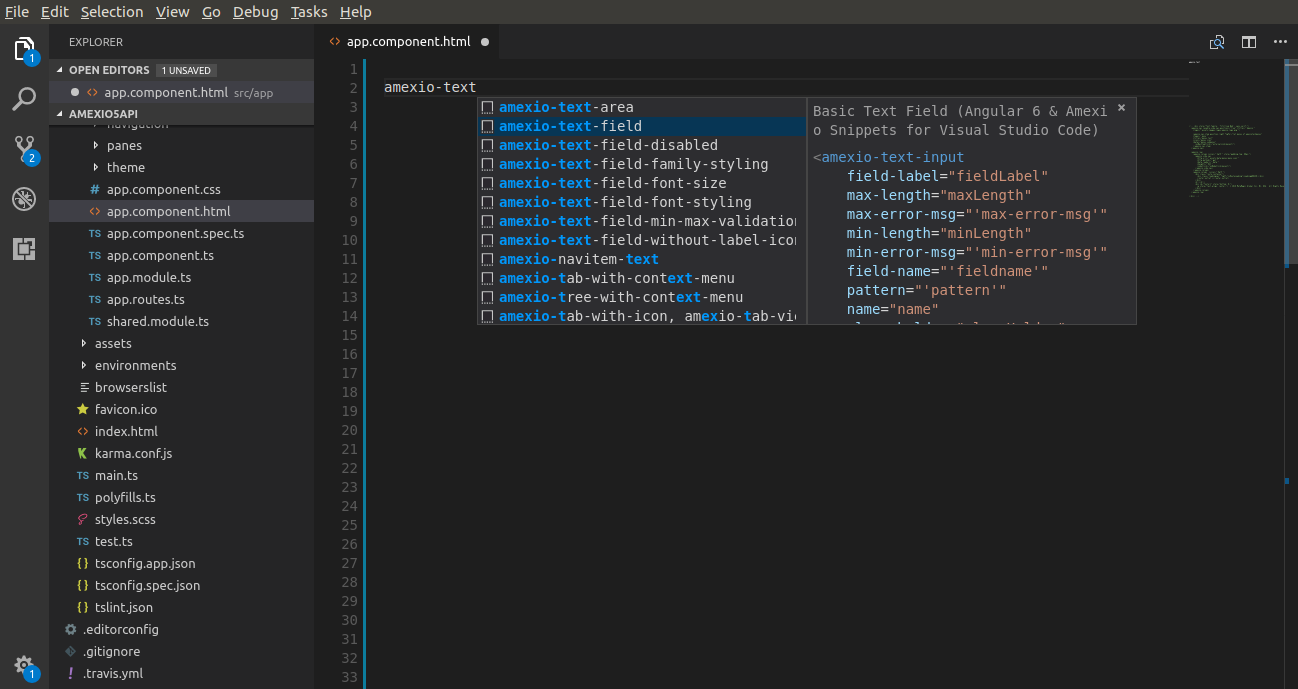
Fill up the required Component Params
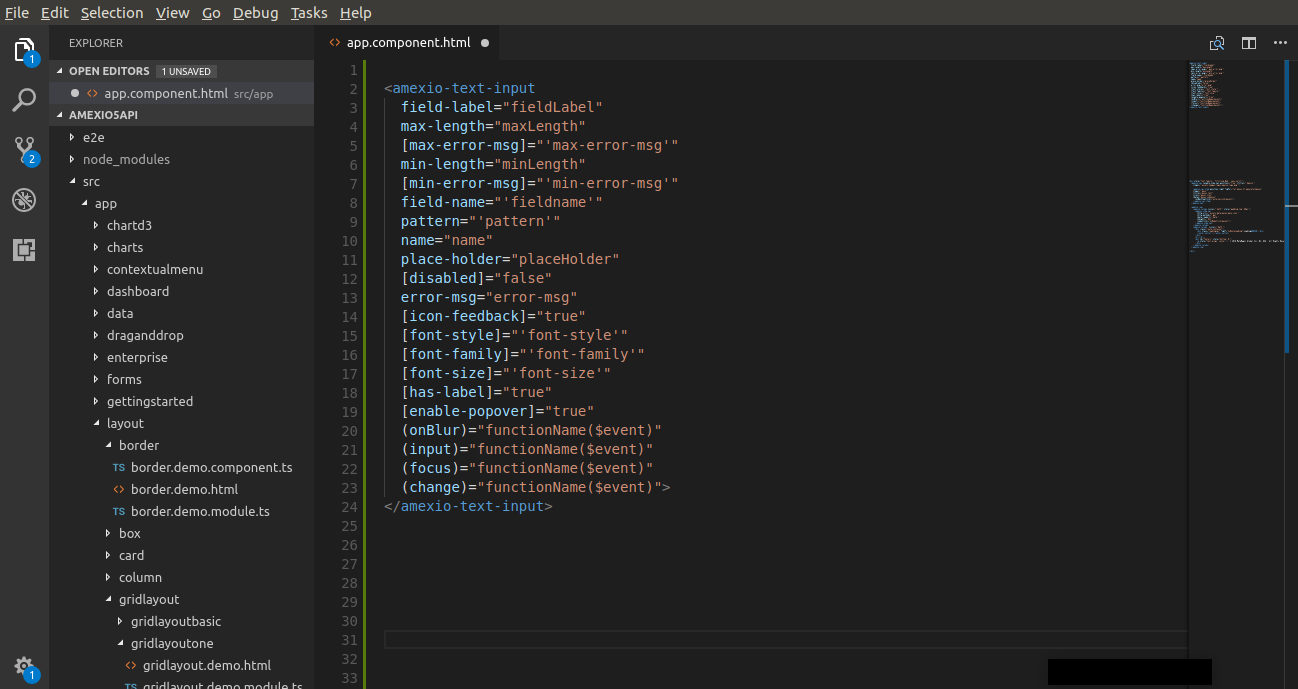
## License
Copyright © [MetaMagic Global Inc](http://www.metamagicglobal.com/), 2017-18. [Amexio Angular EXtensions](http://www.amexio.tech). All rights reserved.
Licensed under the [Apache 2.0](http://www.amexio.org/metamagic-showcase/license.html) License.
**Enjoy!**