https://github.com/meterwhite/taptapuibutton
UIButton double click event extension(Objc, swift, xib, selected)
https://github.com/meterwhite/taptapuibutton
double-tap tap-tap uibutton-double-click
Last synced: 22 days ago
JSON representation
UIButton double click event extension(Objc, swift, xib, selected)
- Host: GitHub
- URL: https://github.com/meterwhite/taptapuibutton
- Owner: Meterwhite
- License: mit
- Created: 2022-10-24T10:41:12.000Z (almost 4 years ago)
- Default Branch: main
- Last Pushed: 2022-10-24T13:49:47.000Z (almost 4 years ago)
- Last Synced: 2025-10-23T09:58:21.360Z (9 months ago)
- Topics: double-tap, tap-tap, uibutton-double-click
- Language: Objective-C
- Homepage:
- Size: 43.9 KB
- Stars: 2
- Watchers: 1
- Forks: 0
- Open Issues: 0
-
Metadata Files:
- Readme: README.md
- License: LICENSE
Awesome Lists containing this project
README
# TapTapUIButton
> [修改Cocoapods源代码!](https://github.com/Meterwhite/ObjcHook4pod)
## 介绍 Introduce
* UIButton double click event extension(Objc, swift, xib, selected)
* iOS按钮双击事件扩展
* 点赞富一生.
## 导入(Import)
- Drag floder `UIButton+TapTap.h` to your project.
```objc
#import "UIButton+TapTap.h"
```
## CocoaPods
```
pod 'TapTapUIButton'
```
## TapTapUIButton工作原理(How TapTapUIButton works)
1. 第一次触摸按钮时状态变为isSelected = true,该状态默认持续2s.
2. 超时后按钮回复原始状态isSelected = false.
3. 未超时时触摸按钮,触发TapTap事件
> 1. When you touch the button for the first time, the status changes to isSelected = true. By default, the status lasts for 2s.
> 2. After timeout, the button returns to the original status isSelected = false.
> 3. A TapTap event is triggered when a button is touched without timeout.
## 使用步骤(Steps to use)
1. 配置按钮normal状态和selected状态下的UI样式
2. 设置tt_enable为true
3. 配置回调`tt_whenTapTaped:`(setTt_whenTapTaped:)或者`tt_addTarget:action:`
> 1. Set the UI style of the button in normal and selected state
> 2. Set tt_enable to true
> 3. Configure the callback ` tt_whenTapTaped: ` or ` tt_addTarget: action: `
## 在UITableViewCell下工作(Work in UITableViewCell)
- 在UITableViewCell下使用时,每次cell重新布局时应该调用一次`tt_refreshState` 。该方法确保按钮的不受cell重用机制的影响。
> - When used UITableViewCell, 'tt_refreshState' should be called each time the cell will dequeue. This method ensures that the button is not affected by the cell reuse mechanism.
## 在XIB上使用(Use on the XIB)
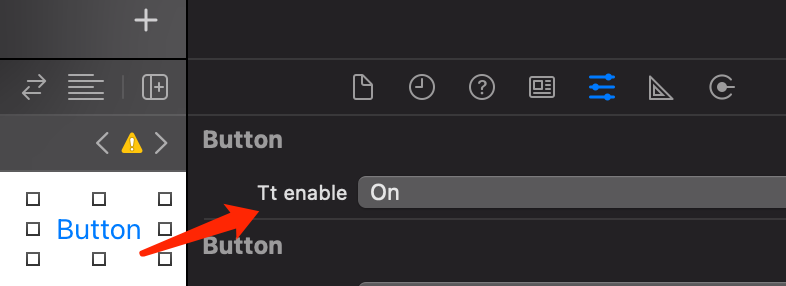
- 设置tt_enable为On(Set tt_enable to On)
## 更多(More)
- 阅读源代码(Read the source code)
## Email
- app合作:meterwhite@outlook.com