https://github.com/mhkeller/interview-syntax-vscode
A VS Code language definition and syntax highlighter meant to help reporters take interview notes.
https://github.com/mhkeller/interview-syntax-vscode
interviews journalism note-taking notes
Last synced: 6 months ago
JSON representation
A VS Code language definition and syntax highlighter meant to help reporters take interview notes.
- Host: GitHub
- URL: https://github.com/mhkeller/interview-syntax-vscode
- Owner: mhkeller
- Created: 2021-12-14T18:55:11.000Z (over 4 years ago)
- Default Branch: main
- Last Pushed: 2022-02-03T15:52:33.000Z (over 4 years ago)
- Last Synced: 2025-10-05T10:56:58.465Z (10 months ago)
- Topics: interviews, journalism, note-taking, notes
- Homepage:
- Size: 1.19 MB
- Stars: 5
- Watchers: 1
- Forks: 0
- Open Issues: 0
-
Metadata Files:
- Readme: README.md
Awesome Lists containing this project
README
Interview Syntax
===
A VS Code syntax definition and highlighter meant to help reporters as they conduct interviews. If you're looking for the original version made for Sublime Text, [it is here](https://github.com/mhkeller/sublime-interview-syntax).
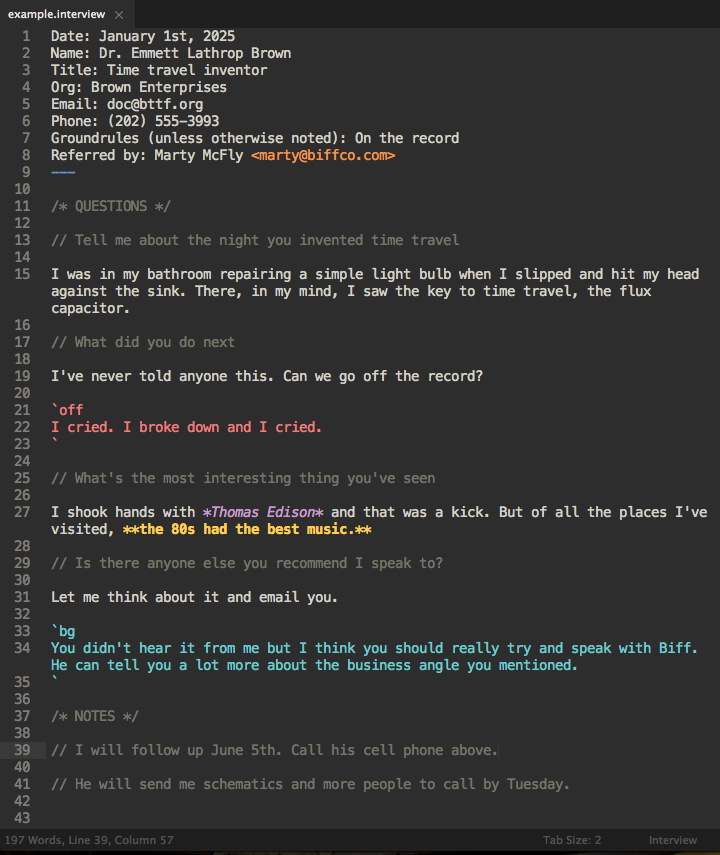
Using [Markdown](http://dillinger.io/) as a jumping off point, Interview highlights whether certain parts of the conversation are on the record, on background or off the record.
It looks best with the [Spacegray Eighties](http://github.com/mhkeller/outer-spacegray-vscode) theme. It will work in other color schemes as long as they have markdown styles but its aesthetics are not guaranteed.
## Who's it for
If you're a reporter who does some programming in VS Code, this can be a useful tool to give more structure and verifiability to interviews you conduct.
If you're a reporter who doesn't program, it can perform the above but also be a useful starting point to familiarize yourself with a text editor.
## What it looks like
Here's an example:
## How to use it
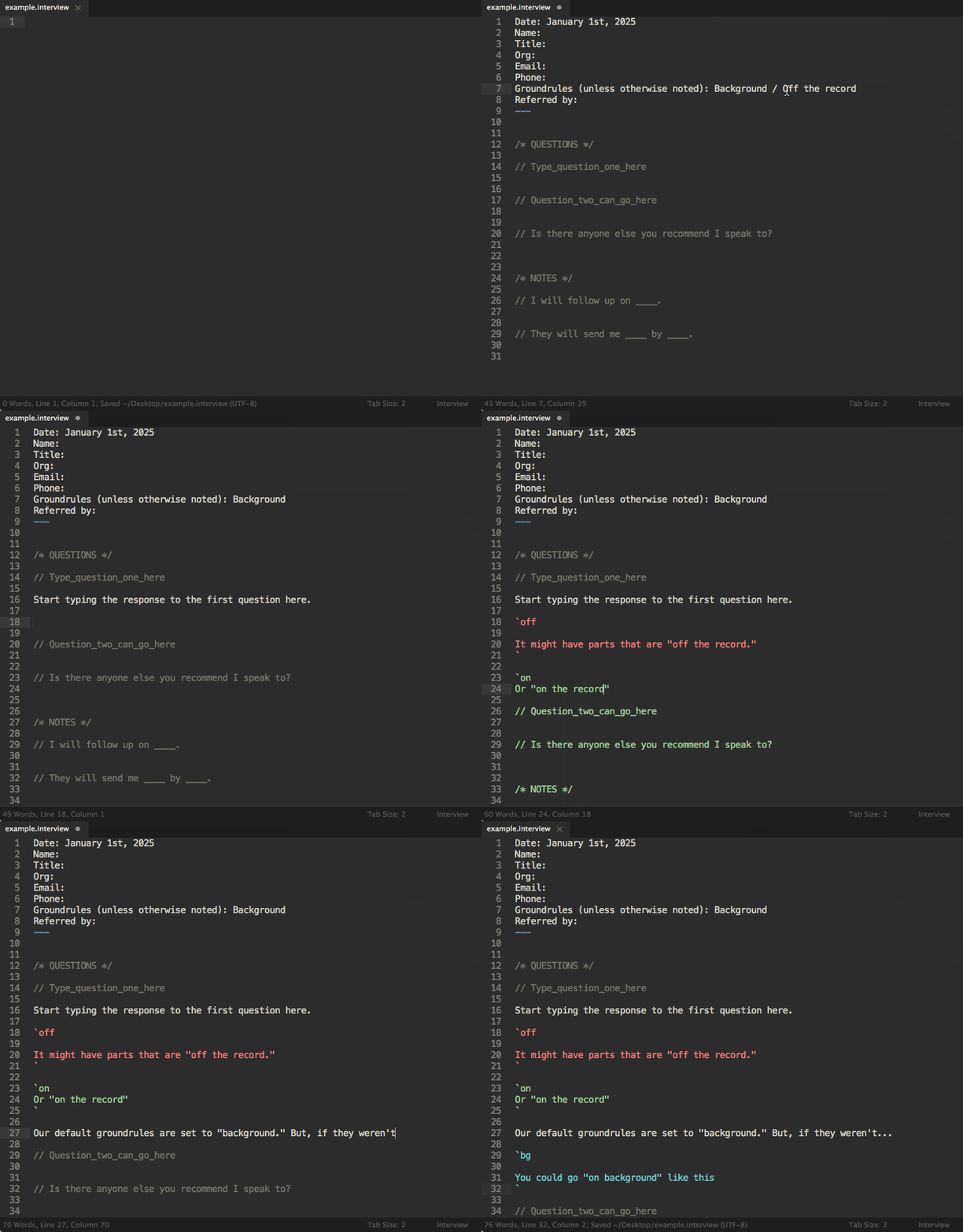
Save your files as `.interview` or `.vw` and VS Code should handle the rest. It also comes with a handy snippet that will give you an interview template by typing `interview` and then hitting the tab key, which will give you a file that looks like the example below.
### Styling for on the record, on background or off the record
Generally, the interview has ground rule terms for how the person wants to be attributed. Interviews can get tricky, however, when the interviewee jumps back and forth. As shown in the screenshot above, you can highlight different regions by surrounding them with tick marks ( \` ) and adding either the `on`, `bg` or `off` keywords.
```
`on
This is on the record
`
`bg
This is on background
`
`off
This is off the record
`
```
### Shortcuts
###### Template - `interview` + tab
This will prefill your page with the interview template pictured above.
###### Questions — cmd + ?
This will start a question for you by writing out `// `. This is useful if you think of a question or note to yourself mid-interview. You can turn turn an existing line into a question with this shortcut as well.
###### Block comments — option cmd + ?
This will start a block comment (a comment that spans mutliple lines) by writing out `/* */` and placing your cursor in the middle. Same as the question shortcut, you can highlight multiple lines and turn them into a comment block with this shortcut.
## Installation
This can be improved but for now, clone it into your VS Code extensions manually then restart VS Code.
```
cd ~/.vscode/extensions && git clone --depth 1 https://github.com/mhkeller/interview-syntax-vscode.git mhkeller.interview-syntax-vscode-1.0.0
```
> On Windows, change `~/.vscode/extensions` to `%USERPROFILE%\.vscode\extensions`
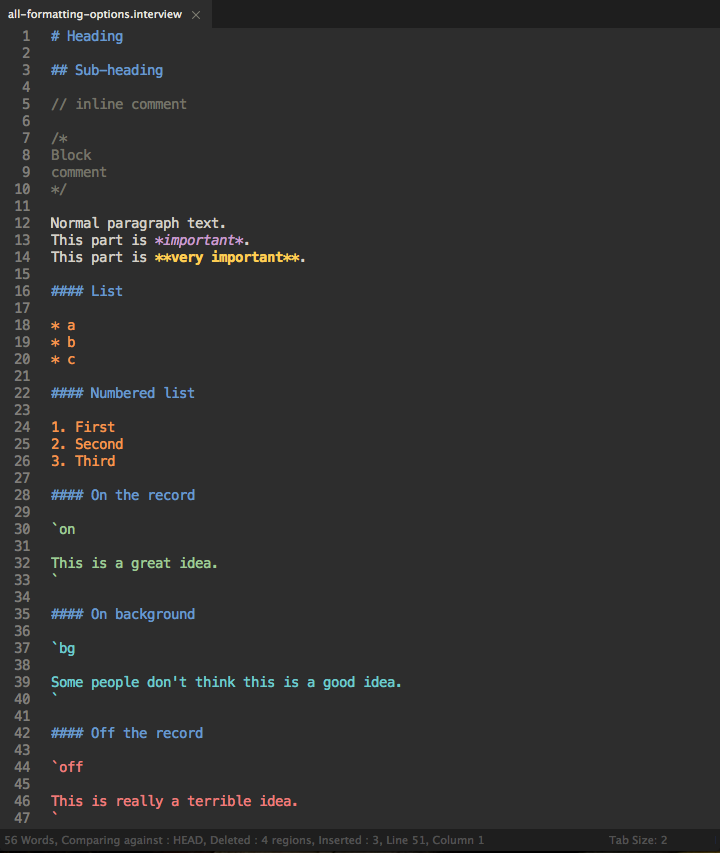
### Other formatting
Here's an example of the other types of formatting you can use.
## Contributing
If you want to help that would be greatly appreciated!
## Helpful extensions
### Auto Snippet - [link](https://marketplace.visualstudio.com/items?itemName=Gruntfuggly.auto-snippet)
Automatically inserts the interview template when you create an interview file.
Add this to your settings.json
```json
"autoSnippet.snippets": [
{ "language": "interview", "snippet": "Interview template" }
]
```
### Todo Tree - [link](https://marketplace.visualstudio.com/items?itemName=Gruntfuggly.todo-tree)
Pulls out TODO items and lists so you can make reminders to yourself during an interview. For example, this unchecked task will become highlighted:
```
// Where can I read more about that
I have a document I can send it to you.
- [ ] They'll send a document
```
### Misc
A spell checker is also handy. There are a few of them out there! Pick one that works for you!