https://github.com/micdah/slackwebhook
Client used to build and send Slack messages to a channel, using a slack incoming webhook which can easily configured
https://github.com/micdah/slackwebhook
csharp incoming-webhooks net-standard slack
Last synced: about 1 year ago
JSON representation
Client used to build and send Slack messages to a channel, using a slack incoming webhook which can easily configured
- Host: GitHub
- URL: https://github.com/micdah/slackwebhook
- Owner: micdah
- License: mit
- Created: 2017-10-23T11:25:12.000Z (over 8 years ago)
- Default Branch: master
- Last Pushed: 2019-02-11T16:26:19.000Z (over 7 years ago)
- Last Synced: 2025-04-02T20:44:44.391Z (about 1 year ago)
- Topics: csharp, incoming-webhooks, net-standard, slack
- Language: C#
- Homepage: https://slackwebhook.micdah.dk/
- Size: 146 KB
- Stars: 5
- Watchers: 2
- Forks: 1
- Open Issues: 0
-
Metadata Files:
- Readme: README.md
- Changelog: CHANGELOG.md
- License: LICENSE
Awesome Lists containing this project
README
# SlackWebhook
[](https://ci.appveyor.com/project/MichaelDahl/slackwebhook/branch/master)
[](https://www.nuget.org/packages/SlackWebhook/)
Provides a simple .Net client for using Slack's [Incoming Webhooks](https://api.slack.com/incoming-webhooks) URL's to
send messages to a slack channel of your choosing.
The Webhooks API is pretty simple, but it always preferable to have a typed interface to use rather than an untyped
(_and undocumented_) JSON object. So using this library should make it simpler to build a slack message and send it
using a webhook URL.
See [changelog](CHANGELOG.md) for version history.
## Example
## How to use
First **install** the nuget package:
```bash
PM> Install-Package SlackWebhook
```
Next simply use the `SlackClient` class to send a message:
```csharp
await new SlackClient(webhookUrl).SendAsync(b => b
.WithUsername("Slack Bot Name")
.WithIcon(IconType.Url, "http://my.host/bot_icon.png")
.WithText("Something very interesting just happened")
);
```
### How to obtain Incoming Webhook URL
In the above example i used the `webhookUrl` which you obtain by adding the **Incoming WebHooks** app configuration
to the channel you want to send messages to (_each url is tied to a specific channel, so if you want to sent to
different channels, just add multiple configurations_).
1. Open [slack.com/services/new/incoming-webhook](https://slack.com/services/new/incoming-webhook)
2. Under _Post to Channel_ select the channel you want to send to
3. Press _Add Incoming WebHooks integration_
4. Now copy the _Webhook URL_
## What is supported?
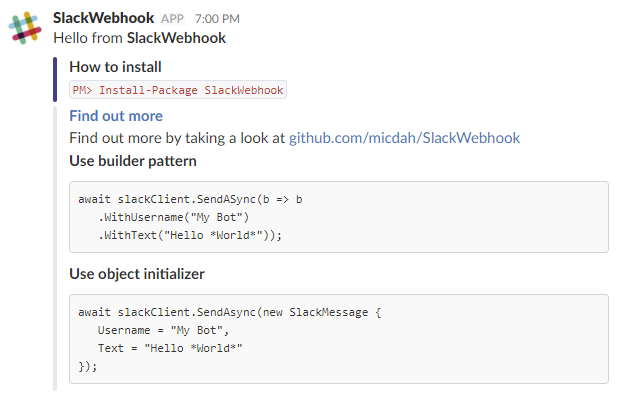
Besides the message, the Slack hook also allows attachments which are pretty neat.
In the above example I used a few attachments and fields to illustrate some of the uses. Especially the attachment
fields are a good way to include extra detail in a table-like structure (_by setting `short` flag on field, two fields
will be shown in the attachment side-by-side for each row_).
My example was generated by this code:
```csharp
await new SlackClient(webhookUrl).SendAsync(b => b
.WithText("Hello from *SlackWebhook*")
.WithUsername("SlackWebhook")
.WithIcon(IconType.Url, "https://raw.githubusercontent.com/micdah/SlackWebhook/master/icon.png")
.WithAttachment(a => a
.WithTitle("How to install")
.WithText("`PM> Install-Package SlackWebhook`")
.WithColor(Color.DarkSlateBlue))
.WithAttachment(a => a
.WithTitle("Find out more")
.WithText("Find out more by taking a look at github.com/micdah/SlackWebhook")
.WithLink("https://github.com/micdah/SlackWebhook")
.WithField(
"Use builder pattern",
"```\n" +
"await slackClient.SendASync(b => b\n" +
" .WithUsername(\"My Bot\")\n" +
" .WithText(\"Hello *World*\"));\n" +
"```")
.WithField(
"Use object initializer",
"```\n" +
"await slackClient.SendAsync(new SlackMessage {\n" +
" Username = \"My Bot\",\n" +
" Text = \"Hello *World*\"\n" +
"});\n" +
"```")));
```
## Documentation
You can find the documentation in [SlackWebhook](SlackWebhook.md), of particular
interest are these:
- [`ISlackClient`](SlackWebhook.md#T-SlackWebhook-ISlackClient):
Interface of the `SlackClient` implementation used to send message
- [`ISlackMessageBuilder`](SlackWebhook.md#T-SlackWebhook-ISlackMessageBuilder):
Inteface of the message builder used to configure your message
- [`ISlackAttachmentBuilder`](SlackWebhook.md#T-SlackWebhook-ISlackAttachmentBuilder):
Interface of the attachment builder used to configure attachments added to your message