https://github.com/michshep/ado_simulator
Simulation of Approximation Distance Oracle
https://github.com/michshep/ado_simulator
approximation cpp11 sdl2 simulation
Last synced: 2 months ago
JSON representation
Simulation of Approximation Distance Oracle
- Host: GitHub
- URL: https://github.com/michshep/ado_simulator
- Owner: MichShep
- Created: 2024-12-10T04:13:35.000Z (over 1 year ago)
- Default Branch: main
- Last Pushed: 2025-02-11T18:22:09.000Z (over 1 year ago)
- Last Synced: 2025-04-07T23:47:55.895Z (about 1 year ago)
- Topics: approximation, cpp11, sdl2, simulation
- Language: C
- Homepage:
- Size: 4.9 MB
- Stars: 0
- Watchers: 1
- Forks: 0
- Open Issues: 0
-
Metadata Files:
- Readme: README.md
Awesome Lists containing this project
README

### Hello!
Welcome to my **Approximate Distance Oracle Simulation**, inspired by the paper _Thorup-Zwick Approximate Distance Oracles (2005)_. This data structure established a fundamental trade-off framework for efficiently estimating distances in a graph. [What is Graph Theory?](https://en.wikipedia.org/wiki/Graph_theory)
### Parameters
The key parameter in this Oracle is $k$, which determines the **stretch factor** of $2k - 1$. This means that the estimated distance will be at most $(2k - 1)$ times the actual shortest path distance.
### How to Use the Simulator
To run the simulation, execute the _play_ file in _TZ_ADO/build/debug/play_ and provide the command-line arguments:
1. **k** (integer between $1$ and $5$ – Determines the stretch factor.
2. **Number of points** (any positive integer) – Higher values may slow performance.
3. **Edge density scale** $[0,1]$ – A value of $1$ creates a complete graph.
This was compiled on a Mac, so you may need to recompile it by simply running _make_ in the _TZ_ADO_ folder in the command line.
### Controls
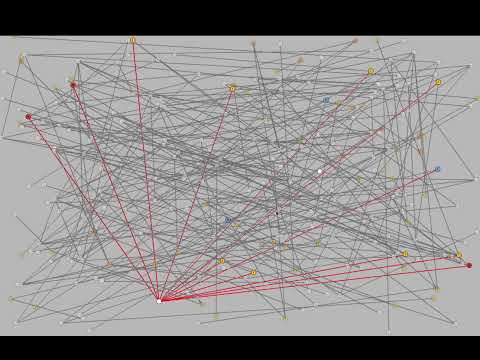
- By default, a **node is selected** at the start, with the red line showing the distances stored from that node.
- **Hover over other nodes** to see their ID and the distance estimated by the Oracle (actual distance will be added later).
- **Pivot nodes** are highlighted in **blue**, and sampled nodes are labeled with **Roman numerals** corresponding to their sample.
- To **change the center node**, right-click on any other node.
- To **view the Oracle's path to a target node**, left-click on that node. This will display the stored distance of that node and reveal where it intersects with the center node.
Here is a short demo video showing the simulation:
[](https://www.youtube.com/watch?v=JlZZQdGzeSo)
Enjoy!