https://github.com/micovi/zilcli
Command Line Interface for Zilliqa Network blockchain
https://github.com/micovi/zilcli
blockchain cli cli-wallet javascript wallet zilliqa
Last synced: 5 months ago
JSON representation
Command Line Interface for Zilliqa Network blockchain
- Host: GitHub
- URL: https://github.com/micovi/zilcli
- Owner: micovi
- Created: 2019-04-07T17:11:37.000Z (over 7 years ago)
- Default Branch: master
- Last Pushed: 2023-10-10T10:11:40.000Z (almost 3 years ago)
- Last Synced: 2025-10-02T06:53:15.224Z (10 months ago)
- Topics: blockchain, cli, cli-wallet, javascript, wallet, zilliqa
- Language: TypeScript
- Homepage: https://zilcli.app
- Size: 526 MB
- Stars: 13
- Watchers: 1
- Forks: 2
- Open Issues: 6
-
Metadata Files:
- Readme: README.md
Awesome Lists containing this project
README

======
Command Line Interface for Zilliqa Blockchain
[](https://oclif.io)
[](https://npmjs.org/package/zilcli)
[](https://npmjs.org/package/zilcli)
[](https://github.com/micovi/zilcli/blob/master/package.json)
* [Installation instructions](#installation-instructions)
* [Commands](#commands)
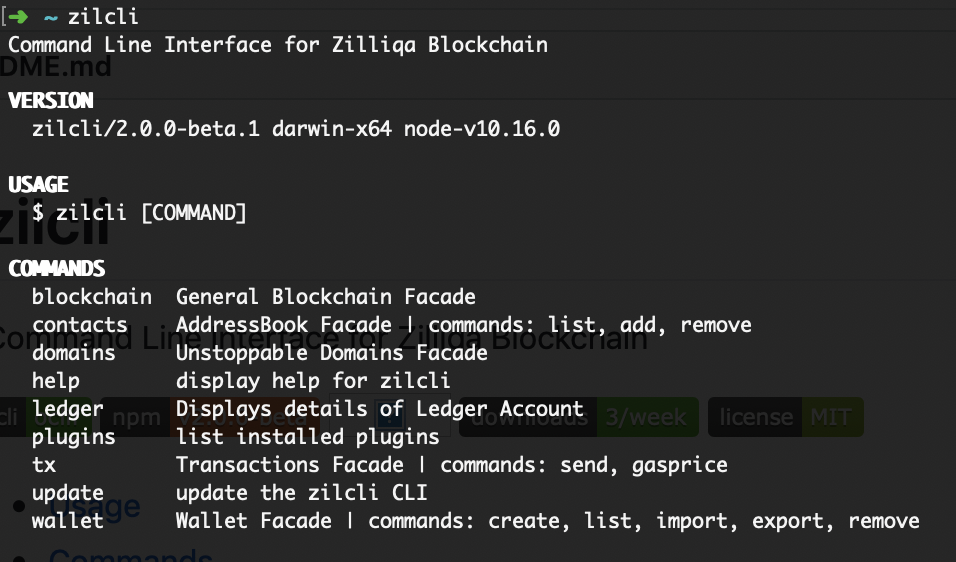
# Installation instructions
If you have nodejs > v8.4.0 installed on your system you can install the CLI globally using
```sh-session
$ npm install -g zilcli
```
Or you can install the binary packaged versions for multiple Operating Systems. Check the Releases page.
# Commands
* [`zilcli blockchain:balance [ADDRESS]`](#zilcli-blockchainbalance-address)
* [`zilcli blockchain:info`](#zilcli-blockchaininfo)
* [`zilcli blockchain:txblock [BLOCK_NUMBER]`](#zilcli-blockchaintxblock-block_number)
* [`zilcli contacts:add [ADDRESS] [NAME]`](#zilcli-contactsadd-address-name)
* [`zilcli contacts:list`](#zilcli-contactslist)
* [`zilcli contacts:remove [NAME]`](#zilcli-contactsremove-name)
* [`zilcli domains:resolve [DOMAIN]`](#zilcli-domainsresolve-domain)
* [`zilcli help [COMMAND]`](#zilcli-help-command)
* [`zilcli ledger:account`](#zilcli-ledgeraccount)
* [`zilcli ledger:send`](#zilcli-ledgersend)
* [`zilcli ledger:sign INIT OUTPUT [CONTRACT]`](#zilcli-ledgersign-init-output-contract)
* [`zilcli plugins`](#zilcli-plugins)
* [`zilcli plugins:install PLUGIN...`](#zilcli-pluginsinstall-plugin)
* [`zilcli plugins:link PLUGIN`](#zilcli-pluginslink-plugin)
* [`zilcli plugins:uninstall PLUGIN...`](#zilcli-pluginsuninstall-plugin)
* [`zilcli plugins:update`](#zilcli-pluginsupdate)
* [`zilcli tx:batch`](#zilcli-txbatch)
* [`zilcli tx:details [HASH]`](#zilcli-txdetails-hash)
* [`zilcli tx:recent [LIMIT]`](#zilcli-txrecent-limit)
* [`zilcli tx:send`](#zilcli-txsend)
* [`zilcli tx:sign INIT OUTPUT [CONTRACT]`](#zilcli-txsign-init-output-contract)
* [`zilcli update [CHANNEL]`](#zilcli-update-channel)
* [`zilcli wallet:create`](#zilcli-walletcreate)
* [`zilcli wallet:details [NAME]`](#zilcli-walletdetails-name)
* [`zilcli wallet:export [NAME]`](#zilcli-walletexport-name)
* [`zilcli wallet:import [NAME] [PRIVATEKEY]`](#zilcli-walletimport-name-privatekey)
* [`zilcli wallet:list`](#zilcli-walletlist)
* [`zilcli wallet:remove [NAME]`](#zilcli-walletremove-name)
## `zilcli blockchain:balance [ADDRESS]`
Returns balance for an address or from a batch of addreses.
```
USAGE
$ zilcli blockchain:balance [ADDRESS]
ARGUMENTS
ADDRESS Address you want to get the balance for (could be domain name or contact name)
OPTIONS
--batch=batch
DESCRIPTION
...
Use batch flag to check balance for multiple addresses. You have to enter the full path to file (eg zilcli
blockchain:balance --batch=/home/user/addresses.txt)
$ zilcli blockchain:balance --batch=/home/user/addresses.txt
```
_See code: [src/commands/blockchain/balance.ts](https://github.com/micovi/zilcli/blob/v2.0.5/src/commands/blockchain/balance.ts)_
## `zilcli blockchain:info`
Retrieves generally blockchain information
```
USAGE
$ zilcli blockchain:info
DESCRIPTION
...
such as the number of nodes per shard.
```
_See code: [src/commands/blockchain/info.ts](https://github.com/micovi/zilcli/blob/v2.0.5/src/commands/blockchain/info.ts)_
## `zilcli blockchain:txblock [BLOCK_NUMBER]`
Retrieves a TxBlock data.
```
USAGE
$ zilcli blockchain:txblock [BLOCK_NUMBER]
ARGUMENTS
BLOCK_NUMBER Block number
DESCRIPTION
...
By passing no argument it will retrieve the latest tx block.
```
_See code: [src/commands/blockchain/txblock.ts](https://github.com/micovi/zilcli/blob/v2.0.5/src/commands/blockchain/txblock.ts)_
## `zilcli contacts:add [ADDRESS] [NAME]`
Describe the command here
```
USAGE
$ zilcli contacts:add [ADDRESS] [NAME]
ARGUMENTS
ADDRESS Contact address
NAME Contact name
DESCRIPTION
...
Extra documentation goes here
```
_See code: [src/commands/contacts/add.ts](https://github.com/micovi/zilcli/blob/v2.0.5/src/commands/contacts/add.ts)_
## `zilcli contacts:list`
Lists all contacts from Address Book
```
USAGE
$ zilcli contacts:list
DESCRIPTION
Prints a table with all the saved accounts.
Name, Address, Old Address format
```
_See code: [src/commands/contacts/list.ts](https://github.com/micovi/zilcli/blob/v2.0.5/src/commands/contacts/list.ts)_
## `zilcli contacts:remove [NAME]`
Remove existing Contact from Address Book
```
USAGE
$ zilcli contacts:remove [NAME]
ARGUMENTS
NAME contact name you want to remove
DESCRIPTION
...
```
_See code: [src/commands/contacts/remove.ts](https://github.com/micovi/zilcli/blob/v2.0.5/src/commands/contacts/remove.ts)_
## `zilcli domains:resolve [DOMAIN]`
Returns the details of a specified domain name.
```
USAGE
$ zilcli domains:resolve [DOMAIN]
ARGUMENTS
DOMAIN Domain name eg: zilcli.zil
DESCRIPTION
...
```
_See code: [src/commands/domains/resolve.ts](https://github.com/micovi/zilcli/blob/v2.0.5/src/commands/domains/resolve.ts)_
## `zilcli help [COMMAND]`
display help for zilcli
```
USAGE
$ zilcli help [COMMAND]
ARGUMENTS
COMMAND command to show help for
OPTIONS
--all see all commands in CLI
```
_See code: [@oclif/plugin-help](https://github.com/oclif/plugin-help/blob/v2.2.0/src/commands/help.ts)_
## `zilcli ledger:account`
Displays details of Ledger Account
```
USAGE
$ zilcli ledger:account
```
_See code: [src/commands/ledger/account.ts](https://github.com/micovi/zilcli/blob/v2.0.5/src/commands/ledger/account.ts)_
## `zilcli ledger:send`
Create and send a transaction using the Ledger Device
```
USAGE
$ zilcli ledger:send
OPTIONS
-a, --amount=amount amount in ZIL
-g, --gas=gas gas to use (defined in Li)
-t, --to=to destination address
DESCRIPTION
```
_See code: [src/commands/ledger/send.ts](https://github.com/micovi/zilcli/blob/v2.0.5/src/commands/ledger/send.ts)_
## `zilcli ledger:sign INIT OUTPUT [CONTRACT]`
Sign a tx json file with Ledger Device
```
USAGE
$ zilcli ledger:sign INIT OUTPUT [CONTRACT]
ARGUMENTS
INIT Absolute file path for init.json
OUTPUT Absolute file path for output.json
CONTRACT Absolute file path for contract.scilla
```
_See code: [src/commands/ledger/sign.ts](https://github.com/micovi/zilcli/blob/v2.0.5/src/commands/ledger/sign.ts)_
## `zilcli plugins`
list installed plugins
```
USAGE
$ zilcli plugins
OPTIONS
--core show core plugins
EXAMPLE
$ zilcli plugins
```
_See code: [@oclif/plugin-plugins](https://github.com/oclif/plugin-plugins/blob/v1.7.8/src/commands/plugins/index.ts)_
## `zilcli plugins:install PLUGIN...`
installs a plugin into the CLI
```
USAGE
$ zilcli plugins:install PLUGIN...
ARGUMENTS
PLUGIN plugin to install
OPTIONS
-f, --force yarn install with force flag
-h, --help show CLI help
-v, --verbose
DESCRIPTION
Can be installed from npm or a git url.
Installation of a user-installed plugin will override a core plugin.
e.g. If you have a core plugin that has a 'hello' command, installing a user-installed plugin with a 'hello' command
will override the core plugin implementation. This is useful if a user needs to update core plugin functionality in
the CLI without the need to patch and update the whole CLI.
ALIASES
$ zilcli plugins:add
EXAMPLES
$ zilcli plugins:install myplugin
$ zilcli plugins:install https://github.com/someuser/someplugin
$ zilcli plugins:install someuser/someplugin
```
_See code: [@oclif/plugin-plugins](https://github.com/oclif/plugin-plugins/blob/v1.7.8/src/commands/plugins/install.ts)_
## `zilcli plugins:link PLUGIN`
links a plugin into the CLI for development
```
USAGE
$ zilcli plugins:link PLUGIN
ARGUMENTS
PATH [default: .] path to plugin
OPTIONS
-h, --help show CLI help
-v, --verbose
DESCRIPTION
Installation of a linked plugin will override a user-installed or core plugin.
e.g. If you have a user-installed or core plugin that has a 'hello' command, installing a linked plugin with a 'hello'
command will override the user-installed or core plugin implementation. This is useful for development work.
EXAMPLE
$ zilcli plugins:link myplugin
```
_See code: [@oclif/plugin-plugins](https://github.com/oclif/plugin-plugins/blob/v1.7.8/src/commands/plugins/link.ts)_
## `zilcli plugins:uninstall PLUGIN...`
removes a plugin from the CLI
```
USAGE
$ zilcli plugins:uninstall PLUGIN...
ARGUMENTS
PLUGIN plugin to uninstall
OPTIONS
-h, --help show CLI help
-v, --verbose
ALIASES
$ zilcli plugins:unlink
$ zilcli plugins:remove
```
_See code: [@oclif/plugin-plugins](https://github.com/oclif/plugin-plugins/blob/v1.7.8/src/commands/plugins/uninstall.ts)_
## `zilcli plugins:update`
update installed plugins
```
USAGE
$ zilcli plugins:update
OPTIONS
-h, --help show CLI help
-v, --verbose
```
_See code: [@oclif/plugin-plugins](https://github.com/oclif/plugin-plugins/blob/v1.7.8/src/commands/plugins/update.ts)_
## `zilcli tx:batch`
Create and send batch transactions
```
USAGE
$ zilcli tx:batch
OPTIONS
-f, --file=file (required) transactions file path
--gasprice=gasprice gas price (in Qa)
DESCRIPTION
Batch file format should contain private key, destination and amount used to send.
File format example:
privatekey destination 10
privatekey destination all
privatekey destination 0.5
```
_See code: [src/commands/tx/batch.ts](https://github.com/micovi/zilcli/blob/v2.0.5/src/commands/tx/batch.ts)_
## `zilcli tx:details [HASH]`
Returns the details of a specified Transaction.
```
USAGE
$ zilcli tx:details [HASH]
ARGUMENTS
HASH Transaction hash you want to get details for
DESCRIPTION
...
```
_See code: [src/commands/tx/details.ts](https://github.com/micovi/zilcli/blob/v2.0.5/src/commands/tx/details.ts)_
## `zilcli tx:recent [LIMIT]`
Retrieve a list with recent 100 transactions
```
USAGE
$ zilcli tx:recent [LIMIT]
ARGUMENTS
LIMIT Limit
DESCRIPTION
...
```
_See code: [src/commands/tx/recent.ts](https://github.com/micovi/zilcli/blob/v2.0.5/src/commands/tx/recent.ts)_
## `zilcli tx:send`
Create and send a transaction
```
USAGE
$ zilcli tx:send
OPTIONS
-a, --amount=amount amount in ZIL
-f, --from=from account name or privateKey
-g, --gas=gas gas to use (defined in Li)
-p, --usePrivateKey Private Key
-t, --to=to destination address
DESCRIPTION
```
_See code: [src/commands/tx/send.ts](https://github.com/micovi/zilcli/blob/v2.0.5/src/commands/tx/send.ts)_
## `zilcli tx:sign INIT OUTPUT [CONTRACT]`
Sign a transaction
```
USAGE
$ zilcli tx:sign INIT OUTPUT [CONTRACT]
ARGUMENTS
INIT Absolute file path for init.json
OUTPUT Absolute file path for output.json
CONTRACT Absolute file path for contract.scilla
OPTIONS
-f, --from=from account name or privateKey
-p, --usePrivateKey Private Key
```
_See code: [src/commands/tx/sign.ts](https://github.com/micovi/zilcli/blob/v2.0.5/src/commands/tx/sign.ts)_
## `zilcli update [CHANNEL]`
update the zilcli CLI
```
USAGE
$ zilcli update [CHANNEL]
```
_See code: [@oclif/plugin-update](https://github.com/oclif/plugin-update/blob/v1.3.9/src/commands/update.ts)_
## `zilcli wallet:create`
```
USAGE
$ zilcli wallet:create
```
_See code: [src/commands/wallet/create.ts](https://github.com/micovi/zilcli/blob/v2.0.5/src/commands/wallet/create.ts)_
## `zilcli wallet:details [NAME]`
Prints out details about Wallet
```
USAGE
$ zilcli wallet:details [NAME]
ARGUMENTS
NAME Wallet name to get details for
DESCRIPTION
Returned data: Name, ID, Address, Balance privateKey, publicKey, Network details
```
_See code: [src/commands/wallet/details.ts](https://github.com/micovi/zilcli/blob/v2.0.5/src/commands/wallet/details.ts)_
## `zilcli wallet:export [NAME]`
Export account to keystore file
```
USAGE
$ zilcli wallet:export [NAME]
ARGUMENTS
NAME account name you want to export
DESCRIPTION
Export wallet account to keystore file encoded with passphrase.
```
_See code: [src/commands/wallet/export.ts](https://github.com/micovi/zilcli/blob/v2.0.5/src/commands/wallet/export.ts)_
## `zilcli wallet:import [NAME] [PRIVATEKEY]`
Import wallet
```
USAGE
$ zilcli wallet:import [NAME] [PRIVATEKEY]
ARGUMENTS
NAME [default: default] Account name
PRIVATEKEY File path / Private Key / Mnemonic phrase
OPTIONS
--type=keystore|privateKey [default: privateKey] import type
DESCRIPTION
You can import wallet accounts from keystore file or by Private Key
Keystore file must be located in $HOME/.zilcli/ directory.
```
_See code: [src/commands/wallet/import.ts](https://github.com/micovi/zilcli/blob/v2.0.5/src/commands/wallet/import.ts)_
## `zilcli wallet:list`
Lists all configured Zilliqa Wallets
```
USAGE
$ zilcli wallet:list
DESCRIPTION
Prints a table with all the configured Wallet Accounts.
ID, Name, Address, Balance
```
_See code: [src/commands/wallet/list.ts](https://github.com/micovi/zilcli/blob/v2.0.5/src/commands/wallet/list.ts)_
## `zilcli wallet:remove [NAME]`
Remove existing wallet from Zilcli Manager
```
USAGE
$ zilcli wallet:remove [NAME]
ARGUMENTS
NAME account name you want to remove
DESCRIPTION
...
```
_See code: [src/commands/wallet/remove.ts](https://github.com/micovi/zilcli/blob/v2.0.5/src/commands/wallet/remove.ts)_