https://github.com/microsoft/vscode-java-dependency
Manage Java projects in Visual Studio Code.
https://github.com/microsoft/vscode-java-dependency
java language-support project-management vscode-extension
Last synced: about 1 year ago
JSON representation
Manage Java projects in Visual Studio Code.
- Host: GitHub
- URL: https://github.com/microsoft/vscode-java-dependency
- Owner: microsoft
- License: mit
- Created: 2018-04-11T07:29:59.000Z (over 8 years ago)
- Default Branch: main
- Last Pushed: 2025-03-28T22:20:36.000Z (over 1 year ago)
- Last Synced: 2025-05-15T00:08:56.468Z (about 1 year ago)
- Topics: java, language-support, project-management, vscode-extension
- Language: TypeScript
- Homepage: https://marketplace.visualstudio.com/items?itemName=vscjava.vscode-java-dependency
- Size: 9.64 MB
- Stars: 170
- Watchers: 16
- Forks: 82
- Open Issues: 95
-
Metadata Files:
- Readme: README.md
- Changelog: CHANGELOG.md
- Contributing: CONTRIBUTING.md
- License: LICENSE
- Security: SECURITY.md
Awesome Lists containing this project
README
# Project Manager for Java
> Manage Java projects in Visual Studio Code
[](https://github.com/microsoft/vscode-java-dependency/actions/workflows/windows.yml?query=branch%3Amain)
[](https://github.com/microsoft/vscode-java-dependency/actions/workflows/linux.yml?query=branch%3Amain)
[](https://github.com/microsoft/vscode-java-dependency/actions/workflows/macOS.yml?query=branch%3Amain)
## Overview
A lightweight extension to provide additional Java project explorer features. It works with [Language Support for Java by Red Hat](https://marketplace.visualstudio.com/items?itemName=redhat.java) to provide the following features:
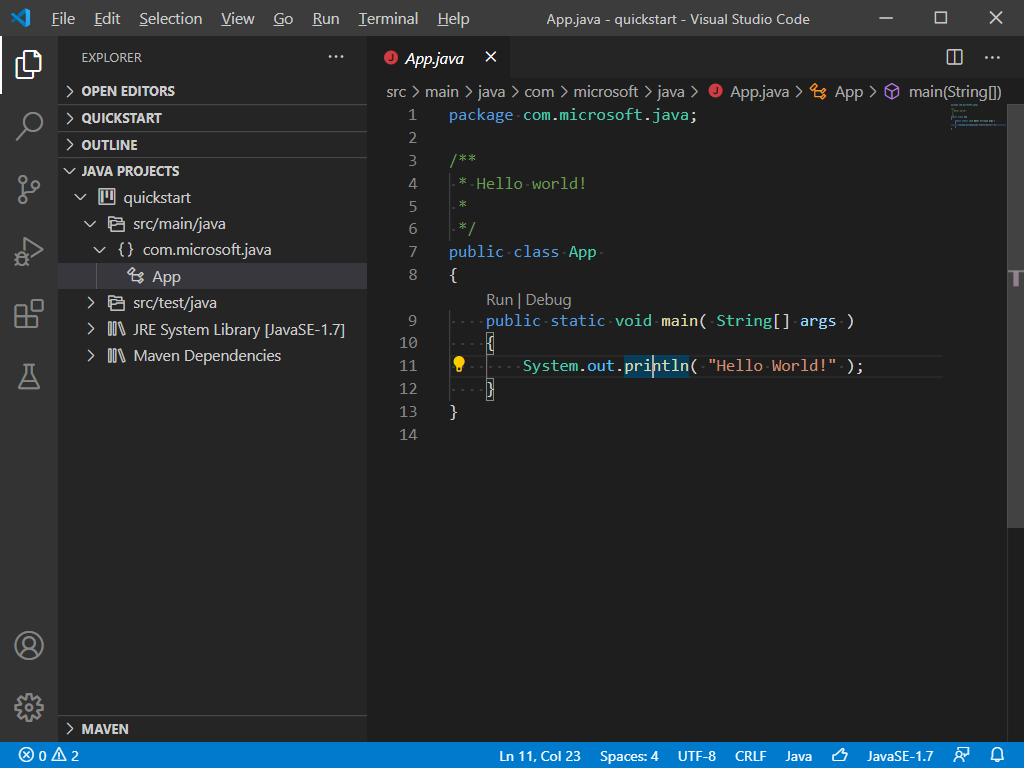
### Project View
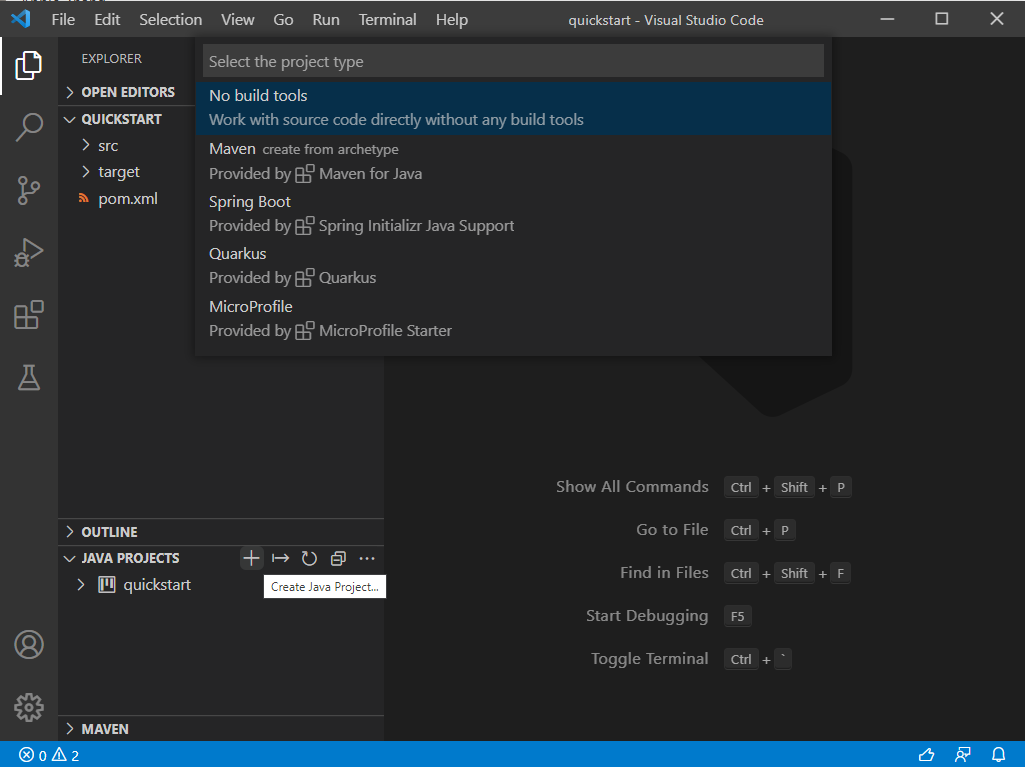
### Create Java Projects
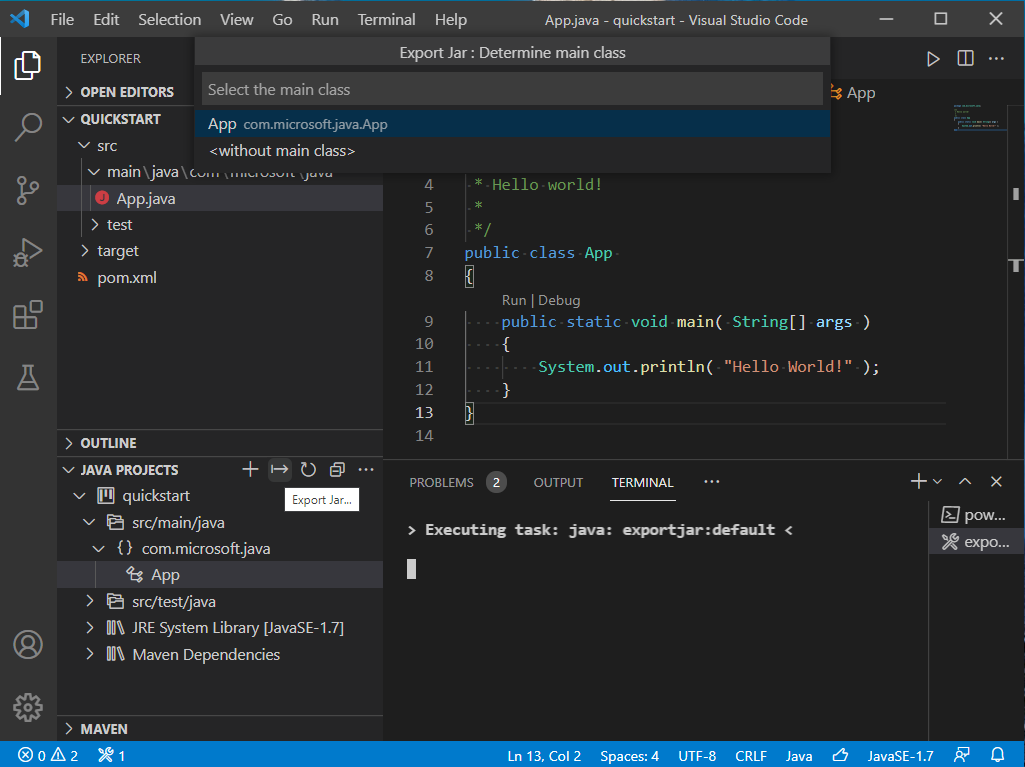
### Export Jar
> Note: For Spring Boot projects, please use the build tool to build the executable jar, for example: `mvn package`.
### Manage Dependencies
You can work with JAR files directly without any build tools. Go to `JAVA PROJECTS` view, find the `Referenced Libraries` node and click the `+` icon:
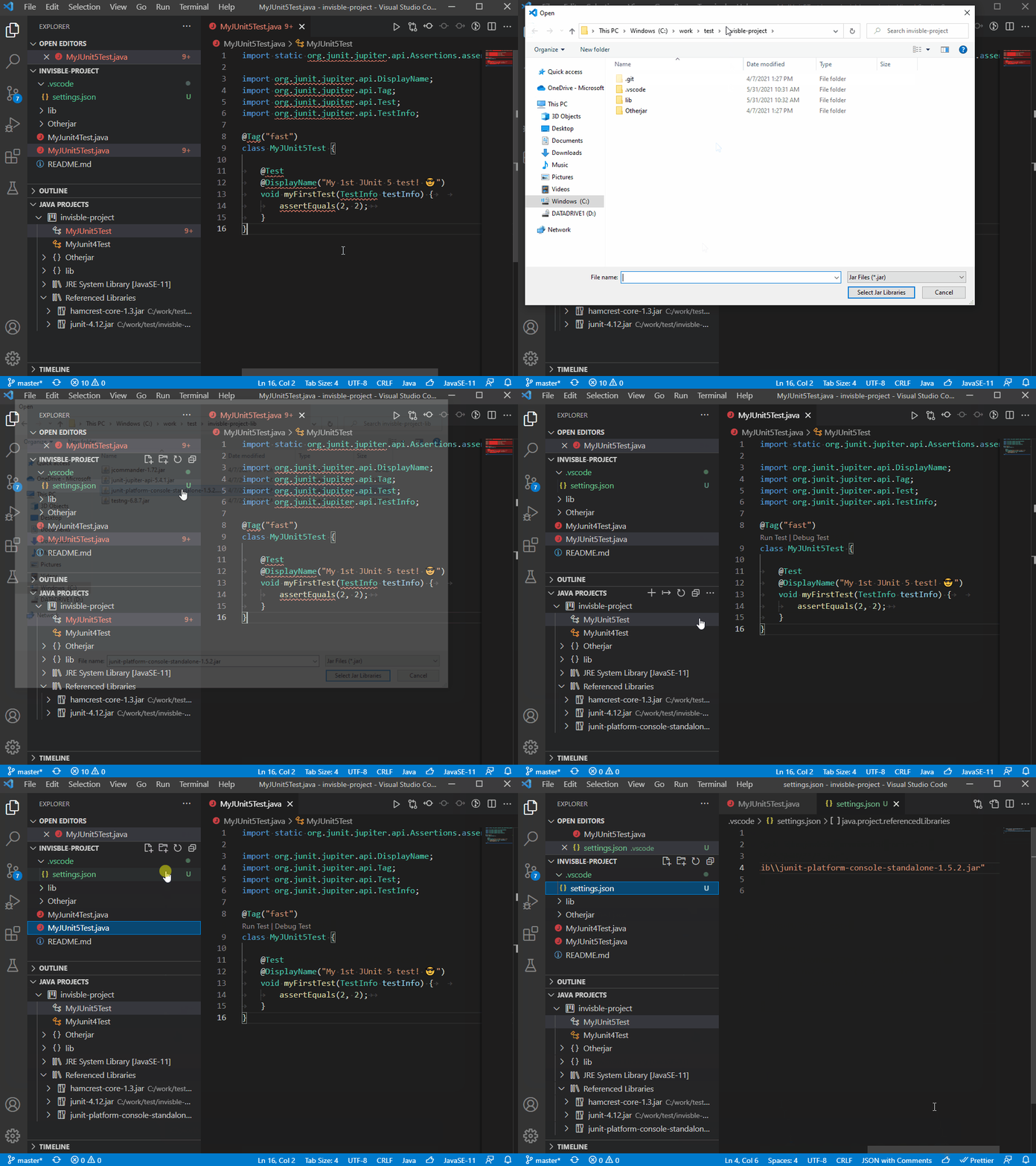
If you want to fine-tune this, go to `settings.json` and look for the `java.project.referencedLibraries` entry.
```json
"java.project.referencedLibraries": [
"library/**/*.jar",
"/home/username/lib/foo.jar"
]
```
You can tell that the glob pattern is supported. And here's more - you can include/exclude certain files, and attach source JARs:
```json
"java.project.referencedLibraries": {
"include": [
"library/**/*.jar",
"/home/username/lib/foo.jar"
],
"exclude": [
"library/sources/**"
],
"sources": {
"library/bar.jar": "library/sources/bar-src.jar"
}
}
```
## Requirements
- VS Code (version 1.83.1+)
- [Language Support for Java by Red Hat](https://marketplace.visualstudio.com/items?itemName=redhat.java)
## Settings
| Setting Name | Description | Default Value |
|---|---|---|
| `java.dependency.showMembers` | Specify whether to show the members in the Java Projects explorer. | `false` |
| `java.dependency.syncWithFolderExplorer` | Specify whether to link Java Projects Explorer with the active editor. | `true` |
| `java.dependency.autoRefresh` | Specify whether to automatically sync the change from editor to the Java Projects explorer. | `true` |
| `java.dependency.refreshDelay` | The delay time (ms) the auto refresh is invoked when changes are detected. | `2000ms` |
| `java.dependency.packagePresentation` | Specify how to display the package. Supported values are: `flat`, `hierarchical`.| `flat` |
| `java.project.exportJar.targetPath` | The output path of export jar. When this setting is **empty** , a file explorer will pop up to let the user select the output location.| `${workspaceFolder}/${workspaceFolderBasename}.jar` |
| `java.project.explorer.showNonJavaResources` | When enabled, the explorer shows non-Java resources. | `true` |
## Contribution
### Build
* Prerequirement
- Node.js
- Java SDK 11 or above
* Go to root folder:
```
npm install
npm run build-server
```
## Telemetry
VS Code collects usage data and sends it to Microsoft to help improve our products and services. Read our [privacy statement](https://go.microsoft.com/fwlink/?LinkID=528096&clcid=0x409) to learn more. If you don't wish to send usage data to Microsoft, you can set the `telemetry.enableTelemetry` setting to `false`. Learn more in our [FAQ](https://code.visualstudio.com/docs/supporting/faq#_how-to-disable-telemetry-reporting).
---
This project has adopted the [Microsoft Open Source Code of Conduct](https://opensource.microsoft.com/codeofconduct/). For more information see the [Code of Conduct FAQ](https://opensource.microsoft.com/codeofconduct/faq/) or contact [opencode@microsoft.com](mailto:opencode@microsoft.com) with any additional questions or comments.