https://github.com/microsoft/vscode-java-test
Run and debug Java test cases in Visual Studio Code.
https://github.com/microsoft/vscode-java-test
java junit test testng vscode
Last synced: over 1 year ago
JSON representation
Run and debug Java test cases in Visual Studio Code.
- Host: GitHub
- URL: https://github.com/microsoft/vscode-java-test
- Owner: microsoft
- License: other
- Created: 2017-11-13T08:40:43.000Z (over 8 years ago)
- Default Branch: main
- Last Pushed: 2025-02-18T01:32:06.000Z (over 1 year ago)
- Last Synced: 2025-04-01T01:38:33.775Z (over 1 year ago)
- Topics: java, junit, test, testng, vscode
- Language: Java
- Homepage: https://marketplace.visualstudio.com/items?itemName=vscjava.vscode-java-test
- Size: 10.7 MB
- Stars: 302
- Watchers: 22
- Forks: 147
- Open Issues: 100
-
Metadata Files:
- Readme: README.md
- Changelog: CHANGELOG.md
- Contributing: CONTRIBUTING.md
- License: LICENSE.txt
- Security: SECURITY.md
Awesome Lists containing this project
README
# Test Runner for Java
> Run and debug Java test cases in Visual Studio Code




## Overview
A lightweight extension to run and debug Java test cases in Visual Studio Code. The extension support following test frameworks:
- JUnit 4 (v4.8.0+)
- JUnit 5 (v5.1.0+)
- TestNG (v6.9.13.3+)
> Note: JUnit 3 styled tests are not supported in this extension (i.e. extends `junit.framework.TestCase`).
The [Test Runner for Java](https://marketplace.visualstudio.com/items?itemName=vscjava.vscode-java-test) works with [Language Support for Java by Red Hat](https://marketplace.visualstudio.com/items?itemName=redhat.java) and [Debugger for Java](https://marketplace.visualstudio.com/items?itemName=vscjava.vscode-java-debug) to provide the following features:
- Run/Debug test cases
- Customize test configurations
- View test report
- View tests in Test Explorer
## Requirements
- JDK (version 17 or later)
- VS Code (version 1.59.0 or later)
- [Language Support for Java by Red Hat](https://marketplace.visualstudio.com/items?itemName=redhat.java)
- [Debugger for Java](https://marketplace.visualstudio.com/items?itemName=vscjava.vscode-java-debug)
## Features
### Run/Debug Test Cases
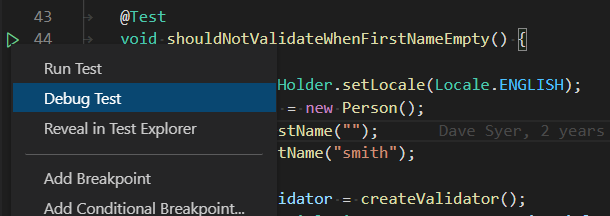
- The extension will generate shortcuts (the green play button) on the left side of the class and method definition. To run the target test cases, simply click on the green play button. You can also right click on it to see more options.
---
### Test Explorer
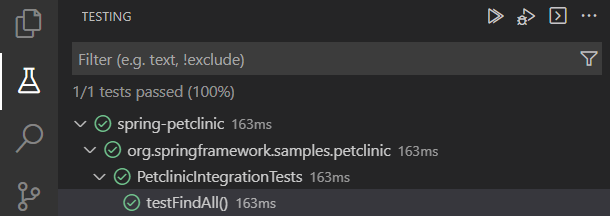
- The Test Explorer is the place to show all the test cases in your workspace. You can also run/debug your test cases from here.
---
### Customize Test Configurations
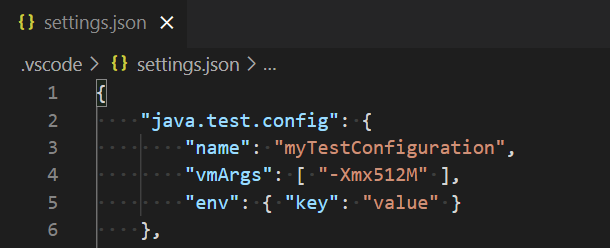
- Sometimes you may want to customize the configuration to run your test cases. To achieve this, you can add the configuration into your workspace settings under the section: `java.test.config`.
> Note: More details can be found [here](https://github.com/Microsoft/vscode-java-test/wiki/Run-with-Configuration).
---
### View Test Result
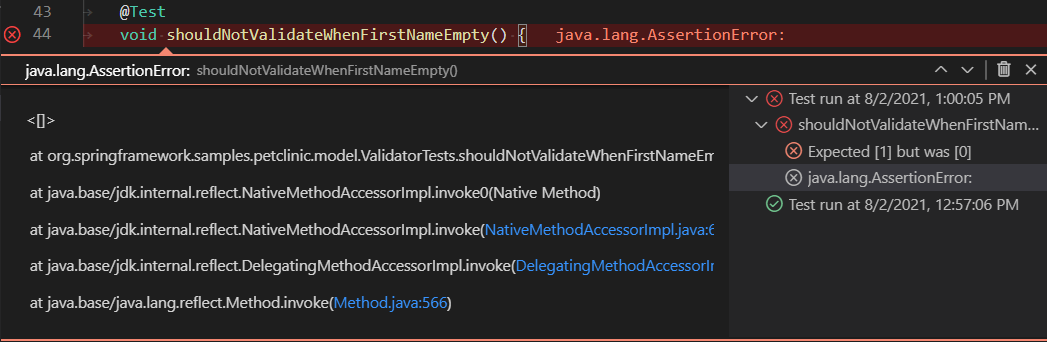
- After running/debugging the test cases, the state of the related test items will be updated in both editor decoration and test explorer.
- You can trigger the command `Test: Peek Output` to peek the result view.
- You can click on the links in the stack trace to navigate to the source location.
### VS Code Embedded Commands for Testing
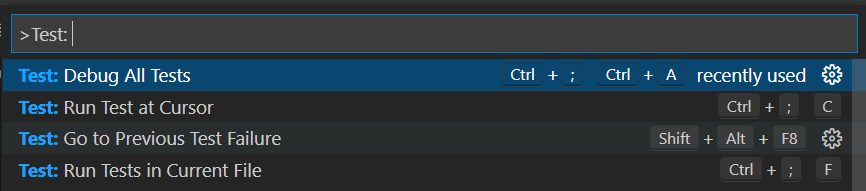
There are other VS Code embedded commands for testing, which can be found by searching `Test:` in the Command Palette.
## Settings
| Setting Name | Description | Default Value |
|---|---|---|
| `java.test.config` | Specify the configuration for the test cases to run with. [More details](https://aka.ms/java-test-config). | `{}` |
| `java.test.defaultConfig` | Specify the name of the default test configuration. | `""` |
### VS Code Embedded Settings for Testing
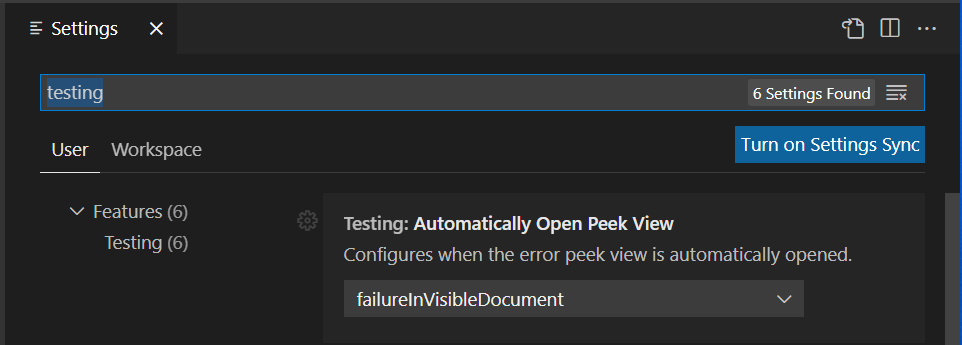
There are some other VS Code embedded settings for testing, which can be found by searching `testing` in the Settings view.
## Project Setup
### JUnit 5
Please refer to [Getting Started](https://junit.org/junit5/docs/current/user-guide/#overview-getting-started) from the JUnit 5's official document for getting started documentation.
> Note: If your project does not use build tools(Maven/Gradle/...), please make sure [junit-platform-console-standalone.jar](https://search.maven.org/search?q=g:org.junit.platform%20AND%20a:junit-platform-console-standalone) is on your project classpath.
### JUnit 4
Please refer to [Download and Install](https://github.com/junit-team/junit4/wiki/Download-and-Install) from the JUnit 4's official document for the getting started documentation.
### TestNG
Please refer to [TestNG Docs](https://testng.org/) from the TestNG's official document for getting started documentation.
## FAQ
If you meet any problem when using the extension, please refer to the [FAQ](https://github.com/microsoft/vscode-java-test/wiki/FAQ) and our [issue list](https://github.com/microsoft/vscode-java-test/issues) to check if there is an answer to your problem.
## Contributing and Feedback
If you are interested in providing feedback or contributing directly to the code base, please check the document [Contributing to Test Runner for Java](https://github.com/Microsoft/vscode-java-test/blob/main/CONTRIBUTING.md), which covers the following parts:
- [Questions and Feedback](https://github.com/Microsoft/vscode-java-test/blob/main/CONTRIBUTING.md#questions-and-feedback)
- [Reporting Issues](https://github.com/Microsoft/vscode-java-test/blob/main/CONTRIBUTING.md#reporting-issues)
- [Contributing Fixes](https://github.com/Microsoft/vscode-java-test/blob/main/CONTRIBUTING.md#contributing-fixes)
## License
This extension is licensed under [MIT License](LICENSE.txt).
## Telemetry
This extension collects telemetry data to help improve our products. Please read [Microsoft privacy statement](https://privacy.microsoft.com/en-us/privacystatement) to learn more. If you opt out to send telemetry data to Microsoft, please set below configuration in settings.json: `telemetry.enableTelemetry = false`. Learn more in our [FAQ](https://code.visualstudio.com/docs/supporting/faq#_how-to-disable-telemetry-reporting).