https://github.com/micyg/polytheremin_labview
Measurement control application for PolyTheremin project
https://github.com/micyg/polytheremin_labview
labview measurement polytheremin theremin
Last synced: 4 months ago
JSON representation
Measurement control application for PolyTheremin project
- Host: GitHub
- URL: https://github.com/micyg/polytheremin_labview
- Owner: MiCyg
- Created: 2025-01-15T23:37:48.000Z (over 1 year ago)
- Default Branch: main
- Last Pushed: 2025-01-21T22:45:50.000Z (over 1 year ago)
- Last Synced: 2025-07-06T23:06:56.481Z (12 months ago)
- Topics: labview, measurement, polytheremin, theremin
- Language: LabVIEW
- Homepage:
- Size: 6.85 MB
- Stars: 1
- Watchers: 1
- Forks: 0
- Open Issues: 0
-
Metadata Files:
- Readme: readme.md
Awesome Lists containing this project
README
# Polytheremin LabView

[← Back to main repository](https://github.com/MiCyg/PolyTheremin.git)
---
# Description
More details are available in the [PolyTheremin repository](https://github.com/MiCyg/PolyTheremin) (currently under development).
This application integrates and tests acquisition and processing techniques while collecting data to support the development of a decorrelation algorithm. It uses the [PolyTheremin testing platform](https://github.com/MiCyg/PolyTheremin_Hardware) to detect hand gestures and measure distances between fingers and proximity sensors.
Hand movement detection is performed using the [Mediapipe library](https://github.com/google-ai-edge/mediapipe). To simplify setup, an installer has been provided to install the required Python version and dependencies.
---
# Before Launching LabVIEW
Run the [installation script](pythonInstallation.bat) to set up the correct Python version, create a virtual environment, and install the Mediapipe library.
[PolyTheremin Installation](https://github.com/user-attachments/assets/24161088-da3a-4458-9bec-f73b979741b2)
If the script fails to run, you can contact me for assistance or manually install the required dependencies:
1. Install **Python 3.10.0**.
2. Create a virtual environment named `mp_env` in the `vision/python/` folder.
3. Install the Mediapipe library in the `mp_env` environment.
---
# Hardware Requirements
- [PolyTheremin testing platform](https://github.com/MiCyg/PolyTheremin_Hardware)
- Camera
- cDAQ-9171 USB chassis
- NI9215 module
---
# Application Demo
Watch the video below for an example of the application's features:
[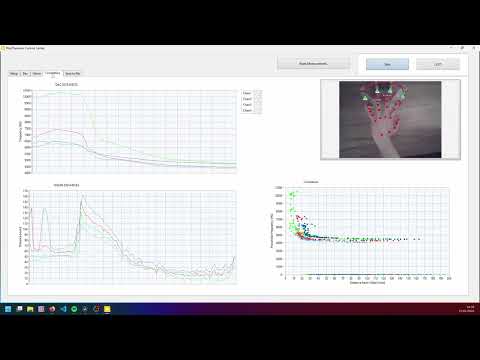](https://www.youtube.com/watch?v=Dlh9XJ3kCwI)
---
# Application Window Description
## Setup
- **Proximitor Parameters**: Configure the cDAQ channels, sample rate, and buffer size. Default values may not be optimal, so it's recommended to adjust them.
- **Output Sound Format**: Select your audio output device.
- **Proximitor Scaling**: Each proximitor can be independently scaled to match your hardware and heterodyne generator.
- **Scaling Offset**: Add an offset to proximitor measurements.
## Dac
Displays a measurement graph for testing purposes.
## Vision
- **Camera Source**: Select the camera input.
- **Test Button**: Test the video feed from the camera.
- **Antenna Selector**: Choose antenna positions by clicking on the video pane.
- **Reverse Fingers**: Adjust the hand direction.
- **Ant Distance**: Calibrate the real distance (in mm) by the average video distance (in px) to calculate real distances between fingers and antennas.
- **FPS**: Displays the frames per second.
## Correlation
Displays a correlation plot for testing purposes.
## File Saver
- **File Save Button**: Start and stop data acquisition to a file.
- **File Path**: Select the TDMS file path.
---
# Contributions
If you encounter any issues, feel free to open a pull request and describe the problem.