https://github.com/mid9tech/asset-management-wiki
Wiki of asset management
https://github.com/mid9tech/asset-management-wiki
Last synced: 6 months ago
JSON representation
Wiki of asset management
- Host: GitHub
- URL: https://github.com/mid9tech/asset-management-wiki
- Owner: mid9tech
- Created: 2024-07-11T03:22:22.000Z (almost 2 years ago)
- Default Branch: wikiMaster
- Last Pushed: 2024-07-18T00:53:47.000Z (almost 2 years ago)
- Last Synced: 2025-02-05T03:27:36.917Z (over 1 year ago)
- Size: 3.46 MB
- Stars: 2
- Watchers: 0
- Forks: 0
- Open Issues: 0
-
Metadata Files:
- Readme: README.md
Awesome Lists containing this project
README
## Hi there 👋, welcome to our project
## Overview
The asset management application is designed to help organizations manage their assets efficiently. It comprises a front-end built with Next.js, a back-end powered by NestJS, and utilizes various services such as Docker, Azure Container Registry, and Prisma for database management. The entire system is deployed and maintained using Azure services to ensure scalability, security, and reliability.
## Diagram
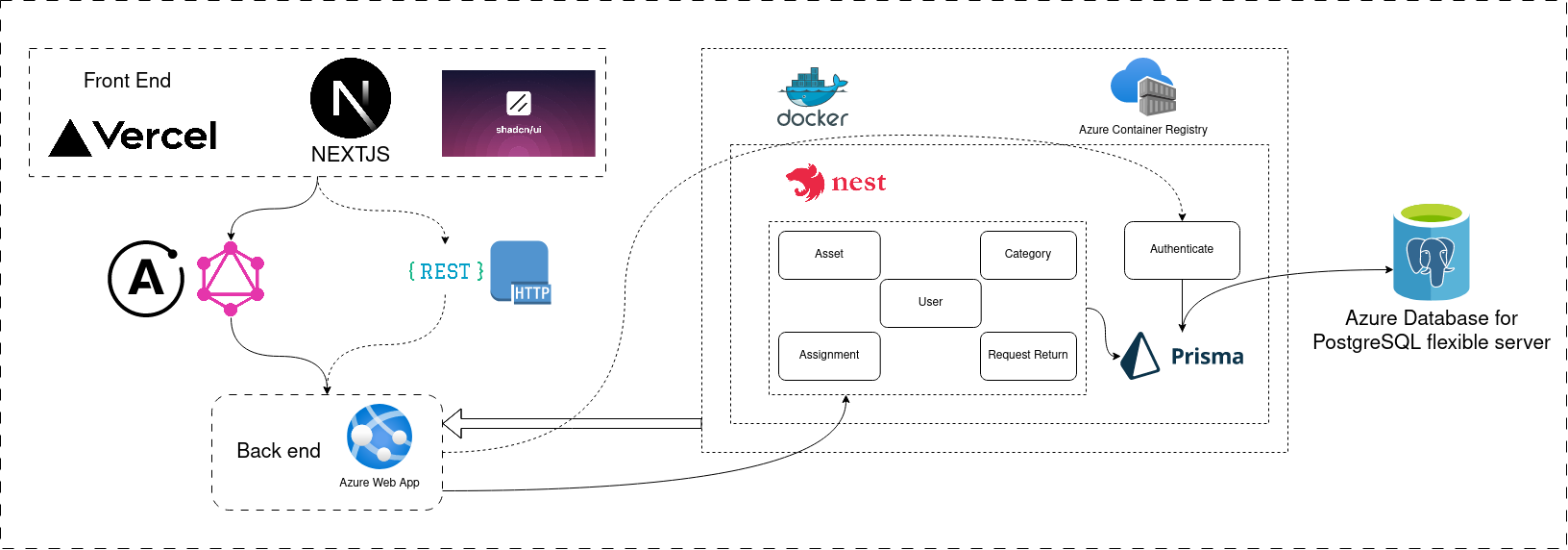
## Detail Information
### Front End
#### Components:
1. **Next.js:**
- **Description:** Next.js is a React framework that enables server-side rendering and generating static websites for React-based web applications. It offers an excellent developer experience with features like automatic code splitting, simple client-side routing, and built-in CSS support.
- **Setup:**
- **Installation:** Install Next.js using npm or yarn.
```sh
npx create-next-app@latest asset-management-fe
# or
yarn create next-app asset-management-fe
```
- **Development:** Implement the application components, pages, and APIs using React and Next.js features.
- **Tools & Technologies:** JavaScript/TypeScript, React, Next.js, CSS Modules, Shadcn/UI.
2. **Shadcn/UI:**
- **Description:** Shadcn/UI is a component library used for building a consistent and cohesive user interface.
- **Setup:**
- **Installation:** Add Shadcn/UI to the Next.js project.
```sh
npm install shadcn
# or
yarn add shadcn
```
- **Development:** Use Shadcn/UI components to build the UI of the asset management application.
- **Tools & Technologies:** JavaScript/TypeScript, Shadcn/UI.
3. **Vercel:**
- **Description:** Vercel is a platform for frontend frameworks and static sites, providing hosting and serverless functions. It integrates seamlessly with Next.js, enabling continuous deployment and performance optimizations.
- **Setup:**
- **Deployment:** Connect the GitHub repository to Vercel for automatic deployments on every push to the main branch.
- **Configuration:** Set environment variables and build settings in the Vercel dashboard.
- **Tools & Technologies:** Vercel platform.
### Back End
#### Components:
1. **NestJS:**
- **Description:** NestJS is a progressive Node.js framework for building efficient and scalable server-side applications. It uses TypeScript by default and supports extensive features like dependency injection, modular architecture, and a powerful CLI.
- **Setup:**
- **Installation:** Install NestJS CLI and create a new project.
```sh
npm i -g @nestjs/cli
nest new asset-management-be
```
- **Development:** Develop the backend services, including asset, category, assignment, and request return modules.
- **Tools & Technologies:** TypeScript, NestJS, REST API, GraphQL.
2. **Docker:**
- **Description:** Docker is a platform for developing, shipping, and running applications in containers. Containers allow developers to package an application with all its dependencies and run it consistently across different environments.
- **Setup:**
- **Dockerfile:** Create a Dockerfile to containerize the NestJS application.
- **Docker Compose:** Use Docker Compose to manage multi-container Docker applications.
- **Tools & Technologies:** Docker, Docker Compose.
3. **Azure Container Registry:**
- **Description:** Azure Container Registry (ACR) is a managed Docker container registry service used for storing and managing private Docker container images.
- **Setup:**
- **Push Images:** Build and push Docker images to ACR.
```sh
az acr build --registry --image .
```
- **Authentication:** Use Azure Active Directory or service principals to authenticate and manage access to ACR.
- **Tools & Technologies:** Azure CLI, Azure Container Registry.
4. **Azure Web App:**
- **Description:** Azure Web App is a fully managed platform for building, deploying, and scaling web apps. It supports various languages and frameworks and integrates with DevOps pipelines for continuous deployment.
- **Setup:**
- **Deployment:** Deploy the Docker container from ACR to Azure Web App.
```sh
az webapp create --name --resource-group --plan --deployment-container-image-name .azurecr.io/:
```
- **Configuration:** Set environment variables and configure application settings in the Azure portal.
- **Tools & Technologies:** Azure CLI, Azure Web App.
5. **Prisma:**
- **Description:** Prisma is an ORM (Object-Relational Mapping) tool that simplifies database access, providing type-safe queries and migrations. It supports various databases, including PostgreSQL.
- **Setup:**
- **Installation:** Install Prisma and initialize it in the NestJS project.
```sh
npm install @prisma/client
npx prisma init
```
- **Development:** Define the database schema, generate Prisma Client, and implement database operations.
- **Tools & Technologies:** TypeScript, Prisma, PostgreSQL.
6. **Azure Database for PostgreSQL:**
- **Description:** Azure Database for PostgreSQL is a managed database service providing enterprise-grade features such as high availability, security, and automated backups.
- **Setup:**
- **Provisioning:** Create a PostgreSQL server and database in the Azure portal.
- **Connection:** Configure Prisma to connect to the Azure PostgreSQL database using connection strings.
```prisma
datasource db {
provider = "postgresql"
url = env("DATABASE_URL")
}
```
- **Tools & Technologies:** Azure Portal, PostgreSQL.
### Communication
1. **GraphQL:**
- **Description:** GraphQL is a query language for APIs that allows clients to request specific data, making APIs more flexible and efficient.
- **Setup:**
- **Integration:** Integrate GraphQL with NestJS using `@nestjs/graphql` package.
```sh
npm install @nestjs/graphql graphql-tools graphql
```
- **Schema Definition:** Define GraphQL schemas and resolvers in the NestJS project.
- **Tools & Technologies:** TypeScript, NestJS, GraphQL.
2. **REST API:**
- **Description:** REST (Representational State Transfer) is an architectural style for designing networked applications. It uses standard HTTP methods and status codes, making it easy to implement and use.
- **Setup:**
- **Controllers:** Implement RESTful endpoints in NestJS using controllers and services.
- **Tools & Technologies:** TypeScript, NestJS, REST API.
# INFRASTRUCTURE
## 1. Project Structure
### Back-end Project Structure
```
src/
├── domains/
│ ├── assets/
│ ├── assignments/
│ ├── request-returns/
│ ├── users/
├── services/
│ └── prisma/
├── shared/
│ ├── constants/
│ ├── enums/
│ ├── exceptions/
│ ├── generics/
│ ├── helpers/
├── app.module.ts
├── main.ts
└── schema.graphql
```
[Explanation](https://github.com/The-Middle-Nine/Wiki/blob/wikiMaster/Documents/Infrastructure/Project-Structure/Backend.md)
### Front-end Project Structure
```
src/
├── app/
│ ├── asset/
│ ├── assignment/
│ ├── home/
│ ├── report/
│ ├── request-returning/
│ ├── user/
│ ├── layout.tsx
│ └── page.tsx
├── components/
├── libs/
├── providers/
├── services/
├── styles/
└── utils/
```
[Explanation](https://github.com/The-Middle-Nine/Wiki/blob/wikiMaster/Documents/Infrastructure/Project-Structure/Frontend.md)
## 2. CI & CD
**Tool:** Azure DevOps
**Pipeline Configuration:** Azure Pipelines
---
## Front End Pipelines
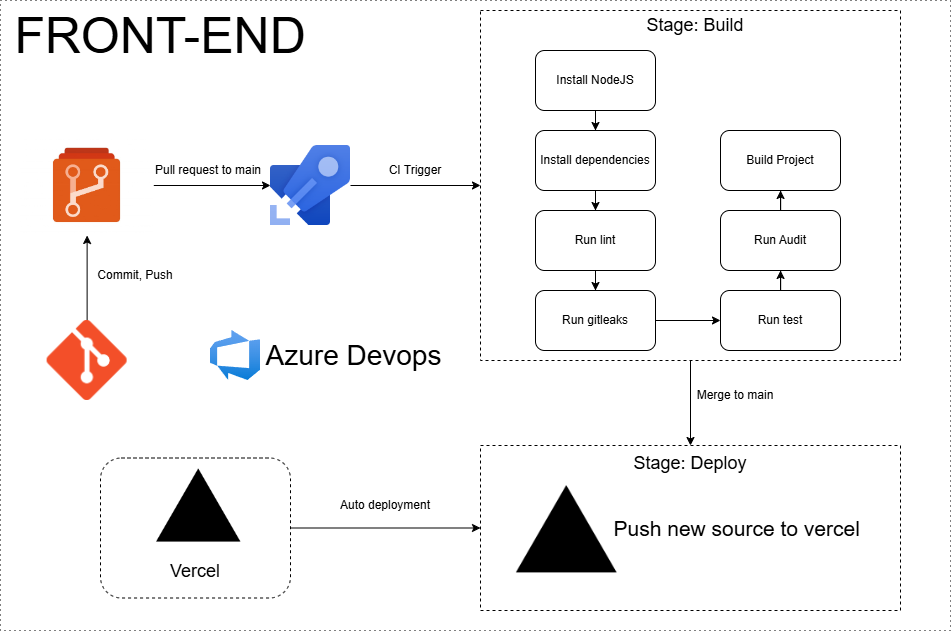
## Backend Pipelines
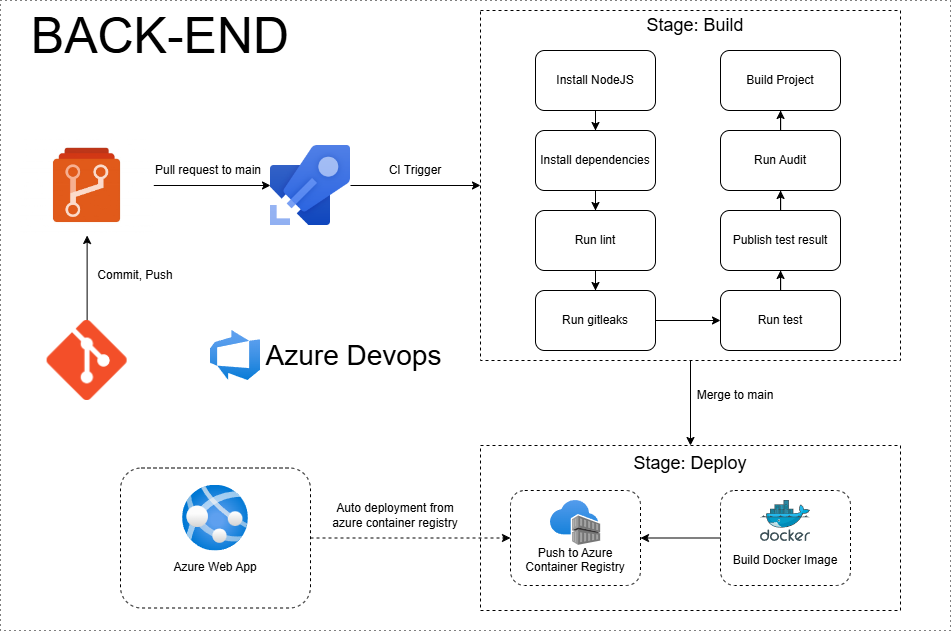
[Explanation](https://github.com/The-Middle-Nine/Wiki/blob/wikiMaster/Documents/Infrastructure/CI%26CD.md)
## 3. Database
**Service**
- Azure PostgreSQL Flexible Server
**Diagram**
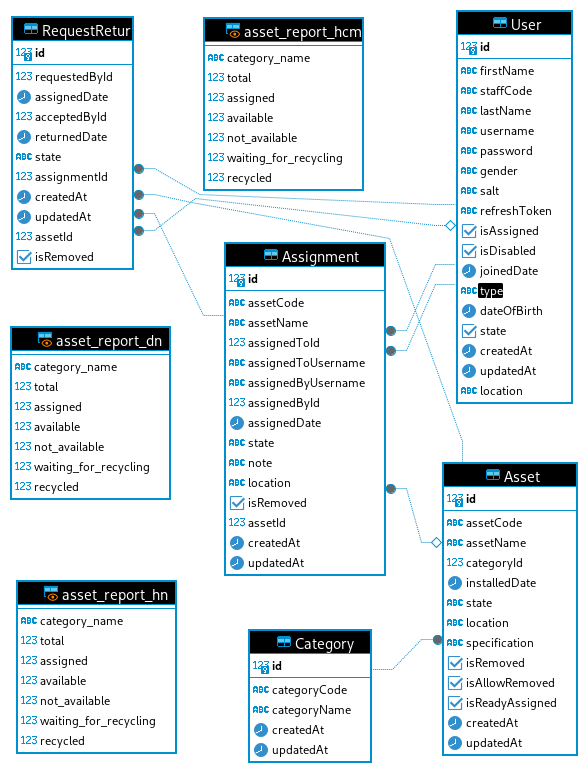
[Entities, Attributes and Relationships Explanation ](https://github.com/The-Middle-Nine/Wiki/blob/wikiMaster/Documents/Infrastructure/Database.md)
## 4. Flow Chart
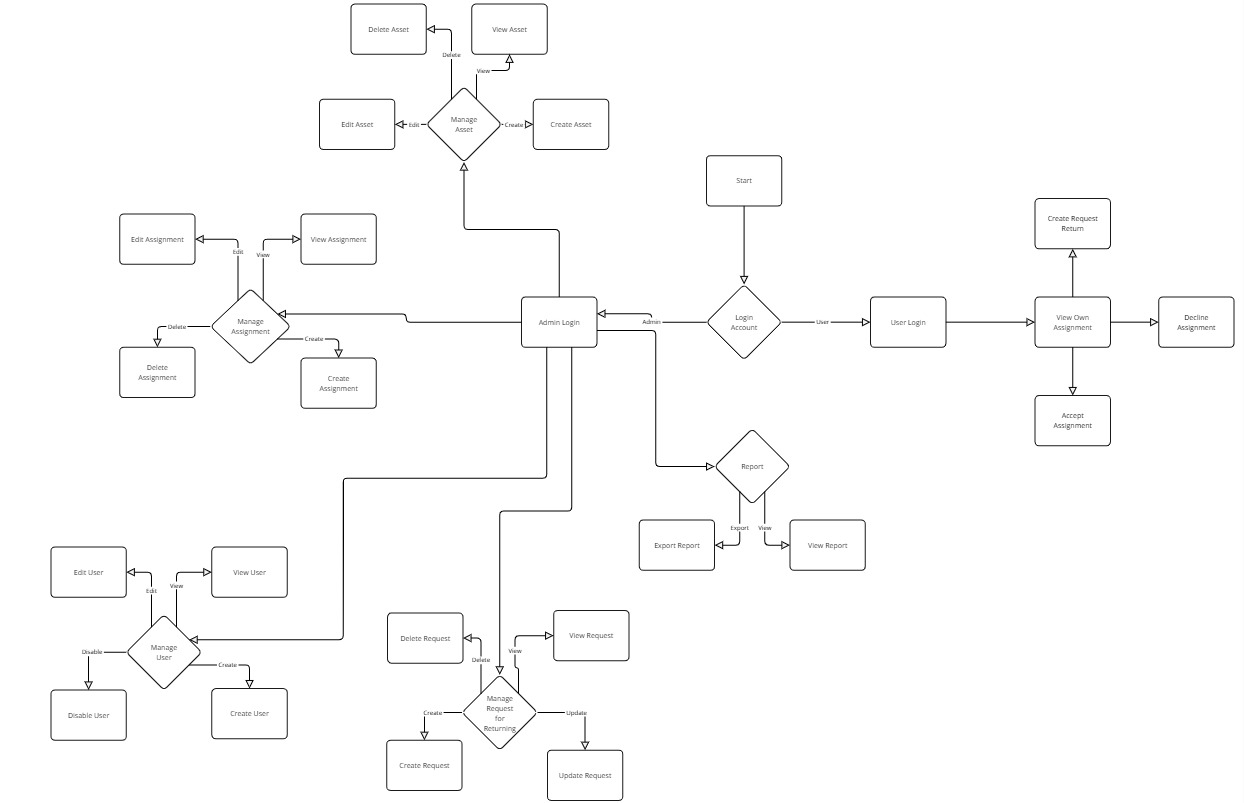
[Flowchart Explanation: Asset Management System](https://github.com/The-Middle-Nine/Wiki/blob/wikiMaster/Documents/Infrastructure/Flow-Chart.md)
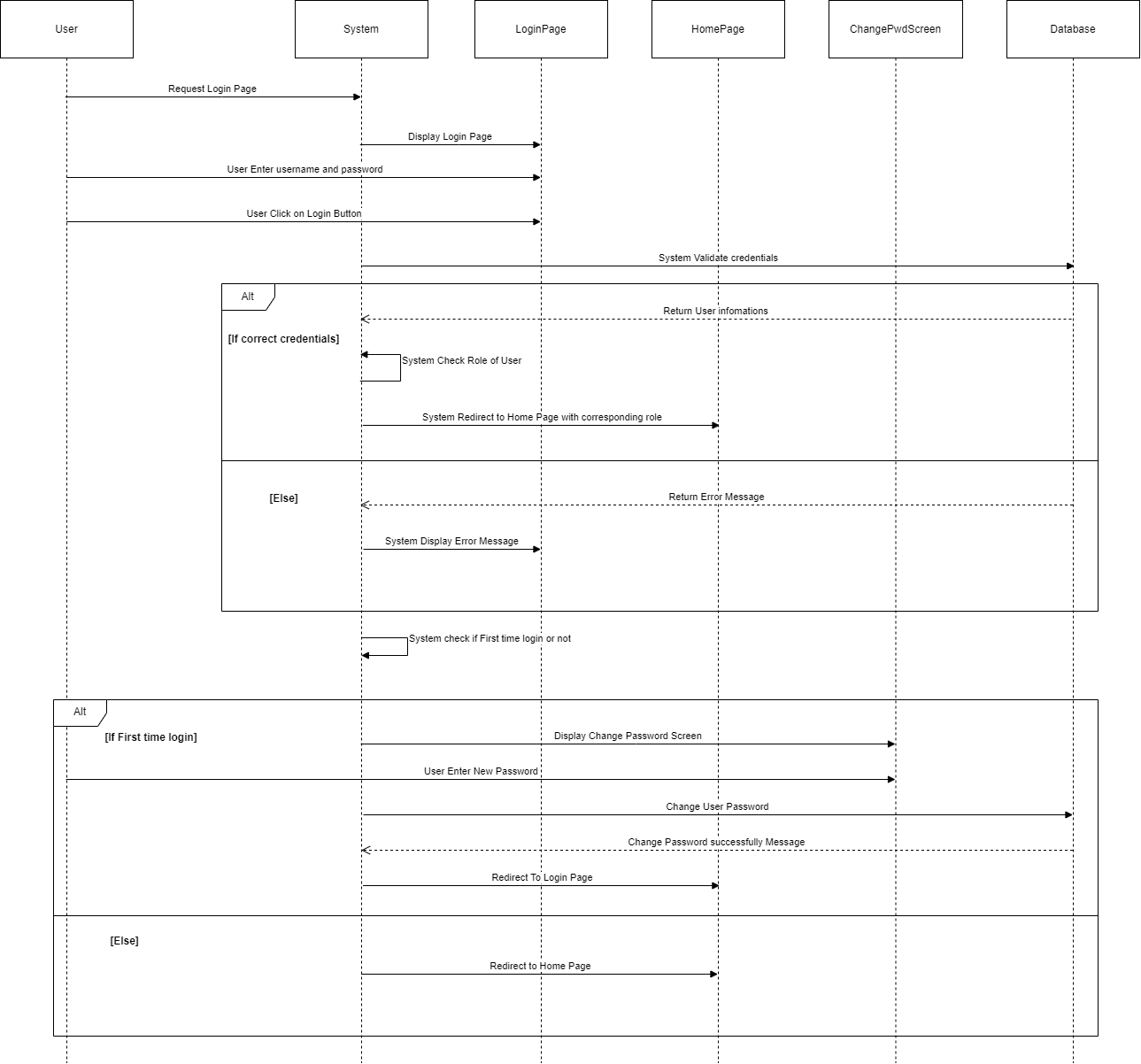
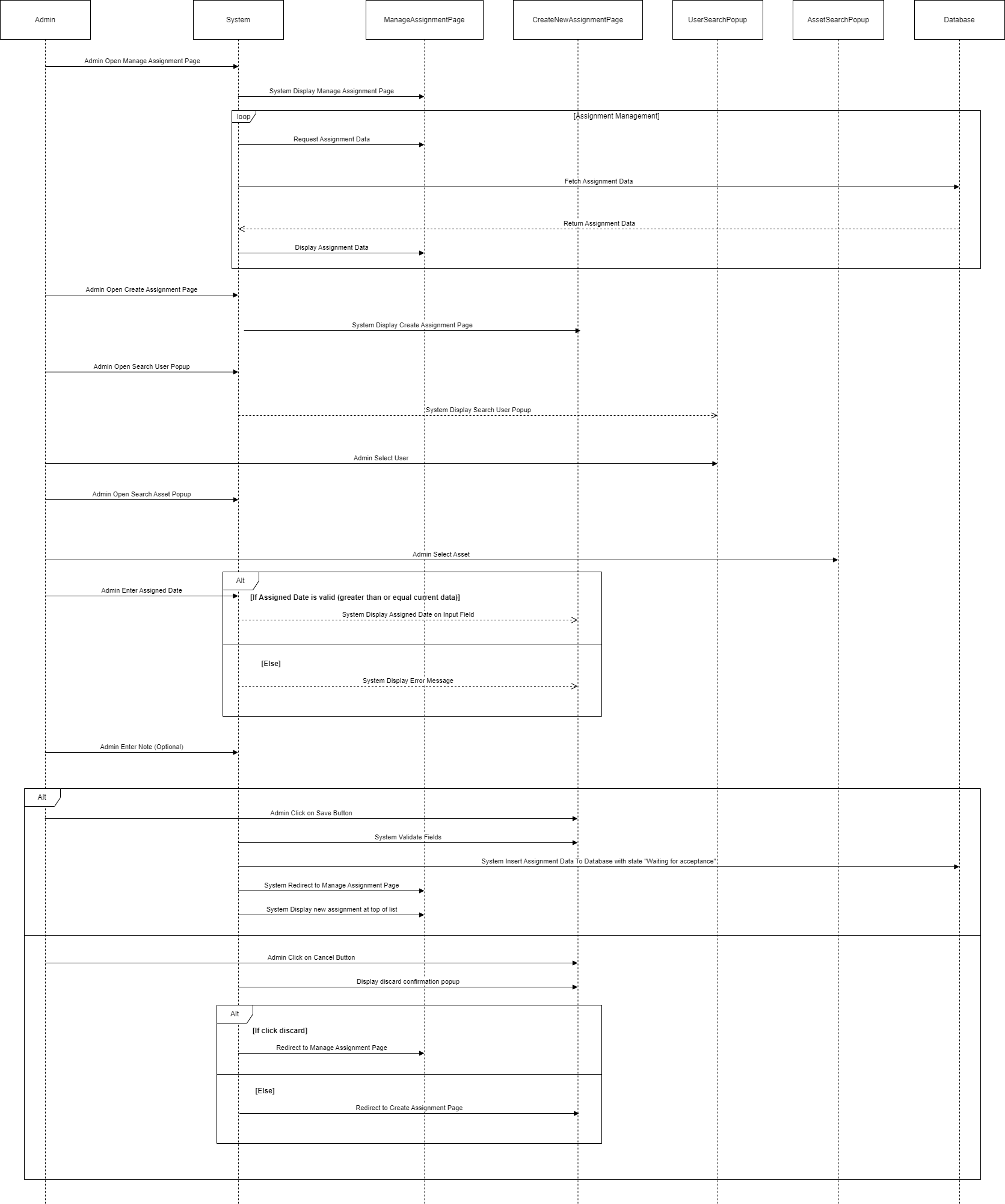
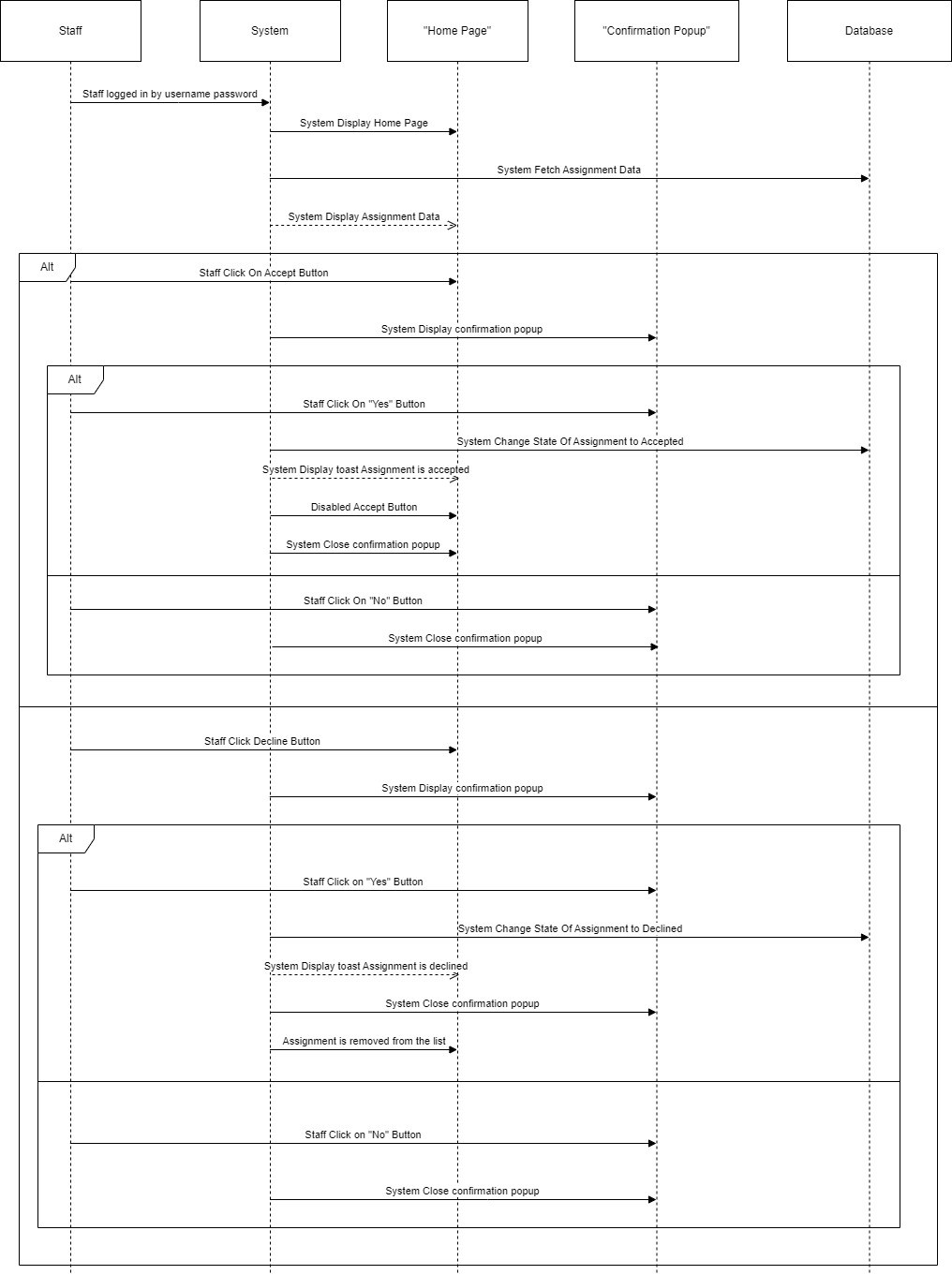
## 5. Sequence Diagram
**Login Flow**
**Assignment Management Flow**
**Staff Response to His/Her Assignment Flow**
**Create Request For Return Asset Flow**
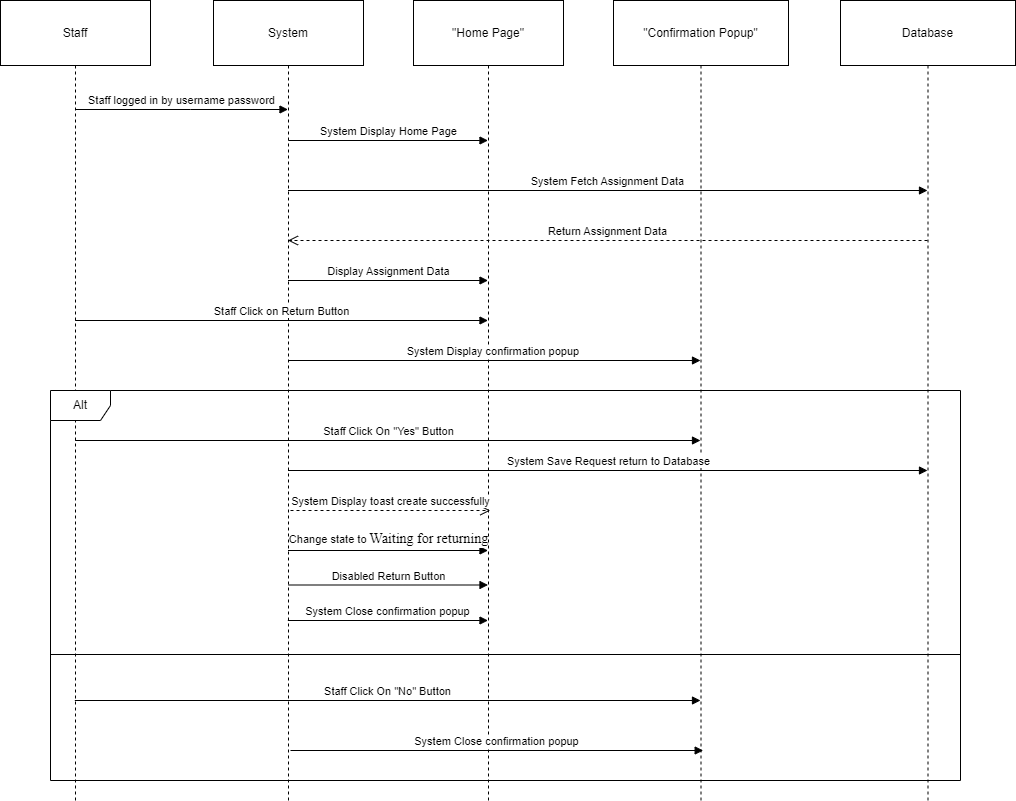
**Request for Return Completion Flow**
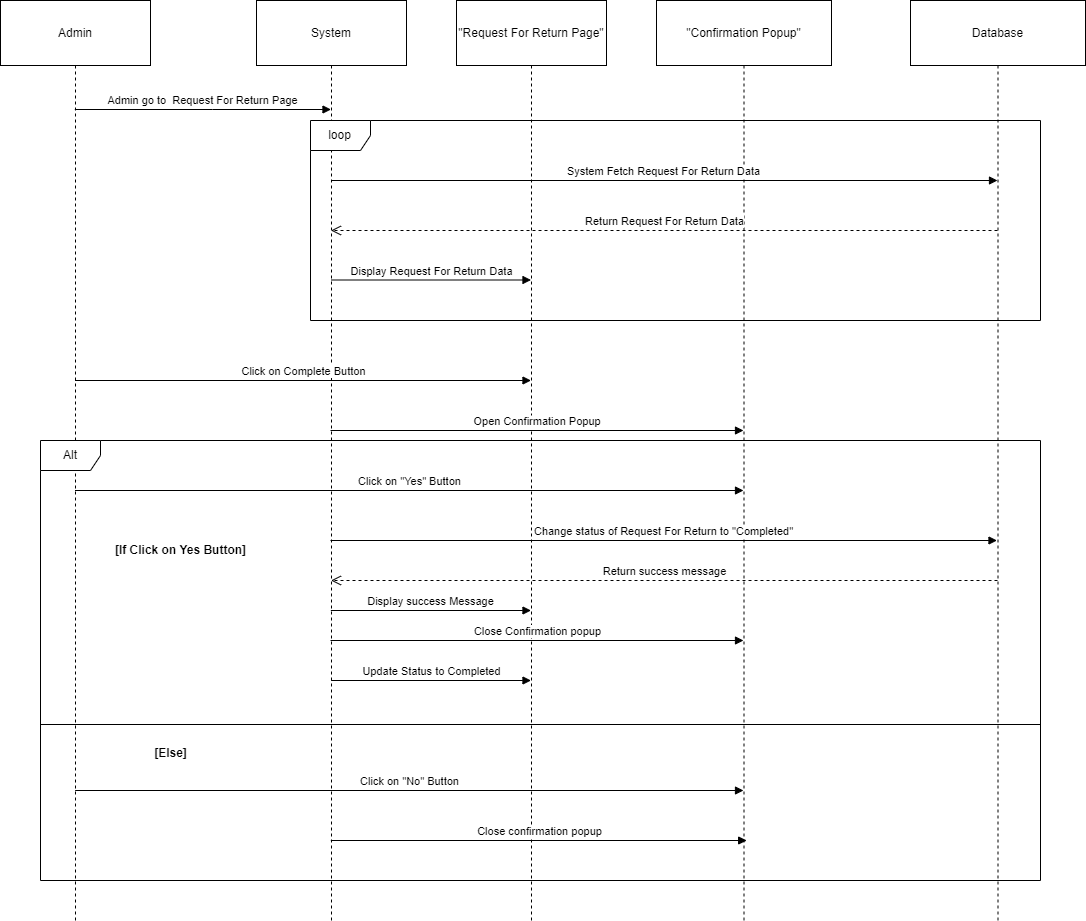
[Diagrams Explanation](https://github.com/The-Middle-Nine/Wiki/blob/wikiMaster/Documents/Infrastructure/Sequence-Diagram.md)
## 6. State Diagram
**Asset Scenarios and State Transitions**
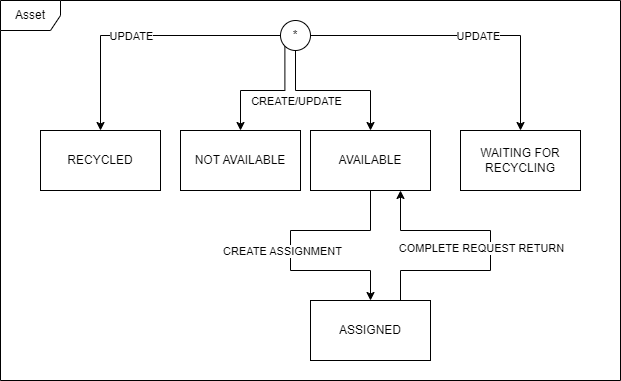
**Assignment Scenarios and State Transitions**
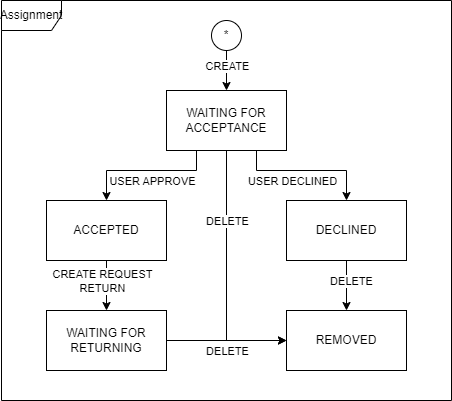
**Request Return Scenarios and State Transitions**
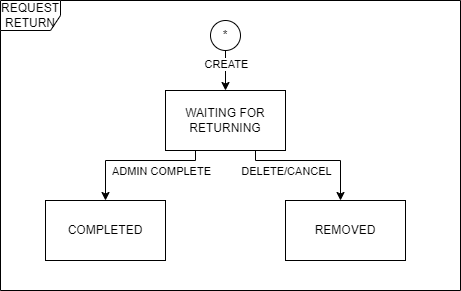
[Diagrams Explanation](https://github.com/the-middle-nine/Wiki/blob/wikiMaster/Documents/Infrastructure/State-Diagram.md)
## 7. Usecase Diagram
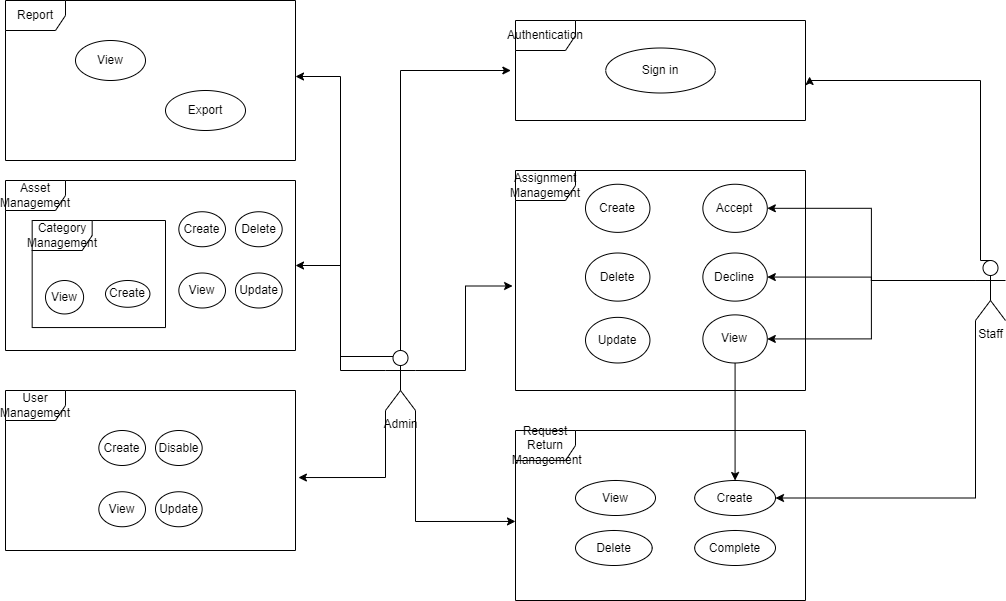
[Diagrams Explanation](https://github.com/the-middle-nine/Wiki/blob/wikiMaster/Documents/Infrastructure/Use-case-Diagram.md)