https://github.com/mightyhorst/nodejs-wod
NodeJS Workout of the Day
https://github.com/mightyhorst/nodejs-wod
babel expressjs nodejs
Last synced: 2 months ago
JSON representation
NodeJS Workout of the Day
- Host: GitHub
- URL: https://github.com/mightyhorst/nodejs-wod
- Owner: mightyhorst
- Created: 2019-02-14T15:32:50.000Z (over 7 years ago)
- Default Branch: master
- Last Pushed: 2019-02-17T23:22:55.000Z (over 7 years ago)
- Last Synced: 2025-10-22T00:39:19.758Z (8 months ago)
- Topics: babel, expressjs, nodejs
- Language: JavaScript
- Size: 126 KB
- Stars: 0
- Watchers: 1
- Forks: 0
- Open Issues: 0
-
Metadata Files:
- Readme: README.md
Awesome Lists containing this project
README
[](https://travis-ci.org/mitni455/nodejs-wod)
# Quick Links
* [Online Demo](http://api.doe.kitset.io/api/v1/logins?start=2001-11-12&end=2020-01-02)
* [Swagger API Docs](http://api.doe.kitset.io/api-docs)
* [Spinakker pipelines (unsecured)](http://spinnaker-deck.doe.kitset.io/#/applications/wod/clusters)
* [Traefik routes (unsecured)](http://dashboard.doe.kitset.io/dashboard/)
# Quick Start
Install and run
1. Clone: `git clone https://github.com/mitni455/nodejs-wod.git`
2. Install dependencies: `npm i`
3. Start elasticsearch: `docker run -d --name elasticsearch -p 9200:9200 -p 9300:9300 -e "discovery.type=single-node" elasticsearch:6.6.0`
4. Run tests
* `npm test` or
* `npm run test:unit`
* `npm run test:api`
5. Serve locally: `npm run dev`
6. Open `http://localhost:10010/api-docs`
or with docker:
1. Start elasticsearch: `docker run -d --name elasticsearch -p 9200:9200 -p 9300:9300 -e "discovery.type=single-node" elasticsearch:6.6.0`
2. Build image: `docker image build -t nodejs-wod .`
3. Start app: `docker run -p 8080:10010 --name nodejs-wod nodejs-wod`
4. Open `http://localhost:8080/api-docs`
# Architecture
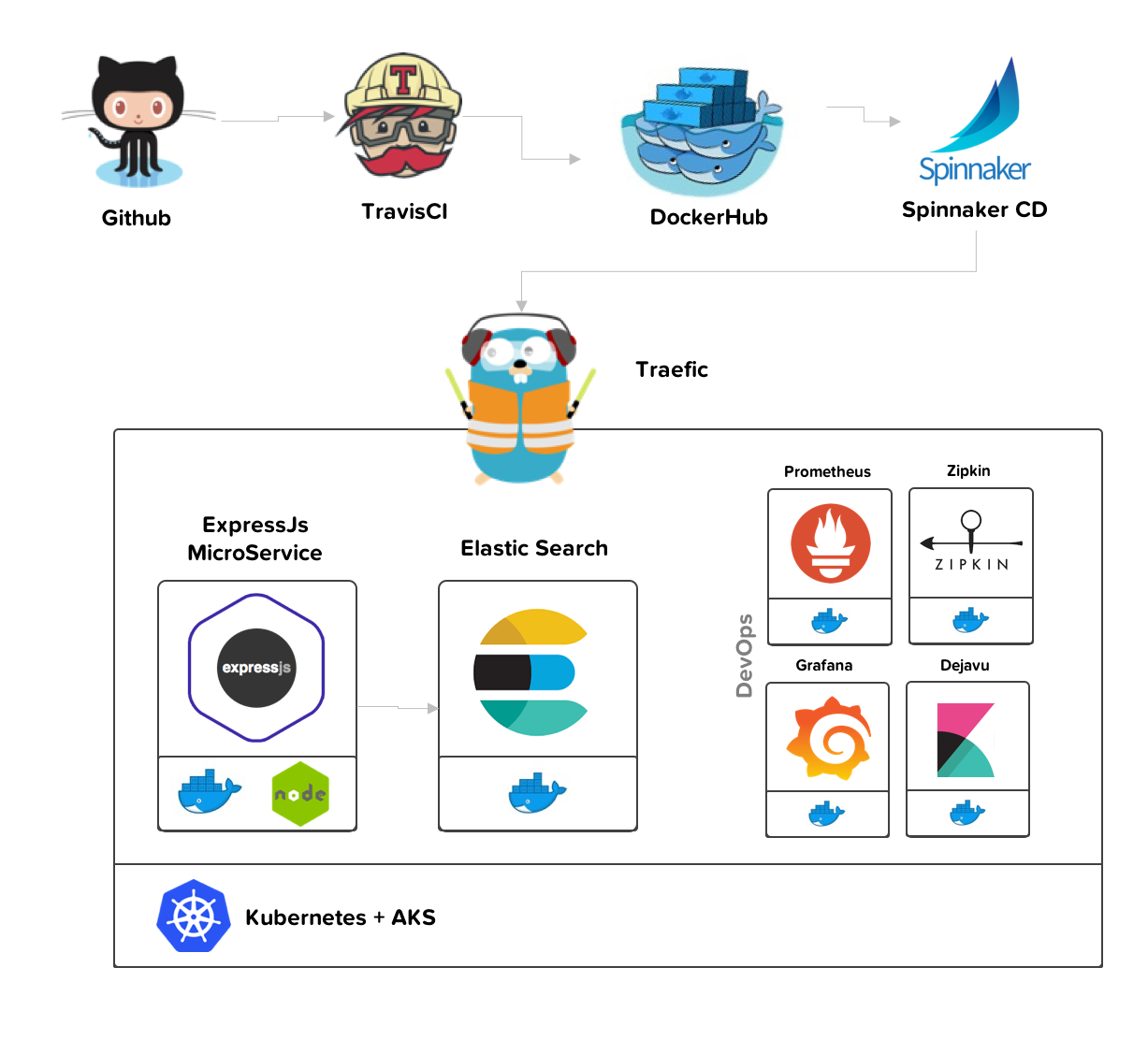
#### Application Architecture
| Application | Description |
| -------- | ----------- |
| `ExpressJs` | The app is served by *ExpressJs*. |
| `nginx` | *@todo* I usually use nginx to load balance and reverse proxy (behind traefik) |
| `Docker` | *Docker* as a container |
| `Swagger` | API lifecycle design and documentation |
| `Mocha` | Unit Tests |
| `SuperTest` | API Tests |
| `Docker Compose` | Dev env for API Tests |
| `npm` | Package Manager |
#### Platform Architecture
| Platform | Description |
| -------- | ----------- |
| `Traefik` | Reverse proxy engine for Kubernetes |
| `ElasticSearch` | Open Source Search & Analytics |
| `Zipkin` | distributed tracing system. |
| `Prometheus` | Open source monitoring system |
| `Grafana` | Data visualization & Monitoring |
| `Kibana` | Web UI for Elasticsearch |
#### Infra Architecture
| Platform | Description |
| -------- | ----------- |
| `Docker` | Containers |
| `Kubernetes` | Container Orchestration |
| `AKS` | Container services for Kubernetes on Azure |
#### CI/CD Architecture
| CI/CD | Description |
| -------- | ----------- |
| `Travis CI` | Continuous Integration and Deployment |
| `DockerHub` | Docker hub is used to host Docker images |
| `Helm` | Kubernetes Package Manager |
| `Spinnaker` | CD for Kubernetes |
Here are the [Spinakker pipelines (unsecured)](http://spinnaker-deck.doe.kitset.io/#/applications/wod/clusters)

Here are the [Traefik routes](http://dashboard.doe.kitset.io/dashboard/)

# Development Process
| Sprint | Description |
| ----------- | ----------- |
| Plan | `Plan > Architecture > Analysis` |
| Development | `User Stories > Test > Code > Deploy ` |
| SCRUM | Time | Phase Description |
| ------| ---- | ----------------- |
| `Plan` | 4 hours | Refine and reorder `product backlog` and `planning poker` |
| `Standup` | 20 mins | Refine and reorder `product backlog` and `planning poker` |
| `Review` | 1 hour | Refine and reorder `product backlog` and `planning poker` |
| `Retrospective` | 30 mins | Refine and reorder `product backlog` and `planning poker` |
| User Story | Lifecycle |
| --------- | ------- |
| `User Story` | Create `issue` for each `user story` |
| `Failing Test` | Design e2e test and unit test that fail |
| `Code` | Create new `branch` for each user story. |
| `Passing Test` | Write code to pass tests |
| `Commit` | Refactor to pass all tests and `pull request` for merge to `master` branch |
| `Test Env` | Push to test environment |
| `Staging` | If tests pass, push to staging |
| `Review` | Business owner to review then push to `production` branch |
| `Production` | If passes tests, push to production |
| `Retrospective` | Collect feedback for sprint retrospective or add to product backlog |
### 0. Analysis
###### Sequence Diagram

| MVC | Library | Description |
| -------- | ----------- | --- |
| `Routes` | `Swagger` | Swagger Middleware to update docs as we go |
| `Controllers` | `ExpressJs` | ExpressJs controllers for handling endpoints |
| `Middleware` | `ExpressJs` | Used for CORs and error handling |
| `Services` | | Used for *BLL* and *DAL* |
| `Models` | | Used as a simple validation layer. We could use *ZSchema* |
| `Contracts` | | Strongly typed requests |
| `Responses` | | Strongly typed response. Typescript will improve this. |
| `Inversion of Control` | `InversifyJs` | Not used here, but used for dependency injection, esp. for testing |
| `Validation` | `ZSchema` | Swagger validation. |
| `Errors` | | Strongly typed errors to aid error-driven-development. |
###### Class Diagram
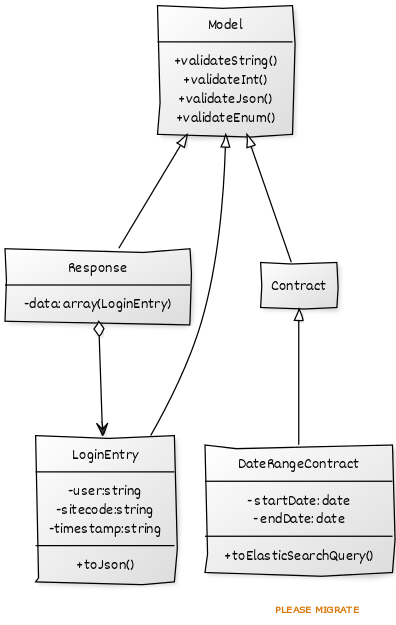
| MVC | class | desc |
| --- | --- | --- |
| `controller` | `SearchController` | handle api requests and response to search the elastic search wod |
| `service` | `ElasticSearchService` | facade for the elastic search *DAL* |
| `models` | `Model` | simple validation paradigm |
| | `LoginEntry` | represnts strongly typed login entry to be returned to the user |
| `contract` | `DateRangeContract` | represnts strongly typed and validated date range request |
| `errors` | *many* | represents validation, model, platform, connectivity, and type errors to name a few |
### 1. Setup
Setup Github, Dockerhub and CI/CD pipeline
### 2. Init
Initialize the libraries and dependencies we will use and setup babel:
```
*ES6 Support*
* babel
*env*
* dotenv
*Swagger*
* Swagger Middleware
*Api*
* Express
*testing*
* Mocha
* Chai
* SuperTest
* node-mocks-http
* mockery
*platforms*
* elasticsearch
```
*Steps*
* `2.1` `npm init`
* `2.2` Update `package.json` and run `npm i`
* `2.3` Create `npm start, test and run` scripts
### 3. Middleware + Errors
This is common stuff we will use:
*Errors*
```
* HttpError
* ConfigError
* DatabaseError
* ValidationError
* ZschemaValidationError
* ModelError
* ModelNotFoundError
* ModelValidationError
```
*Middleware*
```
* cors
* not found error
* error handling
```
*Tests*
* Unit test for error handling
*Steps*
* `3.1.` Run `mocha --require babel-polyfill --require babel-register test/unit/middleware`

### 4. Models and Contracts
*Models*
```
* Model - super class for validation
* LoginEntry - represnts the login entry to return from the service
```
*Contracts*
```
* DateRangeContract - strongly typed and validated contract to make sure we only send valid queries to elastic search
```
*Steps*
* `4.1.` Run `mocha --require babel-polyfill --require babel-register test/unit/models`

### 5. Services
*Services*
```
* elasticsearch - elastic search js SDK
* ElasticSearchService - testable facade for valid querying of the DAL
```
*Steps*
* `4.1.` Run `mocha --require babel-polyfill --require babel-register test/unit/services`

### 5. Controllers
*Unit - tests*
```
* search
```
*API - tests*
```
* stand up docker compose then run
```
*Controllers*
```
* search - performs the search
```
*Steps*
* `4.1.` Run unit tests: `mocha --require babel-polyfill --require babel-register test/unit/controllers`
* `4.2.` Run API tests: `npm run test:api`

### 5. Deploy
Setup
* Environments
* TravisCI
* Helm charts
* Dockerhub
* Spinnaker pipline
* Kubernetes
* write scripts to help deploy
* update npm run scripts
# Key Decisions
### Object Orientated vs Functional Programming
* `OO - MVVM/MVC` - controllers, services, models, errors...
* `FP` - transforms, value streams, debouncing, ect
### TypeScript vs Babel ES6
* `ES6` - for simplicity
# NodeJS Workout of the Day #
This workout is designed to give you a feel for the type of work you will be undertaking, as well as test your knowledge
of creating backend API's that interact with Elasticsearch.
## Pre-requisites ##
To perform this exercise, you will need an instance of elasticsearch running. You can run up a docker container with
the following command:
$ docker run -d --name elasticsearch -p 9200:9200 -p 9300:9300 -e "discovery.type=single-node" elasticsearch:6.6.0
Also, you will need some demo data. We have provided some pre-written JSON documents to be inserted into the elastic
index via the [Bulk API](https://www.elastic.co/guide/en/elasticsearch/reference/current/docs-bulk.html).
To insert those documents you can use something like curl for example:
$ curl -s -H "Content-Type: application/x-ndjson" -XPOST localhost:9200/wod/_bulk --data-binary "@wod.ndjson"
## Objectives ##
We want to create a NodeJS application to serve an API that exposes the elasticsearch data in a particular way.
You can use any backend framework you like to complete the tasks, as long as it runs on NodeJS and queries elasticsearch
using the query parameters given. The API must adhere to the requirements in the section below, titled "API Design".
The project should include a `README.md` file which explains how to install and run it.
### API Design ###
- The API must be accessible at `/api/v1/history`. For the purposes of this exercise there is no authentication.
- The API should accept a query parameter for starting date called `start`, which accepts an ISO 8601 "Date and time".
The records returned should only have a timestamp equal to or greater than the datetime indicated by `start`.
- The API should accept a query parameter for ending date called `end`, which accepts an ISO 8601 "Date and time".
The records returned should only have a timestamp equal to or less than the datetime indicated by `end`.
- The API should return a list of documents in the format described below
**Example Response**
GET /api/v1/logins?start=...&end=...
Content-Type: application/json;charset=utf8
{
"data": [
{
"user": "user1",
"sitecode": 9014,
"timestamp": "2019-02-11T00:00:00Z"
}
]
}
## Submissions ##
Please send a link to the Git repository containing your solution for this project to:
COR0916ITInfraservPlatformMonitoring@det.nsw.edu.au