https://github.com/mike-north/qunit-events
Event-driven Plugins for Qunit
https://github.com/mike-north/qunit-events
javascript learning qunit testing
Last synced: 5 months ago
JSON representation
Event-driven Plugins for Qunit
- Host: GitHub
- URL: https://github.com/mike-north/qunit-events
- Owner: mike-north
- License: mit
- Created: 2017-02-05T04:27:18.000Z (over 9 years ago)
- Default Branch: master
- Last Pushed: 2018-08-03T03:57:05.000Z (almost 8 years ago)
- Last Synced: 2026-01-29T21:46:36.015Z (5 months ago)
- Topics: javascript, learning, qunit, testing
- Language: JavaScript
- Homepage:
- Size: 27.3 KB
- Stars: 0
- Watchers: 1
- Forks: 1
- Open Issues: 4
-
Metadata Files:
- Readme: README.markdown
- License: LICENSE.markdown
Awesome Lists containing this project
README
# QUnit Events [](https://travis-ci.org/mike-north/qunit-events)
[](https://greenkeeper.io/)
A pluggable, event-driven extension to [QUnit](https://qunitjs.com)
## Why might you want to use this?
Anytime you want QUnit to communicate test results and status outside of the test runner’s frame. This might include:
* Showing test results along side your application as you develop
* Communicating test results to an instructor’s machine in a classroom setting
* Agglomerating paralleled tests into a single status UI
## How does this work
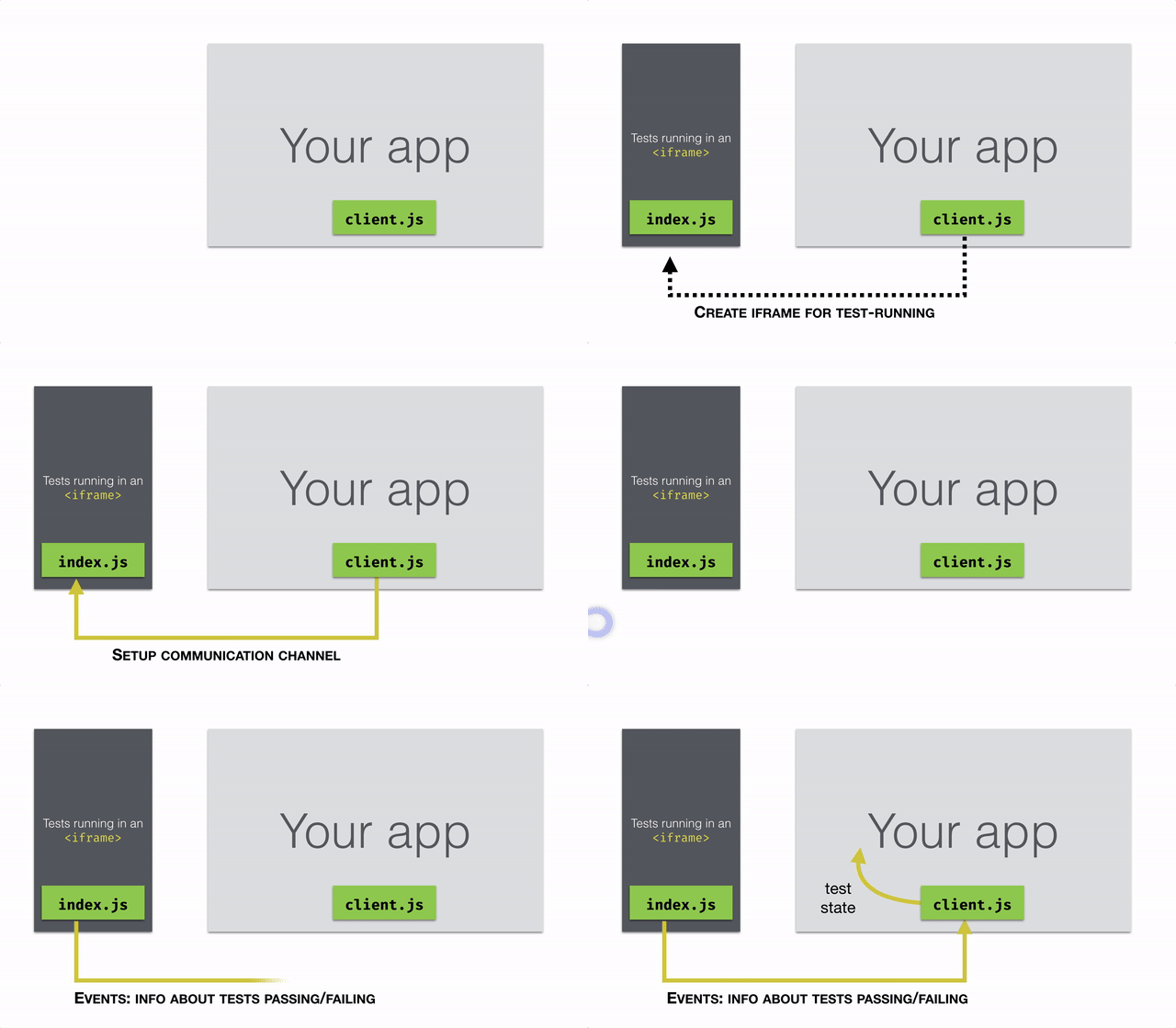
There are two worlds we need to worry about:
* *Test World* where qunit runs all of your tests
* *App World* where we want to see the results of your tests
This library embeds a tiny hidden test world in your app world, by running your qunit tests in an iframe. While in the app world, you will get notifications of what's happening in the test world by way of events.
This library is comprised of two halves
* *index.js* Adds some features to QUnit, allowing it to emit events that may be consumed through postMessage or other mechanisms
* *client.js* Makes it easy to listen the test world's events, from within the app world.
## Setting it up
* Make sure index.js is included wherever you have QUnit present
* Make sure client.js is included wherever you wish to receive test events (and create the iframe for test-running)
* Create and initialize a QUnitEventsClient in your application
##### In the App World
```js
var client = new QUnitEventsClient({
testUrl: 'http://localhost:4200/tests' // test-runner URL
});
client.registerChangeListener(function(testState) {
// This function will be invoked whenever test state changes
// (i.e., a test passes or fails)
});
// We'll choose a DOM element inside which to place the test-runner frame
var $elem = $('.parent-to-create-iframe-in');
// Now, we'll create the iframe. Once it's set up, events will start firing
client.setupTestFrame($elem);
```
Support for additional features is in the works, including WebRTC and WebSocket support for classroom use.