https://github.com/mikebionic/sapapi-core
E-commerce application based on Sap System running on Python REST-Api
https://github.com/mikebionic/sapapi-core
ecommerce flask javascript marketplace nginx online python restapi sqlalchemy store templates website
Last synced: about 2 months ago
JSON representation
E-commerce application based on Sap System running on Python REST-Api
- Host: GitHub
- URL: https://github.com/mikebionic/sapapi-core
- Owner: mikebionic
- License: apache-2.0
- Created: 2020-05-10T19:30:13.000Z (about 6 years ago)
- Default Branch: master
- Last Pushed: 2025-09-04T15:30:17.000Z (10 months ago)
- Last Synced: 2025-09-16T01:48:03.197Z (10 months ago)
- Topics: ecommerce, flask, javascript, marketplace, nginx, online, python, restapi, sqlalchemy, store, templates, website
- Language: JavaScript
- Homepage:
- Size: 95.6 MB
- Stars: 1
- Watchers: 1
- Forks: 0
- Open Issues: 0
-
Metadata Files:
- Readme: README.md
- License: LICENSE
Awesome Lists containing this project
README
# **SAPHASAP E-Commerce Web Application**
*A powerful and flexible e-commerce platform with API + Flask Jinja template support*
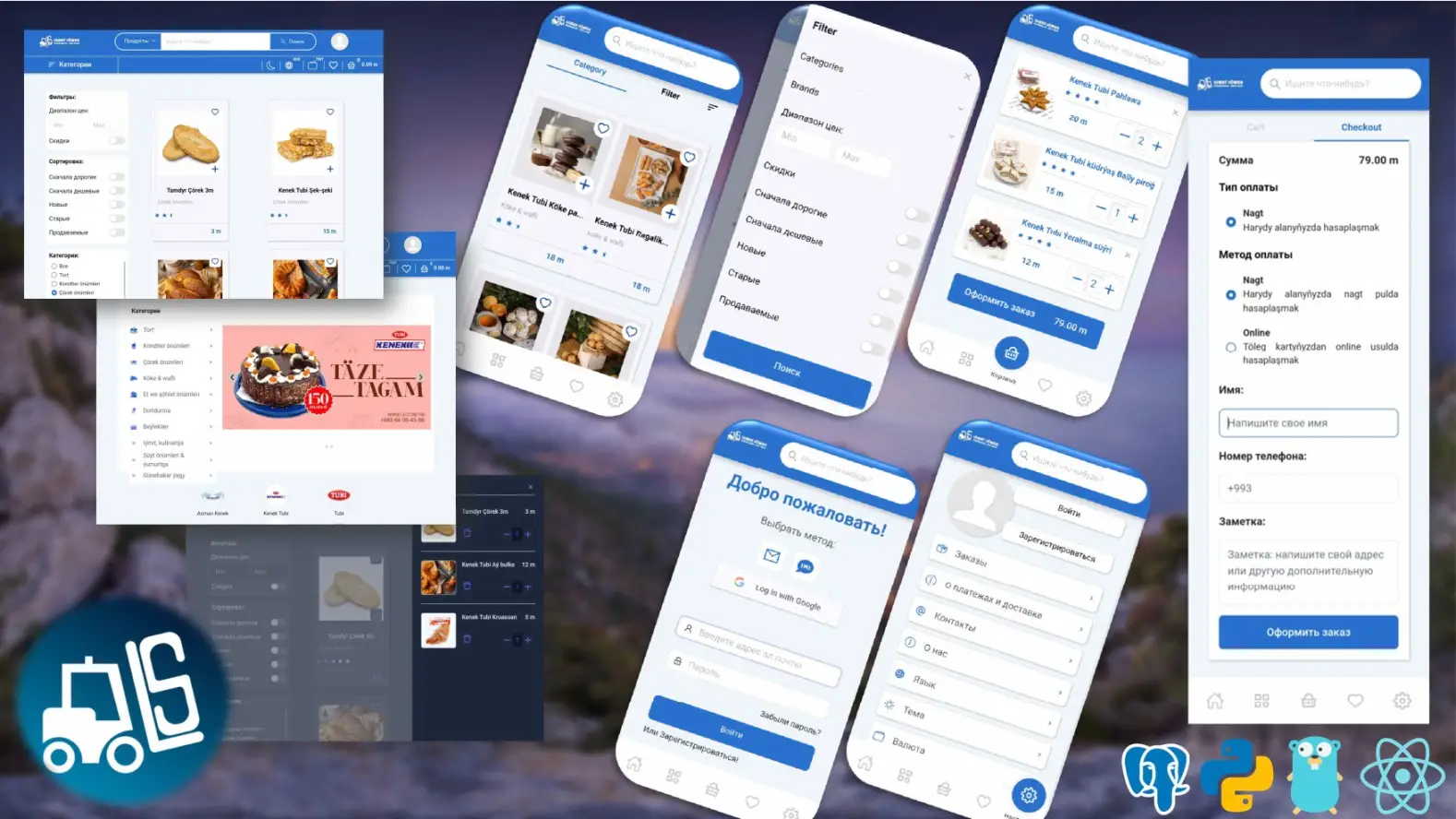
## **Overview**
SAPHASAP is a **large-scale, modular e-commerce platform** designed to support entire marketplaces. It combines:
* A **robust API backend**
* A **Flask Jinja2-compatible frontend system**
* Multiple **sample templates** ready for configuration and deployment
The platform is fully **customizable, scalable**, and built on a strong codebase using **Flask** and **SQLAlchemy ORM**.
### **Core Concept**
Businesses can:
* Create and manage their own online store
* Add products, categories, and attributes
* Customize storefront designs
Supports:
* Multiple currencies & exchange rates
* Precision attribute filtering
* Multiple image uploads with watermarking
* Brand, collection, and slider creation
* Checkout with **online bank BPC integration** (Turkmenistan legacy support)
* Flexible database structure
* Strong security & session management
---
## **Core Features**
* **Customizable Marketplaces**: Businesses can create and manage stores with custom categories, products, and storefront designs
* **Multi-language Support**: Full internationalization (i18n) support
* **Multi-currency & Exchange Rates**: Handles multiple currencies with real-time exchange rates
* **Secure Authentication**: Username/password, Google OAuth, SMS-based registration
* **File Management**: Image upload with watermarking, compression, and management
* **Payment Integration**: Online bank BPC and other gateways
* **Modular Architecture**: Extensible codebase with Flask & SQLAlchemy ORM
* **Caching & Performance**: Redis for session management and caching
* **Rich API**: Comprehensive endpoints for categories, resources, orders, and more
---










## **Tech Stack**
**Backend:** Python (≥3.6), Flask, SQLAlchemy ORM
**Frontend:** Flask Jinja2 templates, JavaScript, jQuery, ReactJS
**Database:** PostgreSQL
**Caching:** Redis
**Other Tools:** BCrypt for password hashing, JWT for authentication, Elasticsearch (optional)
---
## **Features**
- ✅ Stable REST API
- ✅ Web-admin UI
- ✅ Web-client UI
- ✅ Multi-language support
- ✅ File management & compression
- ✅ Security & encryption
- ✅ Relational DB management
- ✅ PostgreSQL support
- ✅ Redis session & caching
- ✅ Modular architecture
- ✅ Client Admin API
- ✅ Full feature key activation
- ✅ WebSocket support
---
## **Installation Guide**
### **1. Prerequisites**
* Python ≥ 3.6
* PostgreSQL
* Redis
* pip and virtualenv
### **2. Clone Repository**
```bash
git clone
cd saphasap
```
### **3. Create Virtual Environment**
```bash
python3 -m venv venv
source venv/bin/activate # On Windows: venv\Scripts\activate
```
### **4. Install Dependencies**
```bash
pip install -r requirements.txt
```
### **5. Configure Environment Variables**
Copy `.env.example` to `.env` and update values:
```bash
cp .env.example .env
nano .env
```
### **6. Database Setup**
Create a database:
```bash
sudo -u postgres psql
CREATE DATABASE saphasap;
\q
```
Run migrations:
```bash
python migrate.py
```
Or restore from backup:
```bash
psql -U postgres -d saphasap < commerceDBTemplate.backup
```
### **7. Start Application**
```bash
python run.py
```
Or via `Makefile`:
```bash
make run
```
---
## **Configuration**
### **Environment Variables**
Sensitive settings are stored in `.env`. Ensure `.env` is listed in `.gitignore`.
### **Site Configuration**
Add static files in `main_pack/static/web_config`:
* `robots.txt`
* `sitemap.xml`
* `watermark.png`
Customize templates in `main_pack/templates/commerce`.
---
## **API Highlights**
The backend exposes **RESTful endpoints**.
### **Category Management**
* **Get all categories**:
```http
GET /api/categories/
```
* **Add category**:
```http
POST /api/categories/
Content-Type: application/json
{
"name": "Electronics",
"description": "Electronic gadgets"
}
```
* **Update category**:
```http
PUT /api/categories//
Content-Type: application/json
{
"name": "Updated Electronics",
"description": "Updated description"
}
```
See [API Documentation](documentation/api_documentation.md) for full details.
---
## **Development**
### **Project Structure**
```
saphasap/
├── codes_for_checking/ # Utility scripts
├── documentation/ # API docs and developer notes
├── main_pack/ # Core app
│ ├── api/ # API routes and logic
│ ├── commerce/ # Frontend routes and templates
│ ├── models/ # SQLAlchemy models
│ ├── static/ # CSS, JS, images
│ ├── templates/ # Jinja2 templates
│ └── utils/ # Helper utilities
├── .env.example # Sample environment variables
├── Makefile # Build and deployment tasks
├── requirements.txt # Python dependencies
├── run.py # Application entry point
└── migrate.py # Database migration script
```
### **Running Tests**
```bash
make test
```
Use `curl` or Postman for API testing:
```bash
curl -X GET http://localhost:5000/api/categories/
```
See [API Testing Guide](documentation/api_testing.md) for full instructions.
---
## **Deployment**
### **Using Docker**
```bash
make docker-build
make docker-run
```
### **Manual Deployment**
1. Install dependencies
2. Copy app code
3. Set `.env` variables
4. Run migrations: `python migrate.py`
5. Start with Gunicorn:
```bash
gunicorn --workers 4 --bind 0.0.0.0:5000 run:app
```
---
## **Contributing**
1. Fork the repository
2. Create a feature branch: `git checkout -b feature-name`
3. Commit changes: `git commit -m "Add feature"`
4. Push to branch: `git push origin feature-name`
5. Open a pull request
Follow the [Code Style Guide](documentation/code_style.md) and include tests for new features.
---
## **TODO / Roadmap**
* [ ] Separate API and UI repositories
* [ ] Optimize backend (Node.js optional)
* [ ] Implement WebSocket support
* [ ] Develop admin client application
* [ ] Migrate app configurations to database
---
## **Additional Resources**
* [API Backend Info](documentation/api_backend.md)
* [Mail Setup](documentation/mail_setup.md)
* [PyBabel Translation](documentation/pybabel_usage.md)
* [Developer Notes](documentation/developers_notes/)
---
## **License**
This project is licensed under the MIT License.