https://github.com/mikeboiko/nvim-flow
neovim command runner
https://github.com/mikeboiko/nvim-flow
Last synced: about 2 months ago
JSON representation
neovim command runner
- Host: GitHub
- URL: https://github.com/mikeboiko/nvim-flow
- Owner: mikeboiko
- License: mit
- Created: 2026-02-27T22:39:05.000Z (2 months ago)
- Default Branch: main
- Last Pushed: 2026-02-28T00:25:19.000Z (2 months ago)
- Last Synced: 2026-02-28T03:43:28.828Z (2 months ago)
- Language: Lua
- Size: 28.3 KB
- Stars: 0
- Watchers: 0
- Forks: 0
- Open Issues: 0
-
Metadata Files:
- Readme: README.md
- License: LICENSE
Awesome Lists containing this project
- awesome-neovim-sorted - mikeboiko/nvim-flow
- awesome-neovim - mikeboiko/nvim-flow - File-scoped command runner with YAML configuration, command preview, debug integration, and traceback quickfix. (Code Runner / Quickfix)
README
# nvim-flow
[](https://github.com/mikeboiko/nvim-flow/actions/workflows/ci.yml)
`nvim-flow` is a pure lua Neovim workflow runner for file-based commands defined in `.flow.yml`.
## Quick start
Create a `.flow.yml` next to your project files:
```yaml
demo.py:
cmd: python "{{filepath}}" --name mike
```
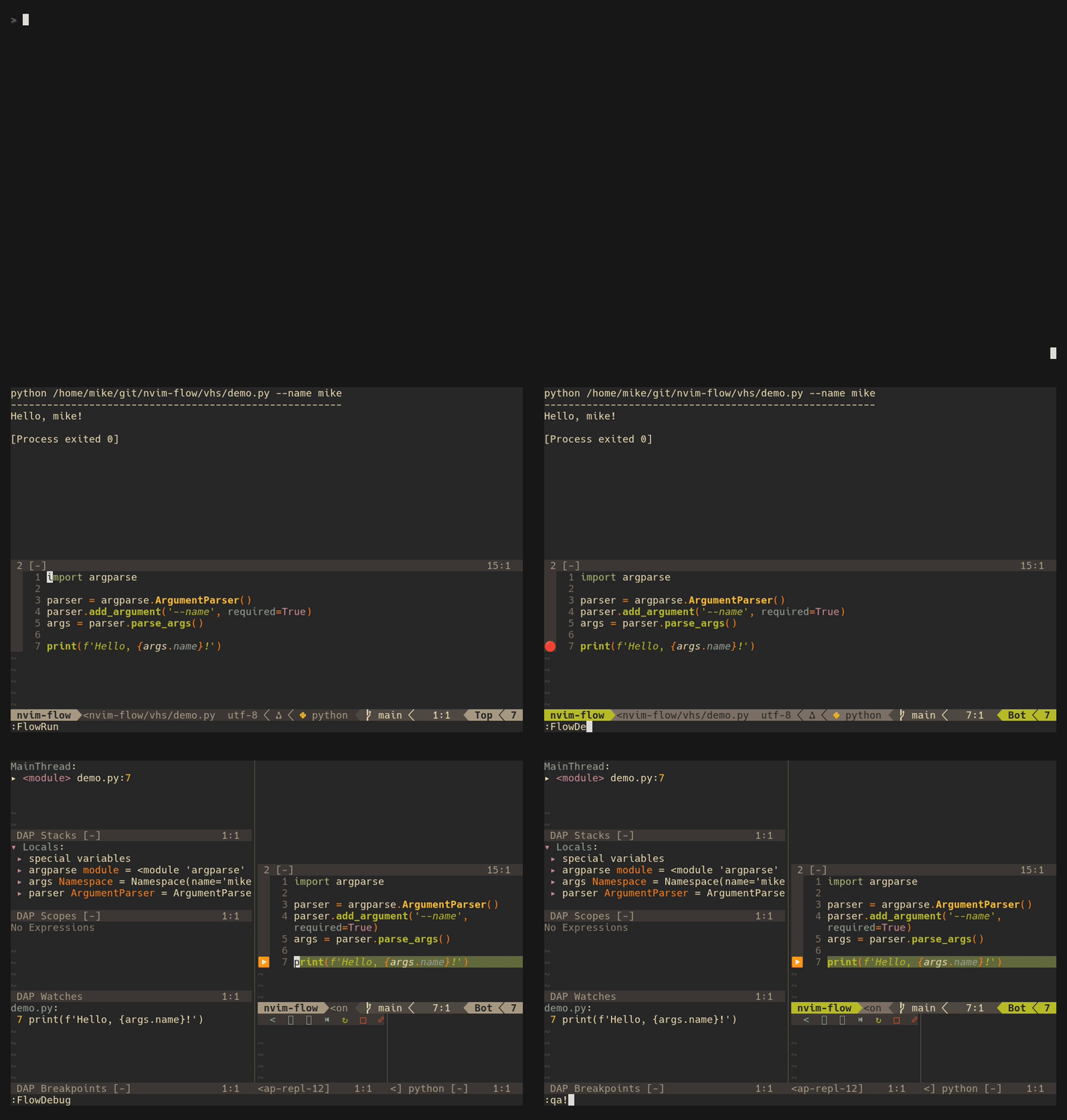
Open the file in Neovim and run `:FlowRun` or `:FlowDebug` — nvim-flow resolves the command for the current file and executes it in a terminal split:
## Motivation
I wanted a workflow that matches how I actually work in Neovim: simple YAML config, fast command resolution, and quick run/debug feedback without extra runtime dependencies.
## Features
- First-class `nvim-dap` integration through `:FlowDebug`
- Flow source jump (`:FlowEdit`) to open the matched `.flow.yml` definition
- File lock support (`:FlowToggleLock`)
- Command preview in a floating window (`:FlowPreview`)
- Python traceback -> quickfix parser (`:FlowQuickfix`)
- YAML config (`.flow.yml`)
- Recursive flow discovery + merge (file dir -> `$HOME`, closer wins)
- Optional `match` arrays for reusable command definitions
- Configurable keymaps through `setup()`
## Installation (lazy.nvim)
### Minimum
```lua
return {
{ "mikeboiko/nvim-flow" },
}
```
### Typical (with optional settings)
```lua
return {
{
"mikeboiko/nvim-flow",
event = { "BufReadPost", "BufNewFile" },
cmd = { "FlowRun", "FlowDebug", "FlowEdit", "FlowToggleLock", "FlowPreview", "FlowQuickfix" },
opts = {
config_file = ".flow.yml",
terminal_height = 15,
terminal_position = "top",
edit_open_command = "tabedit",
stop_at_home = true,
show_command = true,
keymaps = {
run = "",
debug = "fd",
edit = "fe",
toggle_lock = "fl",
preview = "fp",
quickfix = "fq",
},
},
},
}
```
## Setup (optional)
`setup()` is only needed when you want to override defaults.
If you skip setup, `nvim-flow` still works with built-in defaults.
```lua
require("nvim-flow").setup({
config_file = ".flow.yml",
terminal_height = 15,
terminal_position = "top", -- "top" | "bottom"
edit_open_command = "tabedit", -- e.g. "tabedit" | "edit" | "split" | "vsplit"
stop_at_home = true,
show_command = true,
keymaps = {
run = nil,
debug = nil,
edit = nil, -- suggested: "fe"
toggle_lock = nil,
preview = nil,
quickfix = nil,
},
})
```
## Optional parameters
- `config_file` (`string`, default: `".flow.yml"`)
- Filename to search while walking directories upward.
- `terminal_height` (`number`, default: `15`)
- Height of the terminal split used by `FlowRun`.
- `terminal_position` (`"top" | "bottom"`, default: `"top"`)
- Where the terminal split opens.
- `edit_open_command` (`string`, default: `"tabedit"`)
- Vim command used by `FlowEdit` to open the matched `.flow.yml` location (for example: `tabedit`, `edit`, `split`, `vsplit`).
- `stop_at_home` (`boolean`, default: `true`)
- Stop recursive config search at `$HOME` instead of `/`.
- `show_command` (`boolean`, default: `true`)
- Print resolved command before execution output.
- `keymaps` (`table`, default: all `nil`)
- Optional mappings for:
- `run`
- `debug`
- `edit`
- `toggle_lock`
- `preview`
- `quickfix`
- Set any key to `nil` to leave it unmapped.
## Commands
- `:FlowRun` - run resolved flow command in a terminal split
- `:FlowDebug` - resolve the same flow command and launch a matching `nvim-dap` debug session
- `:FlowEdit` - open the matched `.flow.yml` file and jump to the resolved command line
- `:FlowToggleLock[ {filepath}]` - toggle lock (or set lock to explicit path)
- `:FlowSet {filepath}` - compatibility alias for setting lock directly
- `:FlowPreview` - show resolved command for current (or locked) file
- `:FlowQuickfix` - parse the last flow output as Python traceback and fill quickfix
## FlowEdit behavior
`FlowEdit` follows the same resolution pipeline as `FlowRun` / `FlowPreview`, then opens the corresponding `.flow.yml` and jumps to the resolved command line.
By default it opens in a new tab (`edit_open_command = "tabedit"`). Change `edit_open_command` if you prefer `edit`, `split`, or `vsplit`.
## Debug integration (`nvim-dap`)
`FlowDebug` uses the same command resolution pipeline as `FlowRun`, then parses the command to create a debug configuration for `nvim-dap` and calls `dap.continue()`.
Supported command families include `python` / `python3`, `uv run ...` (including module mode), and `node`.
Example:
```yaml
py:
cmd: python "{{filepath}}" --env dev
```
Running `:FlowDebug` on a Python buffer resolves this flow, builds the debug launch config, and starts the debugger.
## `.flow.yml` format
### Basic mode
```yaml
default:
cmd: '{{filepath}}'
py:
cmd: python "{{filepath}}"
main.py:
cmd: python "{{filepath}}" --mode=dev
```
### Advanced match mode
```yaml
python-group:
match: [py, pyw, 'test_*.py', 'scripts/']
cmd: python "{{filepath}}"
```
If `match` is omitted, the top-level key is used as before.
### Match priority
Resolution order:
1. **basename** (e.g., `main.py`)
2. **`match` entries**
3. **folder name**
4. **repo name**
5. **extension** (`.py` then `py`)
6. **`default`**
Example definitions for each priority type:
```yaml
main.py:
cmd: echo "1 basename"
python-group:
match: [py, 'test_*.py']
cmd: echo "2 match"
tests:
cmd: echo "3 folder"
my-repo:
cmd: echo "4 repo"
.py:
cmd: echo "5 extension-dot"
py:
cmd: echo "5 extension"
default:
cmd: echo "6 default"
```
Mini winner scenario:
- For `/work/my-repo/tests/main.py`, `main.py` (basename) wins.
- If the basename entry is removed, `match` entries are checked before folder/repo/extension/default.
If multiple `match` entries apply, `nvim-flow` uses deterministic precedence: nearest config file first, then YAML declaration order within that file.
## Recursive merge behavior
When running from `/a/b/c/file.py`, `nvim-flow` searches for `.flow.yml` in:
- `/a/b/c/.flow.yml`
- `/a/b/.flow.yml`
- `/a/.flow.yml`
- ... up to `$HOME/.flow.yml` (if `stop_at_home = true`)
All found configs are merged. Closer files override farther files.
## Template variables
`nvim-flow` expands these variables in `cmd`:
- `{{filepath}}`
- `{{dir}}`
- `{{filename}}`
- `{{ext}}`
- `{{repo}}`
- `{{folder}}`
## Runner behavior
- Default runner: terminal split (`runner: vim` or omitted)
- Terminal split opens at the top by default; set `terminal_position = "bottom"` to open below.
- With `show_command = true`, the separator line is sized to the command width (capped by terminal width).
- Debug runner: `runner: debug` or `:FlowDebug` (requires `nvim-dap`)
## Quickfix behavior
`FlowQuickfix` parses the **last** `FlowRun` terminal output and extracts Python traceback lines:
`File "/path/file.py", line 42, in ...`
Then it populates and opens the quickfix list.
## Testing
This plugin uses plenary's busted harness.
Run tests:
```bash
nvim --headless -u tests/minimal_init.lua \
-c "PlenaryBustedDirectory tests/nvim-flow { minimal_init = 'tests/minimal_init.lua' }" \
-c "qa"
```
## Recording demo GIFs (VHS)
This repo includes a VHS tape at `vhs/nvim-flow-demo.tape` that records a demo using `./vhs/demo.py` and `.flow.yml`.
The demo shows:
1. `:FlowRun` — execute the command in a terminal split
2. Set a breakpoint with `db`, then `:FlowDebug` (`nvim-dap`)
Run it with:
```bash
vhs vhs/nvim-flow-demo.tape
vhs publish nvim-flow-demo.gif
```
The tape outputs `vhs/nvim-flow-demo.gif`, which autoplays when embedded in README markdown.
## Credit
This project was inspired by ideas from `vim-flow`, with substantial changes for this codebase and workflow:
https://github.com/jonmorehouse/vim-flow