https://github.com/mikecerton/apache_airflow_basic
This repository offers an easy-to-follow guide on Apache Airflow, explaining the basics of creating, running, and managing data pipelines. [Data Engineer]
https://github.com/mikecerton/apache_airflow_basic
apache-airflow docker-compose python
Last synced: 3 months ago
JSON representation
This repository offers an easy-to-follow guide on Apache Airflow, explaining the basics of creating, running, and managing data pipelines. [Data Engineer]
- Host: GitHub
- URL: https://github.com/mikecerton/apache_airflow_basic
- Owner: mikecerton
- Created: 2024-10-13T16:03:54.000Z (almost 2 years ago)
- Default Branch: main
- Last Pushed: 2025-01-26T18:40:37.000Z (over 1 year ago)
- Last Synced: 2025-04-02T07:17:11.623Z (over 1 year ago)
- Topics: apache-airflow, docker-compose, python
- Language: Python
- Homepage:
- Size: 72.3 KB
- Stars: 1
- Watchers: 1
- Forks: 0
- Open Issues: 0
-
Metadata Files:
- Readme: README.md
Awesome Lists containing this project
README
# Apache_Airflow_Tutorial
This repository provides an easy guide on Apache Airflow, explaining how to create, run, and manage data pipelines. It includes steps for installing Airflow using Docker, making the setup easier. The guide also covers basic concepts like DAGs (Directed Acyclic Graphs), which show workflows, and operators that define tasks in those workflows.
### Table of Contents
- Basic concepts of Airflow
- Code Example for Using a DAG
- Install Apache Airflow using Docker
- Accessing the Environment
- Disclaimer
### Basic concepts of Airflow
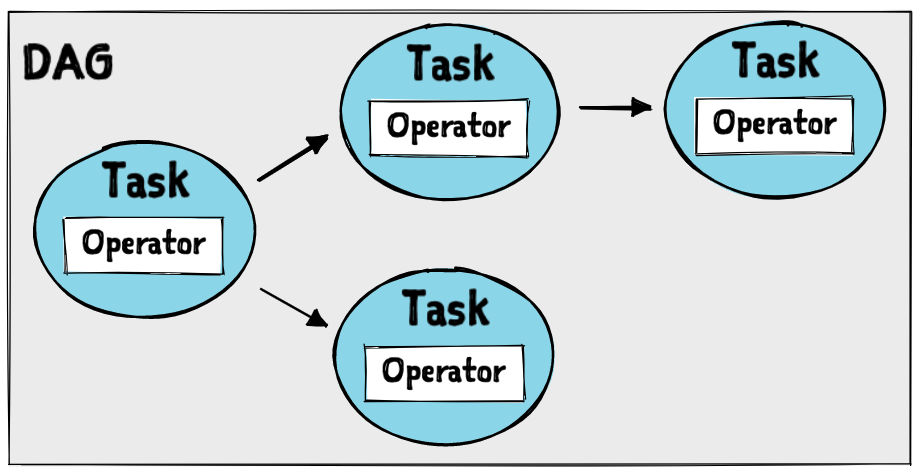
picture from https://fueled.com/wp-content/uploads/2023/08/image_984e18.png
#### 1. Directed Acyclic Graph (DAG):
A DAG is a collection of all the tasks you want to run, organized in a way that reflects their relationships and dependencies. The DAG is "directed" because the tasks must be run in a specific order, and it's "acyclic" because it doesn't contain any cycles, meaning a task can’t depend on itself either directly or indirectly. In Airflow, DAGs define how tasks are scheduled and triggered, but the DAG itself does not perform any actions.
Key Point: A DAG defines the structure and flow of tasks but doesn't execute them directly.
#### 2. Task:
A task is a single unit of work within a DAG. Each task represents a specific operation, such as pulling data from a database, processing data, or sending an email notification. In Airflow, a task is defined by an Operator and can be subject to scheduling, retry logic, and other runtime behaviors.
Key Point: Tasks are the individual pieces of work within a DAG.
#### 3. Operator:
Operators are templates that define what actions a task should perform. Airflow provides different operators for different types of tasks, such as:
BashOperator: Executes a bash command.
PythonOperator: Executes a Python function.
EmailOperator: Sends an email.
Key Point: An operator defines what action a task will perform.
#### 4. Executor:
The executor is responsible for running the tasks defined by the DAG. It defines how and where tasks are executed. There are different types of executors in Airflow, such as:
SequentialExecutor: Runs tasks one by one.
LocalExecutor: Runs tasks in parallel on the local machine.
Key Point: The executor determines how tasks are distributed and executed across resources.
### Apache Airflow Architecture
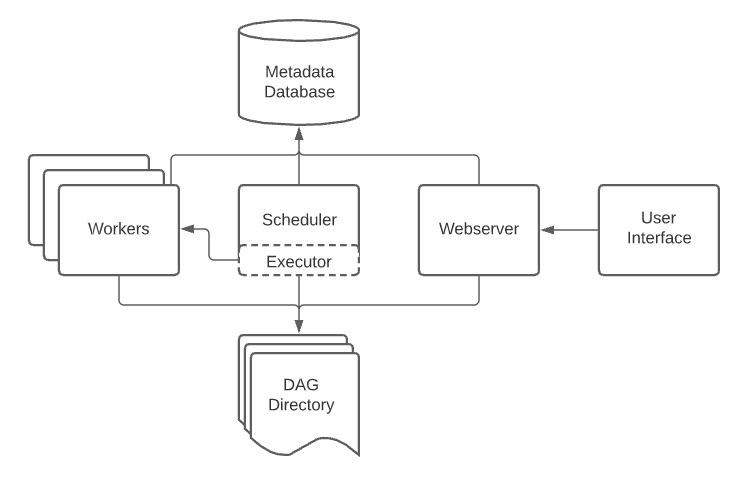
picture from https://airflow.apache.org/docs/apache-airflow/2.6.0/_images/arch-diag-basic.png
### Code Example for Using a DAG
The code example will be in the dags directory, containing files such as:
- bash_DAG.py : code example for bash operator.
- python_DAG.py : code example for python operator.
- CatchUp_explain_DAG.py : How to use and set the Catchup parameter.
- taskflow_API_DAG.py : How to create a DAG using the TaskFlow API.
- cron_in_DAG.py : How to schedule your DAG using a Cron expression.
### Install Apache Airflow using Docker
1. Check that your Docker has more than 4 GB of RAM.
```bash
docker run --rm "debian:bookworm-slim" bash -c "numfmt --to iec $(echo $(($(getconf _PHYS_PAGES) * $(getconf PAGE_SIZE))))"
```
2. Download the docker-compose.yaml file for Apache Airflow.
```bash
curl -LfO 'https://airflow.apache.org/docs/apache-airflow/2.10.2/docker-compose.yaml'
```
or
```bash
Invoke-WebRequest -Uri 'https://airflow.apache.org/docs/apache-airflow/2.10.2/docker-compose.yaml' -OutFile 'docker-compose.yaml'
```
or
just copy text from https://airflow.apache.org/docs/apache-airflow/2.10.2/docker-compose.yaml
3. Run mkdir to create directories: dags, logs, plugins, and config.
```bash
mkdir dags, logs, plugins, config
```
4. Create a .env file to declare AIRFLOW_UID.
```bash
$AIRFLOW_UID = [System.Security.Principal.WindowsIdentity]::GetCurrent().User.Value
echo "AIRFLOW_UID=$AIRFLOW_UID" > .env
```
or
```bash
echo "AIRFLOW_UID=50000" > .env
```
or
create .env file and paste AIRFLOW_UID=50000
5. Run
```bash
docker-compose up airflow-init
```
6. Run
```bash
docker-compose up
```
7. Install Apache Airflow python library using
```bash
pip install apache-airflow
```
### Special Note
#### 1. Install python library in Airflow container
you can list python to install in docker-compose.yaml
```bash
_PIP_ADDITIONAL_REQUIREMENTS: "${_PIP_ADDITIONAL_REQUIREMENTS:-your_library}"
# Example
_PIP_ADDITIONAL_REQUIREMENTS: "${_PIP_ADDITIONAL_REQUIREMENTS:-numpy pandas matplotlib}"
# you can look at line 69 -79 in docker-compose.yaml in this repository
```
#### 2. copy your file to Airflow container
you use valume key in docker-compose.yaml for copy your file to Airflow container
```bash
volumes:
- [your_file_path]:[Destination_file_path]
# Example
volumes:
- ${AIRFLOW_PROJ_DIR:-.}/my_file:/opt/airflow/file_in_container
- ${AIRFLOW_PROJ_DIR:-.}/dags:/opt/airflow/dags
- ${AIRFLOW_PROJ_DIR:-.}/logs:/opt/airflow/logs
- ${AIRFLOW_PROJ_DIR:-.}/config:/opt/airflow/config
- ${AIRFLOW_PROJ_DIR:-.}/plugins:/opt/airflow/plugins
# you can look at line 69 -79 in docker-compose.yaml in this repository
```
### Accessing the Environment
After starting Airflow, you can interact with it in three ways:
1. Via a browser using the web interface.
2. By using the REST API.
3. By running CLI commands.
#### 1. Accessing the Web Interface
The webserver is available at [http://localhost:8080](http://localhost:8080). The default login credentials are:
- **Username:** airflow
- **Password:** airflow
#### 2. Sending Requests to the REST API
The webserver is also available at [http://localhost:8080](http://localhost:8080). The default login credentials are:
- **Username:** airflow
- **Password:** airflow
**Example command to send a request to the REST API:**
```bash
ENDPOINT_URL="http://localhost:8080/"
curl -X GET \
--user "airflow:airflow" \
"${ENDPOINT_URL}/api/v1/pools"
```
### Disclaimer
- https://www.youtube.com/watch?v=K9AnJ9_ZAXE&list=PLwFJcsJ61oujAqYpMp1kdUBcPG0sE0QMT
- https://airflow.apache.org/docs/apache-airflow/stable/index.html