https://github.com/mikecheng1208/vue-path-recognizer
Path recognizing component for Vue
https://github.com/mikecheng1208/vue-path-recognizer
javascript vue
Last synced: about 1 year ago
JSON representation
Path recognizing component for Vue
- Host: GitHub
- URL: https://github.com/mikecheng1208/vue-path-recognizer
- Owner: MikeCheng1208
- License: mit
- Created: 2019-07-10T10:17:21.000Z (almost 7 years ago)
- Default Branch: master
- Last Pushed: 2025-02-11T01:46:48.000Z (over 1 year ago)
- Last Synced: 2025-06-28T05:48:13.886Z (about 1 year ago)
- Topics: javascript, vue
- Language: Vue
- Homepage:
- Size: 1.46 MB
- Stars: 21
- Watchers: 1
- Forks: 3
- Open Issues: 1
-
Metadata Files:
- Readme: README.md
- License: LICENSE
Awesome Lists containing this project
README

Path recognizing component for Vue


[](https://www.npmjs.com/package/vue-path-recognizer)
## Demo

## Installation
```bash
npm install vue-path-recognizer --save
```
## Basic usage
Import the PathRecongizer component. PathRecognizer is a container, it requires a child element to capture mouse moves. PathRecognizer does not draw the moves, for a full drawing example, check the example/ folder of this repo.
```js
import PathRecognizer, { PathRecognizerModel } from 'vue-path-recognizer';
export default {
components: {
PathRecognizer,
},
data() {
return {
context: null,
result: "",
models: [
new PathRecognizerModel([7, 1], "A"),
new PathRecognizerModel([2, 6, 0, 1, 2, 3, 4, 0, 1, 2, 3, 4], "B"),
new PathRecognizerModel([4, 3, 2, 1, 0], "C"),
]
}
}
}
```
Add some path model to the recognizer.
Each path is defined by a direction-sequence and an associated data object.
```js
models: [
new PathRecognizerModel([7, 1], "A"),
new PathRecognizerModel([2,6,0,1,2,3,4,0,1,2,3,4], "B"),
new PathRecognizerModel([4,3,2,1,0], "C"),
new PathRecognizerModel([2,6,7,0,1,2,3,4], "D"),
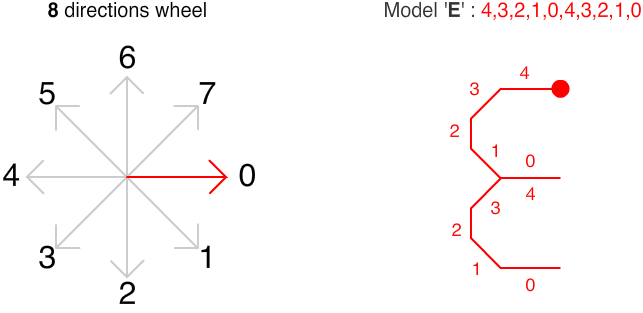
new PathRecognizerModel([4,3,2,1,0,4,3,2,1,0], "E")
}
```
Wrap your sliding template range
```html
```
For example, here the model for the letter E :
Set the models and the onGesture prop on the PathRecognizer component :
```html
```
Note that onGesture({datas}) is always invoked at the end of the drawing. If no gesture is recognized, this parametter is null.
## Custom filter
While adding a model, you can specify a custom filter (third parametter of PathRecognizerModel). The filter callback method, if specified, will let you a last chance to modify / analyze the datas to determine a new score.
For example, the letter D & P have a similar draw-direction-path, however you can discriminate each one by detecting the position of the last point (up -> it's a P, down -> it's a D). The PathInfos struct transmited to the filter function will help you to determine the new score.
```js
filter(infos, model){
let lastPoint
switch (model.datas){
case "P":
lastPoint = [...infos.deltaPoints].pop()
if (lastPoint.y > infos.boundingBox.top + infos.boundingBox.height * 0.6) return Number.POSITIVE_INFINITY
return infos.cost
case "D":
lastPoint = [...infos.deltaPoints].pop()
if (lastPoint.y < infos.boundingBox.top + infos.boundingBox.height * 0.6) return Number.POSITIVE_INFINITY
return infos.cost
}
}
```
For a full example, please consult the example folder of this repo.
## API
### PathRecognizer props
name
type
default
description
sliceCount
Number
8
Resolution of the direction wheel
deltaMove
Number
8
Mouse move threshold (pixels)
costMax
Number
32
Max cost limit to detect a gesture
models
[PathRecognizerModel([Number], Any)]
[]
Models to recognize
onStartDraw
Function()
function
Invoked when the user mouse down the zone
onMovePath
Function([{x:Number, y:Number}])
function
Invoked when the user move his mouse during a record session
onStopDraw
Function()
function
Invoked when the user mouse up the zone
onGesture
Function(datas:Any)
function
Invoked with the datas of the model recognized or null if no gesture is recognized
## Free path
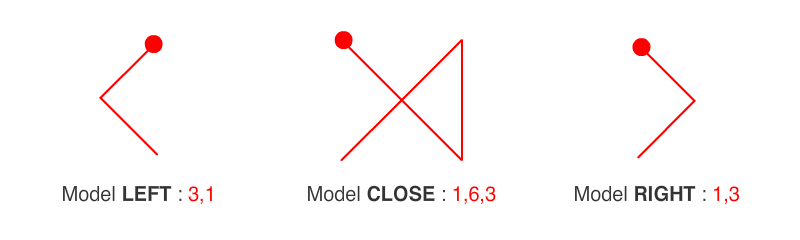
In this sample project I've used the Graffiti alphabet for the didactic aspect. However, react-path-recognizer is a generic algorithm, you can add any free path to control an interface / game :
## References & Original Authors
[Didier Brun](https://github.com/didierbrun)
## License
MIT © [MikeCheng1208](https://github.com/MikeCheng1208)