https://github.com/mikemitterer/dart-fcm-push
https://github.com/mikemitterer/dart-fcm-push
Last synced: 10 months ago
JSON representation
- Host: GitHub
- URL: https://github.com/mikemitterer/dart-fcm-push
- Owner: MikeMitterer
- License: bsd-3-clause
- Created: 2017-03-03T16:34:48.000Z (over 9 years ago)
- Default Branch: master
- Last Pushed: 2019-04-16T22:56:31.000Z (over 7 years ago)
- Last Synced: 2025-07-16T06:44:20.210Z (about 1 year ago)
- Language: Dart
- Size: 144 KB
- Stars: 8
- Watchers: 2
- Forks: 3
- Open Issues: 5
-
Metadata Files:
- Readme: README.md
- Changelog: CHANGELOG.md
- License: LICENSE
Awesome Lists containing this project
README
# fcm-push
> A Dart interface to Firebase Cloud Messaging (FCM) for Android and iOS
You can use fcm-push either as commandline tool or you can use it as a library.
## Prerequisite
- [Setup FB](https://firebase.google.com/docs/cloud-messaging/)
- [Firebase Cloud Messaging step by step](https://www.youtube.com/watch?v=jh9Yqfq5CSg&t=5s)
- [Android Application - Quick start](https://github.com/firebase/quickstart-android/tree/master/messaging)
- [Server Key - StackOverflow](https://stackoverflow.com/a/42439563/504184)
(Maybe someone want's to create a Flutter-Sample)
In your `fcm-push.yaml` (see below) you need your **fcm.server.key** and **token**
For the **server.key** go to your Firebase console / Settings:
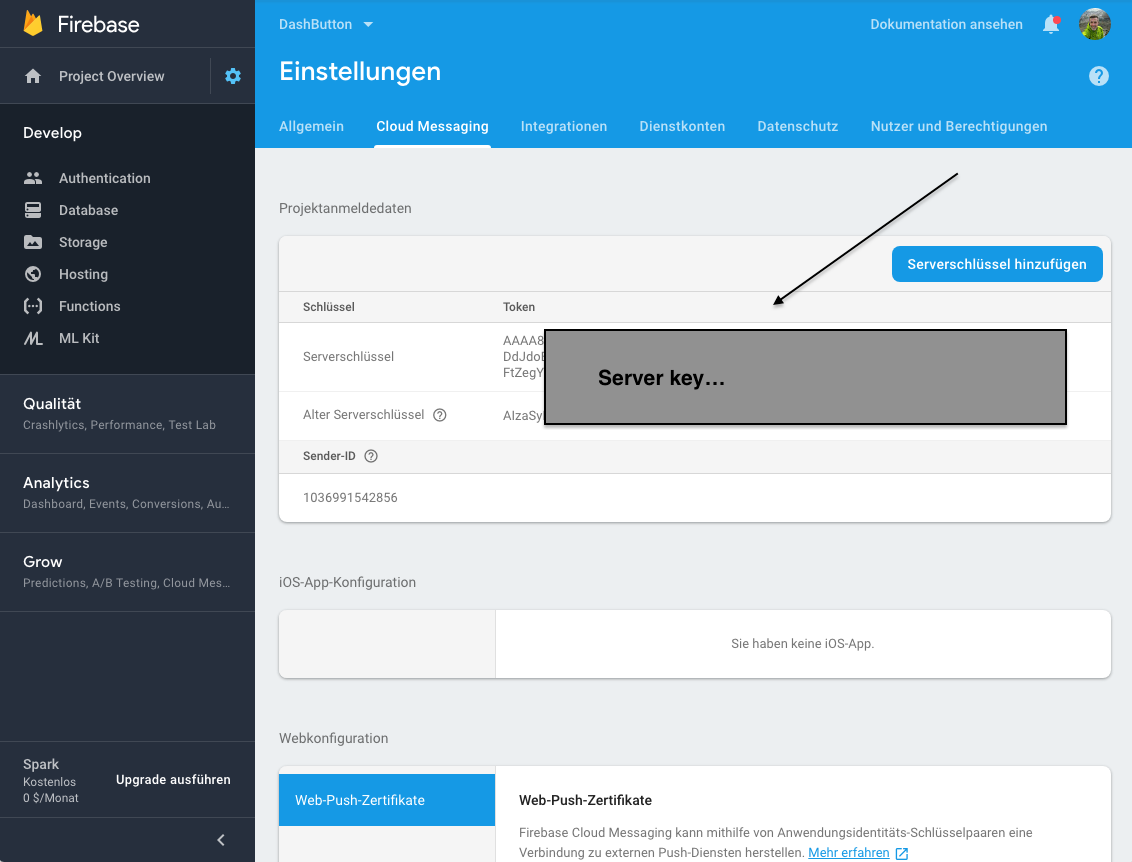
For the **token** check out this Android-Example on GitHub: https://github.com/MikeMitterer/fcm-push-Frontend
The **token** get's logged to the console - see [line #39 in MyFirebaseInstanceIDService.java](https://github.com/MikeMitterer/fcm-push-Frontend/blob/master/app/src/main/java/com/google/firebase/quickstart/fcm/MyFirebaseInstanceIDService.java#L39)
## Command-line
Activate fcm-push:
```bash
pub global activate fcm_push
```
Create fcm-push.yaml:
```yaml
fcm.server.key:
token:
```
Send your message: `fcm-push 'Hello Android' 'Dart rocks!'`
```bash
Usage: fcm-push title [body]
-h, --help Shows this message
-s, --settings Prints settings
-t, --token subject or token
-f, --config_file Change config file
-v, --loglevel Sets the appropriate loglevel
[info, debug, warning]
Sample:
Send message:
fcm-push 'Hello Android' 'Dart rocks!'
```
## As library
```dart
import 'package:fcm_push/fcm_push.dart';
final String serverKey = "";
final String token = "";
Future main() async {
final FCM fcm = new FCM(serverKey);
final Message fcmMessage = new Message()
..to = token
..title = _config.title
..body = _config.body
;
final String messageID = await fcm.send(fcmMessage);
}
```
### Links
- [Send messages to specific devices](https://firebase.google.com/docs/cloud-messaging/send-message#send_messages_to_specific_devices)
- [Dash-Button on GH](https://github.com/MikeMitterer/cpp-dash-button)
### License
Copyright 2018 Michael Mitterer (office@mikemitterer.at),
IT-Consulting and Development Limited, Austrian Branch
Licensed under the Apache License, Version 2.0 (the "License");
you may not use this file except in compliance with the License.
You may obtain a copy of the License at
http://www.apache.org/licenses/LICENSE-2.0
Unless required by applicable law or agreed to in writing,
software distributed under the License is distributed on an
"AS IS" BASIS, WITHOUT WARRANTIES OR CONDITIONS OF ANY KIND,
either express or implied. See the License for the specific language
governing permissions and limitations under the License.
If this plugin is helpful for you - please [(Circle)](http://gplus.mikemitterer.at/) me,
Follow me on [Twitter](http://twitter.mikemitterer.at/) or **star** this repo here on GitHub.