https://github.com/mikeroyal/Apple-Silicon-Guide
Apple Silicon Guide. Learn all about the A17 Pro, A16 Bionic, R1, M1-series, M2-series, and M3-series chips. Along with all the Devices, Operating Systems, Tools, Gaming, and Software that Apple Silicon powers.
https://github.com/mikeroyal/Apple-Silicon-Guide
apple apple-silicon arm64 augmented-reality coreml directx12 dxvk gaming m1 mac machinelearning macos-apps metal proton rendering steam swift5 swiftui virtualization wine
Last synced: over 1 year ago
JSON representation
Apple Silicon Guide. Learn all about the A17 Pro, A16 Bionic, R1, M1-series, M2-series, and M3-series chips. Along with all the Devices, Operating Systems, Tools, Gaming, and Software that Apple Silicon powers.
- Host: GitHub
- URL: https://github.com/mikeroyal/Apple-Silicon-Guide
- Owner: mikeroyal
- Created: 2021-10-24T21:35:58.000Z (almost 5 years ago)
- Default Branch: main
- Last Pushed: 2024-01-04T22:55:52.000Z (over 2 years ago)
- Last Synced: 2025-04-07T23:09:02.771Z (over 1 year ago)
- Topics: apple, apple-silicon, arm64, augmented-reality, coreml, directx12, dxvk, gaming, m1, mac, machinelearning, macos-apps, metal, proton, rendering, steam, swift5, swiftui, virtualization, wine
- Language: Swift
- Homepage:
- Size: 1020 KB
- Stars: 1,739
- Watchers: 44
- Forks: 99
- Open Issues: 3
-
Metadata Files:
- Readme: README.md
- Contributing: CONTRIBUTING.md
- Security: Security Glossary.md
Awesome Lists containing this project
- awesome-swift - mikeroyal/Apple-Silicon-Guide - Apple Silicon Guide. Learn all about the A17 Pro, A16 Bionic, R1, M1-series, M2-series, and M3-series chips. Along with all the Devices, Operating Systems, Tools, Gaming, and Software that Apple Silicon powers. (Other / Mathematics)
README

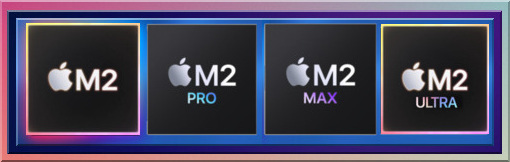

Apple Silicon Guide



#### A guide covering Apple Silicon including the applications, libraries and tools that will make you better and more efficient with your Apple Silicon powered device.
**Note: You can easily convert this markdown file to a PDF in [VSCode](https://code.visualstudio.com/) using this handy extension [Markdown PDF](https://marketplace.visualstudio.com/items?itemName=yzane.markdown-pdf).**

Apple M3/M3 Pro/M3 Max/M3 Ultra Architectures.

Apple M2/M2 Pro/M2 Max/M2 Ultra Architecture.

Apple M1/M1 Pro/M1 Max/M1 Ultra Architectures.
# Table of Contents
1. [Getting Started with Apple Silicon](https://github.com/mikeroyal/Apple-Silicon-Guide#getting-started-with-apple-silicon)
* [A17 Pro](#a17-pro)
* [A16 Bionic](https://github.com/mikeroyal/Apple-Silicon-Guide#A16-Bionic)
* [H2](https://github.com/mikeroyal/Apple-Silicon-Guide#H2)
* [S9](#s9)
* [U1](https://github.com/mikeroyal/Apple-Silicon-Guide#U1)
* [R1](#R1)
* [M1](https://github.com/mikeroyal/Apple-Silicon-Guide#m1)
* [M1 Pro](https://github.com/mikeroyal/Apple-Silicon-Guide#m1-pro)
* [M1 Max](https://github.com/mikeroyal/Apple-Silicon-Guide#m1-max)
* [M1 Ultra](https://github.com/mikeroyal/Apple-Silicon-Guide#m1-ultra)
* [M2](https://github.com/mikeroyal/Apple-Silicon-Guide#m2)
* [M2 Pro](#M2-Pro)
* [M2 Max](#M2-Max)
* [M2 Ultra](#M2-Ultra)
* [M3](#m3)
* [M3 Pro](#m3-pro)
* [M3 Max](#m3-max)
* [M3 Ultra](#m3-ultra)
* [Apple AR and Vision Pro Headset](#apple-ar-and-vision-pro-headset)
* [Devices powered by Apple Silicon](https://github.com/mikeroyal/Apple-Silicon-Guide#Devices-powered-by-Apple-Silicon)
* [Getting Software](https://github.com/mikeroyal/Apple-Silicon-Guide#Getting-Software)
- [Productivity & Workflow Apps](https://github.com/mikeroyal/Apple-Silicon-Guide#Productivity--Workflow-Apps)
- [Secure & Privacy-focused Web Browsers](https://github.com/mikeroyal/Apple-Silicon-Guide#secure--privacy-focused-web-browsers)
* [Privacy & Security Focused Browser extensions](https://github.com/mikeroyal/Apple-Silicon-Guide#privacy--security-focused-browser-extensions)
* [Privacy-focused Search Engines](https://github.com/mikeroyal/Apple-Silicon-Guide#privacy-focused-search-engines)
- [Microsoft Office Alternatives](https://github.com/mikeroyal/Apple-Silicon-Guide#microsoft-office-alternatives)
* [Universal Control](https://github.com/mikeroyal/Apple-Silicon-Guide#Universal-Control)
* [Stage Manager](https://github.com/mikeroyal/Apple-Silicon-Guide#Stage-Manager)
* [File Sync/Transfer](#File-SyncTransfer)
- [Replacing iCloud with Nexcloud](#Replacing-iCloud-with-Nexcloud)
* [Adding Storage(External)](https://github.com/mikeroyal/Apple-Silicon-Guide#Adding-External-Storage)
* [Backups](#Backups)
* [SSD Drive Health/Data Recovery](https://github.com/mikeroyal/Apple-Silicon-Guide#SSD-Drive-HealthData-Recovery)
* [Checking Battery Health](https://github.com/mikeroyal/Apple-Silicon-Guide#Checking-Battery-Health)
- [Turning on Low Power Mode](#low-power-mode)
* [Charging/Powerbanks](#ChargingPowerbanks)
- [USB-C Adapters](#usb-c-adapters)
- [USB-C Fast Charging Cables (from 3.3-10ft)](#usb-c-fast-charging-cables)
* [MacOS/iOS Security Hardening](https://github.com/mikeroyal/Apple-Silicon-Guide#macosios-security-hardening)
1. [Gaming](https://github.com/mikeroyal/Apple-Silicon-Guide#gaming)
- [Gaming on Apple Silicon resources](#gaming-on-apple-silicon-resources)
- [MacOS Game Mode](#macos-game-mode)
- [Game Porting Toolkit](#game-porting-toolkit)
- [Whisky Wine wrapper](#whisky)
- [CrossOver for MacOS](#CrossOver-for-MacOS)
- [Gaming on Xbox Game Pass](#gaming-on-xbox-game-pass)
- [Manage Temps/Fans (CPU and GPU)](#Manage-TempsFans-CPU-and-GPU)
- [Gaming Peripherals](#Gaming-Peripherals)
* [Gaming mice, keyboards, and headsets](#RGB-Devices)
* [Game Controllers](#game-controllers)
- [Setting up OBS Studio](#Setting-up-OBS-Studio)
* [Useful OBS Studio 3rd party Plugins & Themes](#useful-obs-studio-3rd-party-plugins-and-themes)
- [Discord](#Discord)
- [Twitch](#Twitch)
- [Game Stores & Launchers](#Game-Stores--Launchers)
* [Apple Arcade](#apple-arcade)
* [PlayCover](#playcover)
* [Steam](#Steam)
* [Heroic Game Launcher](#heroic-game-launcher)
* [Epic Games Store](#Epic-games-store)
* [Blizzard Battle.net](#Blizzard-Battlenet)
* [Origin](#Origin)
* [EA Play](#EA-Play)
* [Ubisoft Connect](#Ubisoft-Connect)
* [GOG Galaxy Store](#GOG-Galaxy)
* [Itch.io Store](#Itchio-Store)
* [XIV on Mac for FF XIV](#XIV-on-Mac)
- [Game Streaming](#Game-streaming)
* [Cloud Game Streaming](#Cloud-Game-Streaming)
* [Local Game Streaming](#Local-Game-Streaming)
- [Playing Android Games](#Android-Games)
- [Game Emulators](#game-emulators)
* [Emulator Frontends](#Frontends)
* [Nintendo GameCube & Wii](#Nintendo-GameCube--Wii)
* [Nintendo Switch](#Nintendo-Switch)
* [Nintendo 64](#Nintendo-64)
* [Nintendo 3DS](#Nintendo-3DS)
* [Super Nintendo Entertainment System (SNES)](#Super-Nintendo-Entertainment-System-SNES)
* [Nintendo Entertainment System (NES)](#Nintendo-Entertainment-System)
* [Game Boy Advance](#Game-Boy-Advance)
* [DOS](#DOS)
* [Atari](#Atari)
* [Sega Dreamcast](#Sega-Dreamcast)
* [PlayStation Portable](#PlayStation-Portable)
* [PlayStation 1](#PlayStation-1)
* [PlayStation 2](#PlayStation-2)
* [PlayStation 3](#PlayStation-3)
* [Xbox](#Xbox)
* [MAME](#MAME)
- [Performance Benchmarks](#performance-benchmarks)
2. [Wafer Level Multi-Chip Packaging Technology](https://github.com/mikeroyal/Apple-Silicon-Guide#wafer-level-multi-chip-packaging-technology)
- [InFO (Integrated Fan-Out) Wafer Level Packaging](https://github.com/mikeroyal/Apple-Silicon-Guide#info-integrated-fan-out-wafer-level-packaging)
- [Chip on Wafer on Substrate (CoWoS)](https://github.com/mikeroyal/Apple-Silicon-Guide#chip-on-wafer-on-substrate-cowos)
3. [Xcode Development](https://github.com/mikeroyal/Apple-Silicon-Guide#xcode-development)
4. [Core ML Development](https://github.com/mikeroyal/Apple-Silicon-Guide#core-ml-development)
5. [Metal Development](https://github.com/mikeroyal/Apple-Silicon-Guide#Metal-development)
6. [Visual Studio Studio (VSCode) Development](#vscode-development)
- [VS Code Extensions for Developer Productivity](#VS-Code-Extensions-for-Developer-Productivity)
7. [Unreal Engine 5 Development](#Unreal-Engine-5-Development)
8. [Unity Development](#Unity-Development)
9. [Blender Development](#Blender-Development)
10. [Virtualization](https://github.com/mikeroyal/Apple-Silicon-Guide#virtualization)
11. [Docker](https://github.com/mikeroyal/Apple-Silicon-Guide#docker)
12. [Kubernetes](https://github.com/mikeroyal/Apple-Silicon-Guide#kubernetes)
13. [Ansible](https://github.com/mikeroyal/Apple-Silicon-Guide#ansible)
14. [Running Linux on the Apple Silicon](https://github.com/mikeroyal/Apple-Silicon-Guide#running-linux-on-the-apple-silicon)
* [Linux Virtualization on Apple Silicon](#Linux-Virtualization-on-Apple-Silicon)
* [Asahi Linux Development](#Asahi-Linux-Development)
* [Fedora Linux Development](#Fedora-Linux-Development)
* [NixOS Linux Development](#NixOS-Linux-Development)
* [Debian Linux Development](#Debian-Linux-Development)
* [Ubuntu Linux Development](#Ubuntu-Linux-Development)
15. [Running Windows 10/11 on the Apple Silicon](https://github.com/mikeroyal/Apple-Silicon-Guide#running-windows-1011-on-the-apple-silicon)
16. [Game Development](https://github.com/mikeroyal/Apple-Silicon-Guide#game-development)
17. [Professional Audio/Video Development](https://github.com/mikeroyal/Apple-Silicon-Guide#professional-audiovideo-development)
18. [3D Graphics & Design](https://github.com/mikeroyal/Apple-Silicon-Guide#3d-graphics-and-design)
19. [Swift Development](https://github.com/mikeroyal/Apple-Silicon-Guide#swift-development)
20. [Objective-C Development](https://github.com/mikeroyal/Apple-Silicon-Guide#objective-c-development)
21. [C/C++ Development](https://github.com/mikeroyal/Apple-Silicon-Guide#cc-development)
# Getting Started with Apple Silicon
[Back to the Top](https://github.com/mikeroyal/Apple-Silicon-Guide#table-of-contents)
- [Does it ARM? Apps that are reported to support Apple Silicon](https://doesitarm.com)
- [List of apps with native Apple silicon support](https://isapplesiliconready.com/for/m1)
- [M1 compatible Games Master List | AppleGamingWiki ](https://www.applegamingwiki.com/wiki/M1_compatible_games_master_list)
- [M1 Parallels Windows compatible games list | AppleGamingWiki](https://www.applegamingwiki.com/wiki/M1_Parallels_Windows_compatible_games_list)
- [Bring your game to Mac with the Game Porting Toolkit ](https://developer.apple.com/videos/play/wwdc2023/10123/)
- [Apple Silicon Games](https://applesilicongames.com/games)
- [Porting Kit | Install Windows apps in Mac](https://www.portingkit.com/)
- [Games and Apps on Apple Silicon (Compatibility Sheet) by Thomas Schranz(@__tosh on Twitter) ](https://docs.google.com/spreadsheets/d/1er-NivvuIheDmIKBVRu3S_BzA_lZT5z3Z-CxQZ-uPVs)
- [Mac Development Ansible Playbook by Jeff Geerling](https://github.com/geerlingguy/mac-dev-playbook)
- [Running macOS in a Virtual Machine on Apple Silicon Macs](https://developer.apple.com/documentation/virtualization/running_macos_in_a_virtual_machine_on_apple_silicon_macs?language=objc)
- [Running Intel Binaries in Linux VMs with Rosetta](https://developer.apple.com/documentation/virtualization/running_intel_binaries_in_linux_vms_with_rosetta?language=objc)
- [Virtualize macOS on a Mac](https://developer.apple.com/documentation/virtualization/virtualize_macos_on_a_mac?language=objc)
- [Virtualize Linux on a Mac](https://developer.apple.com/documentation/virtualization/virtualize_linux_on_a_mac?language=objc)
- [Stable Diffusion with Core ML on Apple Silicon](https://machinelearning.apple.com/research/stable-diffusion-coreml-apple-silicon)
- [CrossOver® Mac](https://www.codeweavers.com/crossover)
- [DevToysMac](https://github.com/ObuchiYuki/DevToysMac) is the mac app version of [DevToys for Windows](https://github.com/veler/DevToys).
- [asitop](https://github.com/tlkh/asitop) is a Performance monitoring CLI tool for Apple Silicon.
- [macOS Security and Privacy Guide](https://github.com/drduh/macOS-Security-and-Privacy-Guide#openbsm-audit) is a collection of techniques for improving the security and privacy of a modern MacBook running a recent version of macOS.
- [macOS Security Compliance Project](https://github.com/usnistgov/macos_security) is an open source effort to provide a programmatic approach to generating security guidance. The configuration settings in this document were derived from National Institute of Standards and Technology (NIST) Special Publication (SP) 800-53, Security and Privacy Controls for Information Systems and Organizations, Revision 5.
[Apple Hypervisor](https://developer.apple.com/documentation/hypervisor) is a framework that builds virtualization solutions on top of a lightweight hypervisor, without third-party kernel extensions. Hypervisor provides C APIs so you can interact with virtualization technologies in user space, without writing kernel extensions (KEXTs). As a result, the apps you create using this framework are suitable for distribution on the [Mac App Store](https://www.appstore.com/).
[Apple A-series](https://www.apple.com/) is Apple's 64-bit ARM-based system on a chip (SoC) used in their iPhones and iPads. Though, at WWDC 2020 it was announced that [Apple Silicon](https://developer.apple.com/documentation/apple_silicon) would [transition into Mac laptops](https://www.apple.com/newsroom/2020/06/apple-announces-mac-transition-to-apple-silicon/).
## Apple Silicon Chips
### A17 Pro
[Back to the Top](#table-of-contents)

**A17 Pro** is built on new 3nm architecture. It has **6-CPU cores**, with the 2-performance cores 10% faster and the 4-efficiency cores significantly more efficient. Along with a 6-core GPU that is 20 percent faster than the A16 Bionic(iPhone 15 & 15 Plus models). The Neural Engine, will be almost twice as fast as the A16 Bionic. Apple has also added hardware-accelerate ray-tracing to the A17 Pro GPU. The A17 Pro chip is available in the iPhone 15 Pro and 15 Pro Max.

Apple A17 Pro Architecture. Image Credit: Apple
### A16 Bionic
[Back to the Top](#table-of-contents)

**[A16 Bionic Chip](https://www.apple.com/iphone-14-pro/specs/)** is Apple's first 4nm SoC for iPhone 14 Pro & Max with a **6-core CPU has two performance cores and 4 high-efficiency cores**. Along with a **5-core GPU** and **16-core neural engine**.

A16 Bionic Chip Architecture
### H2
[Back to the Top](#table-of-contents)

**[H2 Chip](https://www.apple.com/newsroom/2022/09/apple-announces-the-next-generation-of-airpods-pro/)** is Apple's SoC for the AiPods Pro that facilitates stronger(2x more) active noise cancellation, personalized spatial audio, and better performance during phone calls.

H2 chip powering the AirPods Pro. Credit: [Apple](https://www.apple.com/newsroom/2022/09/apple-announces-the-next-generation-of-airpods-pro/)
### S9
[Back to the Top](#table-of-contents)

The S9 chip has 60% more transistors in its CPU than the Series 8, and 30% more in its GPU. Along with neural engine boosting on-device processing for Siri requests, including 25% faster voice dictation in the Apple Watch Series 9.

S9 Chip for Apple Watch Series 9. Image Credit: Apple
### U1
[Back to the Top](#table-of-contents)

[U1 Ultra Wideband (UWB) chip](https://support.apple.com/en-us/HT212274) is an Apple-designed silicon chip that has Ultra Wideband technology for spatial awareness. The U1 chip enables directional [AirDrop](https://support.apple.com/en-us/HT204144) functionality.
* **UWB (Ultra-wideband)** is a short-range radio technology that precisely pinpoints and measures distance between other UWB equipped devices.
**Apple devices with the U1 chip**
* [Apple AirTags](https://www.apple.com/airtag/)
* iPhone 11
* iPhone 11 Pro
* iPhone 11 Pro Max
* iPhone 12mini
* iPhone 12
* iPhone 12 Pro
* iPhone 12 Pro Max
* iPhone 13 mini
* iPhone 13
* iPhone 13 Pro
* iPhone 13 Pro Max
* iPhone 14
* iPhone 14 Plus
* iPhone 14 Pro
* iPhone 14 Pro Max
* Apple Watch Series 6
* Apple Watch Series 7
* Apple Watch Series 8
* Apple Watch SE (2nd Gen)
* Apple Watch Ultra
* Apple HomePod mini

U1 Chip Die
### R1
[Back to the Top](#table-of-contents)

The **R1 chip** is dedicated toward real-time sensor processing, taking the input from 12 cameras, five sensors (including a LIDAR sensor) and six microphones on the Vision Pro headset.
)
R1 & M2 chips in the Vision Pro Headset
### M1
[Back to the Top](#table-of-contents)

[Apple M1 Chip](https://www.apple.com/mac/m1/) is Apple's first SoC chip designed specifically for their ARM Mac products, it delivers incredible performance(8-core CPU and 8-core GPU), custom technologies, and great power efficiency. The M1 Chip is now available for [Macbook Pro 13 with M1](https://www.apple.com/macbook-pro-13/), [Macbook Air 13 with M1](https://www.apple.com/macbook-air/), [Mac Mini with M1](https://www.apple.com/mac-mini/), [iPad Pro](https://www.apple.com/ipad-pro/), and [iPad Air](https://www.apple.com/ipad-air/).

**M1 Chip. Source: [Apple](https://www.apple.com/newsroom/2020/11/apple-unleashes-m1/)**
### M1 Pro
[Back to the Top](https://github.com/mikeroyal/Apple-Silicon-Guide#table-of-contents)

[Apple M1 Pro Chip](https://www.apple.com/newsroom/2021/10/introducing-m1-pro-and-m1-max-the-most-powerful-chips-apple-has-ever-built/) is a 8 or 10-core system-on-a-chip (SoC) architecture designed for pro systems in the [MacBook Pro 14”](https://www.apple.com/shop/buy-mac/macbook-pro/14-inch). The chip features fast unified memory, industry-leading performance per watt, and incredible power efficiency, along with increased memory bandwidth and capacity. The M1 Pro offers up to 200GB/s of memory bandwidth with support for up to 32GB of unified memory and a GPU (14-core or 16-core option).

**M1 Pro Chip. Source: [Apple](https://www.apple.com/newsroom/2021/10/introducing-m1-pro-and-m1-max-the-most-powerful-chips-apple-has-ever-built/)**
### M1 Max
[Back to the Top](https://github.com/mikeroyal/Apple-Silicon-Guide#table-of-contents)

[Apple M1 Max Chip](https://www.apple.com/newsroom/2021/10/introducing-m1-pro-and-m1-max-the-most-powerful-chips-apple-has-ever-built/) is a 10-core system-on-a-chip (SoC) architecture designed for pro systems in the [MacBook Pro 16”](https://www.apple.com/shop/buy-mac/macbook-pro/16-inch). The chip features fast unified memory, industry-leading performance per watt, and incredible power efficiency, along with increased memory bandwidth and capacity. The M1 Pro offers up to 400GB/s of memory bandwidth with support for up to 64GB of unified memory and a GPU (16-core or 32-core option).

**M1 Max Chip. Source: [Apple](https://www.apple.com/newsroom/2021/10/introducing-m1-pro-and-m1-max-the-most-powerful-chips-apple-has-ever-built/)**

**M1/ M1 Pro/ M1 Max CPU Performance. Source: [Apple](https://www.apple.com/newsroom/2021/10/introducing-m1-pro-and-m1-max-the-most-powerful-chips-apple-has-ever-built/)**

**M1/ M1 Pro/ M1 Max GPU Performance. Source: [Apple](https://www.apple.com/newsroom/2021/10/introducing-m1-pro-and-m1-max-the-most-powerful-chips-apple-has-ever-built/)**
### M1 Ultra
[Back to the Top](https://github.com/mikeroyal/Apple-Silicon-Guide#table-of-contents)

[Apple M1 Ultra Chip](https://www.apple.com/newsroom/2022/03/apple-unveils-m1-ultra-the-worlds-most-powerful-chip-for-a-personal-computer/) is a Apple's most powerful silicon chip in their M1-series lineup. The M1 Ultra is composed of **two M1 Max chips** that are connected together using [Apple's UltraFusion Architecture](https://github.com/mikeroyal/Apple-Silicon-Guide/files/8248834/US20220013504A1.pdf) packaging. This means the M1 Ultra can be configured with up to 128GB of high-bandwidth, low-latency unified memory that can be accessed by the **20-core CPU, 64-core GPU (800GB/s memory bandwidth), and 32-core Neural Engine**. The M1 Ultra is currently available in Apple's **[Mac Studio](https://www.apple.com/shop/buy-mac/mac-studio)**.

**M1 Ultra Chip. Source: [Apple](https://www.apple.com/newsroom/2022/03/apple-unveils-m1-ultra-the-worlds-most-powerful-chip-for-a-personal-computer/)**

**M1 Ultra CPU Performance. Source: [Apple](https://www.apple.com/newsroom/2022/03/apple-unveils-m1-ultra-the-worlds-most-powerful-chip-for-a-personal-computer/)**

**M1 Ultra GPU Performance. Source: [Apple](https://www.apple.com/newsroom/2022/03/apple-unveils-m1-ultra-the-worlds-most-powerful-chip-for-a-personal-computer/)**
### M2
[Back to the Top](https://github.com/mikeroyal/Apple-Silicon-Guide#table-of-contents)

[Apple M2 Chip](https://www.apple.com/newsroom/) has a **18% faster CPU, 35% faster GPU, and 40% faster Neural Engine than the base [M1 chip](https://github.com/mikeroyal/Apple-Silicon-Guide#M1)**. It can be configured with up to **24GB** of high-bandwidth, low-latency unified memory that can be accessed by the **8-core CPU, 10-core GPU (100GB/s memory bandwidth), and 16-core Neural Engine**. The M2 will be available in Apple's new **[MacBook Air](https://www.apple.com/macbook-air/)**, **[MacBook Pro 13"](https://www.apple.com/macbook-pro/)** with old design, and **[iPad Pro with M2 ](https://www.apple.com/ipad-pro/)**.

**M2. Source: [Apple](https://www.apple.com/newsroom/)**

**M2 CPU Performance. Source: [Apple](https://www.apple.com/newsroom/)**

**M2 GPU Performance. Source: [Apple](https://www.apple.com/newsroom)**

**M1 vs M2. Source: [Apple](https://www.apple.com/newsroom)**

**M2 Gaming Performance. Source: [Apple](https://www.apple.com/newsroom)**

**M2 Image Processing Performance. Source: [Apple](https://www.apple.com/newsroom)**

**M2 Video editing Performance. Source: [Apple](https://www.apple.com/newsroom)**

**M2 Image filters & Effects Performance. Source: [Apple](https://www.apple.com/newsroom)**
### M2 Pro
[Back to the Top](#table-of-contents)

[Apple M2 Pro Chip](https://www.apple.com/newsroom/) has a **20% faster CPU, 30% faster GPU, and 40% faster Neural Engine than the base [M1 Pro chip](https://github.com/mikeroyal/Apple-Silicon-Guide#M1-Pro)**. It can be configured with up to **32GB** of high-bandwidth, low-latency unified memory that can be accessed by the **12-core CPU, 19-core GPU (200GB/s memory bandwidth), and 16-core Neural Engine**. The M2 Pro will be available in Apple's **[MacBook Pro 14"](https://www.apple.com/macbook-pro-14-and-16/)**, **[MacBook Pro 16"](https://www.apple.com/macbook-pro-14-and-16/)**, and **[Mac mini](https://www.apple.com/mac-mini/)**.
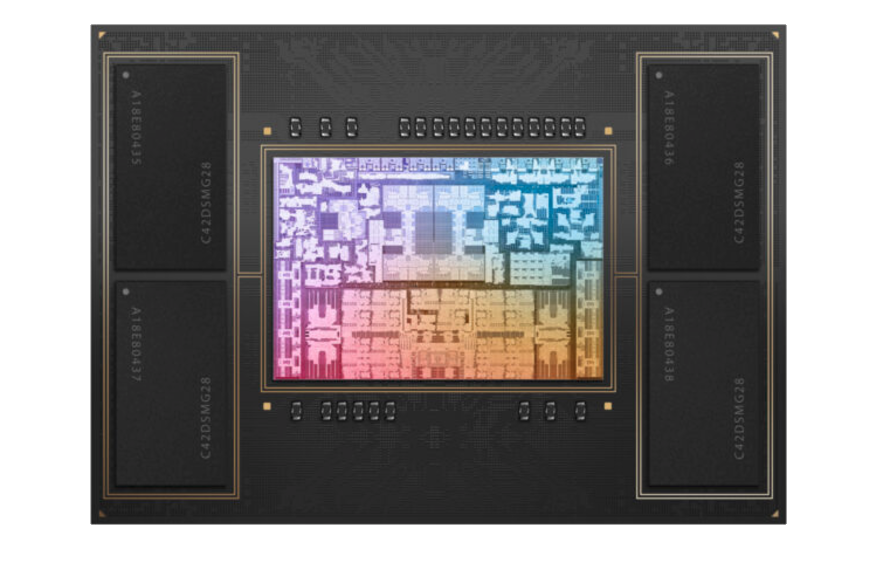
M2 Pro Chip. Image Credit: [Apple](https://www.apple.com/newsroom/)
### M2 Max
[Back to the Top](#table-of-contents)

[Apple M2 Max Chip](https://www.apple.com/newsroom/) is a Apple's most powerful silicon chip in their M2-series for right now. The M2 has a **20% faster CPU, 30% faster GPU, and 40% faster Neural Engine than the base [M1 Max chip](https://github.com/mikeroyal/Apple-Silicon-Guide#M1-Max)**. It can be configured with up to **96GB** of high-bandwidth, low-latency unified memory that can be accessed by the **12-core CPU, 38-core GPU (400GB/s memory bandwidth), and 16-core Neural Engine**. The M2 Max will be available in Apple's **[MacBook Pro 14"](https://www.apple.com/macbook-pro-14-and-16/)**, **[MacBook Pro 16"](https://www.apple.com/macbook-pro-14-and-16/)**, and **[Mac mini](https://www.apple.com/mac-mini/)**.

M2 Max Chip. Image Credit: [Apple](https://www.apple.com/newsroom/)
### M2 Ultra
[Back to the Top](#table-of-contents)

The M2 Ultra is composed of **two M2 Max chips** that are connected together using [Apple's UltraFusion Architecture](https://github.com/mikeroyal/Apple-Silicon-Guide/files/8248834/US20220013504A1.pdf) packaging.
The M2 Ultra can be configured with up to **192GB** of high-bandwidth, low-latency unified memory that can be accessed by the **24-core CPU, 76-core GPU (800GB/s memory bandwidth), and 32-core Neural Engine**. The M2 Ultra is available for the [Mac Studio](https://www.apple.com/mac-studio/) and [Mac Pro](https://www.apple.com/mac-pro/).
### M3
[Back to the Top](#table-of-contents)

**Apple M3 Chip** has a **35% faster CPU, 65% faster GPU, and 40% faster Neural Engine than the base [M1 chip](https://github.com/mikeroyal/Apple-Silicon-Guide#M1)**. It can be configured with up to **24GB** of high-bandwidth, low-latency unified memory that can be accessed by the **8-core CPU (4 high-performance and 4 energy-efficient), 10-core GPU (100GB/s memory bandwidth), and 16-core Neural Engine**. Available in the [MacBook Pro 14”](https://www.apple.com/shop/buy-mac/macbook-pro/14-inch-m3) and [iMac](https://www.apple.com/shop/buy-mac/imac).

M3 Chip Architecture. Image Credit: Apple

M3 Chip Family efficiency cores performance. Image Credit: Apple

M3 Chip Family Neural Engine performance. Image Credit: Apple
### M3 Pro
[Back to the Top](#table-of-contents)

**Apple M3 Pro Chip** has a **30% faster CPU, 40% faster GPU, and 40% faster Neural Engine than the base [M1 Pro chip](https://github.com/mikeroyal/Apple-Silicon-Guide#M1-Pro)**. It can be configured with up to **36GB** of high-bandwidth, low-latency unified memory that can be accessed by the **12-core CPU (6 high-performance and 6 energy-efficient), 18-core GPU (150GB/s memory bandwidth), and 16-core Neural Engine**. Available in the [MacBook Pro 14”](https://www.apple.com/shop/buy-mac/macbook-pro/14-inch-m3-pro) and [MacBook Pro 16”](https://www.apple.com/shop/buy-mac/macbook-pro/16-inch-m3-pro).

M3 Pro Chip Architecture. Image Credit: Apple
### M3 Max
[Back to the Top](#table-of-contents)

**Apple M3 Max Chip** has a **80% faster CPU, 50% faster GPU, and 40% faster Neural Engine than the base [M1 Max chip](https://github.com/mikeroyal/Apple-Silicon-Guide#M1-Max)**. It can be configured with up to **128GB** of high-bandwidth, low-latency unified memory that can be accessed by the **16-core CPU (12 high-performance and 4 energy-efficient), 40-core GPU (400GB/s memory bandwidth), and 16-core Neural Engine**. Available in the [MacBook Pro 14”](https://www.apple.com/shop/buy-mac/macbook-pro/14-inch-m3-max) and [MacBook Pro 16”](https://www.apple.com/shop/buy-mac/macbook-pro/16-inch-m3-max).

M3 Max Chip Architecture. Image Credit: Apple
### M3 Ultra
[Back to the Top](#table-of-contents)

**Apple M3 Ultra Chip** is a Apple's most powerful silicon chip in their M3-series lineup. The M3 Ultra is composed of **two M3 Max chips** that are connected together using [Apple's UltraFusion Architecture](https://github.com/mikeroyal/Apple-Silicon-Guide/files/8248834/US20220013504A1.pdf) packaging. This means the M1 Ultra can be configured with up to 256GB of high-bandwidth, low-latency unified memory that can be accessed by the **32-core CPU (24 high-performance and 8 energy-efficient), 80-core GPU (800GB/s memory bandwidth), and 32-core Neural Engine**.

M3 Ultra Chip Architecture.
## Apple AR and Vision Pro Headset
[Back to the Top](#table-of-contents)
**Important Terms to Know**
* [Augmented Reality (AR)](https://en.wikipedia.org/wiki/Augmented_reality) is an interactive experience of a real-world environment where the objects that reside in the real world are enhanced by computer-generated perceptual information.
* [Virtual Reality (VR)](https://en.wikipedia.org/wiki/Virtual_reality) is a simulated experience that can be similar to or completely different from the real world. The applications of virtual reality include entertainment (video games), education (medical or military training) and business (virtual meetings).
* [Mixed Reality (MR)](https://en.wikipedia.org/wiki/Mixed_reality) is the merging of real and virtual worlds to produce new environments and visualizations, where physical and digital objects co-exist and interact in real time.
* [Extended Reality (XR)](https://en.wikipedia.org/wiki/Extended_reality) is a concept referring to all real-and-virtual combined environments and human-machine interactions generated by computer technology and wearables. Including augmented reality (AR), mixed reality (MR) and virtual reality (VR).

Vision Pro Headset. Image Credit: Apple
)
Vision Pro Headset with battery pack. Image Credit: Apple
R1 & M2 chips in the Vision Pro Headset. Image Credit: Apple

visionOS. Image Credit: Apple
* [visionOS](https://developer.apple.com/visionos/) is Apple's iOS-like operating system for their upcoming AR/VR (Augmented Reality/Virtual Reality) headset powered by Apple's Silicon M2 and R1 chips. It will have an App Store with apps that include mixed-reality versions of their core Apple apps like **[Messages](https://support.apple.com/messages), [FaceTime](https://support.apple.com/facetime), [Maps](https://www.apple.com/maps/), and AR/VR games from [Apple Arcade](https://www.apple.com/apple-arcade/)**. Along with features such as [Memojis](https://apps.apple.com/us/story/id1445637997) and [SharePlay](https://support.apple.com/guide/iphone/use-shareplay-to-watch-and-listen-together-iphb657eb791/ios) that could be central to the user experience.
**visionOS Resources**
* [visionOS SDK](https://developer.apple.com/visionos/)
* [Learn about visionOS](https://developer.apple.com/visionos/learn/)
* [Apple Vision Pro developer kit](https://developer.apple.com/visionos/developer-kit/)
* [Apple Vision Pro developer Labs](https://developer.apple.com/visionos/labs/)
* [Get started with building apps for spatial computing](https://developer.apple.com/videos/play/wwdc2023/10260/)
* [Apple Vision Pro compatibility evaluations](https://developer.apple.com/visionos/compatibility-evaluations/)
* [Checking whether your existing app is compatible with visionOS](https://developer.apple.com/documentation/visionOS/checking-whether-your-app-is-compatible-with-visionos/)
* [Making your existing app compatible with visionOS](https://developer.apple.com/documentation/visionos/making-your-app-compatible-with-visionos/)
* [Bringing your existing apps to visionOS](https://developer.apple.com/documentation/visionos/bringing-your-app-to-visionos/)
* [Interacting with your app in the visionOS simulator](https://developer.apple.com/documentation/visionOS/interacting-with-your-app-in-the-visionos-simulator/)
* [Diagnosing and resolving bugs in your running app](https://developer.apple.com/documentation/xcode/diagnosing-and-resolving-bugs-in-your-running-app/)
* [Running your app in Simulator or on a device](https://developer.apple.com/documentation/xcode/running-your-app-in-simulator-or-on-a-device/)
* [Diagnosing and resolving bugs in your running app](https://developer.apple.com/documentation/xcode/diagnosing-and-resolving-bugs-in-your-running-app/)
* [Improving your app’s performance](https://developer.apple.com/documentation/metrickit/improving_your_app_s_performance/)
* [Analyzing the performance of your Metal app](https://developer.apple.com/documentation/xcode/analyzing-the-performance-of-your-metal-app/)
* [Establishing UIRequiredDeviceCapabilities](https://developer.apple.com/documentation/bundleresources/information_property_list/uirequireddevicecapabilities/)
* [Game controllers (GCSupportsControllerUserInteraction)](https://developer.apple.com/design/human-interface-guidelines/game-controllers/)
* [Vision Pro Human Interface Guidelines](https://developer.apple.com/design/human-interface-guidelines/designing-for-visionos/)
* [Creating your first visionOS app](https://developer.apple.com/documentation/visionos/creating-your-first-visionos-app/)
* [Adding 3D content to your app](https://developer.apple.com/documentation/visionos/adding-3d-content-to-your-app)
* [Adopting best practices for privacy and user preferences](https://developer.apple.com/documentation/visionos/adopting-best-practices-for-privacy)
* [Improving accessibility support in your visionOS app](https://developer.apple.com/documentation/visionos/improving-accessibility-support-in-your-app)
* [Unity support for visionOS: What you need to know](https://blog.unity.com/engine-platform/unity-support-for-visionos)
* [Create immersive Unity apps](https://developer.apple.com/videos/play/wwdc2023/10088/)
* [Bring your Unity VR app to a fully immersive space](https://developer.apple.com/videos/play/wwdc2023/10093/)
**Apple Vision Pro Headset Specs:**
* Powered by an M2 chip and **R1 chip(dedicated toward real-time sensor processing for the 12 cameras and 5 sensors on the Vision Pro headset)**.
* High-resolution 4K micro OLED displays.
* Display refresh rate of [90Hz and supports a special 96Hz mode for 24fps video](https://developer.apple.com/videos/play/wwdc2023/10071/?time=143).
* Display Pixel Size will be between 3000 ppi-4000 ppi.
* Display offers a brightness of 5,000 nits.
* The color gamut is quoted as DCI > 97% DCI.
* 96W USB-C power adapter.
* A USB-C port for data transfer.
* A proprietary magnetic port(MagSafe) to attach the [battery pack](https://www.amazon.com/Apple-MJWY3AM-A-MagSafe-Battery/dp/B099BWY7WT).
* Expected battery life of about **2 hours per pack**.
* 12 optical cameras and 5 sensors for tracking movements, mapping the environment, and projecting visual experiences.
* WiFi 6E, which adds 6GHz spectrum to the 2.4GHz & 5GHz bands for increased bandwidth and less device interference.
OLEDoS (OLED on Silicon) is a display panel that typically has a diagonal length of less than 1 inch and meets the 3000 ppi-4000 ppi resolution criteria of AR/VR device displays. Existing OLED displays use Low-Temperature-Poly-Silicon (LTPS) or Oxide TFT based on glass substrates. OLEDoS uses silicon-wafer-based CMOS substrates. Using silicon substrates, ultra-fine circuit structures typically used in semiconductor processes can be reproduced, which in turn lead to the creation of ultra-high-resolution OLEDs when organic matter is deposited on them.
**LG and Sony OLEDoS Display Specs:**
* High-resolution 4K micro OLED displays.
* Display Pixel Size will be between 3000 ppi-4000 ppi.
* Display offers a brightness of 5,000 nits.
* The color gamut is quoted as DCI > 97% DCI.
### LG OLEDoS

OLEDoS: Solution for ultra-high resolution
Credit: [LG](https://www.lgdisplay.com/eng/technology/oled)
### Sony OLEDoS

Specs for OLED and OLEDoS
Credit: [Sony](https://www.sony.com/en/SonyInfo/research/technologies/OLED_microdisplay/)
### Tools and Frameworks
* [Reality Composer Pro](https://developer.apple.com/videos/play/wwdc2023/10083/) is a tool that let's you discover how to easily compose, edit, and preview 3D content with Reality Composer Pro. Follow along as you explore this developer tool by setting up a new project, composing scenes, adding particle emitters and audio, and even previewing content on your device.
* [Reality Composer](https://developer.apple.com/augmented-reality/tools/) is a powerful tool that makes it easy for you to create interactive augmented reality experiences with no prior 3D experience. The Reality Converter quickly converts your existing 3D models to [USDZ](https://graphics.pixar.com/usd/files/USDZFileFormatSpecification.pdf) so it works seamlessly in our tools and on all AR-enabled iPhone and iPad devices.
* [Apple Vision](https://developer.apple.com/documentation/vision) is a framework that performs face and face landmark detection, text detection, barcode recognition, image registration, and general feature tracking. Vision also allows the use of custom Core ML models for tasks like classification or object detection.
* [Metal shader converter](https://developer.apple.com/metal/shader-converter/) is a tool that converts shader intermediate representations in LLVM IR bytecode into bytecode suitable to be loaded into Metal. It’s available as a library and a standalone executable. All the functionality exposed through the library interface is available via the standalone executable.
* [USDZ](https://graphics.pixar.com/usd/release/spec_usdz.html) is a file format that contains a 3D scene or object saved in the USDZ Universal format, which is developed by Apple and Pixar Animation Studios. It is an uncompressed and unencrypted .ZIP archive that stores a Universal Scene Description (.USD, USDA, or USDC) file, which includes 3D geometry and shading data. USDZ files may also contain .PNG and .JPEG image textures and .M4A, .MP3, or .WAV audio files utilized in the 3D object or scene.
* [ARKit](https://developer.apple.com/augmented-reality/arkit/) is a set set of software development tools to enable developers to build augmented-reality apps for iOS developed by Apple. The latest version ARKit 3.5 takes advantage of the new LiDAR Scanner and depth sensing system on iPad Pro(2020) to support a new generation of AR apps that use Scene Geometry for enhanced scene understanding and object occlusion.
* [RealityKit](https://developer.apple.com/documentation/realitykit) is a framework to implement high-performance 3D simulation and rendering with information provided by the ARKit framework to seamlessly integrate virtual objects into the real world.
* [RealityUI](https://github.com/maxxfrazer/RealityUI) is a Swift Package for creating familiar UI Elements and animations in a RealityKit rendered Augmented Reality or Virtual Reality scene.
* [SceneKit](https://developer.apple.com/scenekit/) is a high-level 3D graphics framework that helps you create 3D animated scenes and effects in your iOS apps.
* [SwiftUI](https://developer.apple.com/documentation/swiftui) is a user interface toolkit that provides views, controls, and layout structures for declaring your app's user interface. The SwiftUI framework provides event handlers for delivering taps, gestures, and other types of input to your application.
* [UIKit](https://developer.apple.com/documentation/uikit) is a framework provides the required infrastructure for your iOS or tvOS apps. It provides the window and view architecture for implementing your interface, the event handling infrastructure for delivering Multi-Touch and other types of input to your app, and the main run loop needed to manage interactions among the user, the system, and your app.
* [SpriteKit](https://developer.apple.com/documentation/spritekit) is a general-purpose framework for drawing shapes, particles, text, images, and video in two dimensions. It leverages Metal to achieve high-performance rendering, while offering a simple programming interface to make it easy to create games and other graphics-intensive apps.
* [MetalFX](https://developer.apple.com/videos/play/wwdc2022/10103/) is a new API that provides platform optimized graphics effects for Metal applications. With MetalFX Upscaling, your application can now render frames at a lower resolution, reducing rendering time, without compromising rendering quality. We'll also show you how and when to use its two effects: spatial upscaling, which delivers substantial performance gains, and temporal AA and upscaling, which delivers the highest quality rendering.

MetalFX Rendering. Image Credit: Apple
* [Apple Core Animation Framework](https://developer.apple.com/documentation/quartzcore) is a graphics rendering and animation infrastructure that provides high frame rates and smooth animations without burdening the CPU and slowing down your app.
* [Apple Core Graphics Framework](https://developer.apple.com/documentation/coregraphics) is a framework based on the Quartz advanced drawing engine. It provides low-level, lightweight 2D rendering with unmatched output fidelity.
* [GPUImage3](https://github.com/BradLarson/GPUImage3) is the third generation of the [GPUImage framework](https://github.com/BradLarson/GPUImage), an open source project for performing GPU-accelerated image and video processing on Mac and iOS. This third generation is redesigned to use **[Apple's Metal](https://developer.apple.com/metal/) in place of OpenGL**.
* [XR Interaction Toolkit package](https://docs.unity3d.com/Packages/com.unity.xr.interaction.toolkit@2.3/manual/index.html) is a high-level, component-based, interaction system for creating VR and AR experiences. It provides a framework that makes 3D and UI interactions available from Unity input events. The core of this system is a set of base Interactor and Interactable components, and an Interaction Manager that ties these two types of components together.
* [Input System](https://docs.unity3d.com/Packages/com.unity.inputsystem@1.6/manual/index.html) is a tool that allows your users to control your game or app using a device, touch, or gestures
* [XR Hands package](https://docs.unity3d.com/Packages/com.unity.xr.hands@1.1/manual/index.html) is an API that allows you to access hand tracking data from devices that support hand tracking. To access hand tracking data, you must also enable a provider plug-in that implements the XR hand tracking subsystem.
### Developer Resources
* [AR Creation Tools - Augmented Reality | Apple Developer](https://developer.apple.com/augmented-reality/tools/)
* [Augmented Reality applications | Apple](https://www.apple.com/augmented-reality/)
* [Unity's Beta Program for Creating Spatial Experiences](https://create.unity.com/spatial)
* [Unity Learn Training Program](https://learn.unity.com)
* [Unity Manual: XR](https://docs.unity3d.com/Manual/XR.html)
* [Intro to XR: VR, AR, and MR Foundations - Unity Learn](https://learn.unity.com/course/introduction-to-xr-vr-ar-and-mr-foundations)
* [Unity XR: Build VR and AR Apps](https://unity3d.com/learn/unity-xr-apps)
## Devices powered by Apple Silicon
[Back to the Top](#table-of-contents)

Devices powered by Apple Silicon.
### macOS
[macOS](https://www.apple.com/macos) is an advanced desktop operating system (OS) for Apple's series of desktops and laptops.

**macOS Sonoma. Source: [Apple](https://www.apple.com/macos/sonoma/)**
**These are the Mac computers compatible with macOS Sonoma:**
* iMac 2019 and later
* iMac Pro 2017
* Mac Pro 2019 and later
* Mac Studio 2022 and later
* MacBook Air 2018 and later
* MacBook Pro 2018 and later
* Mac mini 2018 and later
### iOS
[iOS](https://www.apple.com/ios/) is an advanced mobile operating system (OS) for Apple's series of iPhone products.

**iOS 17. Source: [Apple](https://www.apple.com/ios)**
### iPadOS
[iPadOS](https://www.apple.com/ipados/) is an advanced mobile operating system (OS) for Apple's series of iPad products.

**iPadOS 17. Source: [Apple](https://www.apple.com/ipados)**
### watchOS
[watchOS](https://www.apple.com/watchos/) is an advanced mobile operating system (OS) for Apple's series of Watch products.

**watchOS 10. Source: [Apple](https://www.apple.com/watchos/)**
### tvOS
[tvOS](https://www.apple.com/tv-home/) is an advanced mobile operating system (OS) for Apple's series of TV streaming devices.

**tvOS. Source: [Apple](https://www.apple.com/tv-home/)**
### visionOS
[visionOS](https://www.apple.com/newsroom/2023/06/introducing-apple-vision-pro/) is Apple's iOS-like operating system for their upcoming AR/VR (Augmented Reality/Virtual Reality) headset powered by Apple's Silicon M2 and R1 chips. It will have an App Store with apps that include mixed-reality versions of their core Apple apps like **[Messages](https://support.apple.com/messages), [FaceTime](https://support.apple.com/facetime), [Maps](https://www.apple.com/maps/), and AR/VR games from [Apple Arcade](https://www.apple.com/apple-arcade/)**. Along with features such as [Memojis](https://apps.apple.com/us/story/id1445637997) and [SharePlay](https://support.apple.com/guide/iphone/use-shareplay-to-watch-and-listen-together-iphb657eb791/ios) that could be central to the user experience.
visionOS. Image Credit: Apple
## Getting Software
[Back to the Top](#table-of-contents)
[Apple App Store](https://www.apple.com/app-store/)
[Developing for the App Store](https://www.apple.com/app-store/developing-for-the-app-store/)

[Homebrew](https://brew.sh) is the missing Package Manager for your macOS, Linux, and Windows 10 (with [Windows Subsystem for Linux (WSL)](https://docs.microsoft.com/en-us/windows/wsl/)) system. Homebrew is an essential tool for any developer/engineer.

[MacPorts Project](https://www.macports.org/) is an open-source community initiative to design an easy-to-use system for compiling, installing, and upgrading either command-line, X11 or Aqua based open-source software on macOS.
[Nix package manager](https://nixos.org/) is a cross-platform package manager that utilizes a purely functional deployment model where software is installed into unique directories generated through cryptographic hashes. Choose from Thousands of Packages The Nix Packages collection (Nixpkgs) is a set of over 80 000 packages for the Nix package manager.
* **[Nix-darwin](https://github.com/LnL7/nix-darwin)** is Nix modules for darwin, ```/etc/nixos/configuration.nix``` for macOS.
**Multi-user installation on macOS:**
```$ sh <(curl -L https://nixos.org/nix/install)```
**Note:** Nix will install all it's packages within ```/nix/store```.
**Note 2:** You may need to source the nix profile at this point.
```source /nix/var/nix/profiles/default/etc/profile.d/nix-daemon.sh```
```source /nix/var/nix/profiles/default/etc/profile.d/nix.sh```
### Productivity & Workflow Apps
[Back to the Top](#table-of-contents)
[Signal](https://www.signal.org/) is a state-of-the-art end-to-end encryption (powered by the open source [Signal Protocol](https://github.com/signalapp)) messaging app that keeps your conversations secure.

Signal
[NordVPN](https://nordvpn.com/) is a VPN service and the flagship product of the cybersecurity company Nord Security. It's available for wireless routers, NAS devices, and other platforms.

NordVPN
[WireGuard](https://www.wireguard.com/) is a fast, open-source, and secure VPN tunnel. WireGuard allows users to manage and use WireGuard tunnels. The app can import new tunnels from archives and files, from QR codes, or you can create one from scratch.

WireGuard
[Tailscale](https://tailscale.com/) is a open-source mesh VPN alternative built on WireGuard® that makes it easy to connect your devices. It includes features like automatic key rotation, NAT traversal, and single sign-on with two-factor authentication.

Tailscale
[BitWarden](https://bitwarden.com/) is a free and open-source password management service that stores sensitive information such as website credentials(logins and passwords) in an encrypted vault while conveniently keeping them synced between all of your devices.

BitWarden
[1Blocker](https://1blocker.com/) is a fast, secure, and robust tool for iPhone, iPad, and Mac that empowers users to put a stop to invasive online content.

1Blocker
[Matrix](https://matrix.org/) is a client tool that gives you simple HTTP APIs and SDKs (iOS, Android, Web) to create chatrooms, direct chats and chat bots, complete with end-to-end encryption, file transfer, synchronized conversation history, formatted messages, read receipts and more.

Matrix
[Element](https://element.io/) is a Matrix web client built using the [Matrix React SDK](https://github.com/matrix-org/matrix-react-sdk). It is a robust and reliable hosting service for fast, secure real time communication.

Element
[Nextcloud](http://nextcloud.com/) is a suite of client-server software for creating and using file hosting services. It offers an on-premise Universal File Access and sync platform with powerful collaboration capabilities and desktop, mobile and web interfaces.

Nextcloud
[Synology](https://www.synology.com/) is a tool that allows you to easily access and manage files in your Synology Drive on the go. Apart from common file types, such as documents, images, videos and music, you can also open Synology Office document, spreadsheets and slides in the user-friendly viewer provided by Drive.

Synology
[Adobe Lightroom Photo Editor](https://apps.apple.com/us/app/lightroom-photo-video-editor/id878783582) is a free, powerful photo & video editor and camera app that empowers you to capture and edit stunning images. It offers photo & video editing tools like sliders to retouch your images, apply photo filters, fine-tune backgrounds, and use transformative presets to quickly add unique adjustments.

Adobe Lightroom Photo Editor
[Things](https://culturedcode.com/things/) is an app that helps you plan your day, manage your projects, and make real progress toward your goals.

Things
[Airbuddy 2](https://v2.airbuddy.app/) is a utility that let's you simply open your AirPods case next to your Mac and see the current status right away, just like how it works on your iPhone. A single click gets you connected, a swipe down lets you connect and change listenings modes at the same time. It has a fully customizable battery alerts help you keep track of your device's batteries.

Airbuddy 2
[Fantastical 3](https://flexibits.com/fantastical) is a calendar app that works seamlessly across your Mac, iPad, iPhone, and Apple Watch.

Fantastical 3
[Bartender](https://www.macbartender.com/) is an app for macOS that superpowers your menu bar, giving you total control over your menu bar items, what's displayed, and when, with menu bar items only showing when you need them. It improves your workflow with quick reveal, search, custom hotkeys and triggers, and lots more.

Bartender menu bar tray

Bartender Settings
[Magnet](https://magnet.crowdcafe.com/) is an app that keeps your workspace organized. magnet is activated by dragging, customizable keyboard shortcuts or via menu bar, it declutters your screen by snapping windows into organized tiles.

Magnet
[AltTab](https://alt-tab-macos.netlify.app/) is an app that brings the power of Windows’s “alt-tab” window switcher to macOS.

AltTab
[MonitorControl](https://monitorcontrol.app/) is an app that controls your external display brightness and volume and shows native OSD. Use menulet sliders or the keyboard, including native Apple keys.

MonitorControl
[WebCatalog](https://webcatalog.io/webcatalog/) is an app that turns any Website into Real Desktop Apps.

WebCatalog
[Maccy](https://maccy.app/) is a lightweight clipboard manager for macOS. It keeps the history of what you copy and lets you quickly navigate, search, and use previous clipboard contents.

Maccy clipboard manager
[Daisydisk](https://daisydiskapp.com/) is a utility that provides a visual breakdown of your disk space in form of an interactive map, reveal the biggest space wasters, and remove them with a simple drag and drop. It supports all kinds of local drives, as well as the most popular cloud disks.

Daisydisk
[Page screenshot for Safari](https://alexdenk.eu/mywork/pagescreenshot.html) is an awesome extension, just a click away, ready to use every time you need to capture a webpage screenshot, either the full page or just part of it. Along with your pictures will also automatically open in Preview for easy editing (annotations, blurring sensitive info, printing, drawing, sharing).

Page screenshot for Safari
[Paste](https://pasteapp.io/) is a Clipboard manager for Mac, iPhone, and iPad.

Paste
[PasteBot](https://tapbots.com/pastebot/) is an indispensable tool to improve your productivity. It quickly recalls clippings that you have copied before and apply powerful text filters to format before pasting. Queue up multiple clippings to paste in sequence.

PasteBot
[Speedcut](https://www.speedcut.app/) is a tool that lets your remove backgrounds from photos straight from your Mac's menu bar.

Speedcut
[Pulse](https://kean.blog/pulse/home) is a powerful logging system for Apple Platforms builtin in SwiftUI. It allows you to record and inspect logs and ```URLSession``` network requests right from your iOS app. Shared logs and view them in [Pulse Pro](https://kean.blog/pulse/pro) or use remote logging to see them in real-time. Logs are stored locally and never leave your devices.
p align="center">

Pulse
[Cleaner One Pro](https://cleanerone.trendmicro.com/cleaner-one-pro-for-mac/) is an all-in-one Mac Master Cleaner App. It can optimize your disk usage, free up space on your Mac, keep the hard drive clean, remove duplicate photos and other files, manage your apps, and much more.

Cleaner One Pro
[Yabai](https://github.com/koekeishiya/yabai) is a window management utility that is designed to work as an extension to the built-in window manager of macOS.

[Bear](https://bear.app/) is a Private Markdown Editor for iPhone, iPad and Mac. It uses todos to stay on task across every device. Organize easily Link notes to each other to build a body of work. Add hashtags to organize the way you think. Use Face/Touch ID to protect sensitive notes.

Bear
[Obsidian](https://obsidian.md/) is a powerful knowledge base that works on top of a local folder of plain text Markdown files. It comes with 25 core plugins, 638 community plugins, and 130 themes, plus custom styling, you can tweak Obsidian to work and look exactly how you want it.

Obsidian
[MarkText](https://github.com/marktext/marktext) is a simple and elegant open-source markdown editor that focused on speed and usability.

MarkText
[1Focus](https://onefocusapp.com/) is an App and Website Blocker to keep you focused on your work. Block specific apps such as email, games or unsupported web browsers. Also, block internet access by blocking the installed web browsers and the App Store.

1Focus
[Harvest](https://www.getharvest.com/) is an easy Time Tracking Software With Invoicing. It creates a project Create entries for your projects and tasks, or import them via one of our integrations.

Harvest
[MindNode](https://www.mindnode.com/) is a map and brainstorming tool that lets you capture, organize, style and share your thoughts. Capture your thoughts Organize your ideas Style your mind map Discreetly Powerful All the features you need.

MindNode
[Unclutter](https://apps.apple.com/us/app/unclutter/id577085396?mt=12) is a 3-in-1 productivity app to power up your efficiency and comfort on Mac during the day. It's a smart and super handy place on your desktop for storing notes, files and pasteboard clips.

Unclutter
[Warp terminal](https://www.warp.dev/) is a blazingly fast, rust-based terminal reimagined from the ground up to work like a modern app.

Warp
[Jettison](https://www.stclairsoft.com/Jettison/) is a tool that automatically ejects external disks from your Mac before your computer goes to sleep. Simply close the lid of your MacBook and Jettison will automatically eject your backup drive, iPod, or whatever is connected so you can safely unplug it.

Jettison
[Numi](https://numi.app/) is a calculator that magically combines calculations with text, and allows you to freely share your computations. Numi combines text editor and calculator Support plain English.

NuMi
[Dropzone](https://aptonic.com/) is a productivity app for the Mac that makes it faster and easier to move and copy files, launch applications, upload to many different services, and more.

Dropzone
[System Color Picker](https://sindresorhus.com/system-color-picker) is the macOS color picker as an app with lots of extra features.

System Color Picker
[Raycast](https://www.raycast.com/) is a blazingly fast, totally extendable launcher. It lets you complete tasks, calculate, share common links, and much more.

[Tinkertool](https://www.bresink.com/osx/TinkerTool.html) is an application that gives you access to additional preference settings Apple has built into MacOS. This allows to activate hidden features in the operating system and in some of the applications delivered with the system.

Tinkertool
[App Cleaner](https://app-cleaner.com/) is an application that uninstall/remove applications from Mac entirely with all their preferences, caches and other bits and pieces.

App Cleaner
[Infuse](https://firecore.com/) is a Video Player for iOS, Apple TV, and Mac. It plays every video file ever created to avoid wasting hours converting and transcoding files.

Infuse Video Player
## Secure & Privacy Focused Web Browsers
[Back to the Top](#table-of-contents)
**Note: While [Safari](https://www.apple.com/safari/) is a great browser that comes included on all Apple devices. It may not have all the extensions you need for your workflow so I recommend checking out the several great options below.**
[Mozilla Firefox](https://www.mozilla.org/firefox/) is a free and open-source web browser developed by the Mozilla Foundation.

Firefox
[Brave](https://brave.com/) is a fast, private and secure web browser for PC, Mac and mobile. It comes with [Brave Search](https://brave.com/search/), which is a private search engine that puts you first, not big tech for those that don't want to use Google Search.

Brave
[Ungoogled-Chromium](https://www.techspot.com/downloads/7181-ungoogled-chromium.html) is a lightweight approach to removing Google web service dependency.

Ungoogled-Chromium
[Vivaldi](https://vivaldi.com/) is a fast, private and secure web browser for PC, Mac and mobile. It comes with built-in features like Notes, Screen Capture, Image Properties and (a lot) more.

Vivaldi
[Ghostery Dawn](https://www.ghostery.com/dawn) is a fast, private and secure web browser for PC, Mac and mobile. It comes with the complete Ghostery Privacy Suite including [Ghostery Glow](https://www.ghostery.com/glow) a private search engine that does not log your search history, which means you get served objective results, not results that are filtered by the likelihood you’ll click on them.

Ghostery Dawn
[DuckDuckGo Privacy Browser](https://apps.apple.com/us/app/duckduckgo-privacy-browser/id663592361) is a fast, private and secure web browser for MacOS and mobile(iOS and Android).

DuckDuckGo
### Privacy & Security Focused Browser extensions
[Back to the Top](#table-of-contents)
[UBlock Origin](https://ublockorigin.com/) is a free and open-source, cross-platform browser extension for content filtering primarily aimed at neutralizing privacy invasion in an efficient, user-friendly method.
* [Firefox extension](https://addons.mozilla.org/en-US/firefox/addon/ublock-origin/)
* [Chrome extension](https://chrome.google.com/webstore/detail/ublock-origin/cjpalhdlnbpafiamejdnhcphjbkeiagm)
[Privacy Badger](https://privacybadger.org/) is a browser extension that automatically learns to block invisible trackers.
* [Firefox extension](https://addons.mozilla.org/en-US/firefox/addon/privacy-badger17/)
* [Chrome extension](https://chrome.google.com/webstore/detail/privacy-badger/pkehgijcmpdhfbdbbnkijodmdjhbjlgp)
[DuckDuckGo Privacy Essentials](https://duckduckgo.com/app) is an extension that seamlessly helps prevent your personal information from being exposed during everyday online activity.
* [Firefox extension](https://addons.mozilla.org/en-US/firefox/addon/duckduckgo-for-firefox/)
* [Chrome extension](https://chrome.google.com/webstore/detail/duckduckgo-privacy-essent/bkdgflcldnnnapblkhphbgpggdiikppg?hl=fr)
[Ghostery](https://www.ghostery.com/ghostery-browser-extension) is a comprehensive privacy protection Ad Blocker browser extension.
* [Firefox extension](https://www.ghostery.com/ghostery-ad-blocker-firefox)
* [Chrome extension](https://www.ghostery.com/ghostery-ad-blocker-chrome)
[HTTPS Everywhere](https://www.eff.org/https-everywhere) is an extension created by EFF and the Tor Project which automatically switches thousands of sites from insecure "http" to secure "https".
* [Firefox extension](https://addons.mozilla.org/en-US/firefox/addon/https-everywhere/)
* [Chrome extension](https://chrome.google.com/webstore/detail/https-everywhere/gcbommkclmclpchllfjekcdonpmejbdp?hl=en)
[CleanURLs](https://gitlab.com/KevinRoebert/ClearUrls) is an extension will automatically remove tracking elements from URLs to help protect your privacy when browsing through the Internet.
* [Firefox extension](https://addons.mozilla.org/en-US/firefox/addon/clearurls/)
* [Chrome extension](https://chrome.google.com/webstore/detail/clearurls/lckanjgmijmafbedllaakclkaicjfmnk/)
**PixelBlock** is an Gmail extension that blocks email tracking attempts used to detect when you open and read emails.
* [Chrome extension](https://chrome.google.com/webstore/detail/pixelblock/jmpmfcjnflbcoidlgapblgpgbilinlem/)
[Sitejabber](https://www.sitejabber.com/) is an extension for consumers to find trustworthy online businesses and avoid scams.
[Firefox extension](https://addons.mozilla.org/en-US/firefox/addon/sitejabber/)
[Chrome extension](https://chrome.google.com/webstore/detail/sitejabber-ratings-review/ckiddbafgcfifpioacgfijgicacanflo)
[1Password](https://1password.com/) is a password manager that provides a place for users to store various passwords, software licenses, and other sensitive information in a virtual vault that is locked with a PBKDF2-guarded master password.
* [Firefox extension](https://addons.mozilla.org/en-US/firefox/addon/1password-x-password-manager/)
* [Chrome extension](https://chrome.google.com/webstore/detail/1password-%E2%80%93-password-mana/aeblfdkhhhdcdjpifhhbdiojplfjncoa?hl=en)
[Bitwarden](https://bitwarden.com/) is a free and open-source password management service that stores sensitive information such as website credentials in an encrypted vault.
* [Firefox extension](https://addons.mozilla.org/en-US/firefox/addon/bitwarden-password-manager/)
* [Chrome extension](https://chrome.google.com/webstore/detail/bitwarden-free-password-m/nngceckbapebfimnlniiiahkandclblb)
[Guardio](https://guard.io/) is a lightweight extension designed to help you browse quickly and securely. It will clean your browser, speed it up, and protect your private information.
* [Chrome extension](https://chrome.google.com/webstore/detail/guardio-protection-for-ch/gjfpmkejnolcfklaaddjnckanhhgegla)
[OneTab](https://www.one-tab.com/) is an extension that converts your tabs to a list and speeds up your browser.
* [Firefox extension](https://addons.mozilla.org/en-US/firefox/addon/onetab/)
* [Chrome extension](https://chrome.google.com/webstore/detail/onetab/chphlpgkkbolifaimnlloiipkdnihall)
### Privacy-focused Search Engines
[Back to the Top](#table-of-contents)
* [Brave Search](https://brave.com/search/)

* [Ghostery Glow](https://www.ghostery.com/glow)

* [DuckDuckGo](https://duckduckgo.com/)

* [Startpage](https://www.startpage.com/)

* [Qwant](https://www.qwant.com/)

* [Ecosia](https://www.ecosia.org/)

* [Swisscows](https://swisscows.com/)

* [searX](https://searx.info/)

* [Mojeek](https://www.mojeek.com/)

## Microsoft Office Alternatives
[Back to the Top](#table-of-contents)
[OnlyOffice](https://www.onlyoffice.com/) is a secure offline/online office suite highly compatible with MS Office formats for Windows, Mac and Linux.

OnlyOffice
[FreeOffice](https://www.freeoffice.com/) is a secure office suite highly compatible with MS Office formats for Windows, Mac and Linux.

FreeOffice
[LibreOffice](https://www.libreoffice.org/) is a free and open-source office productivity software suite similar to Microsoft Office.

LibreOffice
## Universal Control
[Back to the Top](#table-of-contents)
[Universal Control](https://www.apple.com/newsroom/2021/10/macos-monterey-is-now-available/) is a software feature for Apple devices such as MacBooks and iPads that makes it possible to use a single keyboard, mouse, and trackpad with your Mac and iPad as long as they're side-by-side. Much like SideCar, there are limited settings for Universal Control. Without a second device connected, you can go to System Preferences -> Displays and click Advanced to pull up Universal Control settings. If a device is already connected, you'll have to go to Displays -> Display Settings -> Advanced.

Bluetooth, Wi-Fi, and Handoff must be enabled on each device, and they must be within 30 feet. If you prefer to use Universal Control wired, the devices can be connected via USB and you must trust your Mac on your iPad. At the moment, Apple does not mention support for Ethernet but we will test this ourselves during the beta period.
You must also have supported devices. Apple says supported devices include:
- MacBook Pro (2016 and later)
- MacBook (2016 and later)
- MacBook Air (2018 and later)
- iMac (2017 and later)
- iMac (5K Retina 27-inch, Late 2015)
- iMac Pro, Mac mini (2018 and later)
- Mac Pro (2019)
- Any iPad Pro
- iPad Air (3rd generation and later)
- iPad (6th generation and later)
- iPad mini (5th generation and later)

## Stage Manager
[Back to the Top](#table-of-contents)
Stage Manager is an iPadOS feature that provides better support for external displays. Stage Manager allows the iPad Air(**M1 chip**) and iPad Pro(**M1 chip**):
* **Fast access to windows and apps**: The windows of the apps you’re working in are displayed prominently in the center, and other apps are arranged on the left side in order of recent use.
* **Resizable windows**: Resize your windows to make them the perfect size for your task.
* **Center app**: Focus on the app you’re working with without going full screen.
* **Overlapping windows**: Create overlapping windows of different sizes in a single view, giving you the control to arrange your ideal workspace.
* **Group apps together**: Drag and drop windows from the side or open apps from the Dock to create app sets that you can always get back to.

## File Sync/Transfer
[Back to Top](#table-of-contents)
[Syncthing](https://syncthing.net/) is a continuous file synchronization program. It synchronizes files between two or more computers in real time.
[Seafile](https://www.seafile.com) is an open source file sync&share solution designed for high reliability, performance and productivity. Sync, share and collaborate across devices and teams.
[Synology](https://www.synology.com/) is a tool that allows you to easily access and manage files in your Synology Drive on the go. Apart from common file types, such as documents, images, videos and music, you can also open Synology Office document, spreadsheets and slides in the user-friendly viewer provided by Drive.
[Nextcloud](http://nextcloud.com/) is a suite of client-server software for creating and using file hosting services. It offers an on-premise Universal File Access and sync platform with powerful collaboration capabilities and desktop, mobile and web interfaces.
[TeraCopy for Mac](https://www.codesector.com/teracopy-for-mac) is a program to copy and paste large files at a high speed. The program is used for frequent file transfers, large file sizes, moving files from separate SSD drives/Hard drives.
[FileRun](https://hub.docker.com/r/filerun/filerun) is a self-hosted Google Drive alternative. It is a full featured web based file manager with an easy to use user interface.
[FileBrowser](https://hub.docker.com/r/filebrowser/filebrowser) provides a file managing interface within a specified directory and it can be used to upload, delete, preview, rename and edit your files. It allows the creation of multiple users and each user can have its own directory.
[Rsync](https://rsync.samba.org/) is a utility in the command line which enables users to transfer and synchronize files efficiently between a computer and an external hard drive in the entire connected network.
[rsync.net](https://rsync.net/) is a Cloud Storage for Offsite Backup that give you an empty UNIX filesystem to access with any SSH tool. Built on ZFS for data security and fault tolerance with support for rsync/sftp/scp/borg/rclone/restic/git-annex.
[Warpinator](https://github.com/linuxmint/warpinator) is a free, open-source tool for sending and receiving files between computers that are on the same network.
[FileZilla Client](https://filezilla-project.org/) is a fast and reliable cross-platform FTP, FTPS and SFTP client with lots of useful features and an intuitive graphical user interface.
[WinFsp](https://github.com/winfsp/winfsp) is a set of software components for Windows computers that allows the creation of user mode file systems. In this sense it is similar to FUSE (Filesystem in Userspace), which provides the same functionality on UNIX-like computers.
[SSHFS-Win](https://github.com/winfsp/sshfs-win) is a minimal port of SSHFS to Windows. Looking under the hood it uses Cygwin for the POSIX environment and WinFsp for the FUSE (Filesystem in Userspace) functionality.
[RiftShare](https://riftshare.app) is a cross platform (Windows, MacOS, Linux) file sharing tool that supports fully encrypted transfers both on the local network and off network using a simple passphrase. RiftShare uses [magic-wormhole](https://github.com/magic-wormhole/magic-wormhole) under the hood and is compatible with other magic-wormhole clients. It is also fully open source and licensed under the GPLv3.
[Usermode FTP Server](https://gitlab.com/ergoithz/umftpd) is a tool that let's you start an FTP server as user and transfer files with any FTP client. Allowing you to access your files directly with many file browsers' builtin FTP support: Windows File Explorer, Thunar, Gnome Files, Dolphin and many more.
[TagSpaces](https://www.tagspaces.org/) is a free, no vendor lock-in, open source application for organizing, annotating and managing local files with the help of tags. It features advanced note taking functionalities and some capabilities of to-do apps. It's available for Windows, Linux, Mac OS and Android.
## Replacing iCloud with Nexcloud
[Back to the Top](#table-of-contents)

**Replacing these iCloud services:**
* File sync (“iCloud Drive”) -> [Nextcloud Files](https://nextcloud.com/files/)
* Photos (“iCloud Photo Library”) -> [Nextcloud Photos](https://github.com/nextcloud/photos)
* Mail -> [Nextcloud Mail](https://apps.nextcloud.com/apps/mail) + [SnappyMail](https://apps.nextcloud.com/apps/snappymail)
* Contacts -> [Nextcloud Contacts](https://apps.nextcloud.com/apps/contacts)
* Calendar -> [Nextcloud Calendar](https://apps.nextcloud.com/apps/calendar)
* Reminders -> [SnappyMail](https://apps.nextcloud.com/apps/snappymail)
* Browser sync (“Safari”) -> [Nextcloud Bookmarks](https://apps.nextcloud.com/apps/bookmarks) or [Floccus](https://floccus.org/)
* Notes -> [Nextcloud Notes](https://apps.nextcloud.com/apps/notes)
* Password sync (“Keychain”) -> [KeePass DB on Nextcloud](https://apps.nextcloud.com/apps/keeweb)
* Remote access (“Back to my mac”) -> [Tailscale](https://tailscale.com/) + [docker-ddns](https://github.com/dprandzioch/docker-ddns)
* Find my iPhone -> [Nextcloud PhoneTrack](https://apps.nextcloud.com/apps/phonetrack)
* iWork for iCloud -> [Nextcloud with Onlyoffice](https://nextcloud.com/onlyoffice/) or [Collabora Online in Nextcloud](https://nextcloud.com/collaboraonline/)
* News -> [Miniflux](https://miniflux.app/) with [Fever API](https://miniflux.app/docs/services.html)
* Audiobooks (“iBooks”) -> [audiobookshelf](https://www.audiobookshelf.org/)
* Repository Hosting -> [GitLab](https://gitlab.com/)
[Nextcloud](https://nextcloud.com) is an industry-leading, on-premises content collaboration platform for file sync & share and communication server. It is fully open source and you can host it yourself or pay a company to do it for you. Also checkout the following links below:
- [Nextcloud App Store](https://apps.nextcloud.com)
- [Nextcloud GitHub](https://github.com/nextcloud)
- [Nextcloud Developer Program](https://nextcloud.com/developer)

Nexcloud login screen
[Nextcloud Hub](https://nextcloud.com/hub/) is a tool that allows you to share and collaborate on documents, send and receive email, manage your calendar and have video chats without data leaks. As fully on-premises solution, Nextcloud Hub provides the benefits of online collaboration without the compliance and security risks.

Nexcloud Hub
[Nextcloud AIO (All In One)](https://github.com/nextcloud/all-in-one) is a tool that provides easy deployment and maintenance with most features included in this one Nextcloud instance.
**Features it includes:**
* Nextcloud
* Nextcloud Office
* High performance backend for Nextcloud Files
* High performance backend for Nextcloud Talk
* Backup solution (based on BorgBackup)
* Imaginary
* ClamAV
* Fulltextsearch
[Nextcloud Desktop Client](https://nextcloud.com/install/#install-clients) is a tool to synchronize files from Nextcloud Server with your computer.
[Nextcloud Deck](https://apps.nextcloud.com/apps/deck) is a kanban style organization tool aimed at personal planning and project organization for teams integrated with Nextcloud.
[Nextcloud Files](https://nextcloud.com/files/) is a tool tool that allows your employees have easy access to their files, photos and documents to work and can share and collaborate with team members, customers and partners. So IT knows nobody besides those they shared with has access to those files.
[Nextcloud Talk](https://nextcloud.com/talk/) is a tool that protects your communication better than other team collaboration platforms like Microsoft Teams or Slack, making sure your data stays on your servers. It also goes further than other encrypted communication technologies by keeping even metadata from leaking.
[Nextcloud Home](https://nextcloud.com/athome/) is a tool that allows you store your documents, calendar, contacts and photos on your server at home, at one of at one Nextcloud's providers or in a data center you trust.
[Nextcloud Enterprise](https://nextcloud.com/enterprise/) is a service that gives professional organizations software optimized and tested for mission critical environments.
[Nextcloud Outlook Integration](https://nextcloud.com/outlook/) is a tool that automatically upload files to replace large attachments or integrate Calendars and Contacts in Microsoft Outlook.
[Collabora Online in Nextcloud](https://nextcloud.com/collaboraonline/) is a powerful LibreOffice-based online office suite with collaborative editing, which supports all major document, spreadsheet and presentation file formats and works in all modern browsers.
[ONLYOFFICE integration in Nextcloud](https://nextcloud.com/onlyoffice/) is a service that empowers your users to collaborate on office documents with team members in real time. It has compatibility with Microsoft Office formats means perfect documents, every time.
[Nextcloud VM(virtual machine appliance)](https://download.nextcloudvm.com/) is a set of carefully crafted family of [*nix](https://bit.ly/2UaCC7b) scripts, which interactively guide you through a quality-controlled installation of a Nextcloud instance for Home/SME Server and scripts for Raspberry Pi 4. It is Community developed and maintained.
## Adding External Storage
[Back to the Top](#table-of-contents)
[Sabrent XTRM Q](https://www.sabrent.com/rocket-xtrmq/) is a perfect SSD for all your creative pursuits: high-res photos, videos, sound files, etc. It's perfect for saving, creating and editing available in 500GB, 1TB, 2TB, and 4TB drives.
[Shell Thunder](https://m.fledging.net/products/shell-thunder) is a high-performance Intel-Certified Thunderbolt 3 SSD Enclosure engineered for active cooling with smart fan technology. Shell Thunder is designed for 2280 and 2260 m.2 NVME SSDs for macOS and Windows.
[Orico USB4.0 NVMe SSD Enclosure](https://www.orico.cc/us/product/detail/7328.html) is a high-performance SSD Enclosure engineered with up to a 40Gbps transmission rate and 2 TB capacity. It supports Windows, macOS, and Linux devices.
[USB-C to Lightning Cable (2 m)](https://www.apple.com/shop/product/MQGH2AM/A/usb-c-to-lightning-cable-2-m) is cable to connect your iPhone, iPad, or iPod with Lightning connector to your USB-C or Thunderbolt 3 (USB-C) enabled Mac for syncing and charging, or to your USB-C enabled iPad for charging.
[SanDisk Phone Drive (iPhone, iPad, or MacBook) up to 256GB](https://www.westerndigital.com/products/usb-flash-drives/sandisk-phone-drive-lightning-usb-c?sku=SDIX70N-064G-GG6NN).
**More fast External Storage options for MacOS/iOS/iPadOS:**
* [Kingston XS2000 Portable SSD](https://www.amazon.com/Kingston-Performance-Pocket-Sized-SXS2000-2000G/dp/B09F6279PY)
* [Crucial X8](https://www.amazon.com/Crucial-X8/s?k=Crucial+X8)
* [Samsung Portable SSD X5](https://www.samsung.com/us/computing/memory-storage/portable-solid-state-drives/portable-ssd-x5-1tb-mu-pb1t0b-am/)
* [Samsung Portable SSD T7 Touch](https://www.samsung.com/us/computing/memory-storage/portable-solid-state-drives/portable-ssd-t7-touch-usb-3-2-500gb-black-mu-pc500k-ww/)
* [SanDisk Professional Pro-G40 SSD](https://www.westerndigital.com/products/portable-drives/sandisk-professional-pro-g40-ssd)
* [SanDisk Professional G-Drive ArmorATD](https://www.westerndigital.com/products/portable-drives/sandisk-professional-g-drive-armoratd-usb-3-1-hdd)
* [WD Black P10](https://www.westerndigital.com/products/portable-drives/wd-black-p10-game-drive-usb-3-2-hdd)
* [WD Black D10](https://www.westerndigital.com/products/external-drives/wd-black-d10-game-drive-usb-3-2-hdd)
* [WD My Passport (5TB)](https://www.westerndigital.com/products/portable-drives/wd-my-passport-usb-3-0-hdd)
* [OWC Envoy Pro EX With USB-C](https://www.amazon.com/OWC-Envoy-External-Storage-Solution/dp/B07T7X7HRK)
* [LaCie Rugged SSD Pro](https://www.lacie.com/products/rugged/)
* [LaCie Rugged RAID Shuttle](https://www.lacie.com/products/rugged/)
* [LaCie 2big RAID](https://www.lacie.com/products/big/2big/)
* [LaCie Mobile Drive](https://www.lacie.com/products/mobile-drive/)
* [CalDigit AV Pro 2](https://www.caldigit.com/av-pro-2/)
## Backups
[Back to the Top](#table-of-contents)
[Proxmox Backup Server](https://www.proxmox.com/en/proxmox-backup-server) is an enterprise backup solution for backing up and restoring VMs, containers, and physical hosts. The open-source solution supports incremental backups, deduplication, Zstandard compression, and authenticated encryption.
[Borgmatic](https://github.com/modem7/docker-borgmatic) is a simple, configuration-driven backup software for servers and workstations. It protects your files with client-side encryption. Backup your databases too. Monitor it all with integrated third-party services.
[BorgWarehouse](https://borgwarehouse.com/) is a fast and modern WebUI for a BorgBackup's central repository server.
[Emborg](https://emborg.readthedocs.io/en/latest/) is a simple command line utility to orchestrate backups. It is built as a front-end to Borg, a powerful and fast de-duplicating backup program.
[Vorta](https://vorta.borgbase.com/) is a backup client for macOS and Linux desktops. It integrates the mighty Borg Backup with your favorite desktop environment to protect your data from disk failure, ransomware and theft.
[rsync.net](https://rsync.net/) is a Cloud Storage for Offsite Backup that give you an empty UNIX filesystem to access with any SSH tool. Built on ZFS for data security and fault tolerance with support for rsync/sftp/scp/borg/rclone/restic/git-annex.
[BackupPC](https://github.com/backuppc/backuppc) is a high-performance, enterprise-grade system for backing up Linux, Windows and macOS PCs and laptops to a server's disk. BackupPC is highly configurable and easy to install and maintain.
[UrBackup](https://www.urbackup.org/) is an easy to setup Open Source client/server backup system, that through a combination of image and file backups accomplishes both data safety and a fast restoration time. File and image backups are made while the system is running without interrupting current processes. Available for Windows, macOS, and Linux.
[Kopia](https://kopia.io/) is a user-friendly desktop app for Windows, macOS, and Linux which allows you to create snapshots, define policies, and restore files quickly with Fast and Encrypted Backups.
[rsnapshot](https://rsnapshot.org/) is a filesystem snapshot utility based on rsync. This makes it easy to make periodic snapshots of local machines, and remote machines over ssh.
[Proton Drive](https://drive.proton.me/) is an end-to-end encrypted Swiss storage space for your files, photos, and videos, ensuring that nobody, except those authorized by you, can access your data.
[pCloud](https://www.pcloud.com/) is a secure place for your photos, videos and documents from every device, anywhere you go. pCloud starts with 10 GB free storage and auto