https://github.com/mikropsoft/StevenBlock
🚫 Advanced Ad-Blocking Module for Android | Compatible with Magisk, KernelSU, and APatch 🔒
https://github.com/mikropsoft/StevenBlock
ad-block adblock adblocker android apatch block-ads content-blocker dns firewall hosts kernelsu magisk magisk-module modules network privacy root security stevenblack systemless
Last synced: 12 months ago
JSON representation
🚫 Advanced Ad-Blocking Module for Android | Compatible with Magisk, KernelSU, and APatch 🔒
- Host: GitHub
- URL: https://github.com/mikropsoft/StevenBlock
- Owner: mikropsoft
- License: gpl-2.0
- Created: 2024-03-20T17:27:37.000Z (over 2 years ago)
- Default Branch: main
- Last Pushed: 2025-07-08T17:05:17.000Z (about 1 year ago)
- Last Synced: 2025-07-08T18:28:18.654Z (about 1 year ago)
- Topics: ad-block, adblock, adblocker, android, apatch, block-ads, content-blocker, dns, firewall, hosts, kernelsu, magisk, magisk-module, modules, network, privacy, root, security, stevenblack, systemless
- Language: Shell
- Homepage: https://github.com/Magisk-Modules-Alt-Repo/StevenBlock
- Size: 176 MB
- Stars: 173
- Watchers: 3
- Forks: 4
- Open Issues: 1
-
Metadata Files:
- Readme: README.md
- Changelog: changelog.md
- License: LICENSE
Awesome Lists containing this project
- awesome-android-root - StevenBlock - Ad Blocking Module for Android supporting Magisk, KernelSU and APatch. `FOSS` `[M]` (🛡️ Ads and Tracking Blockers / Step 4: **Post-Root Setup**)
README
# 🛡️ **StevenBlock**: Your Digital Guardian 🛡️






Hey there, digital explorer! 👋 Ready to reclaim your online experience? Say hello to **StevenBlock**, your new best friend in the fight against pesky ads and sneaky malware. Let's dive into how this little powerhouse can transform your digital life!
## **🚀 What Makes StevenBlock Your Digital Superhero?**
- **🛑 Ad Annihilator**: Wave goodbye to annoying pop-ups, intrusive video ads, and clingy banners. **StevenBlock** makes them vanish.
- **📱 App Ad Assassin**: Tired of ads crashing your app party? **StevenBlock** kicks them to the curb, letting you enjoy your apps in uninterrupted peace.
- **🎯 Customizable Protection**: You are in control! During installation, choose from four different blocklists, from light to aggressive, to perfectly match your needs.
- **🔋 Battery Friendly**: **StevenBlock** is a lean, mean, blocking machine. It's **not an app** that runs in the background. It's a system-level module, meaning it does its job silently without draining your battery.
- **🛡️ Broad Root Support**: Whether you're using **Magisk**, **KernelSU**, or **APatch**, **StevenBlock** integrates seamlessly. We've got your back, no matter your root solution.
- **💬 Conversation Keeper**: Don't worry, we know you need to stay connected. **StevenBlock** plays nice with WhatsApp, Telegram, and LinkedIn, keeping your social and professional lifelines intact.
- **🔄 Effortless Updates**: Keeping **StevenBlock** fighting fit is a breeze. Your root manager handles updates, so you're always rocking the latest and greatest protection with just a few taps.
## **🎯 Choose Your Shield: Customizable Blocklists**
**StevenBlock** now puts the power in your hands. During installation, you'll be prompted to select the hosts file that best suits your browsing style.
- **StevenBlack (Main)**: The classic, balanced blocklist. A great starting point for most users, based on the original **StevenBlack** hosts.
- **1Hosts Lite (Light)**: A lighter touch for minimal blocking, focusing on the most intrusive ads while maintaining high compatibility.
- **1Hosts Pro (Balanced)**: A comprehensive and well-rounded list for everyday use, blocking a wide range of ads, trackers, and malware.
- **1Hosts Xtra (Aggressive)**: For the power user who wants maximum blocking. This list is more aggressive and may require some manual whitelisting for certain sites or services.
## **📊 The Numbers Game: How We Protect You**
> [!WARNING]
> Brace yourself: Depending on the list you choose, **StevenBlock** acts as a bouncer for your device, blocking between **100,000 to 500,000+** troublemakers (read: malware, ad, and spyware domains). And just like a top-tier security team, our blocklists are constantly updated to keep the riffraff out.
## **🧠 Knowledge is Power: F.A.Q. Time!**
> [!TIP]
> **❔: What's this "hosts file" and where is it?**
>
> Think of the hosts file as your device's bouncer list. It lives in `/system/etc` and tells your device which connections to block before they even start.
> [!TIP]
> **❔: How does StevenBlock actually work?**
>
> It's a master of misdirection. When an app or website tries to connect to a blocked domain, **StevenBlock** redirects that request to a digital dead end (0.0.0.0). By merging multiple trusted sources into one powerful hosts file, we ensure comprehensive protection without slowing you down.
> [!TIP]
> **❔: How can I see what's being blocked?**
>
> Curiosity is a great thing! Head over to Google Play or F-Droid and search for a "hosts manager" or "hosts editor" app. These tools let you view and even customize the list of blocked domains.
## **🛠️ Let's Get This Party Started: Installation Guide**
Ready to level up your digital defense? It's as easy as 1-2-3-4:
1. **Grab & Install**: Open your root manager (**Magisk**, **KernelSU**, or **APatch**), head to the Modules section, tap the 'Install from storage' button, and select the **StevenBlock** module zip.
2. **Choose Your Shield**: An interactive menu will appear during installation. Use your **Volume Up** key to navigate through the blocklist options and **Volume Down** to confirm your selection.
3. **Quick Reboot**: Give your device a quick restart to activate **StevenBlock**'s shields.
4. **Enjoy the Peace**: Welcome to your new, cleaner, and faster digital world!
## **💖 Support the Project 💖**
Enjoying a cleaner, ad-free digital life thanks to **StevenBlock**? Consider supporting its development! Every coffee you buy helps keep the project alive, updated, and continuously improving.

Got questions or want to hang out? Join our **[Telegram group](https://t.me/stevenblockmodule)** and get help from the community!
## **🔔 Hot Off the Press: Updates & Pro Tips**
> [!IMPORTANT]
> If you're already using a root solution like **Magisk**, **KernelSU**, or **APatch**, you **do not** need any other "systemless hosts" modules. **StevenBlock** handles everything. For best results, avoid using it alongside **AdAway** to prevent conflicts.
> [!INFO]
> **What's NOT Blocked By Default?**
> **StevenBlock** focuses on ads, trackers, and malware. It does **not** include blocklists for pornography or gambling websites. If you need those, join our Telegram group! The community often shares custom lists you can use.
> [!NOTE]
> While we're pros at blocking domains, some ads served directly by browsers (like on YouTube's website) might still sneak through. We're powerful, but not quite magicians!
> [!TIP]
> We're always evolving! Expect fresh updates 1-2 times a week. Star us on GitHub to stay in the loop. Most root solutions will notify you of updates, but checking our GitHub is always a good idea.
## **🙌 Standing on the Shoulders of Giants**
A huge shoutout to these amazing projects for making **StevenBlock** possible:
- **[StevenBlack](https://github.com/StevenBlack)** for being the original hosts file guru and inspiration.
- **[1Hosts](https://github.com/badmojr)** for providing the excellent alternative blocklists that power our selection menu.
- A special thanks to **[ZG089](https://github.com/ZG089)** for their incredible support and contributions to the project.
---
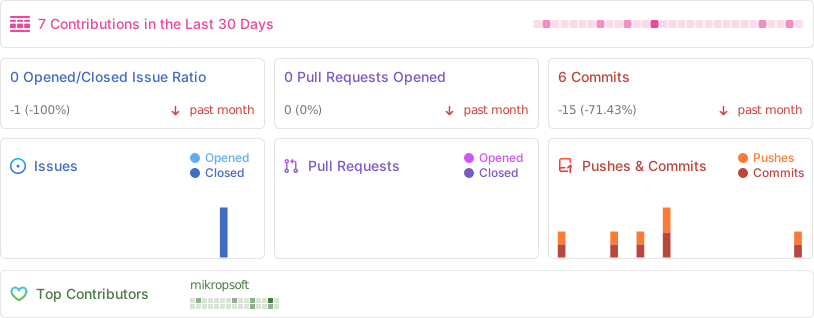
## **🏆 Watch Us Grow!**
---
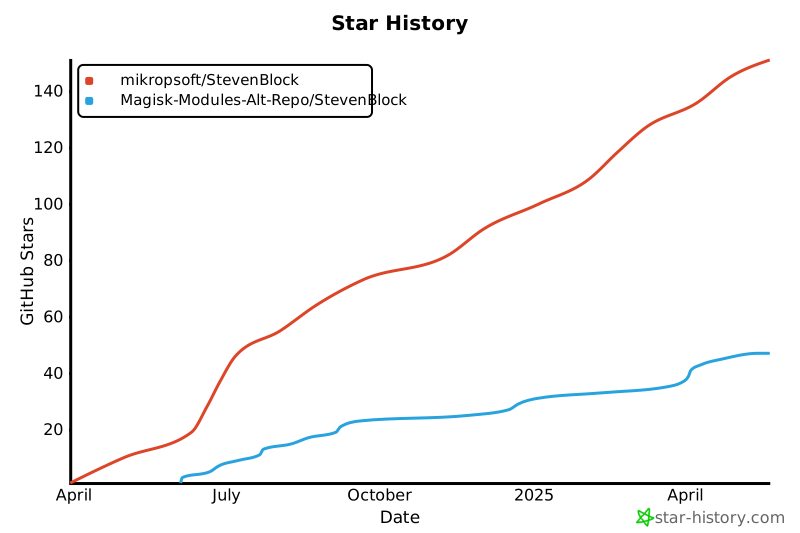
## **⭐ Our Rising Star**
[](https://star-history.com/#mikropsoft/StevenBlock&Magisk-Modules-Alt-Repo/StevenBlock&Date)
---
