https://github.com/miltroj/result-companion
Result Companion is a Python-based CLI tool designed to analyze Robot Framework output.xml results, focusing on identifying and diagnosing failing tests. It leverages LiteLLM to integrate with powerful models for root cause analysis, helping automate the troubleshooting process in test workflows
https://github.com/miltroj/result-companion
Last synced: 4 months ago
JSON representation
Result Companion is a Python-based CLI tool designed to analyze Robot Framework output.xml results, focusing on identifying and diagnosing failing tests. It leverages LiteLLM to integrate with powerful models for root cause analysis, helping automate the troubleshooting process in test workflows
- Host: GitHub
- URL: https://github.com/miltroj/result-companion
- Owner: miltroj
- License: apache-2.0
- Created: 2025-01-26T12:03:13.000Z (over 1 year ago)
- Default Branch: main
- Last Pushed: 2026-03-26T16:04:03.000Z (4 months ago)
- Last Synced: 2026-03-26T20:27:11.119Z (4 months ago)
- Language: Python
- Homepage:
- Size: 9.73 MB
- Stars: 1
- Watchers: 1
- Forks: 1
- Open Issues: 6
-
Metadata Files:
- Readme: README.md
- Changelog: CHANGELOG.md
- Contributing: CONTRIBUTING.md
- License: LICENSE
Awesome Lists containing this project
- awesome-robotframework - Result Companion - AI-powered Robot Framework debugger — pinpoints why tests failed and how to fix them directly in log.html; supports custom analysis prompts and 100+ LLM providers. (Tools / AI Tools)
README
# Result Companion
[](https://pypi.org/project/result-companion/)
[](https://pypi.org/project/result-companion/)
[](https://github.com/miltroj/result-companion/blob/main/LICENSE)
[](https://github.com/miltroj/result-companion/actions/workflows/publish.yml)
**Turn your Robot Framework test failures into instant, actionable insights with AI.**
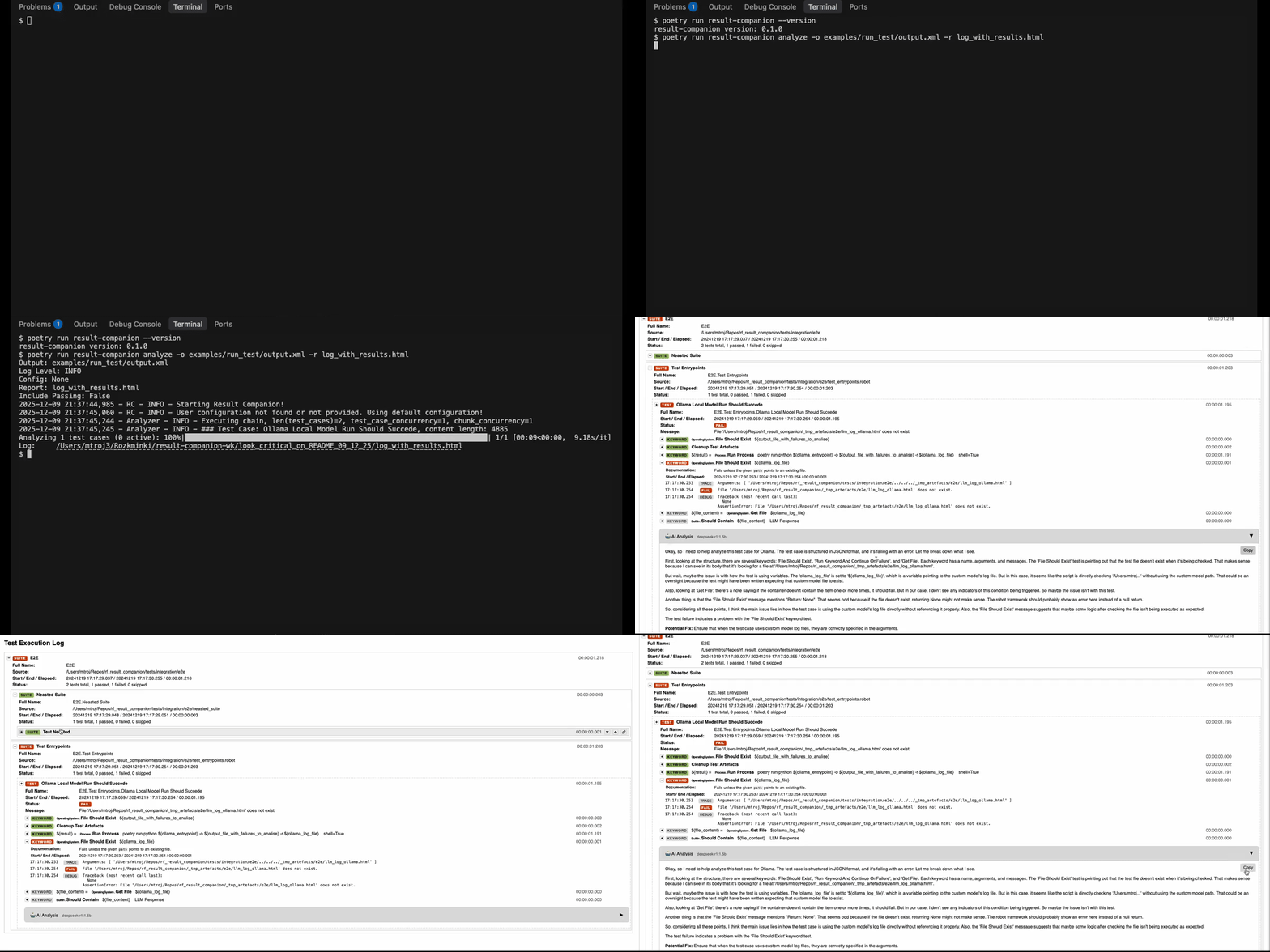
## Why Result Companion?
Every QA engineer knows the pain: A test fails. You dig through logs. You trace keywords. You hunt for that one error message buried in thousands of lines. **Hours wasted.**
Result Companion changes that. It reads your `output.xml`, understands the entire test flow, and tells you exactly what went wrong and how to fix it—in seconds, not hours.
## What It Does
```bash
# Before: Manual debugging for hours
robot tests/ # Test fails
# Now: Where did it fail? Why? What's the root cause?
# After: Instant AI analysis
result-companion analyze -o output.xml # Get answers in seconds
```
Your enhanced `log.html` now includes:
- **Root Cause Analysis**: Pinpoints the exact keyword and reason for failure
- **Test Flow Summary**: Understand what happened at a glance
- **Actionable Fixes**: Specific suggestions to resolve the issue
For CI logs and pipelines, use text output. An overall failure synthesis is run by default and added to both `rc_log.html` and text output. Disable with `--no-overall-summary`:
```bash
result-companion analyze -o output.xml --text-report rc_summary.txt
result-companion analyze -o output.xml --print-text-report
result-companion analyze -o output.xml --no-overall-summary
```
## Copilot Review Agent
Replaces the manual "which commit broke this test?" investigation. AI cross-references Robot Framework failures with PR code changes via GitHub Copilot and posts the verdict as a PR comment:
```bash
result-companion analyze -o output.xml --json-report rc_summary.json
result-companion review -s rc_summary.json --repo owner/repo --pr 65
# Save to file for review/editing before posting
result-companion review -s rc_summary.json --repo owner/repo --pr 65 --preview -o review.md
```
See [`examples/PR_REVIEW.md`](examples/PR_REVIEW.md) for setup, flow diagram, flags, and GitHub Actions usage.
Example generated PR comment — PR #65
## 🔍 result-companion: Test Failure Analysis
**Root cause:** unclear — investigate further
- **Location:** [`poc_pr_review.py:6`](https://github.com/miltroj/result-companion/blob/investigate_code_review_functionality/poc_pr_review.py#L6) — file docstring and example usage reference interactive `gh auth login` which, if executed in CI without a token, can trigger GitHub 403/forbidden responses
- **Location:** [`poc_pr_review.py:35`](https://github.com/miltroj/result-companion/blob/investigate_code_review_functionality/poc_pr_review.py#L35) — the prompt/action builder constructs shell commands that would run `gh pr comment` without using a non-interactive token, risking authentication failures in CI
## 💡 Suggested Fix
Replace interactive GH auth and posting with a token-based non-interactive command:
```python
action = (
"Print the review comment body only — do NOT run gh pr comment."
if preview
else (
f'echo "$GITHUB_TOKEN" | gh auth login --with-token && '
f'gh pr comment {pr_number} --repo {repo_name} --body ""'
)
)
```
Ensure CI provides `GITHUB_TOKEN` secret and keep `preview=True` by default in CI invocation.
## Quick Start
### Option 1: GitHub Copilot (Easiest for Users With Copilot)
Already have GitHub Copilot? Use it directly—no API keys needed.
```bash
pip install result-companion
# One-time setup
brew install copilot-cli # or: npm install -g @github/copilot
copilot -i "/login" # Login when prompted, then /exit
# Analyze your tests
result-companion analyze -o output.xml -c examples/configs/copilot_config.yaml
```
See [Copilot setup guide](https://github.com/miltroj/result-companion/blob/main/examples/EXAMPLES.md#github-copilot-recommended-for-users-with-copilot).
### Option 2: Local AI (Free, Private)
```bash
pip install result-companion
# Auto-setup local AI model
result-companion setup ollama
result-companion setup model deepseek-r1:1.5b
# Analyze your tests
result-companion analyze -o output.xml -c examples/configs/ollama_config.yaml
```
### Option 3: Cloud AI ([OpenAI](https://github.com/miltroj/result-companion/blob/main/examples/EXAMPLES.md#openai), Azure, Google)
```bash
pip install result-companion
# Configure and run
export OPENAI_API_KEY="your-key"
result-companion analyze -o output.xml -c examples/configs/openai_config.yaml
```
Supports 100+ LLM providers via [LiteLLM](https://docs.litellm.ai/docs/providers).
## Real Example
**Your test fails with:**
```
Login Test Suite
└── Login With Valid Credentials [FAIL]
```
**Result Companion tells you:**
```markdown
**Flow**
- Open browser to login page ✓
- Enter username "testuser" ✓
- Enter password ✓
- Click login button ✓
- Wait for dashboard [FAILED after 10s timeout]
**Failure Root Cause**
The keyword "Wait Until Page Contains Element" failed because
element 'id=dashboard' was not found. Server returned 503 error
in network logs at timestamp 14:23:45.
**Potential Fixes**
- Check if backend service is running and healthy
- Verify dashboard element selector hasn't changed
- Increase timeout if service startup is slow
```
## Beyond Error Analysis
Customize prompts for any use case:
```yaml
# security_audit.yaml
llm_config:
question_prompt: |
Find security issues: hardcoded passwords,
exposed tokens, insecure configurations...
```
```yaml
# performance_review.yaml
llm_config:
question_prompt: |
Identify slow operations, unnecessary waits,
inefficient loops...
```
See [Custom Analysis examples](https://github.com/miltroj/result-companion/blob/main/examples/EXAMPLES.md#custom-analysis) for security audits, performance reviews, and more. The `llm_config` section also supports `chunking` prompts for large test suites.
## Configuration Examples
Check [`examples/configs/`](https://github.com/miltroj/result-companion/tree/main/examples/configs) for ready-to-use configs:
- **GitHub Copilot** (easiest for users with copilot)
- Local Ollama setup
- OpenAI, Azure, Google Cloud
- Custom endpoints (Databricks, self-hosted)
- Prompt customization for security, performance, quality reviews
## Filter Tests by Tags
Analyze only the tests you care about:
```bash
# Analyze smoke tests only
result-companion analyze -o output.xml --include "smoke*"
# Exclude work-in-progress tests
result-companion analyze -o output.xml --exclude "wip,draft*"
# Analyze critical tests (including passes)
result-companion analyze -o output.xml --include "critical*" -i
```
Or use config file:
```yaml
test_filter:
include_tags: ["smoke", "critical*"]
exclude_tags: ["wip", "flaky"]
include_passing: false # Analyze failures only
```
See [tag_filtering_config.yaml](https://github.com/miltroj/result-companion/blob/main/examples/configs/tag_filtering_config.yaml) for details.
## Limitations
- Text-only analysis (no screenshots/videos)
- Large test suites processed in chunks
- **Local models**: Need 4-8GB RAM + GPU/NPU for good performance (Apple Silicon, NVIDIA, AMD)
## Contributing
Contributions welcome! See [CONTRIBUTING.md](https://github.com/miltroj/result-companion/blob/main/CONTRIBUTING.md) for guidelines.
For bugs or feature requests, open an issue on GitHub.
## Development Setup
```bash
make install # install with dev dependencies
poetry run pre-commit install # one-time: install pre-commit hooks
make test-unit # unit tests only
make test-integration # integration tests (e2e skipped automatically)
make test-e2e # e2e only (requires Copilot CLI / Ollama locally)
make test-integration-all # all integration tests including e2e
```
## License
Apache 2.0 - See [LICENSE](https://github.com/miltroj/result-companion/blob/main/LICENSE)
## Disclaimer
Cloud AI providers may process your test data. Local models (Ollama) keep everything private on your machine.
**You are responsible for data privacy.** The creator takes no responsibility for data exposure, intellectual property leakage, or security issues. By using Result Companion, you accept all risks and ensure compliance with your organization's data policies.