https://github.com/mingsnx/animated_digit
A scrolling digit animation widget
https://github.com/mingsnx/animated_digit
animated animated-number animation dart flutter number
Last synced: 6 months ago
JSON representation
A scrolling digit animation widget
- Host: GitHub
- URL: https://github.com/mingsnx/animated_digit
- Owner: mingsnx
- License: mit
- Created: 2021-04-22T06:38:36.000Z (over 5 years ago)
- Default Branch: master
- Last Pushed: 2025-09-25T02:40:37.000Z (11 months ago)
- Last Synced: 2025-11-03T15:20:36.879Z (9 months ago)
- Topics: animated, animated-number, animation, dart, flutter, number
- Language: Dart
- Homepage:
- Size: 26.7 MB
- Stars: 43
- Watchers: 2
- Forks: 23
- Open Issues: 1
-
Metadata Files:
- Readme: README.cn-zh.md
- Changelog: CHANGELOG.md
- License: LICENSE
Awesome Lists containing this project
README


English | 中文简体
# animated_digit
滚动的动画数字 widget,凡是需要动画效果的数字,简单易用。
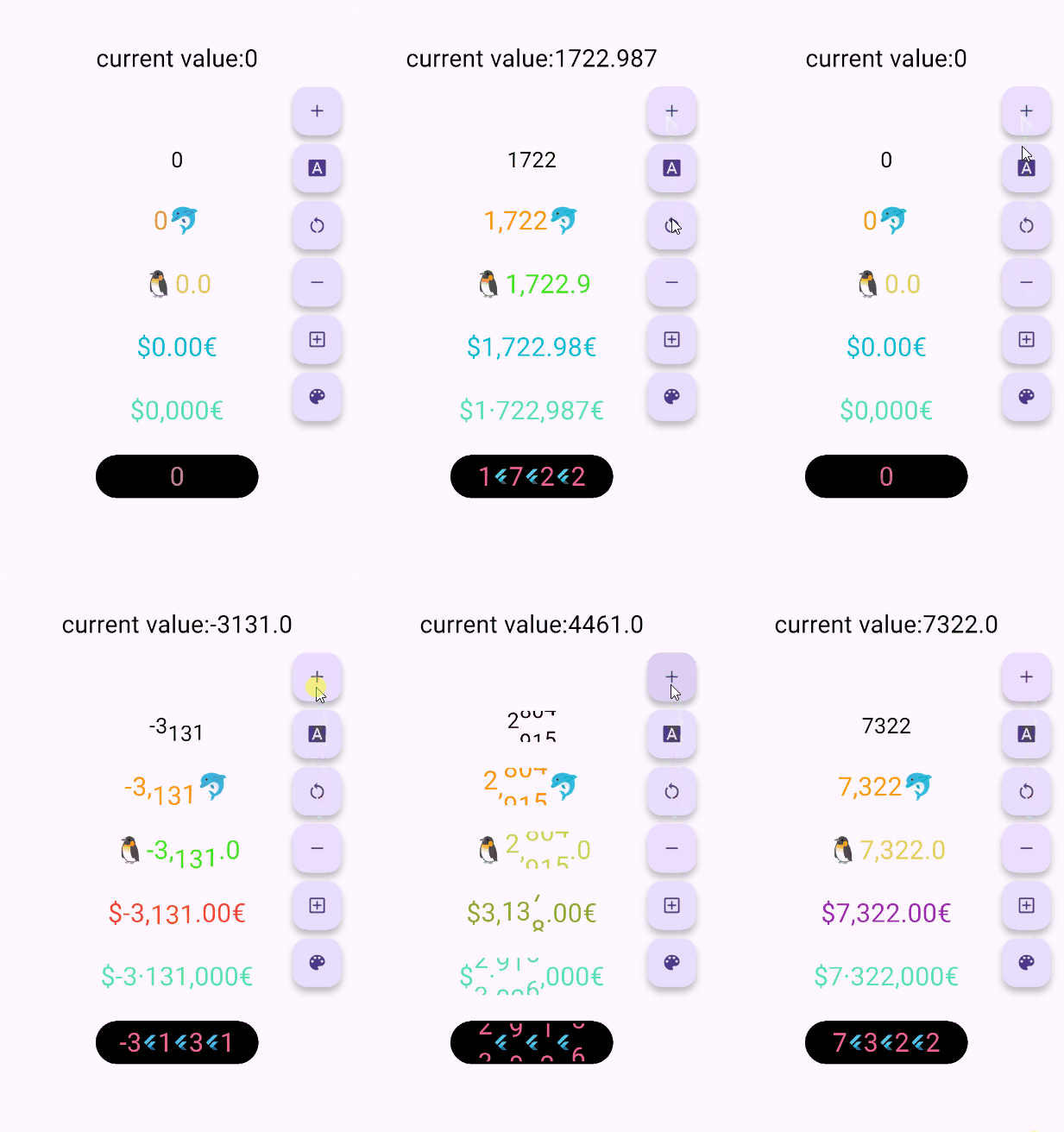
## Usage
#### 🚴🏻 简单展示
```dart
// 只展示
AnimatedDigitWidget(
value: 9999
),
```
#### 🚄 简单展示 & 🔥 状态
```dart
// 极简控制
int value = 9999;
AnimatedDigitWidget(
value: value
textStyle: TextStyle(color: Colors.pink, fontSize: 24),
),
setState((){
value = 191919;
});
```
#### 🎡 通过 Controller 来控制
> 内置精确度计算
```dart
AnimatedDigitController _controller = AnimatedDigitController(10240.987);
AnimatedDigitWidget(
controller: _controller,
textStyle: TextStyle(color: Colors.pink, fontSize: 24),
fractionDigits: 2, // 保留的小数位数,只截取,不会四舍五入
enableSeparator: true, // 启用数字分隔,如这样 10,240.98
),
// UI结果 => 10,240.98
// 累加一个数字
_controller.addValue(1314);
// 减
_controller.minusValue(1314); // 自 v3.1.0 起添加
// 乘
_controller.timesValue(1314); // 自 v3.1.0 起添加
// 除
_controller.divideValue(1314); // 自 v3.1.0 起添加
// 重置一个数字
_controller.resetValue(1314);
// 最后
_controller.dispose();
```
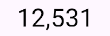
### 🖼 UI效果图 & 💻 代码示列
[](https://raw.githubusercontent.com/mingsnx/animated_digit/master/example/ex1.png)
```dart
AnimatedDigitWidget(
value: 12531.98, // or use controller
),
```
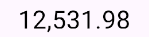
[](https://raw.githubusercontent.com/mingsnx/animated_digit/master/example/ex2.png)
```dart
AnimatedDigitWidget(
value: 12531.98, // or use controller
enableSeparator: true,
),
```
[](https://raw.githubusercontent.com/mingsnx/animated_digit/master/example/ex3.png)
```dart
AnimatedDigitWidget(
value: 12531.98, // or use controller
fractionDigits: 2,
enableSeparator: true,
),
```
[](https://raw.githubusercontent.com/mingsnx/animated_digit/master/example/ex4.png)
```dart
SingleDigitProvider(
data: SingleDigitData(
useTextSize: true,
builder: (size, value, isNumber, child) {
return isNumber ? child : FlutterLogo();
},
),
child: AnimatedDigitWidget(
value: 12531.98, // or use controller
textStyle: TextStyle(color: Colors.pink[200], fontSize: 30),
separateLength: 1,
separateSymbol: "#",
enableSeparator: true,
),
),
```
[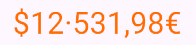](https://raw.githubusercontent.com/mingsnx/animated_digit/master/example/ex5.png)
```dart
AnimatedDigitWidget(
value: 12531.98, // or use controller
textStyle: TextStyle(color: Colors.orangeAccent.shade700, fontSize: 30),
fractionDigits: 2,
enableSeparator: true,
separateSymbol: "·",
separateLength: 3,
decimalSeparator: ",",
prefix: "\$",
suffix: "€",
),
```
### ✌ 如果想根据 `value` 来改变颜色
通过 `valueColors` 添加一个 `ValueColor` 对象,它是一个数组,你可以添加更多,但始终取最后一个符合条件的。
> 颜色自 v3.3.1+1 起支持动画过渡,不再是直接切换颜色,避免切换生硬
```dart
int value = 9999; // 或使用 Controller.value
AnimatedDigitWidget(
value: value,
textStyle: TextStyle(
color: Colors.orange[200],
fontSize: 30,
),
valueColors: [
ValueColor(
// 当 value <= 0 时,颜色变为红色
condition: () => value <= 0,
color: Colors.red,
),
// 你可以添加更多,但始终取最后一个符合条件的。
],
),
```
### 🍓如果第一次加载不需要从 0 开始的滚动动画可以设置
```dart
AnimatedDigitWidget(
...,
firstScrollAnimate: false // 设置为 false,自 v3.3.1+1 开始
),
```
### 🍓支持最小整数位不足补0
> 仅限范围 [0, 9],像这样:🐧0 ➡️ 00、1 ➡️ 01、2 ➡️ 02 ...
```dart
AnimatedDigitWidget(
...,
fractionDigits: 0, // 必须为 0,小数的话确实没必要了吧(痛苦面具)~
enableMinIntegerDigits: true // 设置为 true,自 v3.3.1+2 开始
),
```
### 🐳 Widget 参数 - [文档](https://pub.flutter-io.cn/documentation/animated_digit/latest/animated_digit/AnimatedDigitWidget-class.html)
#### **🚀 必填参数**
| Prop | Type | Default | Description |
| ------- | ---- | ------------ | ------------ |
| **controller** | AnimatedDigitController | null | **数字控制器**,可以通过`addValue` 和 `resetValue` 来控制显示的数字。
⚠️ `value` 和 `controller` 不能同时为 `null` |
| **value** | num | null | **显示的数字**,当与 `controller` 同时存在时,**`controller` 具有更高的优先级**,
⚠️ `value` 和 `controller` 不能同时为 `null` |
---
#### **🍑 设置文字样式和容器样式**
| Prop | Type | Default | Description |
| ------- | ---- | ------------ | ------------ |
| **textStyle** | TextStyle | null / TextStyle(color: Colors.black,fontSize: 25); | 数字字体样式 | numbers text style |
| **boxDecoration** | BoxDecoration | null | 同 `Container` 的 `decoration` 使用 |
---
#### **🍇 设置整数(默认)或小数类型**
| Prop | Type | Default | Description |
| ------- | ---- | ------------ | ------------ |
| **fractionDigits** | int | 0 | 小数位 ( `1000520.987` )
`0` => `1000520`;
`1` => `1000520.9`;
`2` => `1000520.98`;
`3` => `1000520.987`;
`...` => `1000520.[...]`;
默认 `0` 为整数;当为小数时,值不足位数则向右补 `0`,采用的是截断方式,所以不存在四舍五入的情况|
---
#### **🍓 设置数字展示样式**
| Prop | Type | Default | Description |
| ------- | ---- | ------------ | ------------ |
| **decimalSeparator** | String | `.` | **小数分隔符**,默认 `.`,可以替换为其他的符号来代替小数分隔符 |
| **enableSeparator** | bool | false | **是否启用数字分隔符** 默认 `false` 不开启,开启样例:`1000520` => `1,000,520` ,
**⚠️ 只有为 `true` 时,`separateLength` and `separateSymbol` 才会生效** |
| **separateSymbol** | String | `,` | ⚠️ **当 `enableSeparator = true` 有效。**⚠️
数字分隔的**符号**(例如:千分位符号)
`,` => `1,000,520`
`'` => `1'000'520`
`-` => `1-000-520` |
| **separateLength** | int | 3 | ⚠️ **当 `enableSeparator = true` 有效。**⚠️
数字分隔的**长度**,默认为 `3` (千分位)。
当 `separateSymbol` 为 `,` :
`1` => `1,0,0,0,5,2,0`
`2` => `1,00,05,20`
`3` => `1,000,520`
---
#### **🥝 设置滚动动画**
| Prop | Type | Default | Description |
| ------- | ---- | ------------ | ------------ |
| **duration** | Duration | Duration(milliseconds: 300) | 动画持续时间 |
| **curve** | Curve | Curves.easeInOut | [观看动画曲线](https://flutter.github.io/assets-for-api-docs/assets/animation/curve_ease_in_out.mp4) |
| **loop** | bool | true | 是否采用无限循环滚动,默认 `true` 始终向下滚动,不会从 9 -> 0 时向上滚动,反之上下来回滚动。 |
---
#### **🍎 设置数字的尺寸采用方式**
| Prop | Type | Default | Description |
| ------- | ---- | ------------ | ------------ |
| **autoSize** | bool | true | 默认 `true` 根据(数字 / 符号)本身的大小来自动伸缩,`false`,采用数字 `0` 的文字大小作为每个数字的容器大小,这样能够保证等宽,不过看起来会觉得 `1` 与其他数字有细微的间隔 😊 |
| **animateAutoSize** | bool | true | 默认 `true` 为使用动画来伸缩大小,`false` 则会直接变化到该数字/符号的大小 |
---
#### **🍒 设置数字前缀和后缀**
| Prop | Type | Default | Description |
| ------- | ---- | ------------ | ------------ |
| **prefix** | String | null | 默认 `null` 不会添加前缀字符串。 |
| **suffix** | String | null | 默认 `null` 不会添加后缀字符串。 |
### 感谢
[number_precision](https://pub.flutter-io.cn/packages/number_precision)