https://github.com/missinglink/passport-facebook-canvas
Facebook Canvas authentication strategy for Passport and Node.js.
https://github.com/missinglink/passport-facebook-canvas
Last synced: about 1 year ago
JSON representation
Facebook Canvas authentication strategy for Passport and Node.js.
- Host: GitHub
- URL: https://github.com/missinglink/passport-facebook-canvas
- Owner: missinglink
- Created: 2013-11-30T01:03:40.000Z (over 12 years ago)
- Default Branch: master
- Last Pushed: 2015-04-18T09:50:32.000Z (about 11 years ago)
- Last Synced: 2025-03-20T11:12:30.620Z (over 1 year ago)
- Language: JavaScript
- Size: 177 KB
- Stars: 15
- Watchers: 3
- Forks: 7
- Open Issues: 2
-
Metadata Files:
- Readme: README.md
Awesome Lists containing this project
README
Passport Strategy for Facebook Canvas apps
---
Use this strategy to log users in to your Facebook Canvas app automatically.
**Note:** This strategy simply augments [passport-facebook](https://github.com/jaredhanson/passport-facebook), if you don't need Facebook Canvas support you should use that module instead.
```bash
npm install passport-facebook-canvas --save
```
[](https://nodei.co/npm/passport-facebook-canvas/)
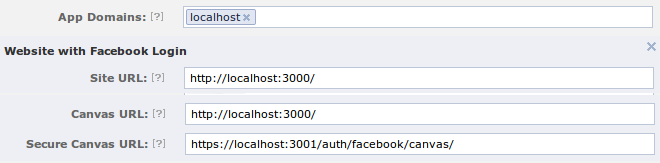
### App Settings
### Configuring Secure Canvas Url
Facebook has deprecated `Canvas Url` in favour of `Secure Canvas Url` and so requires setting up an SSL cert. You can produce a `self-signed certificate` with a command such as this: (don't set a password for a testing cert)
```bash
# Ubuntu
sudo openssl req -x509 -nodes -days 365 -newkey rsa:2048 -keyout self_signed_ssl.key -out self_signed_ssl.crt
```
Then you must tell `express` to listen on another port, something like this:
```javascript
var certificate = {
key: fs.readFileSync(path.resolve(__dirname, './self_signed_ssl.key'), 'utf8'),
cert: fs.readFileSync(path.resolve(__dirname, './self_signed_ssl.crt'), 'utf8')
}
http.createServer(app).listen(3000);
https.createServer(certificate, app).listen(3001);
```
### Configure Strategy
Configuration is exactly the same as with [passport-facebook](https://github.com/jaredhanson/passport-facebook) except the module name is `'passport-facebook-canvas'` instead of `'passport-facebook'`.
```javascript
var FacebookStrategy = require('passport-facebook-canvas');
passport.use(new FacebookStrategy({
clientID: FACEBOOK_APP_ID,
clientSecret: FACEBOOK_APP_SECRET,
callbackURL: "https://apps.facebook.com/yourgame"
},
function(accessToken, refreshToken, profile, done) {
User.findOrCreate({ facebookId: profile.id }, function (err, user) {
return done(err, user);
});
}
));
```
### Authentication Routes
Configuration is exactly the same as with [passport-facebook](https://github.com/jaredhanson/passport-facebook) except the strategy name is `'facebook-canvas'` instead of `'facebook'`.
```javascript
app.get('/auth/facebook', passport.authenticate('facebook-canvas', { successRedirect: '/',
failureRedirect: '/error' }));
```
### Canvas Route
This is the `Secure Canvas Url` route that Facebook will POST data to.
**Note** If this is the first time the app has seen this user then redirect to `failureRedirect`.
```javascript
app.post('/auth/facebook/canvas',
passport.authenticate('facebook-canvas', { successRedirect: '/',
failureRedirect: '/auth/facebook/canvas/autologin' }));
```
### Auto Login Route
We cannot forward the user to another URL via HTTP redirect so we have to use a client-side js **hack** instead.
```javascript
app.get('/auth/facebook/canvas/autologin', function( req, res ){
res.send( '' +
'' +
'' +
'' +
'top.location.replace("/auth/facebook");' +
'' +
'' +
'' );
});
```
Please suggest a better solution: https://developers.facebook.com/docs/appsonfacebook/tutorial/#canvas
### Done
Now you should be able to navigate to your app page: https://apps.facebook.com/myapp/ and be prompted to approve the app. On subsequent visits you should be logged in automatically.
### License
(The MIT License)
Copyright (c) 2013 Peter Johnson <@insertcoffee>
Permission is hereby granted, free of charge, to any person obtaining
a copy of this software and associated documentation files (the
'Software'), to deal in the Software without restriction, including
without limitation the rights to use, copy, modify, merge, publish,
distribute, sublicense, and/or sell copies of the Software, and to
permit persons to whom the Software is furnished to do so, subject to
the following conditions:
The above copyright notice and this permission notice shall be
included in all copies or substantial portions of the Software.
THE SOFTWARE IS PROVIDED 'AS IS', WITHOUT WARRANTY OF ANY KIND,
EXPRESS OR IMPLIED, INCLUDING BUT NOT LIMITED TO THE WARRANTIES OF
MERCHANTABILITY, FITNESS FOR A PARTICULAR PURPOSE AND NONINFRINGEMENT.
IN NO EVENT SHALL THE AUTHORS OR COPYRIGHT HOLDERS BE LIABLE FOR ANY
CLAIM, DAMAGES OR OTHER LIABILITY, WHETHER IN AN ACTION OF CONTRACT,
TORT OR OTHERWISE, ARISING FROM, OUT OF OR IN CONNECTION WITH THE
SOFTWARE OR THE USE OR OTHER DEALINGS IN THE SOFTWARE.