https://github.com/missinglink/pipeline
distributed non-buffering data pipeline with built in orchestrator and flood control (alpha)
https://github.com/missinglink/pipeline
Last synced: 12 months ago
JSON representation
distributed non-buffering data pipeline with built in orchestrator and flood control (alpha)
- Host: GitHub
- URL: https://github.com/missinglink/pipeline
- Owner: missinglink
- Created: 2014-06-16T16:56:50.000Z (about 12 years ago)
- Default Branch: master
- Last Pushed: 2014-06-19T19:44:38.000Z (about 12 years ago)
- Last Synced: 2025-03-15T18:26:04.222Z (over 1 year ago)
- Language: JavaScript
- Homepage:
- Size: 673 KB
- Stars: 2
- Watchers: 2
- Forks: 0
- Open Issues: 1
-
Metadata Files:
- Readme: README.md
Awesome Lists containing this project
README
## Pipeline
A distributed non-buffering data pipeline with built in orchestrator and flood control.
====
#### Overview
A pipeline is a set of workers acting both in series and in parallel. The data is constantly moving down the pipeline from one server to the next.
The pipeline will auto balance, turning off the tap when the pipes or sink can't handle the flow, each worker can disconnect/recoonect if they are experiencing flooding or internal errors. This mitigates the memory and disk issues and isolates them to a single node.
====
#### Notice
**In active development** - The public API will likely change before the initial release.
**Unpublished** - calls to `require('pipeline')` will fail as the module is not being published in `npm`. Additionally the name `pipeline` has been taken so it will use a different name.
Run `npm run symlink` to create a symlink that fixes this during development.
====
#### Inspired by unix pipes and zeromq
`unix pipes` provide an amazingly easy-to-use and portable API.
```bash
#unix pipes
echo '{ hello: "world" }' | filter.sh 2>> error.txt | map.sh 1> out.txt 2>> error.txt
```
`zeromq (ØMQ)` is an asynchronous messaging library.
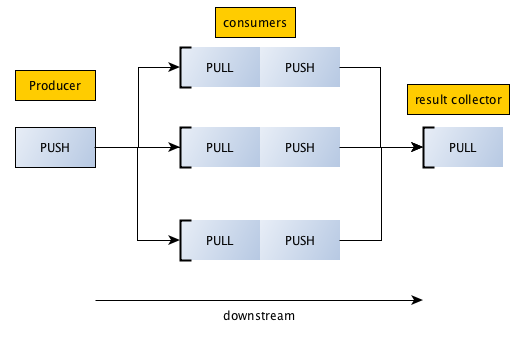
====
#### Pipeline
`pipeline` aims to provide a similar unix pipes `API` with support for `TCP` sockets while also offering:
- The ability to attach **multiple processes** to `stdin` `stdout` and `stderr`.
- Smart **flood control** mechanisms to avoid buffering data at any branch of the pipe.
- Role-based workflows which allows simple ways to **perform tasks in parallel** or **in a series**.
====
#### Orchestrator
`pipeline` allows you to create worker processes which run anywhere on your network. Rather than assigning your workers fixed addresses, `pipeline` allows you to delegate addressing to a process called the `orchestractor`.
An example `orchestrator` is provided with the package. You can use this type of `socket` to assign work to other `Worker` processes like this:
```javascript
var pipeline = require('pipeline');
var orchestrator = new pipeline.Orchestrator(
new pipeline.Pipeline()
.from('tap').to('filter')
.from('filter').to('map')
.from('map').to('sink')
);
orchestrator.bind(5000);
```
====
#### Worker
Each worker must be assigned a `role`. Their unique network addresses don't matter and can change without causing the entire pipeline to error.
As with unix sockets, the worker does not need to know where the data comes from or where it is going next; the `orchestrator` will tell it which other `Worker` sockets to connect to.
Example worker:
```javascript
var pipeline = require('pipeline');
var worker = new pipeline.Worker({
role: 'filter',
concurrency: 10,
orchestrator: { port: 5000 }
});
// recieve work from upstream
worker.on( 'data', function( msg, done ){
worker._debug( 'worker2 got message', msg );
// worker must call done() when task is completed
doSomethingAsnyc( { cmd: 'takes_time', msg: msg }, function( err, data ){
// send some work downstream and pass done handler to write socket
worker.write( data, done );
});
});
```
The worker will automatically handle concurrency control; when the maximum number of concurrent jobs are being executed on this process the `stdin` socket(s) will disconnect.
When the worker is again free to process data it will automatically re-connect it's `stdin` socket(s) and start processing messages again.
====
#### Trying out the project
You can try out the project in it's current form; while the code is not release-ready yet, there IS a functional demo that runs all the workers in child processes and pipes all their `stdout` streams to one window for easy debugging.
```bash
$> git clone git@github.com:missinglink/pipeline.git && cd pipeline
$> npm install
$> npm run symlink
$> npm start
```
====
#### Example
In this example, we want to parse a file of 10M user records. For each `user` in the file we want to go and look up their facebook profile; twitter profile and then save the record to the `database`.
###### workers
- orchestrator (singleton)
- file parser (1 worker)
- facebook (10 workers)
- twitter (10 workers)
- database client (2 workers)
then we tell the `orchestrator` how to connect them together:
either **in series**:
```
┌─→ facebook ─→ twitter ──┐
parser ──┼─→ facebook ─→ twitter ──┼─→ database_client
└─→ facebook ─→ twitter ──┘
```
```javascript
new pipeline.Pipeline()
.from('parser').to('facebook')
.from('facebook').to('twitter')
.from('twitter').to('database_client');
```
or **in parallel**:
```
┌─→ facebook ──┐
├─→ facebook ──┤
parser ──┤ ├─→ merger ─→ database_client
├─→ twitter ───┤
└─→ twitter ───┘
```
```javascript
new pipeline.Pipeline()
.from('parser').to('facebook').from('facebook').to('merger')
.from('parser').to('twitter').from('twitter').to('merger')
.from('merger').to('database_client');
```
... simple as that, the pipeline will load-balance each role. workers will slow-down and speed up depending on the ability of the 3rd party services to fulful the requests.
**Note:** The `parser` should pause iteration when no peer sockets are connected.
**Note:** The `merger` should be configured with a high concurrency value.
**Note:** The `database_client` should call `worker.pause()` if the database starts to become slow or un-responsive.
====
#### FAQ
**Q. How does this differ from a traditional job queue?**
A queue system has a single centralized server to store messages until worker nodes collect them.
A queue is limited by the available memory and disk space, which can become a problem when dealing with very large datasets.
**Q. So you stream from the orchestrator to the available workers and then stream the responses back to the orchestrator?**
No, the orchestractor **ONLY** tells workers where to attach their `stdin` streams to; it does not do any work and does not usually ever see any of the data.
**Q. How do the worker know which port to bind to?**
Each worker binds it's `stdout` stream(s) to `INADDR_ANY` (any available port).
The worker then connects to the `orchestrator` and announces it's `role` and the network address that peers can connect to if they wish to consume it's output.
Conventional logic would suggest you `bind` your `stdin` and `connect` on your `stdout`.
Using the inverse allows for the worker to `disconnect` its `stin` socket(s) when it starts to flood while maintaining the port it has bound for `stdout`.
====
... more to come