https://github.com/mittelmark/fusion-tutorial
Tutorial for the Fusion Programming Language
https://github.com/mittelmark/fusion-tutorial
programming-language swig transpiler tutorial
Last synced: 4 months ago
JSON representation
Tutorial for the Fusion Programming Language
- Host: GitHub
- URL: https://github.com/mittelmark/fusion-tutorial
- Owner: mittelmark
- License: bsd-3-clause
- Created: 2026-01-24T12:58:38.000Z (5 months ago)
- Default Branch: main
- Last Pushed: 2026-02-16T12:05:25.000Z (5 months ago)
- Last Synced: 2026-02-16T15:58:23.447Z (5 months ago)
- Topics: programming-language, swig, transpiler, tutorial
- Language: HTML
- Homepage:
- Size: 396 KB
- Stars: 3
- Watchers: 0
- Forks: 1
- Open Issues: 1
-
Metadata Files:
- Readme: README.md
- License: LICENSE
Awesome Lists containing this project
README
# Tutorial and Code examples for the Fusion Programming Language
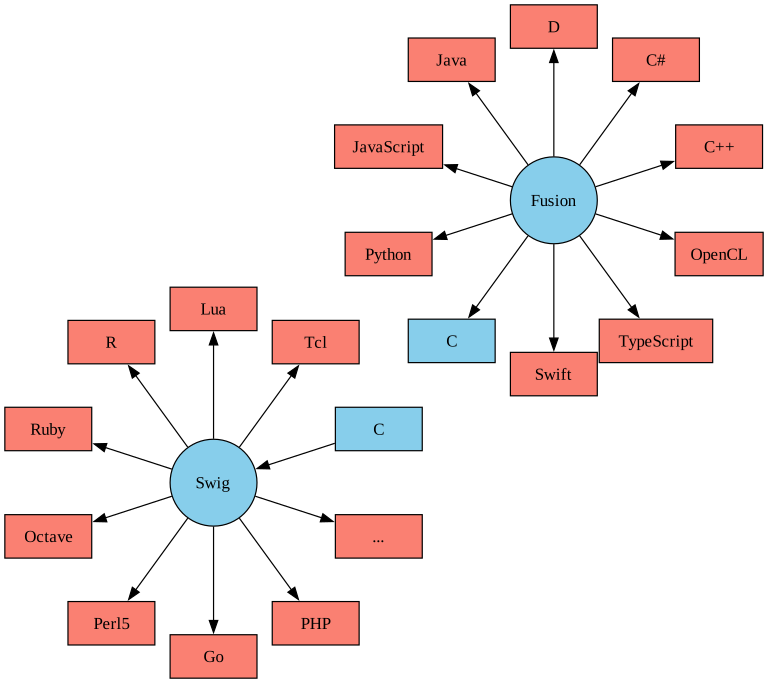
The [Fusion programming language](https://www.fusion-lang.org/) allows you to
write code which can be transpiled to code for other programming languages
like C, C++, Java and others. The generated C or C++ code can be then used in
scripting languages like Tcl, R or others using the
[Simplified Wrapper and Interface Generator (Swig)](https://swig.org).
## Links
__This site:__
- [Fusion Tutorial (WIP)](http://htmlpreview.github.io/?https://github.com/mittelmark/fusion-tutorial/blob/master/tutorial/tutorial.html)
- [GetMessage Example 1](https://github.com/mittelmark/fusion-tutorial/blob/master/samples/hello) - hello world example for the nine programming languages and as well for using Go, Lua, Octave, Tcl, and V with Fusion
- [GetMessage Example 2](https://github.com/mittelmark/fusion-tutorial/blob/master/samples/hello2) - hello world example with Main function as well for the 9 languages and examples using the code with Tcl via [Swig](https://swig.org)
- [Fibonacci Example](https://github.com/mittelmark/fusion-tutorial/blob/master/samples/fib) - function for Fibonacci numbers as well use examples for Go, Lua, Octave and Tcl
__External:__
- [Fut Project Page](https://github.com/fusionlanguage/fut)
- [Getting Started](https://github.com/fusionlanguage/fut/blob/master/doc/getting-started.md)
- [Fusion Reference](https://github.com/fusionlanguage/fut/blob/master/doc/reference.md)
- [Fusion Playground](https://www.fusion-lang.org/playground)
Below you see a list of programming languages which you can target directly
using using the [fut - command line tool for Fusion](https://github.com/fusionlanguage/fut/)
or, indirectly, using the `fut` generated C code and with [Swig](https://www.swig.org). See the Tcl section below for that approach.
## Example
Here is the classical "Hello World" example:
```csharp
public class Hello
{
public static string GetMessage()
{
return "Hello, world!";
}
}
```
The folder [samples/hello](samples/hello) contains a Makefile which shows how
to translate this code into these various programming languages as well as
one example to use Swig to generate a Tcl library based on the Fusion output.
## Python example
If you put the code above into a file `Hello.fu`, you can translate this file into a Python source file with this command:
```
fut Hello.fu -o hello.py
```
The contents of that file would then look like this:
```python
# Generated automatically with "fut". Do not edit.
class Hello:
@staticmethod
def get_message() -> str:
"""Returns a greeting message."""
return "Hello, world!"
```
The Fusion language is not meant to be used to write applications directly.
It is possible to some extent and we will show it later. However, Fusion is focused on
writing libraries which can be then used within the mentioned languages. To
test the example code above, you can create a small file which contains code
to use the generated Python file with following content.
```python
#!/usr/bin/env python3
import hello
h=hello.Hello()
print(h.get_message())
```
So the full procedure to create and run the Python code is as follows:
```bash
fut -o hello.py Hello.fu
python3 run-hello.py
```
## C example
Similarly, you can transpile the Fu-file into a C-file like this:
```
fut Hello.fu -o hello.c
```
This will create two files "hello.c" and "hello.h".
To run the generated method in a C program, you might create a C file
with a `main` function like this:
```c
// file: run-hello.c
#include
#include "hello.h"
int main (int argc, char * argv[]) {
printf("%s\n",Hello_GetMessage());
return(0);
}
```
You can then compile your _fut_ generated hello files and the run-hello.c file
to an executable like this:
```bash
gcc hello.c run-hello.c -o hello
```
## Tcl example
Using the Swig tools, we can additionally take the generated C or C++ code and wrap
it into a Tcl, R, Perl, Ruby or many other language libraries by creating a Swig interface file which looks like
this:
```
%{
#include "hello.h"
%}
%include "hello.h"
```
The pipeline to create and test the code using a shared library on a Debian
system looks like this (using the Tcl programming language):
```bash
fut -o tcl/hello.c Hello.fu ## generate hello.c and hello.h
swig -tcl8 -module hello hello.i ## create the interface C code
gcc -fPIC -c hello.c ## compile the FU generated code
gcc -fPIC -c hello_wrap.c -I/usr/include/tcl8.6 ## compile the SWIG generated code
gcc -shared hello.o hello_wrap.o -o hello.so ## combine both to a Tcl library
echo "load ./hello.so; puts [Hello_GetMessage];" | tclsh ## execute the code using Tcl
```
## Other Language Examples
The file [samples/hello/Makefile](samples/hello/Makefile) contains
examples to translate and compile the [Hello.fu](samples/hello/Hello.fu) file shown above to C++, C#,
D, Java, JavaScript, Python, Swift and via Swig to Tcl, R, Lua, Go or Octave programs.
The file [samples/hello2/Makefile](samples/hello2/Makefile) contains
examples to translate and compile a [Hello2.fu](samples/hello2/Hello2.fi) file shown above to C++, C#,
D, Java, JavaScript, Swift and Tcl programs. In contrast to the example shown above,
this one shows how to use a `Main` method within your class to create a terminal application.
## Standalone applications
Even if the main target of the Fusion language is writing libraries, for testing purposes
you can also write simple standalone applications, in order to directly test
your code. This avoids a second source file to run the library code which we have shown before.
Our "Hello World!" example show above would
look then like this:
```csharp
// file Main.fu
public static class Main {
public static void Main() {
Console.WriteLine("Hello World!");
}
}
```
That file can be then transpiled and executed as a Python program like this:
```bash
fut -o main.py Main.fu
python3 main.py
Hello World!
```
The generated output file main.py looks like this:
```python
# Generated automatically with "fut". Do not edit.
class Main:
@staticmethod
def main() -> None:
print("Hello World!")
if __name__ == '__main__':
Main.main()
```
You can as well execute this translation as an one liner:
```bash
fut -o main.py Main.fu && cat main.py | python3
Hello World!
```
Using Python as the target language allows for fast development without extra compilation steps.
## Tutorial
There is a more extensive tutorial as a WIP project which you can view here
[](http://htmlpreview.github.io/?https://github.com/mittelmark/fusion-tutorial/blob/master/tutorial/tutorial.html)
## See Also
Here are three other programming languages which transpile to several other programming languages:
- [Haxe](https://haxe.org/) - C++ and Java like language, transpiles to C++, C#, JVM, PHP, Lua, Python, Neko
- [Temper](https://temperlang.dev/) - C++ and Java like language - transpiles to C#, Java, JavaScript/TypeScript, Python, Lua
- [Wax](https://github.com/LingDong-/wax) - Lisp like language - transpiles to C, Java, Typecript, Python, C#, Swift, Lua
The main __advantages__ of Fusion seem to be its easy-to-learn language,
which is closely similar to C#, and its clear and small implementation. It
has a reasonable set of target languages, covering the top six programming
languages from the TIOBE index. The installation size is less than 1 MB and
easy to accomplish.
The main __disadvantage__ seems to be the smaller core library, which results
in fewer string or list functions, for example. However, this is the price we
have to pay for a small, clean core. However, we can implement missing
functionalities by using native blocks to add more features in a language-
specific manner or by writing utility classes that provide the necessary
functionality for a specific project.
## Summary
The Fusion programming language allows you to implement libraries and
algorithms usable for many widely used programming languages in a C#-like
syntax. This syntax is therefore easy for many programmers to comprehend.
With the SWIG interface generator, you can target even more languages,
including scripting languages such as Tcl, Perl, Lua, and Octave, as well as
compiled languages such as GO.
## TODO
- adding swig/R examples (done - [src](https://github.com/mittelmark/fusion-tutorial/tree/main/samples/hello/R), [Makefile r-run section](https://github.com/mittelmark/fusion-tutorial/blob/main/samples/hello/Makefile))
- adding swig/Go examples (done [src](https://github.com/mittelmark/fusion-tutorial/tree/main/samples/hello/goswig))
- fibonacci examples for return an integer and recursive programming
## Author
Detlef Groth, University of Potsdam, Germany
## License
The Fusion transpiler "fut" is released under a GPL license, the documents on
code examples used in this Github repo are released under a BSD 3 license.