https://github.com/mityax/rpi-temperature-alert
Monitor the CPU temperature of a Raspberry Pi, send warn emails if it gets really warm and shutdown the system if it gets too hot
https://github.com/mityax/rpi-temperature-alert
kodi libreelec monitoring python raspberry-pi raspberry-pi-3 rpi rpi3 rpi4
Last synced: 9 months ago
JSON representation
Monitor the CPU temperature of a Raspberry Pi, send warn emails if it gets really warm and shutdown the system if it gets too hot
- Host: GitHub
- URL: https://github.com/mityax/rpi-temperature-alert
- Owner: mityax
- Created: 2020-04-07T15:48:34.000Z (about 6 years ago)
- Default Branch: master
- Last Pushed: 2020-05-03T21:11:42.000Z (about 6 years ago)
- Last Synced: 2025-04-04T20:44:45.525Z (about 1 year ago)
- Topics: kodi, libreelec, monitoring, python, raspberry-pi, raspberry-pi-3, rpi, rpi3, rpi4
- Language: Python
- Homepage:
- Size: 35.2 KB
- Stars: 4
- Watchers: 0
- Forks: 1
- Open Issues: 1
-
Metadata Files:
- Readme: README.md
Awesome Lists containing this project
README
# Raspberry Pi temperature alert
Monitor the CPU temperature of a Raspberry Pi, send warn emails and shut down the system if it gets too hot.
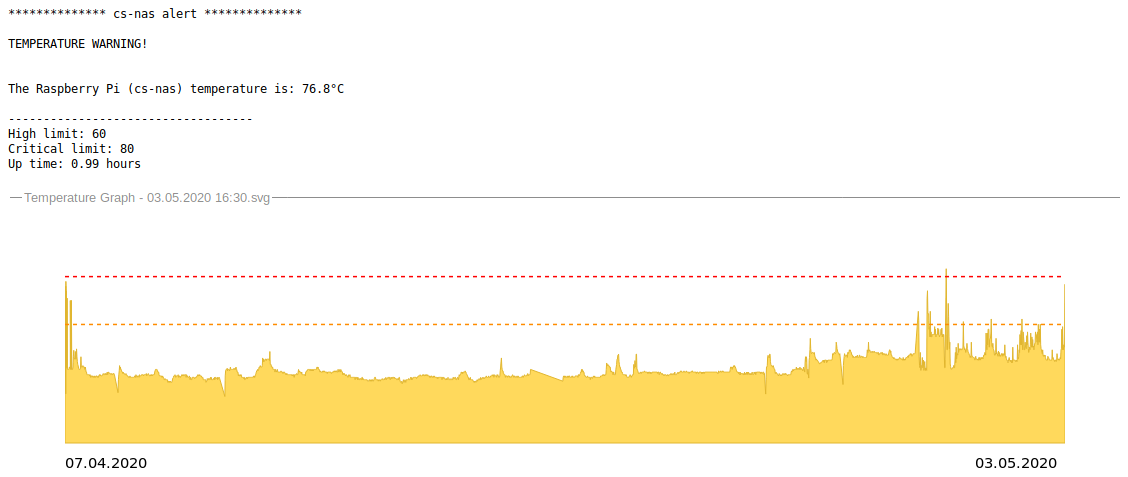
The original code comes from [here](https://gist.github.com/LeonardoGentile/7a5330e6bc55860feee5d0dd79e7965d). I modified it to send more detailed warning messages and added a nice CPU temperature graph over the past 60 days to the emails. Below
is an example email.
## Setup
```pip install python-simplemail```
To run this script periodically (as it is intended) type
```sudo crontab -e```
and add this line:
```*/15 * * * * python /home/pi/temperature-alert.py```
Then adjust the email credentials at the beggining of the script.
That's it. Your Pi is now save.
__Setup on systems without pip (e.g. LibreElec and OpenElec)__
To use this script on systems without pip just download [this python script](https://github.com/gerold-penz/python-simplemail/blob/master/simplemail/__init__.py), rename it to ```simplemail.py``` and place it next to ```temperature-alert.py```
## Testing the Setup
To test your setup, just type
```python temperature-alert.py 70```
This will emulate a CPU temperature of 70°C and thus send you a warn e-mail. Use 81°C to test the shutdown function.