https://github.com/mjmccans/hassio-addon-airthings
Home Assistant Add-on for Airthings devices that uses mqtt to integrate with Home Assistant via mqtt discovery.
https://github.com/mjmccans/hassio-addon-airthings
airthings airthings-wave airthings-wave-plus bluetooth-le bluetooth-low-energy btle home-assistant mqtt radon
Last synced: about 2 months ago
JSON representation
Home Assistant Add-on for Airthings devices that uses mqtt to integrate with Home Assistant via mqtt discovery.
- Host: GitHub
- URL: https://github.com/mjmccans/hassio-addon-airthings
- Owner: mjmccans
- License: mit
- Created: 2021-08-12T01:17:52.000Z (almost 5 years ago)
- Default Branch: main
- Last Pushed: 2023-10-31T02:27:46.000Z (over 2 years ago)
- Last Synced: 2023-10-31T03:26:05.639Z (over 2 years ago)
- Topics: airthings, airthings-wave, airthings-wave-plus, bluetooth-le, bluetooth-low-energy, btle, home-assistant, mqtt, radon
- Language: Python
- Homepage:
- Size: 307 KB
- Stars: 20
- Watchers: 1
- Forks: 3
- Open Issues: 5
-
Metadata Files:
- Readme: README.md
- Changelog: CHANGELOG.md
- License: LICENSE
Awesome Lists containing this project
README
# **WARNING**: This Add-on is no longer needed because support for [Airthings BLE](https://www.home-assistant.io/integrations/airthings_ble/) has been added to Home Assistant Core. This repository is here only for historic purposes in case any of the code is helpful to others.
# Home Assistant Add-on: Airthings
This Home Assistant Add-on will read sensor values from [Airthings](https://www.airthings.com/) environmental monitoring devices through Bluetooth Low Energy (BLE) and send those values to Home Assistant via the internal MQTT broker. This add-on includes [Home Assistant MQTT discovery](https://www.home-assistant.io/docs/mqtt/discovery/) so your sensors will automatically appear in Home Assistant if everything is set up correctly, but you can turn off that feature if you like. Airthings monitoring products are interesting because they can monitor radon levels, which is a radioactive gas that can be found in homes and is thought to be a cause of lung cancer.
## Screenshot
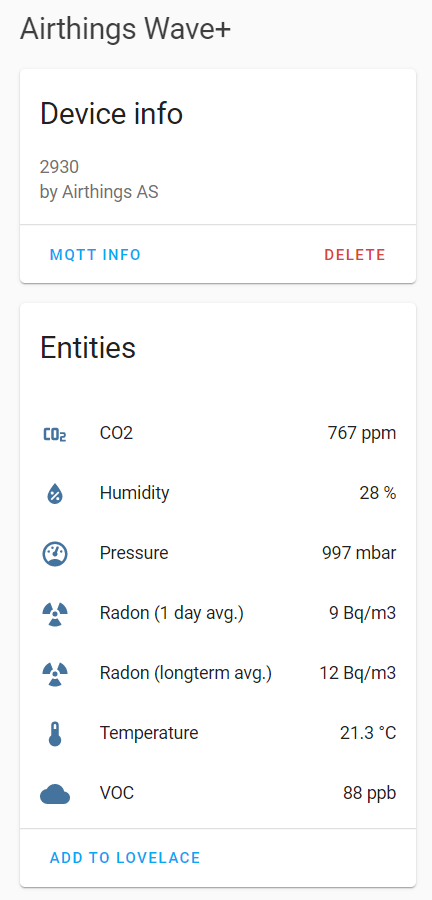
The screenshot below shows an Airthings Wave Plus device as it appears in Home Assistant, including the sensors associated with the device.
## Requirements
In order to use this add-on you need:
* The [Mosquitto Broker Add-on](https://github.com/home-assistant/addons/tree/master/mosquitto) installed
* An Airthings Wave, Airthings Wave Plus or Airthings Wave Mini
* A Raspberry Pi 3/4 with built-in Bluetooth or a Bluetooth adapter that supports Bluetooth Low Energy (BLE) (such as [this one](https://www.amazon.com/Plugable-Bluetooth-Adapter-Compatible-Raspberry/dp/B009ZIILLI)).
I has successfully run this add-on on an Raspberry Pi and an Odroid-N2+ running HassOS with the above Plugable USB Bluetooth 4.0 Low Energy Micro Adapter.
## Installation
[](https://my.home-assistant.io/redirect/supervisor_add_addon_repository/?repository_url=https%3A%2F%2Fgithub.com%2Fmjmccans%2Fhassio-addon-airthings)
Please do the following to install this add-on:
1. Go to the `Supervisor` tab in Home Assistant and go to the `Add-on Store`.
1. Click on the three dots in the upper right-hand corner and select `Repositories`.
1. Paste the url for this github page (`https://github.com/mjmccans/hassio-addon-airthings`) into the input field and click `Add`.
1. A new section called `Home Assistant Airthings Add-on` should appear in your `Add-on Store` and you can install the add-on from there like you would any other Home Assistant add-on.
## Configuration
**Note**: _Remember to restart the add-on when the configuration is changed._
### Scanning for Airthings Devices
When you first load the add-on the configuration defaults to a blank mac address, and if no valid mac address is provided then the add-on will enter into a scanning mode. This will cause the add-on to search for Airthings devices, output a recommended configuration and then exit.
After starting the add-on, go to the `Log` tab and hit the `REFRESH` button until a recommended configuration is shown. Once shown, copy that configuration into the `Configuration` tab, and then edit the `name` for each device as appropriate.
### Example Configuration
Example add-on configuration:
```yaml
devices:
- mac: 58:54:D8:8B:12:7C
name: Basement Office
refresh_interval: 150
retry_count: 10
retry_wait: 3
log_level: INFO
mqtt_discovery: 'true'
```
**Note**: _This is just an example, don't copy and paste it! Create your own!_
### Option: `devices`
The `devices` option sets out your Airthings devices. For each device you set out its `mac` address and a `name`. The `name` is used for the mqtt discovery feature so your devices and their associated sensors are given human readable and unique names. Below is an example of two devices being configured:
```yaml
devices:
- mac: 58:54:D8:8B:12:7C
name: Basement Office
- mac: 8H:93:D8:8B:12:8F
name: Living Room
```
### Option: `refresh_interval`
This option sets how many seconds to wait before next refresh of the sensor data. Note that the sensors on the Airthings Wave + only update every 5 minutes, but the default has been set to half that to avoid delays in getting new sensor values.
### Option: `retry_count`
This option sets the number of times to retry accessing your Airthings devices when there is a bluetooth error or other issue before exiting. The default is 10, but you can increase this if you have reception or other issues.
### Option: `retry_wait`
This option sets the time, in seconds, to wait between the retries set out in `retry_count`.
### Option: `log_level`
The `log_level` option controls the level of log output by the add-on and can be changed to be more or less verbose, which might be useful when you are dealing with an unknown issue. Possible values are:
`CRITICAL`, `ERROR`, `WARNING`, `INFO` or `DEBUG`
### Option: `mqtt_discovery`
This option controls whether the Home Assistant's MQTT Discovery feature is enabled or disabled. If disabled, you can configure the sensors individually and they will be located at mqtt topic `/airthings//` where is the `mac` address you set for your device and `sensor name` is the name of the sensor from the device. For example, the sensor names for the Airthings Wave Plus are: `humidity`, `radon_1day_avg`, `radon_longterm_avg`, `temperature`, `rel_atm_pressure`, `co2` and `voc`.
### Option: `retain`
This option sets the "retain" flag for the sensor values sent to the MQTT broker. This means that the last sensor value will be retained by the MQTT broker, meaning that if you restart Home Assistant the last sensor values sent to the MQTT broker will show up immediately once Home Assistant restarts. The downside is that the sensor values may be out of date, particularly if the add-on has stopped. If you change this value to "false" the add-on will clear any existing retained values.
### Option: `mqtt_host` (optional)
This option sets out the hostname of your mqtt broker. If this option is not set the internal Home Assistant MQTT broker is automatically used.
### Option: `mqtt_port` (optional)
This option sets out the port of your mqtt broker. If this option is not set the internal Home Assistant MQTT broker is automatically used.
### Option: `mqtt_username` (optional)
This option sets out the username to use to access your mqtt broker. If this option is not set the internal Home Assistant MQTT broker is automatically used.
### Option: `mqtt_password` (optional)
This option sets out the password to use to access your mqtt broker. If this option is not set the internal Home Assistant MQTT broker is automatically used.
## Current Limitations
* This add-on has only been tested with a single Airthings Wave Plus device, but should work with multiple devices
and with many other Airthings devices (although some testing and tweaks may be needed).
* Only metric units are supported at this time, although it should be easy to add unit conversion if desired.
* The Airthings devices must be connected to the official app at least once before you can use this add-on.
* Point in time radon levels are not made available through Bluetooth LE so they cannot be accessed by this add-on, but you can regularly get the 1 day and long term average measurements.
## Inspiration
As is often the case with open source software, this project would not have been possible without the hard work others. In particular, I have heavily leveraged the code developed by Marty Tremblay for his [sensor.airthings_wave](https://github.com/custom-components/sensor.airthings_wave) project for interacting with Airthings devices. If you find this add-on useful please head over to Marty's project and buy him a coffee or a beer.
## Contributions and Feedback
Feedback, suggested changes and code contributions are welcome. I have not been a professional programmer for close to 20 years and my experience dates back to the Python 2.2 era, so it is possible that my code is behind the times or just simply wrong. I am open to constructive feedback and improvements, I love learning new things from the community, and I am willing to admit when I am wrong. That is the power of open source software, and all that I ask is that any feedback or comments are courteous and respectful and I will a endeavor to do same with my responses. If you do submit any code changes, you are deemed to have agreed that your changes will be licensed under the MIT License that covers the project. If you do not agree with that license, then please do not submit any code changes.