https://github.com/mkropat/tidydesktopmonster
Prevent shortcuts from cluttering your desktop ever again
https://github.com/mkropat/tidydesktopmonster
systray systray-application windows
Last synced: about 1 year ago
JSON representation
Prevent shortcuts from cluttering your desktop ever again
- Host: GitHub
- URL: https://github.com/mkropat/tidydesktopmonster
- Owner: mkropat
- License: mit
- Created: 2017-12-02T02:42:00.000Z (over 8 years ago)
- Default Branch: main
- Last Pushed: 2022-09-05T18:02:29.000Z (almost 4 years ago)
- Last Synced: 2025-04-13T01:40:02.171Z (about 1 year ago)
- Topics: systray, systray-application, windows
- Language: C#
- Homepage:
- Size: 544 KB
- Stars: 22
- Watchers: 2
- Forks: 2
- Open Issues: 0
-
Metadata Files:
- Readme: README.md
- License: LICENSE.txt
Awesome Lists containing this project
README

# Tidy Desktop Monster
Tidy Desktop Monster is a desktop daemon. It lies quietly in the system tray, waiting for a shortcut to appear on the desktop. When one appears, Tidy Desktop Monster comes to life to eat the shortcut and poop it into the Recycle Bin.
## Getting Started
1. [Download the latest `TidyDesktopMonster.zip`](https://github.com/mkropat/TidyDesktopMonster/releases/latest)
1. Unzip it
1. Move `TidyDesktopMonster.exe` to wherever you want it
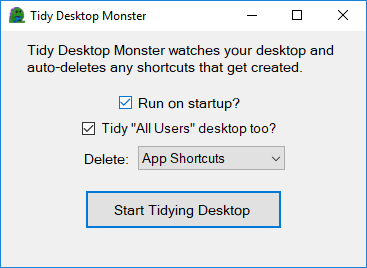
1. Double click `TidyDesktopMonster.exe` to start it
SmartScreen may flag the program because I'm too cheap to spend 28€ for a program I'm giving away for free:
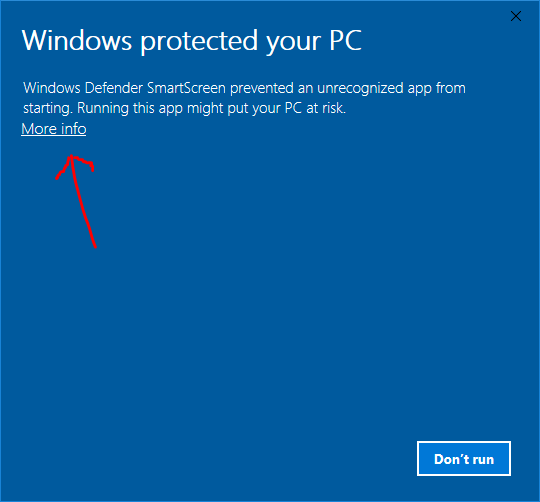
If you click __More info__ then __Run Anyway__ the program should start.
## Troubleshooting
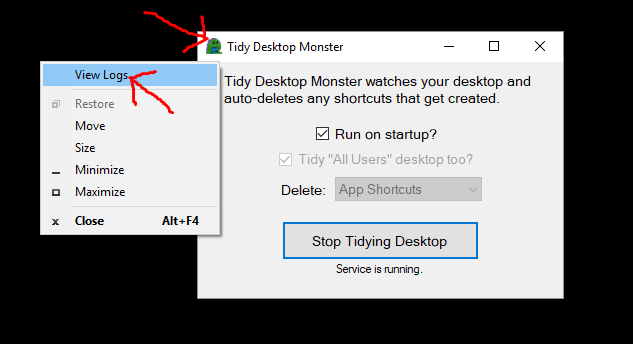
When submitting a [bug report](/../../issues), it can help to include the logs. You can view the logs by right clicking on the icon in the upper-left corner of the settings window and clicking __View Logs__: