https://github.com/mkubdev/material-vscode-jetbrains
🔧 VSCode Dark+ colourings for WebStorm, working with the Material UI plugin + colorScheme dark+ from @lenny1882
https://github.com/mkubdev/material-vscode-jetbrains
Last synced: 4 months ago
JSON representation
🔧 VSCode Dark+ colourings for WebStorm, working with the Material UI plugin + colorScheme dark+ from @lenny1882
- Host: GitHub
- URL: https://github.com/mkubdev/material-vscode-jetbrains
- Owner: mkubdev
- License: mit
- Created: 2019-11-27T10:44:59.000Z (over 6 years ago)
- Default Branch: master
- Last Pushed: 2019-12-04T10:58:48.000Z (over 6 years ago)
- Last Synced: 2025-08-25T01:43:46.504Z (10 months ago)
- Homepage:
- Size: 9.77 KB
- Stars: 7
- Watchers: 1
- Forks: 1
- Open Issues: 0
-
Metadata Files:
- Readme: README.md
- License: LICENSE
Awesome Lists containing this project
README
# material-vscode-jetbrains
VSCode Dark+ colourings for WebStorm, working with the Material UI plugin + colorScheme dark+ from @lenny1882
Last version checked: WebStorm 2019.3
## Introduction
In order for the theme to work and it can be installed, you must first install the __Material UI__ plugin for Webstorm.
You can find the plugin [on this repos](https://github.com/ChrisRM/material-theme-jetbrains) from @ChrisRM.
## Use
### Theming - (Need Material UI Plugin)
* Download the .xml file
* Open IDE, and go to __Settings__
* In the left-hand menu: Appearance & Behavior > Material Theme > select __Custom theme__
* In the left-hand menu: Appearance & Behavior > Material Custom Theme
* Click the dropdown selector on the top right corner
* Click __Select .xml file from disk__
* Select the .xml file, Aply
### Colourings
* Download the .icls file
* Open IDE, and go to __Settings__
* In the left-hand menu: Editor > Color Scheme
* Click the cog next to the _Scheme_ dropdown and __Import Scheme__
* Select the .icls file, Apply
#### User Screenshots
|[TheOnlyReadOnly](https://github.com/TheOnlyReadOnly)|
|---|
|[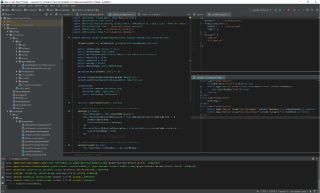](https://raw.githubusercontent.com/lenny1882/vscode-dark-plus-webstorm/screenshots/screenshots/TheOnlyReadOnly.png?raw=true)|
## TODO and Not Done
### Theming
__TODO__
* Match all the color from VSCode
* Match Highlight color
### Colourings
__TODO__
* Diff & Merge
* VCS
__NOT DONE__ (from @lenny1882)
The following have not had their colours changed, as there is no VSCode equivalent, or they require extensions for syntax highlighting (which may be opinionated).
* Cucumber
* Diagrams
* EditorConfig
* EJS
* HAML
* HTTP Request
* JSP
* RegExp
* Stylus
* XPath
* Spy-js
## Disclaimer
The vast majority of work has been done with WebStorm open next to VSCode and its DevTools, selecting elements in VSCode and copying colour values where WebStorm does not match. As such, neither colourings nor theme are an exact replica (and never will be - VSCode and WebStorm handle a lot of things differently. VSCode, for example, offers far more granular syntax highlighting).
This project is maintained, as WebStorm is my favorite IDE. Pull requests are welcome.
## Contributors and Thanks
### Thanks
* Zhan Ishzhanov ([janat08](https://github.com/janat08)) - for flagging font differences across platforms
* Marco Nava ([TheOnlyReadOnly](https://github.com/TheOnlyReadOnly)) - user screenshot