https://github.com/mlocati/servicescontrol
Control execution of Windows Services
https://github.com/mlocati/servicescontrol
Last synced: 5 months ago
JSON representation
Control execution of Windows Services
- Host: GitHub
- URL: https://github.com/mlocati/servicescontrol
- Owner: mlocati
- License: mit
- Created: 2015-08-23T13:24:10.000Z (over 10 years ago)
- Default Branch: master
- Last Pushed: 2021-05-27T06:50:48.000Z (over 4 years ago)
- Last Synced: 2025-03-24T01:45:14.800Z (10 months ago)
- Language: C#
- Size: 79.1 KB
- Stars: 0
- Watchers: 2
- Forks: 0
- Open Issues: 0
-
Metadata Files:
- Readme: README.md
- License: LICENSE
Awesome Lists containing this project
README
# ServiceControl
:imagesdir:
A handy Windows program to control running services.
## Screenshots
ServiceControl runs in the traybar area

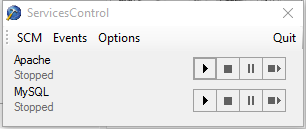
Click on the tray icon to view the main application window:
# Sample Usage
You can use ServicesControl to run NGIN and PHP-FPM in background.
For example, use the following code to add NGINX and two PHP-FPM workers:
1. Download [NGINX](https://nginx.org/en/download.html)
2. Download [PHP](https://windows.php.net/download/) (hint: you can also use [this handy PowerShell module](https://github.com/mlocati/powershell-phpmanager))
3. Create the file `conf\snippets\fastcgi-php.conf` in the NGINX directory with the following content:
```nginx
index index.php index.html index.htm;
location ~ /\.ht {
deny all;
}
location / {
try_files $uri $uri/ /index.php?$query_string;
}
location ~ \.php$ {
fastcgi_keep_conn off;
fastcgi_split_path_info ^(.+\.php)(/.+)$;
try_files $fastcgi_script_name =404;
fastcgi_index index.php;
include fastcgi.conf;
fastcgi_param PHP_VALUE "memory_limit = 256M;\n max_execution_time = 300";
fastcgi_read_timeout 300;
fastcgi_pass php;
}
```
4. Create the file `conf\nginx.conf` in the NGINX directory with the following content:
```nginx
worker_processes 2;
events {
worker_connections 1024;
}
http {
upstream php {
server 127.0.0.1:8081;
server 127.0.0.1:8082;
}
sendfile on;
client_max_body_size 8m;
keepalive_timeout 65;
include mime.types;
default_type application/octet-stream;
server {
listen 8080;
listen [::]:8080;
include snippets/fastcgi-php.conf;
server_name localhost;
root C:/Path/To/Your/Webroot/;
}
}
```
5. In the ServicesControl options - Custom programs tab:
1. Add the NGINX entry:
- Name: `Nginx`
- Executable: `C:\PathToYourNginx\nginx.exe`
- Current directory: `C:\PathToYourNginx`
- Arguments: *none*
2. Add the first PHP worker:
- Name: `PHP1`
- Executable: `C:\PathToYourPHP\php-cgi.exe`
- Current directory: `C:\PathToYourPHP`
- Arguments: `-c C:\PathToYourPHP\php.ini -b 127.0.0.1:8081`
3. Add the second PHP worker:
- Name: `PHP2`
- Executable: `C:\PathToYourPHP\php-cgi.exe`
- Current directory: `C:\PathToYourPHP`
- Arguments: `-c C:\PathToYourPHP\php.ini -b 127.0.0.1:8082`