https://github.com/mmgrant73/flowchart
This is a custom tree like flowchart web component (block element). It was made using StencilJS It only has one attribute that a user needs to set (tree). The tree attribute is an array that represent the nodes on the tree.
https://github.com/mmgrant73/flowchart
component css css3 custom-tree flowchart html5 javascript stenciljs tree-attribute web webpage
Last synced: about 2 months ago
JSON representation
This is a custom tree like flowchart web component (block element). It was made using StencilJS It only has one attribute that a user needs to set (tree). The tree attribute is an array that represent the nodes on the tree.
- Host: GitHub
- URL: https://github.com/mmgrant73/flowchart
- Owner: mmgrant73
- License: mit
- Created: 2020-01-10T03:53:41.000Z (over 6 years ago)
- Default Branch: master
- Last Pushed: 2020-01-10T03:54:34.000Z (over 6 years ago)
- Last Synced: 2025-07-28T03:43:47.081Z (11 months ago)
- Topics: component, css, css3, custom-tree, flowchart, html5, javascript, stenciljs, tree-attribute, web, webpage
- Language: JavaScript
- Size: 65.4 KB
- Stars: 0
- Watchers: 1
- Forks: 0
- Open Issues: 0
-
Metadata Files:
- Readme: readme.md
- License: LICENSE
Awesome Lists containing this project
README
[](https://www.webcomponents.org/element/owner/my-element)
# FlowChart (Tree):
### What is it?
This is a custom tree like flowchart web component (block element). It was made using StencilJS It only has one
attribute that a user needs to set (tree). The tree attribute is an array that represent the nodes on the tree.
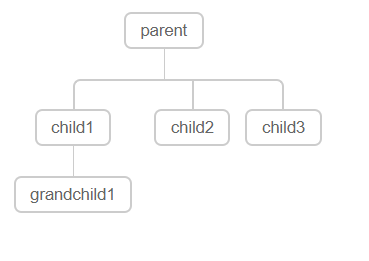
For example the below array will product the below flowchart
```
tree = ['parent', ['child1',['grandchild1'], 'child2', 'child3']]
```
[Click here for Demo](https://mmgrant73.github.io/flowchart/flowchart.html)
### How to use it?
It is quite easy to use it on your webpage. Just follow the below steps:
1. Install it from NPM using the following at the terminal
```
npm install x-flowchart --save
```
2. Include the link to the script file that holds the this custom web component (reveal-box.js) near the bottom of
the body section of your webpage. See below
```
```
3. Then use the custom element tags on your webpage.
```
```
Note: That is all you have to do to use this custom element. There is an example HTML page (acronym.html) that shows how to use it.
```
Stencil Component Starter
```
### There are only one properties that you can use to customize this element.
The only attribute the user needs to set is the tree attribute that holds an array that represent the structure of the tree
### To Do:
1. Add support for more tree types
2. Add support for setting text and background color
### Credit:
The CSS for this web component was inspired by code I found on PenCode by Emil Devantie Brockdorff. That person deserves credit for the css.
Note: It has to be ran from a web server and not just opened locally in a browser or the loading of x-flowchart will be blocked due to
CORS policy: (Cross origin requests)