https://github.com/mmgrant73/typewriter
type-writer is a text effect web component (block element). Whatever you put in the innerText will look like its being type out. There are four types of cursors that can be set and two types of typing effects. You can set the font-size but at the moment it only uses the Source Code Pro font but in the future I will add support whatever font a user would like to use.
https://github.com/mmgrant73/typewriter
component css html javascript text typewriter web webpage
Last synced: 13 days ago
JSON representation
type-writer is a text effect web component (block element). Whatever you put in the innerText will look like its being type out. There are four types of cursors that can be set and two types of typing effects. You can set the font-size but at the moment it only uses the Source Code Pro font but in the future I will add support whatever font a user would like to use.
- Host: GitHub
- URL: https://github.com/mmgrant73/typewriter
- Owner: mmgrant73
- License: mit
- Created: 2020-01-08T17:36:59.000Z (over 6 years ago)
- Default Branch: master
- Last Pushed: 2020-01-08T17:45:13.000Z (over 6 years ago)
- Last Synced: 2025-10-20T06:49:51.733Z (9 months ago)
- Topics: component, css, html, javascript, text, typewriter, web, webpage
- Language: JavaScript
- Size: 22.5 KB
- Stars: 0
- Watchers: 1
- Forks: 0
- Open Issues: 0
-
Metadata Files:
- Readme: readme.md
- License: LICENSE
Awesome Lists containing this project
README
[](https://www.webcomponents.org/element/owner/my-element)
# TypeWriter:
### What is it?
type-writer is a text effect web component (block element). Whatever you put in the innerText will look like
its being type out. There are four types of cursors that can be set and two types of typing effects. You can set
the font-size but at the moment it only uses the Source Code Pro font but in the future I will add support
whatever font a user would like to use.
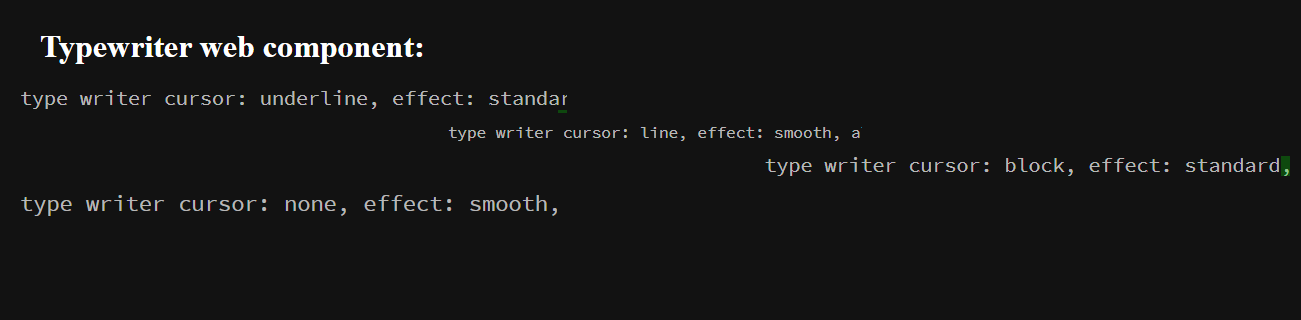
[Click here for Demo](https://mmgrant73.github.io/typewriter/typewriter.html)
### How to use it?
It is quite easy to use it on your webpage. Just follow the below steps:
1. Include the link to the script file that holds the this custom web component (reveal-box.js) near the bottom of
the body section of your webpage. See below
```
```
2. Then use the custom element tags on your webpage.
```
This is a typewriter effect
```
Note: That is all you have to do to use this custom element. There is an example HTML page (acronym.html) that shows how to use it.
```
Typewriter Web Component
body {
padding: 40px;
background-color: #121212;
color: white;
}
Typewriter web component:
This is a test.
```
### There are only four properties that you can use to customize this element.
There are six attributes that you can set:
1. cursor - the type of cursor that will be used for the typing effect
2. effect - the type of typing effect that will be used
3. align - is used to set how the text will be aligned in the DIV tag
4. fontsize - The font-size that the text will take
5. textcolor - The color of the text
6. cursorcolor - the color of the cursor
Note: The inner text within the type-writer tag will be the text used for the typing effect
### Type of Cursor (There are four types):
1. line
2. underline
3. block
4. none
### Type of effect (There are two):
1. standard - the cursor would jump in steps to make it look like the text is being typed
2. smooth - the cursor would travel smoothly across the screen without jumping.
### Types of aligment:
1. left
2. right
3. center
### To Do:
1. Add support for more fonts families
Note: The default attributes are (cursor: line, effect: standard. align: left and font-size: 28px)