https://github.com/mmomtchev/react-native-settings
React Native Universal Settings Screen
https://github.com/mmomtchev/react-native-settings
android ios preferences react-native settings
Last synced: about 1 year ago
JSON representation
React Native Universal Settings Screen
- Host: GitHub
- URL: https://github.com/mmomtchev/react-native-settings
- Owner: mmomtchev
- License: isc
- Created: 2022-05-17T20:45:48.000Z (about 4 years ago)
- Default Branch: main
- Last Pushed: 2023-10-16T15:38:44.000Z (over 2 years ago)
- Last Synced: 2025-03-24T19:06:00.515Z (over 1 year ago)
- Topics: android, ios, preferences, react-native, settings
- Language: TypeScript
- Homepage:
- Size: 6.59 MB
- Stars: 3
- Watchers: 1
- Forks: 0
- Open Issues: 2
-
Metadata Files:
- Readme: README.md
- Changelog: CHANGELOG.md
- License: LICENSE
Awesome Lists containing this project
README
# react-native-settings
[](https://github.com/mmomtchev/react-native-settings/blob/main/LICENSE) [](https://www.npmjs.com/package/@mmomtchev/react-native-settings) [](https://github.com/mmomtchev/react-native-settings/actions/workflows/test-dev.yml) [](https://codecov.io/gh/mmomtchev/react-native-settings)
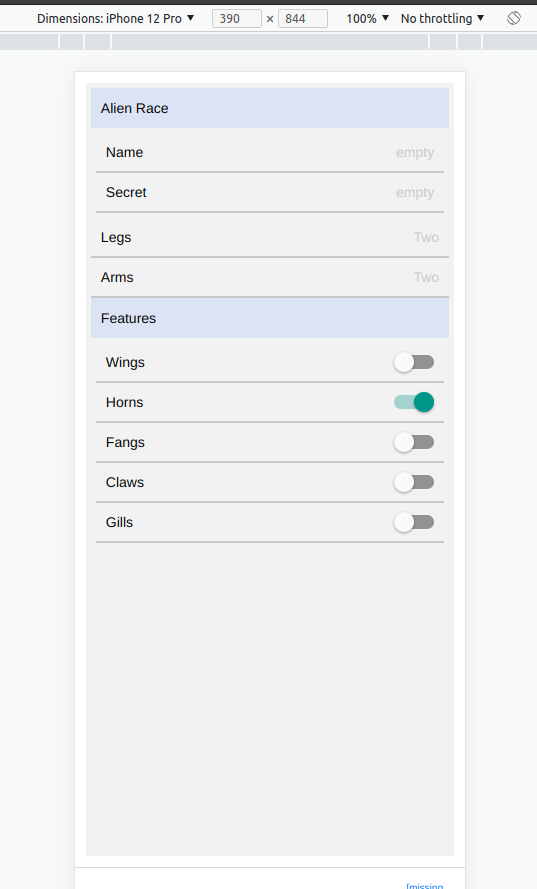
**React Native Universal Settings Screen With Async Support & Spinner**
To my greatest surprise, `react-native`, unlike the native frameworks of iOS and Android, does not offer a standard ready-to-use `Settings` screen template.
This package fills this void providing the basic framework needed to implement a settings screen, bringing down its cost from 1 day to 15 minutes for a simple application.
It works with any configuration getter or setter and it will automatically display a spinner if you use an asynchronous function.
It can be freely styled to match the looks of the application.
It has no runtime dependencies besides `@react-navigation`.
# Usage
```shell
npm i --save @mmomtchev/react-native-settings
```
[Check the examples](https://mmomtchev.github.io/react-native-settings/)
## Quick Start
A simple Settings screens is easy to make:
```tsx
import React from 'react';
import {StyleSheet, View} from 'react-native';
import {NavigationContainer} from '@react-navigation/native';
import {default as ReactNativeSettings, SettingsElement} from '@mmomtchev/react-native-settings';
// We will store the config here
const configData: Record = {};
const styles = StyleSheet.create({
container: {
flex: 1,
backgroundColor: '#fff',
justifyContent: 'center',
padding: '1.5%'
}
});
// Retrieve a conf item or return the default
const confGet = (key: string, def: string): string => configData[key] || def;
// Store a conf item
const confSet = (key: string, value: string): void => {
configData[key] = value;
};
// Choose from a list item
const intelligence: Record = {L: 'Low', M: 'Medium', H: 'High'};
// This is the configuration schema
const settings: SettingsElement[] = [
{
label: 'Name',
type: 'string',
// You can override the way the value is displayed
display: (s) => (s && s.length ? s : 'empty'),
get: confGet.bind(null, '@name', ''),
set: confSet.bind(null, '@name')
},
// Choose from a list, uses the standard phone navigation screens
{
label: 'Intelligence',
title: 'Select Intelligence',
type: 'enum',
values: Object.keys(intelligence),
display: (v: string) => intelligence[v],
get: confGet.bind(null, '@int', 'M'),
set: confSet.bind(null, '@int')
},
// Boolean switch group
{
label: 'Wings',
type: 'boolean',
get: async () => (await confGet('@wings', 'false')) === 'true',
set: (v) => confSet('@wings', v.toString())
}
];
export default function Settings() {
// Simply pass the schema here
// It integrates in your existing `NavigationContainer` or `Screen`
return (
);
}
```
# API
### Table of Contents
* [ReactNativeSettingsGetter](#reactnativesettingsgetter)
* [ReactNativeSettingsSetter](#reactnativesettingssetter)
* [SettingsElementString](#settingselementstring)
* [label](#label)
* [get](#get)
* [set](#set)
* [display](#display)
* [label](#label-1)
* [get](#get-1)
* [set](#set-1)
* [display](#display-1)
* [label](#label-2)
* [get](#get-2)
* [set](#set-2)
* [display](#display-2)
* [title](#title)
* [label](#label-3)
* [get](#get-3)
* [set](#set-3)
* [label](#label-4)
* [elements](#elements)
* [SettingsStyle](#settingsstyle)
* [defaultStyles](#defaultstyles)
* [ReactNativeSettings](#reactnativesettings)
* [Parameters](#parameters)
* [settings](#settings)
* [styles](#styles)
* [spinnerGraceTime](#spinnergracetime)
## ReactNativeSettingsGetter
A configuration getter, may be synchronous or asynchronous.
Asynchronous getters will trigger a spinning activity indicator.
Type: function (): (T | [Promise](https://developer.mozilla.org/docs/Web/JavaScript/Reference/Global_Objects/Promise)\)
## ReactNativeSettingsSetter
A configuration setter, may be synchronous or asynchronous.
May synchronously return false to deny the operation.
Type: function (v: T): ([boolean](https://developer.mozilla.org/docs/Web/JavaScript/Reference/Global_Objects/Boolean) | void | [Promise](https://developer.mozilla.org/docs/Web/JavaScript/Reference/Global_Objects/Promise)\)
## SettingsElementString
A string element.
`display` can be used to control the value shown - ie a password
can be reduced to '\*\*\*'.
### label
Label, either a string or a JSX element
Type: ([string](https://developer.mozilla.org/docs/Web/JavaScript/Reference/Global_Objects/String) | JSX.Element)
### get
Configuration getter, will be called to retrieve the current value.
If it returns a Promise, a spinning activity indicator will be shown
until the Promise resolve. Should not reject.
Type: [ReactNativeSettingsGetter](#reactnativesettingsgetter)<[string](https://developer.mozilla.org/docs/Web/JavaScript/Reference/Global_Objects/String)>
### set
Configuration setter, will be called when the user sets a new value.
If it returns a Promise, a spinning activity indicator will be shown
until the Promise resolve. Should not reject.
If it synchronously returns false, the operation will be considered rejected.
Type: [ReactNativeSettingsSetter](#reactnativesettingssetter)<[string](https://developer.mozilla.org/docs/Web/JavaScript/Reference/Global_Objects/String)>
### display
Render function.
Can be used for example to always show a password as '\*\*\*'
or to display a fixed value such as 'Not set' for empty strings
Type: function (v: [string](https://developer.mozilla.org/docs/Web/JavaScript/Reference/Global_Objects/String)): [string](https://developer.mozilla.org/docs/Web/JavaScript/Reference/Global_Objects/String)
## label
Label, either a string or a JSX element
Type: ([string](https://developer.mozilla.org/docs/Web/JavaScript/Reference/Global_Objects/String) | JSX.Element)
## get
Configuration getter, will be called to retrieve the current value.
If it returns a Promise, a spinning activity indicator will be shown
until the Promise resolve. Should not reject.
Type: [ReactNativeSettingsGetter](#reactnativesettingsgetter)<[number](https://developer.mozilla.org/docs/Web/JavaScript/Reference/Global_Objects/Number)>
## set
Configuration setter, will be called when the user sets a new value.
If it returns a Promise, a spinning activity indicator will be shown
until the Promise resolve. Should not reject.
If it synchronously returns false, the operation will be considered rejected.
Type: [ReactNativeSettingsSetter](#reactnativesettingssetter)<[number](https://developer.mozilla.org/docs/Web/JavaScript/Reference/Global_Objects/Number)>
## display
Render function.
Can be used for example to always show a password as '\*\*\*'
or to display a fixed value such as 'Not set' for empty strings
Type: function (v: [number](https://developer.mozilla.org/docs/Web/JavaScript/Reference/Global_Objects/Number)): [string](https://developer.mozilla.org/docs/Web/JavaScript/Reference/Global_Objects/String)
## label
Label, either a string or a JSX element
Type: ([string](https://developer.mozilla.org/docs/Web/JavaScript/Reference/Global_Objects/String) | JSX.Element)
## get
Configuration getter, will be called to retrieve the current value.
If it returns a Promise, a spinning activity indicator will be shown
until the Promise resolve. Should not reject.
Type: [ReactNativeSettingsGetter](#reactnativesettingsgetter)<[string](https://developer.mozilla.org/docs/Web/JavaScript/Reference/Global_Objects/String)>
## set
Configuration setter, will be called when the user sets a new value.
If it returns a Promise, a spinning activity indicator will be shown
until the Promise resolve. Should not reject.
If it synchronously returns false, the operation will be considered rejected.
Type: [ReactNativeSettingsSetter](#reactnativesettingssetter)<[string](https://developer.mozilla.org/docs/Web/JavaScript/Reference/Global_Objects/String)>
## display
Render function.
Can be used for example to always show a password as '\*\*\*'
or to display a fixed value such as 'Not set' for empty strings
Type: function (v: [string](https://developer.mozilla.org/docs/Web/JavaScript/Reference/Global_Objects/String)): [string](https://developer.mozilla.org/docs/Web/JavaScript/Reference/Global_Objects/String)
## title
Optional title for the selection screen. If it is not provided
the selection screen won't have a header and won't have a back button.
Type: [string](https://developer.mozilla.org/docs/Web/JavaScript/Reference/Global_Objects/String)
## label
Label, either a string or a JSX element
Type: ([string](https://developer.mozilla.org/docs/Web/JavaScript/Reference/Global_Objects/String) | JSX.Element)
## get
Configuration getter, will be called to retrieve the current value.
If it returns a Promise, a spinning activity indicator will be shown
until the Promise resolve. Should not reject.
Type: [ReactNativeSettingsGetter](#reactnativesettingsgetter)<[boolean](https://developer.mozilla.org/docs/Web/JavaScript/Reference/Global_Objects/Boolean)>
## set
Configuration setter, will be called when the user sets a new value.
If it returns a Promise, a spinning activity indicator will be shown
until the Promise resolve. Should not reject.
If it synchronously returns false, the operation will be considered rejected.
Type: [ReactNativeSettingsSetter](#reactnativesettingssetter)<[boolean](https://developer.mozilla.org/docs/Web/JavaScript/Reference/Global_Objects/Boolean)>
## label
Label, either a string or a JSX element
Type: ([string](https://developer.mozilla.org/docs/Web/JavaScript/Reference/Global_Objects/String) | JSX.Element)
## elements
Subelements
Type: [Array](https://developer.mozilla.org/docs/Web/JavaScript/Reference/Global_Objects/Array)\
## SettingsStyle
Allows optional overriding of the styles of the elements
The default styles are in `defaultStyles`
## defaultStyles
Default styles
Type: [SettingsStyle](#settingsstyle)
## ReactNativeSettings
Configurable Settings Screen for React Native.
Must be included inside of a or a <*navigation*.Screen> component.
### Parameters
* `props` **{settings: [Array](https://developer.mozilla.org/docs/Web/JavaScript/Reference/Global_Objects/Array)\, styles: [SettingsStyle](#settingsstyle)?, spinnerGraceTime: [number](https://developer.mozilla.org/docs/Web/JavaScript/Reference/Global_Objects/Number)?}**
Returns **JSX.Element**
## settings
List of settings
Type: [Array](https://developer.mozilla.org/docs/Web/JavaScript/Reference/Global_Objects/Array)\
## styles
Optional styles overriding the default styles
Type: [SettingsStyle](#settingsstyle)
## spinnerGraceTime
Optional delay in ms before showing the activity indicator.
Prevents screen flickering when the updates are very fast.
Type: [number](https://developer.mozilla.org/docs/Web/JavaScript/Reference/Global_Objects/Number)
# License
ISC License
Copyright (c) 2022, Momtchil Momtchev
Permission to use, copy, modify, and/or distribute this software for any
purpose with or without fee is hereby granted, provided that the above
copyright notice and this permission notice appear in all copies.
THE SOFTWARE IS PROVIDED "AS IS" AND THE AUTHOR DISCLAIMS ALL WARRANTIES
WITH REGARD TO THIS SOFTWARE INCLUDING ALL IMPLIED WARRANTIES OF
MERCHANTABILITY AND FITNESS. IN NO EVENT SHALL THE AUTHOR BE LIABLE FOR
ANY SPECIAL, DIRECT, INDIRECT, OR CONSEQUENTIAL DAMAGES OR ANY DAMAGES
WHATSOEVER RESULTING FROM LOSS OF USE, DATA OR PROFITS, WHETHER IN AN
ACTION OF CONTRACT, NEGLIGENCE OR OTHER TORTIOUS ACTION, ARISING OUT OF
OR IN CONNECTION WITH THE USE OR PERFORMANCE OF THIS SOFTWARE.
**Includes Wings by Pedro Santos from NounProject.com**