https://github.com/mobilequickie/rds-aurora-mysql-serverless
Getting started with Amazon Aurora Serverless Databae with Data API for building cloud enabled serverless backends for mobile and web applications.
https://github.com/mobilequickie/rds-aurora-mysql-serverless
Last synced: about 1 year ago
JSON representation
Getting started with Amazon Aurora Serverless Databae with Data API for building cloud enabled serverless backends for mobile and web applications.
- Host: GitHub
- URL: https://github.com/mobilequickie/rds-aurora-mysql-serverless
- Owner: mobilequickie
- License: apache-2.0
- Created: 2019-04-18T16:53:58.000Z (about 7 years ago)
- Default Branch: master
- Last Pushed: 2019-05-09T00:35:32.000Z (about 7 years ago)
- Last Synced: 2025-02-16T10:14:41.346Z (over 1 year ago)
- Homepage:
- Size: 19.5 KB
- Stars: 13
- Watchers: 3
- Forks: 4
- Open Issues: 3
-
Metadata Files:
- Readme: README.md
- License: LICENSE
Awesome Lists containing this project
README
# Getting Started with Amazon RDS Aurora Serverless Data API
Getting started with Amazon RDS Aurora (MySQL) Serverless with Data API for building cloud enabled serverless backends for mobile and web applications.
If you want to learn a bit more about Aurora Serverless Data API, checkout my getting started blog [here](https://read.acloud.guru/getting-started-with-the-amazon-aurora-serverless-data-api-6b84e466b109).
In this repo, I have uploaded a one-click CloudFormation template that will deploy all the resources necessary to build a Serverless Aurora MySQL database and provided manual steps to enable the Data API and connect to this serverless database via an AWS Lambda function using the [RDSDataService API](https://docs.aws.amazon.com/AWSJavaScriptSDK/latest/AWS/RDSDataService.html).
In this solution below, we'll create resources using a CloudFormation template that does the following:
* Creates a new RDS **Aurora Serverless Cluster**
* Creates a **blank database** within the newly creted cluster
* Creates an **AWS Secrets** to store the master user credentials for connecting to the serverless database
* Creates a new **AWS Lambda function** (Node.js) with three environment variables (database name, cluster arn, and secrets arn) for connecting directly to your serverless database and making SQL statements through HTTP requests
* Creates a **Lambda IAM execution role** with permissions for the Lambda function to make CRUD operations against an Aurora Serverless database, read-only of AWS Secrets for getting the master credentials, and logging to CloudWatch Logs.
*Note*: The CloudFormation template does not currently enable the "Data API" for the created Aurora Serverless Cluster as this feature is currently in BETA. The only (feasable) way to enable Data API is through the RDS management console. See step 2 to enable the Data API manually after the Cloudformation Stack completes.
## Step 1: Create an Aurora Serverless Database via CloudFormation
This CloudFormation template automates the creation of an RDS Aurora MySQL Serverless Cluster, an AWS Secrets for storing the cluster master account credentials, an AWS Lambda function used to make CRUD operations directly against your serverless database, and all the permission needed.
Once the stack completes, see the **Output tab** for the Aurora Cluster Arn and Secrets Arn which will be used to for connecting to the database via the AWS CLI, SDK, or Lambda. Please note that these arn's will also automatically made available as environment variables for the deployed Lambda function.
## ⚡️ Getting Started
1. Click on the Launch Stack button to start provisioning your new Aurora MySQL Serverless Database (defaults to us-east-1 region).
[](https://console.aws.amazon.com/cloudformation/home?region=us-east-1#/stacks/new?stackName=my-serverless-cluster&templateURL=https://s3.amazonaws.com/cloudformation-templates-useast-1/rds-aurora-serverless/rds-aurora-serverless.yml)
This will launch the AWS CloudFormation Console, passing in the template, create a new stack, and automate the creation of an Aurora Serverless Cluster, database, Lambda function, and IAM role.
2. Click **Next** on the Select Template page
3. Provide a Database name (e.g. MarketPlace) and a master username/password for connecting to your serverless instance.

4. Click **Next**
5. On the Options page, leave all the defaults and click **Next**
6. On the Review page, check the box to acknowledge that CloudFormation will create IAM resources and click **Create**.
7. Wait for the *my-serverless-cluster* stack to reach a status of CREATE_COMPLETE
8. With the my-serverless-cluster-stack selected, **click on the Outputs tab** and you should see three rows.

9. Copy the Value for each of the three resources as we’ll be pasting those values into AWS CLI command for executing CRUD operations agains the serverless database.
## Step 2: Enable Data API for your Aurora Serverless Cluster
Here we are going to enable the Data API for the newly created Aurora serverless cluster manually via the RDS Management Console. Hopefully this is temporary and we'll be able to enable via the CF template using EnableHTTPEndpointAPI.
1. Launch the [RDS Management Console](https://console.aws.amazon.com/rds/home?region=us-east-1#databases:)
2. Select your cluster (even though it says database)
3. Select the `Modify` button on the upper right
4. Select `Data API` under the Network & Security section
5. Click orange `Continue` button
6. Select `Apply immediately` under Scheduling of modifications
7. Select `Modify cluster` button
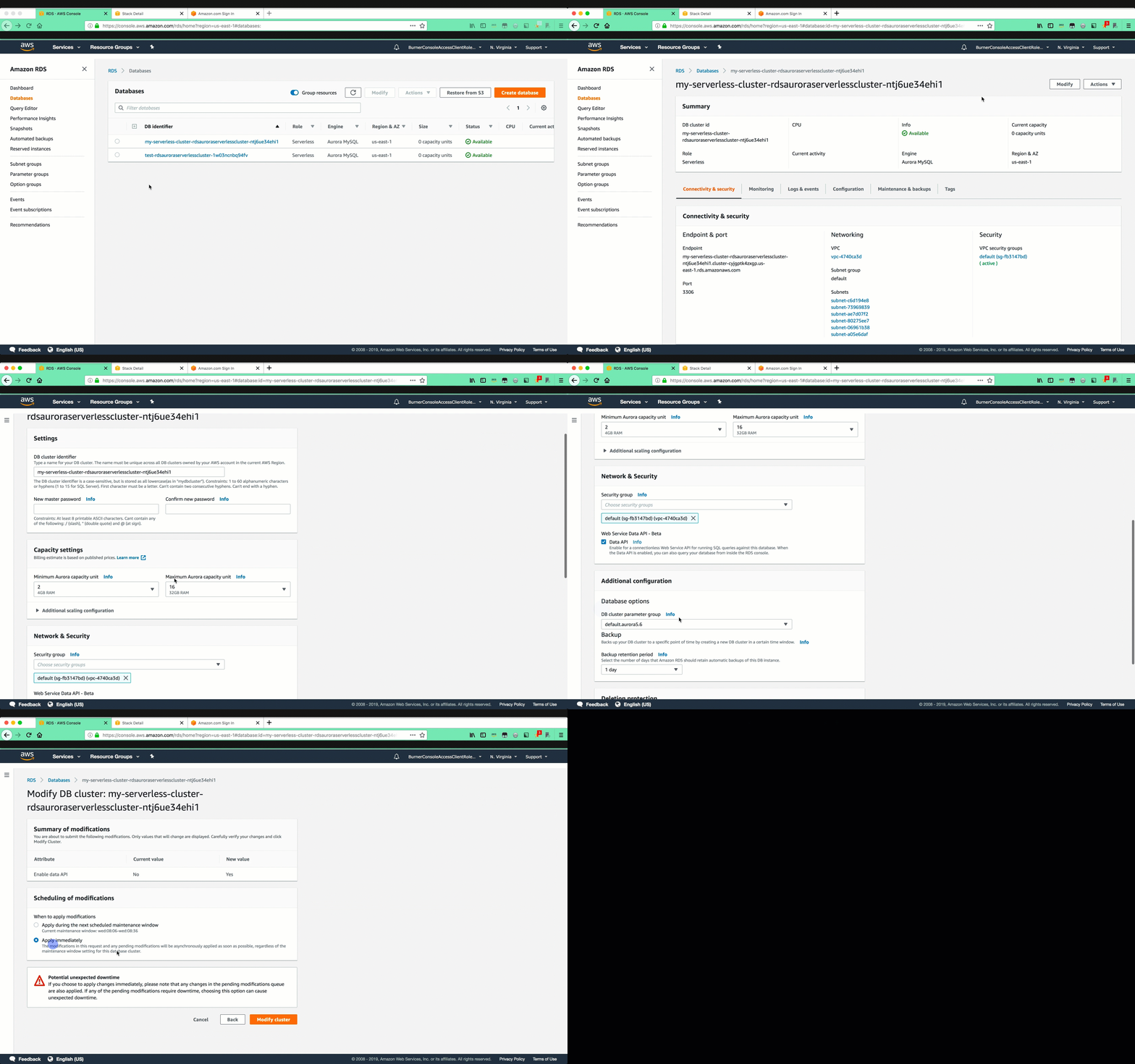
Congrats! The Aurora Serverless Cluster is now Data API enabled.
## 📝 Notes about Data API and support
* The Data API can only be enabled for Aurora Serverless databases
* Aurora Serverless **Data API** is currently in BETA (as of May 8, 2019)
* Aurora Serverless **Data API** is only available in the us-east-1 (N. Virginia) region (as of May 8, 2019).
* The Lambda function deployed via this CloudFormation template invokes the RDSDataService API that is not currently built into the default Node.js SDK support from Lambda so you need to build via NPM, zip the package and upload to Lambda. (as of May 8, 2019)
I'll try to keep this update as things change above.